ആമുഖം
Thank you for choosing the DOUXURY Wireless RV Backup Camera System. This system is designed to enhance driving safety by providing clear, high-definition rear views for various large vehicles including RVs, trucks, 5th wheels, trailers, pickups, campers, and buses. With its advanced digital signal technology, IP69 waterproof camera, and DVR recording capabilities, this system offers reliable performance and ease of use.
പാക്കേജ് ഉള്ളടക്കം
താഴെ ലിസ്റ്റ് ചെയ്തിരിക്കുന്ന എല്ലാ ഇനങ്ങളും നിങ്ങളുടെ പാക്കേജിൽ ഉൾപ്പെടുത്തിയിട്ടുണ്ടെന്ന് ദയവായി പരിശോധിക്കുക:
- Wireless Backup Camera (x1)
- 7 Inches HD Backup Monitor (x1)
- Detailed Manual Book (x1)
- ആന്റിന (x4)
- Other Parts (mounting brackets, power cables, cigarette lighter charger)

ചിത്രം: ഉൽപ്പന്ന പാക്കേജിൽ ഉൾപ്പെടുത്തിയിരിക്കുന്ന എല്ലാ ഘടകങ്ങളും.
സജ്ജമാക്കുക
ഇൻസ്റ്റലേഷൻ
The DOUXURY Wireless RV Backup Camera System is designed for easy installation with no wires required between the monitor and the camera. The camera can be powered by connecting to a 12-36V DC power source, such as a taillight, or directly via the included power adapter. The monitor can be powered via the cigarette lighter charger.

Image: Simplified wiring diagram for monitor and camera installation.
അധിക ക്യാമറകൾ ജോടിയാക്കുന്നു
The system supports up to 4 cameras. To pair an additional camera, access the monitor's menu, navigate to the 'Pairing' option, and follow the on-screen instructions. The monitor will display a countdown while searching for new cameras. Once detected, the new camera will automatically pair with the system.

Image: Visual representation of the strong wireless signal range between the camera and monitor.
പ്രവർത്തന നിർദ്ദേശങ്ങൾ
DVR Recording Function
The RV backup camera system supports a DVR recording function, allowing you to record video footage. The video data is loop recorded and stored on an SD card (maximum 128G support). This feature can be useful for security and incident documentation.

Image: Monitor screen showing the DVR recording feature.
4 Split Screen Monitor
The 7-inch LCD monitor features a 4-channel display, allowing you to view feeds from up to four cameras simultaneously. This is particularly useful for eliminating blind spots around your vehicle. Additional cameras can be purchased separately.
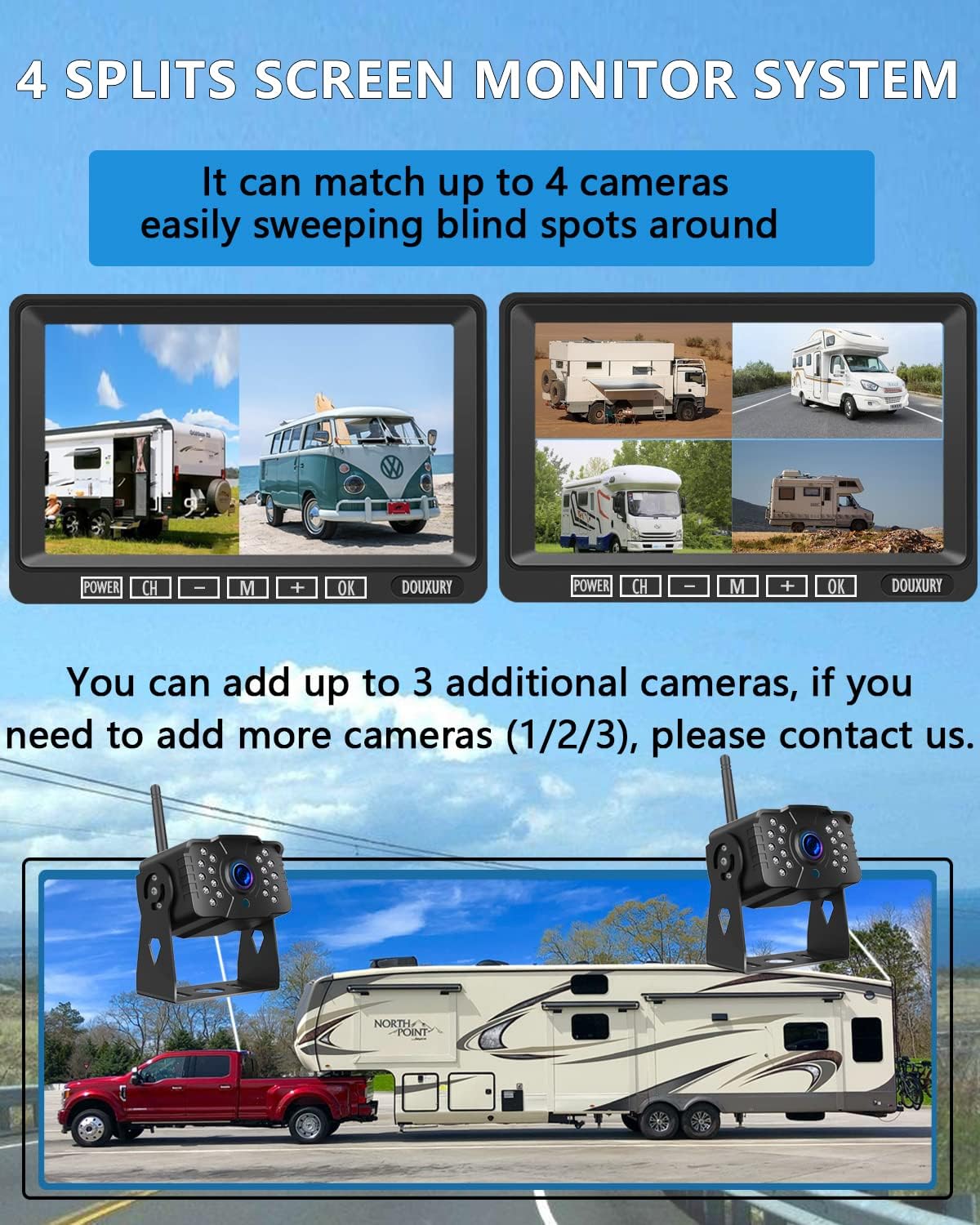
Image: Monitor displaying multiple camera views in a split-screen layout.
Parking Assist Line
The system includes a parking assist line feature to aid in safe maneuvering. This feature can be toggled ON or OFF through the monitor's settings menu, providing visual guides for parking and backing up.
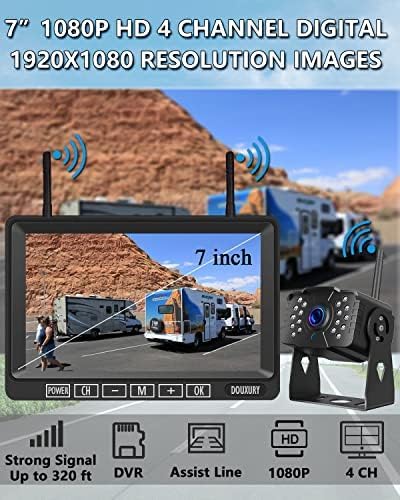
Image: Comparison of the monitor display with parking assist lines ON and OFF.
പ്രധാന സവിശേഷതകൾ
1080P HD Video Quality
Equipped with a 1080p CCD image processing chip, the camera delivers high-definition images during the day and bright, clear images at night, ensuring 24-hour clear vision.

Image: Monitor displaying a clear 1080P HD image from the camera.
IP69 Waterproof and Temperature Resistance
The wireless backup camera features IP69 waterproof level with the latest sealing technology, protecting it from water and fog. It is also designed to withstand extreme temperatures ranging from -4°F to 149°F.

Image: Camera shown in a waterproof environment, demonstrating its IP69 rating.
170° വീതി View ആംഗിൾ
ക്യാമറ 170° വീതി നൽകുന്നു view angle, significantly expanding your field of vision behind the vehicle and reducing blind spots for safer driving and maneuvering.

Image: Visual representation of the camera's 170-degree wide viewing ആംഗിൾ.
സ്പെസിഫിക്കേഷനുകൾ
| ഫീച്ചർ | വിശദാംശങ്ങൾ |
|---|---|
| ബ്രാൻഡ് | ഡക്സറി |
| മോഡൽ നമ്പർ | D-1T1 (The 2023 Latest Version) |
| ഇനത്തിൻ്റെ ഭാരം | 2 പൗണ്ട് |
| ഉൽപ്പന്ന അളവുകൾ | 15.35 x 7.48 x 2.36 inches (Package) / 11"L x 8"W x 3"H (Product) |
| മാതൃരാജ്യം | ചൈന |
| വാല്യംtage | 12 വോൾട്ട് |
| സ്ക്രീൻ വലിപ്പം | 7 ഇഞ്ച് |
| ലക്സ് റേറ്റിംഗ് | 0.1 ലക്സ് |
| അനുയോജ്യമായ ഉപകരണങ്ങൾ | RV, Semi, Box Truck, Trailer |
| ഡിസ്പ്ലേ ടെക്നോളജി | എൽസിഡി |
| ഇൻസ്റ്റലേഷൻ തരം | ഉപരിതല മൗണ്ട് |
| വീഡിയോ ക്യാപ്ചർ റെസല്യൂഷൻ | 1080p |
| ഒപ്റ്റിക്കൽ സെൻസർ ടെക്നോളജി | സിസിഡി |
| പ്രത്യേക സവിശേഷതകൾ | Night Vision Function, IP69 Waterproof, Wide View ആംഗിൾ |
മെയിൻ്റനൻസ്
To ensure the longevity and optimal performance of your DOUXURY Wireless RV Backup Camera System, regular maintenance is recommended:
- വൃത്തിയാക്കൽ: ക്യാമറ ലെൻസും മോണിറ്റർ സ്ക്രീനും ഒരു സോഫ്റ്റ്, ഡി ക്ലീനർ ഉപയോഗിച്ച് പതിവായി വൃത്തിയാക്കുക.amp തുണി. പ്രതലങ്ങളിൽ പോറലുകൾ ഉണ്ടാക്കാൻ സാധ്യതയുള്ള ഉരച്ചിലുകൾ ഉണ്ടാക്കുന്ന ക്ലീനറുകൾ ഒഴിവാക്കുക.
- കേബിൾ പരിശോധന: Periodically check all power cables and connections for any signs of wear, fraying, or damage. Ensure connections are secure.
- ഫേംവെയർ അപ്ഡേറ്റുകൾ: Check the official DOUXURY website periodically for any available firmware updates for your system to ensure you have the latest features and bug fixes.
- SD കാർഡ് മാനേജുമെന്റ്: If using the DVR recording function, regularly check the SD card for storage capacity and format it periodically to maintain recording efficiency.
ട്രബിൾഷൂട്ടിംഗ്
If you encounter any issues with your system, please refer to the following common problems and solutions:
- No Signal on Monitor:
- ക്യാമറയും മോണിറ്ററും ഓണാക്കിയിട്ടുണ്ടെന്ന് ഉറപ്പാക്കുക.
- Check that the antennas are securely attached to both the camera and monitor.
- Verify that the camera and monitor are within the effective wireless range (320ft in open area, 180ft in vehicles). Large metal objects or structures can interfere with the signal.
- Re-pair the camera with the monitor if the connection is lost (refer to 'Pairing Additional Cameras' in the Setup section).
- മിന്നിമറയുന്നതോ ഇടയ്ക്കിടെയുള്ളതോ ആയ സിഗ്നൽ:
- This may be due to signal interference. Try repositioning the antennas or moving the monitor slightly.
- Ensure no other strong wireless devices are operating too close to the system.
- മോശം ചിത്രത്തിന്റെ ഗുണനിലവാരം:
- Clean the camera lens to remove any dirt, dust, or water spots.
- Ensure the monitor screen is clean and free from smudges.
- Check the monitor's brightness and contrast settings in the menu.
- DVR Recording Not Working:
- Ensure an SD card is properly inserted into the monitor.
- Check if the SD card has sufficient free space. Format the card if necessary (this will erase all data).
- Verify the recording function is enabled in the monitor's settings.
If you are unable to resolve an issue using these steps, please contact customer support.
പിന്തുണ
For any questions, technical assistance, or if you receive the package with some accessories missed or broken, please contact our customer support team:
Email: DouxuryUS@hotmail.com
Please provide your product model number (D-1T1) and a detailed description of your issue when contacting support for faster assistance.


