1. ആമുഖം
The Walrus Audio MAKO Series D1 is a powerful multi-function delay pedal designed for high-fidelity audio processing. It features five studio-grade, custom-tuned delay programs: Digital, Mod, Vintage, Dual, and Reverse. Each program offers extensive customization through modulation, tone, age, and subdivision controls. The D1 also includes an Attack knob for dynamic sound shaping, stereo input and output capabilities, MIDI control, and onboard preset storage, making it suitable for both studio and live applications.
2. സജ്ജീകരണം
2.1 പവർ ആവശ്യകതകൾ
The D1 pedal requires a 9VDC power supply with a minimum current of 300mA. The use of an isolated power supply is recommended for optimal performance and to prevent noise. Daisy-chain power supplies are not recommended. The power supply is not included with the pedal.
2.2 കണക്ഷനുകൾ
The D1 features stereo input and output jacks, allowing for flexible integration into various audio setups. MIDI input and output ports are also available for external control and synchronization.

Figure 2.1: Right Side Connections. This image displays the right side of the D1 pedal, highlighting the "IN LEFT (MONO)" and "IN RIGHT" 1/4-inch audio input jacks.

Figure 2.2: Left Side Connections. This image shows the left side of the D1 pedal, featuring the 9VDC power input jack and the "OUT LEFT (MONO)" and "OUT RIGHT" 1/4-inch audio output jacks.
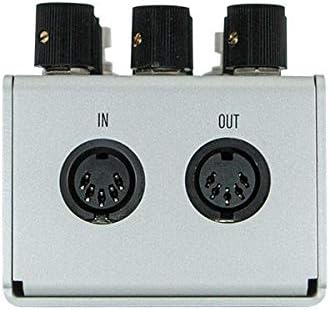
Figure 2.3: Rear MIDI Connections. This image illustrates the rear panel of the D1 pedal, displaying the MIDI IN and MIDI OUT 5-pin DIN connectors for external control.
3. പ്രവർത്തന നിർദ്ദേശങ്ങൾ
The D1 pedal features a user-friendly interface with several knobs and switches to sculpt your delay sounds. Familiarize yourself with the controls for optimal use.

Figure 3.1: D1 Pedal Controls Overview. ഈ ചിത്രം മുകളിൽ നിന്ന് താഴേക്ക് വ്യക്തമായ ഒരു ചിത്രം നൽകുന്നു. view of the Walrus Audio D1 pedal, detailing the layout of all knobs, toggle switches, and footswitches.
3.1 കൺട്രോൾ നോബുകൾ
- സമയം: കാലതാമസ സമയം ക്രമീകരിക്കുന്നു.
- ആവർത്തനങ്ങൾ: Controls the number of delay repeats, from a single echo to infinite feedback.
- മിക്സ്: ഡ്രൈ സിഗ്നലിനും വെറ്റ് (ഇഫക്റ്റഡ്) സിഗ്നലിനും ഇടയിലുള്ള മിശ്രിതം സജ്ജമാക്കുന്നു.
- ട്വിക്ക്: This knob's function changes based on the position of the Tweak toggle switch.
- പ്രോഗ് (പ്രോഗ്രാം): Selects one of the five delay programs.
- ആക്രമണം: Softens the attack of the echoes, creating a more ethereal or ambient sound.
3.2 Toggle Switches
- TWEAK Toggle (MOD | TONE | AGE):
- മോഡ്: The Tweak knob controls modulation applied to the delay trails.
- ടോൺ: The Tweak knob brightens or darkens the delay trails.
- പ്രായം: The Tweak knob adds grit and wear, emulating vintage delay units.
- PROG Toggle (DIG | MOD | VINT | DUAL | REV): Selects the delay program.
- ഡിജിറ്റൽ: Clean, pristine digital delay.
- മോഡ്: മോഡുലേഷൻ ഉള്ള ഡിജിറ്റൽ കാലതാമസം.
- VINTAGE: Emulates classic analog or tape delays.
- ഇരട്ട: Two independent delays.
- റിവേഴ്സ്: Reverse delay effect.
- SUBDIVISION Toggle (Quarter | Eighth | Dotted Eighth): Sets the rhythmic subdivision of the delay repeats relative to the tap tempo.
3.3 ഫുട്സ്വിച്ചുകൾ
- ബൈപാസ്: ഫലത്തെ ഉൾപ്പെടുത്തുകയോ വിച്ഛേദിക്കുകയോ ചെയ്യുന്നു.
- ടാപ്പ്: Used for tap tempo input. Holding both footswitches simultaneously allows for preset selection.
3.4 പ്രീസെറ്റുകൾ
The D1 supports onboard presets. Specific instructions for saving and recalling presets can be found in the full Walrus Audio D1 manual, typically involving holding down both footswitches and cycling through banks (A, B, C) and preset slots.
4. പരിപാലനം
To ensure the longevity and optimal performance of your Walrus Audio D1 pedal, follow these maintenance guidelines:
- വൃത്തിയാക്കൽ: പെഡലിന്റെ പുറംഭാഗം വൃത്തിയാക്കാൻ മൃദുവായതും ഉണങ്ങിയതുമായ തുണി ഉപയോഗിക്കുക. ഫിനിഷിനോ ആന്തരിക ഘടകങ്ങളോ കേടുവരുത്തുന്ന അബ്രസിവ് ക്ലീനറുകളോ ലായകങ്ങളോ ഉപയോഗിക്കരുത്.
- സംഭരണം: Store the pedal in a cool, dry environment away from direct sunlight, extreme temperatures, and excessive humidity.
- ശക്തി: Always use the correct power supply specifications (9VDC, 300mA minimum, center-negative). Disconnect power when the pedal is not in use for extended periods.
- കണക്ഷനുകൾ: എല്ലാ കേബിൾ കണക്ഷനുകളിലും തേയ്മാനം സംഭവിച്ചിട്ടുണ്ടോയെന്ന് ഇടയ്ക്കിടെ പരിശോധിക്കുക. ജാക്കുകൾ പൊടിയും അവശിഷ്ടങ്ങളും ഇല്ലാത്തതാണെന്ന് ഉറപ്പാക്കുക.
5. പ്രശ്നപരിഹാരം
If you encounter issues with your D1 pedal, consider the following troubleshooting steps:
- ശക്തിയില്ല:
- Ensure the power supply meets the 9VDC, 300mA minimum, center-negative specification.
- Verify the power cable is securely connected to both the pedal and the power source.
- Test with a different power supply if available.
- No Sound/Effect:
- Check all audio cables for proper connection and functionality.
- Ensure the pedal is engaged (Bypass footswitch).
- Verify the MIX knob is not set to fully dry (counter-clockwise).
- Confirm the PROG knob is set to a desired delay program.
- Unwanted Noise/Buzzing:
- Use an isolated power supply. Daisy-chain power supplies can introduce noise.
- നിങ്ങളുടെ സിഗ്നൽ ശൃംഖലയിൽ ഗ്രൗണ്ട് ലൂപ്പുകൾ ഉണ്ടോ എന്ന് പരിശോധിക്കുക.
- എല്ലാ കേബിളുകളും സംരക്ഷിതമാണെന്നും നല്ല നിലയിലാണെന്നും ഉറപ്പാക്കുക.
- Tone Alteration (Bypassed or Dry Signal):
- While the D1 is designed for high fidelity, some users may perceive subtle tonal changes depending on their specific amplifier and signal chain. Experiment with pedal order and buffer placement.
- Ensure the pedal is receiving adequate, clean power.
If issues persist after attempting these steps, contact Walrus Audio customer support for further assistance.
6 സ്പെസിഫിക്കേഷനുകൾ
| ഫീച്ചർ | വിശദാംശങ്ങൾ |
|---|---|
| ഇനത്തിൻ്റെ ഭാരം | 1.03 പൗണ്ട് |
| ഉൽപ്പന്ന അളവുകൾ | 5 x 4 x 3 ഇഞ്ച് |
| മോഡൽ നമ്പർ | 900-1051 |
| പവർ ആവശ്യകതകൾ | 9VDC, 300mA minimum (center-negative) |
| ഹാർഡ്വെയർ ഇന്റർഫേസ് | 1/4-inch Audio, MIDI (5-pin DIN) |
| സിഗ്നൽ ഫോർമാറ്റ് | ഡിജിറ്റൽ |
| നിറം | വെള്ളി |
7. വാറൻ്റിയും പിന്തുണയും
For warranty information, product registration, or technical support, please visit the official Walrus Audio webസൈറ്റിൽ ബന്ധപ്പെടുക അല്ലെങ്കിൽ അവരുടെ ഉപഭോക്തൃ സേവന വിഭാഗവുമായി ബന്ധപ്പെടുക. വാങ്ങിയതിന്റെ തെളിവായി നിങ്ങളുടെ വാങ്ങൽ രസീത് സൂക്ഷിക്കുക.
കൂടുതൽ വിവരങ്ങളും ഉറവിടങ്ങളും നിങ്ങൾക്ക് ഇവിടെ കണ്ടെത്താനാകും Walrus Audio Store on Amazon.


