ആമുഖം
Thank you for choosing the Atolla 4-Port USB 3.0 Hub. This device expands a single USB 3.0 port into four additional USB 3.0 data ports, offering high-speed data transfer and a dedicated smart charging port. Each data port features an individual on/off switch for convenient control. This manual provides detailed instructions for setup, operation, and maintenance to ensure optimal performance of your hub.
പ്രധാന സവിശേഷതകൾ
- SuperSpeed Syncing: Four USB 3.0 data ports capable of syncing data at speeds up to 5Gbps.
- സ്മാർട്ട് ചാർജിംഗ് പോർട്ട്: One dedicated charging port providing up to 2.4 Amps for charging devices like iPads and iPhones.
- വ്യക്തിഗത ഓൺ/ഓഫ് സ്വിച്ചുകൾ: Each USB data port is equipped with an illuminated individual on-off switch for independent control.
- ശക്തമായ ഡിസൈൻ: Compact case with a sleek glossy UV finish and a durable 65 cm (25.59 inch) cord.
- വിശാലമായ അനുയോജ്യത: Plug and play functionality with Windows, Mac OS X, and Linux, requiring no drivers. Supports hot swapping.
- ബാഹ്യ പവർ അഡാപ്റ്റർ: Includes a 5V/3A AC power adapter for stable power delivery to connected devices.
പാക്കേജ് ഉള്ളടക്കം
- Atolla 4-Port USB 3.0 Hub
- 5V/3A AC Power Adapter
- ദ്രുത സജ്ജീകരണ ഗൈഡ് (ഈ മാനുവൽ)
സജ്ജീകരണ നിർദ്ദേശങ്ങൾ
- പവർ അഡാപ്റ്റർ ബന്ധിപ്പിക്കുക: Plug the included 5V/3A AC power adapter into the DC 5V input port on the Atolla USB 3.0 Hub. Then, plug the power adapter into a wall outlet. This ensures stable power for all connected devices, especially power-hungry ones like external hard drives.
- നിങ്ങളുടെ കമ്പ്യൂട്ടറിലേക്ക് ബന്ധിപ്പിക്കുക: Connect the USB 3.0 cable from the Atolla USB 3.0 Hub to an available USB 3.0 port on your computer (laptop or desktop). The hub is plug-and-play, so no drivers are required.
- നിങ്ങളുടെ ഉപകരണങ്ങൾ ബന്ധിപ്പിക്കുക: You can now connect your USB devices (e.g., flash drives, external hard drives, keyboards, mice, printers) to the four USB 3.0 data ports on the hub. Use the individual on/off switches to activate or deactivate each port as needed.

Image: The Atolla 4-Port USB 3.0 Hub, showing the hub itself, the included 5V/3A AC power adapter, and the USB 3.0 cable for connecting to a computer.
Operating the Hub
Using Data Ports
The four USB 3.0 data ports allow you to connect multiple USB devices to your computer simultaneously. These ports support SuperSpeed data transfer rates of up to 5Gbps, making them ideal for transferring large fileവേഗം.

Image: A diagram illustrating the four USB 3.0 data ports and the dedicated smart charging port on the Atolla USB hub, highlighting their functions and data transfer speeds.
Individual On/Off Switches
Each of the four data ports has an independent on/off switch. This feature allows you to power on or off individual devices connected to the hub without unplugging them. This is useful for conserving power or managing device connections.
- ഒരു പോർട്ട് ഓണാക്കാൻ: Tap the corresponding button next to the port. The blue LED indicator will illuminate.
- ഒരു പോർട്ട് ഓഫാക്കാൻ: Press and hold the corresponding button for approximately 2 seconds. The blue LED indicator will turn off.

Image: A hand demonstrating the use of the individual on/off switches on the Atolla USB hub, with text indicating how to turn ports on and off.
സ്മാർട്ട് ചാർജിംഗ് പോർട്ട്
The dedicated smart charging port (marked with a lightning bolt icon) provides up to 2.4 Amps of power, suitable for charging smartphones, tablets, and other USB-powered devices. This port is designed for charging and does not support data transfer.

Image: A visual representation of a USB cable plugged into the smart charging port of the Atolla USB hub, with a lightning effect indicating power delivery.
അനുയോജ്യത
The Atolla 4-Port USB 3.0 Hub offers broad compatibility with various operating systems and devices:
- ഓപ്പറേറ്റിംഗ് സിസ്റ്റങ്ങൾ: Compatible with Windows 10, 8.1, 8, 7, Vista, XP, Mac OS X (10.x or above), and Linux.
- ഉപകരണങ്ങൾ: Supports a wide range of USB devices including keyboards, mice, PCs, laptops, headsets, U-disks (USB flash drives), external hard drives, and game machines.
- പ്ലഗ് ആൻഡ് പ്ലേ: Fully plug and play, requiring no additional drivers for installation.
- ഹോട്ട് സ്വാപ്പിംഗ്: Supports hot swapping, allowing you to connect or disconnect devices while the hub is powered on without needing to restart your computer.

Image: A graphic illustrating the universal compatibility of the Atolla USB hub with icons representing various devices such as keyboards, PCs, mice, headsets, U-disks, and game machines.
സ്പെസിഫിക്കേഷനുകൾ
| ആട്രിബ്യൂട്ട് | വിശദാംശങ്ങൾ |
|---|---|
| ഉൽപ്പന്ന അളവുകൾ | 4.25 x 1.69 x 0.91 ഇഞ്ച് (108 x 43 x 23 മിമി) |
| ഇനത്തിൻ്റെ ഭാരം | 6.8 ഔൺസ് |
| മോഡൽ നമ്പർ | CH-204U3-K |
| ബ്രാൻഡ് | അറ്റോള |
| നിറം | കറുപ്പ് |
| ഹാർഡ്വെയർ ഇന്റർഫേസ് | USB, USB 3.0 |
| പവർ അഡാപ്റ്റർ | 5V/3A AC Power Adapter |
| ഡാറ്റ ട്രാൻസ്ഫർ വേഗത | 5Gbps വരെ (USB 3.0) |
| പോർട്ട് put ട്ട്പുട്ട് ചാർജുചെയ്യുന്നു | 2.4 വരെ Amps |
| മാതൃരാജ്യം | ചൈന |
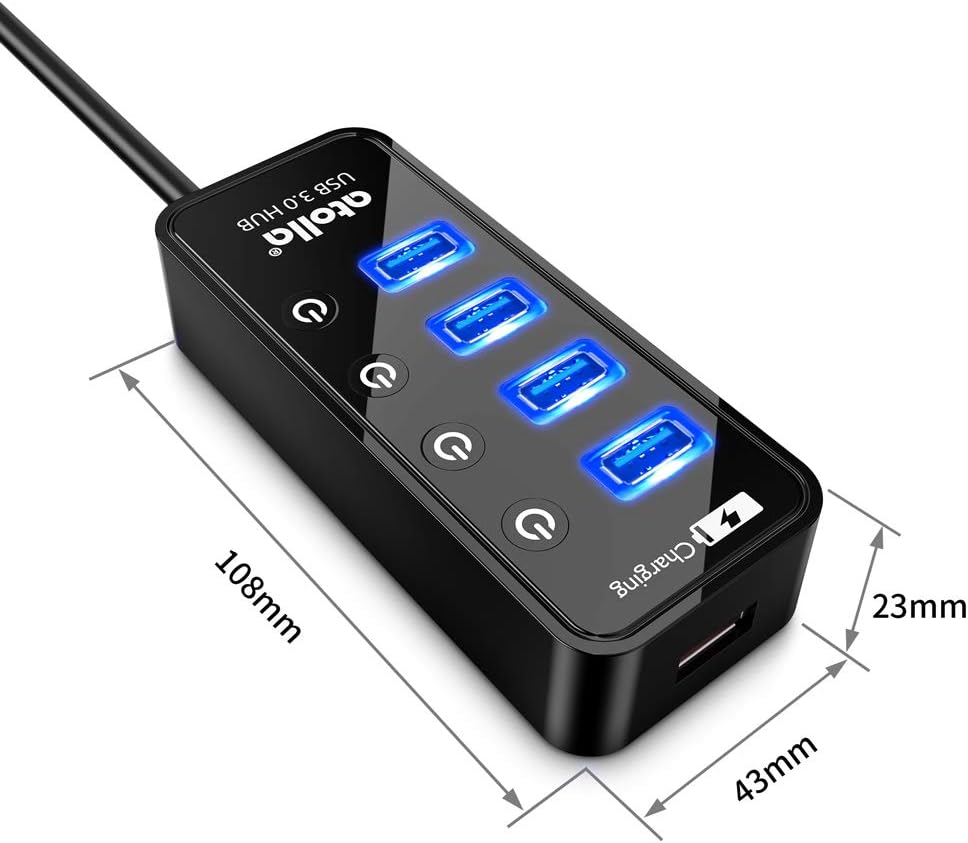
Image: A diagram showing the physical dimensions (length, width, height) of the Atolla 4-Port USB 3.0 Hub in millimeters.
ട്രബിൾഷൂട്ടിംഗ്
- ഉപകരണം തിരിച്ചറിഞ്ഞിട്ടില്ല:
- Ensure the hub's USB cable is securely connected to a USB port on your computer.
- Verify that the power adapter is properly connected to the hub and a working power outlet.
- Try connecting the device directly to your computer's USB port to confirm the device itself is functional.
- If using an individual switch, ensure the port is turned on (blue LED illuminated).
- നിങ്ങളുടെ കമ്പ്യൂട്ടറിൽ മറ്റൊരു USB പോർട്ട് പരീക്ഷിക്കുക.
- കുറഞ്ഞ ഡാറ്റാ ട്രാൻസ്ഫർ വേഗത:
- Ensure both the hub and your connected device are USB 3.0 compatible for optimal speeds. Connecting a USB 2.0 device to a USB 3.0 port will result in USB 2.0 speeds.
- Confirm the hub is connected to a USB 3.0 port on your computer (usually blue colored).
- Ensure the power adapter is connected and providing sufficient power, especially for external hard drives.
- Charging Not Working or Slow:
- Ensure the device is connected to the dedicated smart charging port (lightning bolt icon).
- പവർ അഡാപ്റ്റർ ബന്ധിപ്പിച്ചിട്ടുണ്ടെന്നും പ്രവർത്തിക്കുന്നുണ്ടെന്നും ഉറപ്പാക്കുക.
- Some devices may require higher charging currents than the hub can provide, or may charge slower than with their original wall charger.
- ഇടവിട്ടുള്ള കണക്ഷൻ:
- എല്ലാ കേബിൾ കണക്ഷനുകളിലും അയവ് ഉണ്ടോ എന്ന് പരിശോധിക്കുക.
- പവർ അഡാപ്റ്റർ സുരക്ഷിതമായി ബന്ധിപ്പിച്ചിട്ടുണ്ടെന്ന് ഉറപ്പാക്കുക.
- Avoid connecting too many power-hungry devices simultaneously without sufficient external power.
മെയിൻ്റനൻസ്
To ensure the longevity and optimal performance of your Atolla USB 3.0 Hub, follow these simple maintenance guidelines:
- വൃത്തിയാക്കൽ: Use a soft, dry cloth to wipe the surface of the hub. Avoid using liquid cleaners or abrasive materials, as they may damage the finish or internal components.
- സംഭരണം: ദീർഘനേരം ഉപയോഗിക്കാത്തപ്പോൾ, നേരിട്ടുള്ള സൂര്യപ്രകാശത്തിൽ നിന്നും കടുത്ത താപനിലയിൽ നിന്നും അകന്ന് തണുത്തതും വരണ്ടതുമായ സ്ഥലത്ത് ഹബ് സൂക്ഷിക്കുക.
- കൈകാര്യം ചെയ്യൽ: Handle the hub with care. Avoid dropping it or subjecting it to strong impacts, which could damage internal circuitry.
- വെൻ്റിലേഷൻ: Ensure the hub is placed in an area with adequate ventilation to prevent overheating, especially when multiple devices are connected and active.
വാറൻ്റിയും പിന്തുണയും
The Atolla 4-Port USB 3.0 Hub is guaranteed by an atolla 18-Month Warranty. ഈ വാറന്റി നിർമ്മാണ വൈകല്യങ്ങൾ ഉൾക്കൊള്ളുകയും സാധാരണ ഉപയോഗത്തിൽ നിങ്ങളുടെ ഉൽപ്പന്നം പ്രതീക്ഷിച്ചതുപോലെ പ്രവർത്തിക്കുന്നുവെന്ന് ഉറപ്പാക്കുകയും ചെയ്യുന്നു.
For technical support, warranty claims, or any questions regarding your Atolla product, please contact Atolla customer service. You can typically find contact information on the Atolla official webസൈറ്റ് അല്ലെങ്കിൽ നിങ്ങൾ ഉൽപ്പന്നം വാങ്ങിയ റീട്ടെയിലർ വഴി.
Please have your model number (CH-204U3-K) and purchase details ready when contacting support.


