ആമുഖം
This manual provides detailed instructions for the setup, operation, and maintenance of your RockJam 61 Key Keyboard Piano Super Kit. This comprehensive kit includes a 61-key digital keyboard, a sturdy keyboard stand, a comfortable piano bench, and high-quality over-ear headphones. The keyboard features advanced functionality with 200 tones, 200 rhythms, and 40 demo songs, delivered through integrated stereo speakers. It also offers USB and AUX inputs for versatile connectivity, making it suitable for both beginners and experienced players.
എന്താണ് ഉൾപ്പെടുത്തിയിരിക്കുന്നത്
Your RockJam 61 Key Keyboard Piano Super Kit package contains the following components:
- 61 കീ കീബോർഡ് പിയാനോ
- പിയാനോ ബെഞ്ച്
- കീബോർഡ് സ്റ്റാൻഡ്
- Keynote Stickers
- ഷീറ്റ് മ്യൂസിക് സ്റ്റാൻഡ്
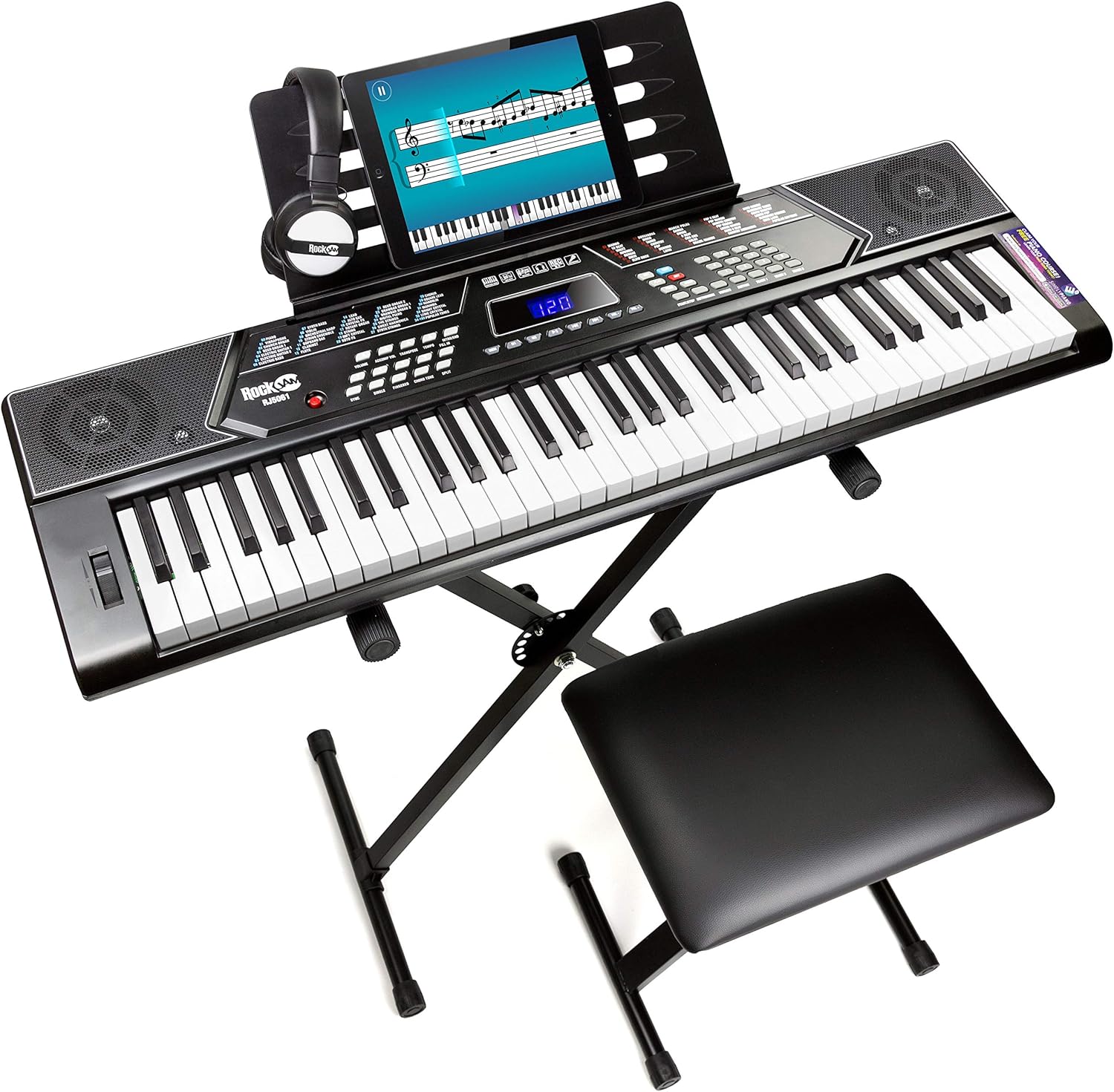
Image: The complete RockJam 61 Key Keyboard Piano Super Kit, showing the keyboard, stand, bench, and headphones.
സജ്ജീകരണ ഗൈഡ്
1. കീബോർഡ് സ്റ്റാൻഡ് അസംബ്ലി
The keyboard stand is designed for stability and adjustability.
- Unfold the X-style keyboard stand.
- Adjust the height using the quick-release mechanism to a comfortable playing position. Ensure the grips for stability are securely in place.
- Verify that the rubber feet are firmly on the ground for secure grip.

ചിത്രം: വിശദമായത് view of the keyboard stand's features, including grips for stability, quick release mechanism, and rubber feet.
2. Piano Bench Setup
The piano bench provides comfortable seating.
- Unfold the piano bench.
- Ensure the legs are fully extended and stable. The bench features extra padding for comfort and rubber feet for secure placement.
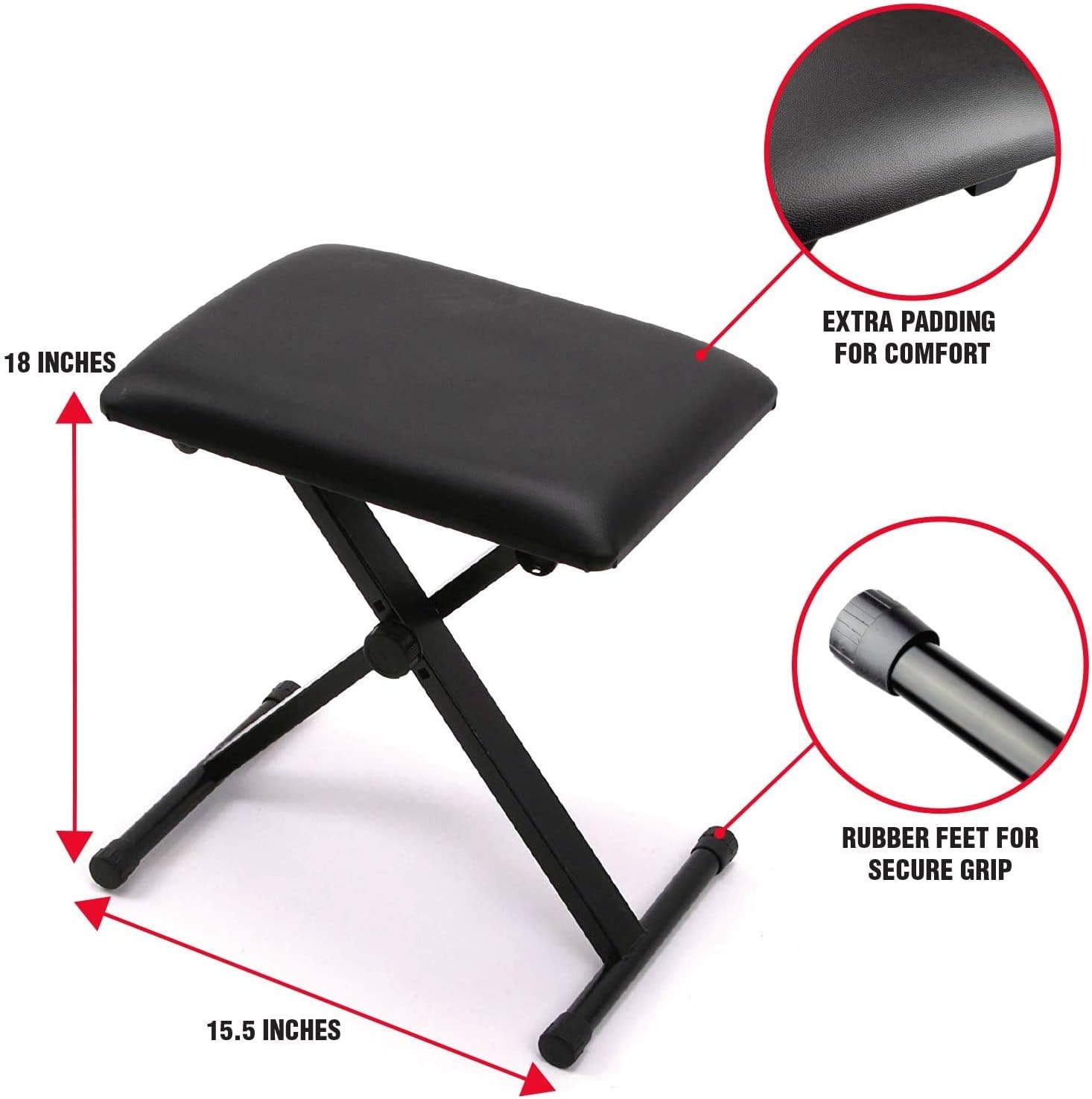
Image: The piano bench, highlighting its 18-inch height, 15.5-inch width, extra padding, and rubber feet.
3. Keyboard Placement and Power
- Carefully place the 61-key keyboard onto the assembled stand, ensuring it is centered and stable.
- Connect the included mains power adapter to the keyboard's power input and a suitable wall outlet. Alternatively, for portable use, insert 6 x 1.5V Size D batteries (not included) into the battery compartment.
- Attach the sheet music stand to the designated slot on the keyboard.

ചിത്രം: ഓവർഹെഡ് view of the RockJam keyboard, illustrating its control panel, speakers, and key layout.
4. ഹെഡ്ഫോൺ കണക്ഷൻ
For private practice, connect the included over-ear headphones to the 3.5mm headphone jack on the keyboard.

Image: A pair of black RockJam over-ear headphones.
പ്രവർത്തന നിർദ്ദേശങ്ങൾ
അടിസ്ഥാന പ്രവർത്തനങ്ങൾ
- പവർ ഓൺ/ഓഫ്: Use the power button to turn the keyboard on or off.
- വോളിയം നിയന്ത്രണം: Adjust the main volume using the dedicated volume buttons or knob.
- സ്വരങ്ങളും താളങ്ങളും: Select from 200 tones and 200 rhythms using the numerical keypad and the LED display. Refer to the keyboard's panel for tone and rhythm categories.
- ഡെമോ ഗാനങ്ങൾ: Play one of the 40 built-in demo songs to experience the keyboard's capabilities.

Image: A close-up of the keyboard's control panel, displaying the tone and rhythm selection options.
വിപുലമായ സവിശേഷതകൾ
- റെക്കോർഡും പ്ലേബാക്കും: Utilize the record function to capture your performances (up to 46 notes memory) and the playback function to listen to them.
- അധ്യാപന രീതികൾ: Engage the three teaching modes to assist with learning.
- മെട്രോനോം: Use the built-in metronome for timing practice.
- Split Keyboard Mode: Divide the keyboard into two sections for different instrument sounds or for duet playing.
- നിലനിർത്തുക: Apply sustain effect to notes for a prolonged sound.
- മാറ്റുക: Change the key of the keyboard without altering finger positions.
- പിച്ച് ബെൻഡ്: Use the pitch bend wheel to smoothly vary the pitch of notes.

ചിത്രം: വിശദമായ ഒരു ചിത്രം view of the pitch bend wheel located on the left side of the keyboard.
കണക്റ്റിവിറ്റി
- യുഎസ്ബി ഇൻപുട്ട്: Connect a USB stick (MP3) to play along with your favorite songs.
- AUX ഇൻപുട്ട്: Connect mobile devices via the AUX input to stream audio through the keyboard's speakers.
പഠന വിഭവങ്ങൾ
Your kit includes access to exclusive content within the Simply Piano application (iOS & Android) and TakeLessons for face-to-face and group lessons.
Keynote stickers are provided to assist with learning note identification on the keys.

Image: Close-up of piano keys with keynote stickers applied, indicating notes like Middle C, D, E, and F.
മെയിൻ്റനൻസ്
To ensure the longevity and optimal performance of your RockJam Keyboard Piano Super Kit, follow these maintenance guidelines:
- വൃത്തിയാക്കൽ: Use a soft, dry cloth to wipe down the keyboard and accessories. Avoid abrasive cleaners or solvents.
- സംഭരണം: When not in use, store the keyboard in a dry, cool place away from direct sunlight and extreme temperatures.
- കൈകാര്യം ചെയ്യൽ: Handle the keyboard and its components with care to prevent damage. Avoid dropping or subjecting them to strong impacts.
- ശക്തി: Disconnect the power adapter when the keyboard will not be used for extended periods. If using batteries, remove them to prevent leakage.
ട്രബിൾഷൂട്ടിംഗ്
If you encounter any issues with your RockJam Keyboard Piano Super Kit, please refer to the following common troubleshooting tips:
- ശബ്ദമില്ല:
- Ensure the power adapter is securely connected or batteries are correctly inserted and charged.
- Check the volume level on the keyboard and any connected headphones.
- Verify that headphones are fully plugged into the correct jack.
- വികലമായ ശബ്ദം:
- വോളിയം കുറയ്ക്കുക.
- അയഞ്ഞ കണക്ഷനുകൾക്കായി പരിശോധിക്കുക.
- Ensure no foreign objects are obstructing the speakers.
- പ്രതികരിക്കാത്ത കീകൾ:
- കീബോർഡ് ഓണാണെന്ന് ഉറപ്പാക്കുക.
- താക്കോലുകൾക്കടിയിൽ എന്തെങ്കിലും അവശിഷ്ടങ്ങൾ ഉണ്ടോയെന്ന് പരിശോധിക്കുക.
- ഡിസ്പ്ലേ പ്രവർത്തിക്കുന്നില്ല:
- Confirm the keyboard is powered on.
- പ്രശ്നം നിലനിൽക്കുകയാണെങ്കിൽ, ഉപഭോക്തൃ പിന്തുണയുമായി ബന്ധപ്പെടുക.
For more complex issues, please consult the official RockJam support resources.
സ്പെസിഫിക്കേഷനുകൾ
| ഫീച്ചർ | വിശദാംശങ്ങൾ |
|---|---|
| മോഡലിൻ്റെ പേര് | Keyboard Piano Superkit with Pitch Bend |
| ഇനം മോഡൽ നമ്പർ | RJ5061 |
| ബ്രാൻഡ് | റോക്ക്ജാം |
| കീകളുടെ എണ്ണം | 61 |
| ടോണുകൾ | 200 |
| താളം | 200 |
| ഡെമോ ഗാനങ്ങൾ | 40 |
| കണക്റ്റിവിറ്റി ടെക്നോളജി | Auxiliary, Headphone Jack, USB |
| പവർ ഉറവിടം | Battery Powered (6 x 1.5V Size D), Mains Power Adapter |
| ഉൽപ്പന്ന അളവുകൾ | 11.2"D x 36.8"W x 3.1"H |
| ഇനത്തിൻ്റെ ഭാരം | 3.3 കിലോഗ്രാം (7.26 പൗണ്ട്) |
| ഔട്ട്പുട്ട് വാട്ട്tage | 10 വാട്ട്സ് |
| വാല്യംtage | 120 വോൾട്ട് |
| നിർമ്മാതാവ് | PDT Limited |
| മാതൃരാജ്യം | ചൈന |
ഔദ്യോഗിക ഉൽപ്പന്ന വീഡിയോകൾ
Currently, there are no official product videos from the seller available for embedding in this manual. Please refer to the product page for any available video content.
വാറൻ്റിയും പിന്തുണയും
For warranty information and customer support, please refer to the official RockJam website or the contact details provided with your purchase.
ഈ ഉപയോക്തൃ മാനുവലിന്റെ ഡിജിറ്റൽ പതിപ്പ് ഡൗൺലോഡ് ചെയ്യാൻ ലഭ്യമാണ്: ഉപയോക്തൃ മാനുവൽ (PDF)


