1. ആമുഖം
Thank you for choosing the MI MDZ-27-DI Wireless Bluetooth Soundbar. This soundbar is designed to enhance your audio experience for movies, gaming, and music playback. Featuring 8 sound drivers, it delivers rich and balanced audio. Its minimalist design integrates seamlessly with various home décors. This manual provides essential information for setup, operation, and maintenance of your new soundbar.
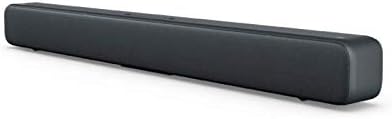
Figure 1.1: The MI MDZ-27-DI Wireless Bluetooth Soundbar, showcasing its sleek, dark grey design and compact form factor.
2 സുരക്ഷാ വിവരങ്ങൾ
- സൗണ്ട്ബാറിൽ വെള്ളം കയറുകയോ ഈർപ്പമോ ഏൽക്കുകയോ ചെയ്യരുത്.
- വെന്റിലേഷൻ തുറസ്സുകളൊന്നും തടയരുത്. നിർമ്മാതാവിന്റെ നിർദ്ദേശങ്ങൾക്കനുസൃതമായി ഇൻസ്റ്റാൾ ചെയ്യുക.
- റേഡിയറുകൾ, ഹീറ്റ് രജിസ്റ്ററുകൾ, സ്റ്റൗകൾ, അല്ലെങ്കിൽ മറ്റ് ഉപകരണങ്ങൾ (ഉൾപ്പെടെ) പോലെയുള്ള താപ സ്രോതസ്സുകൾക്ക് സമീപം ഇൻസ്റ്റാൾ ചെയ്യരുത്. ampലൈഫയറുകൾ) ചൂട് ഉത്പാദിപ്പിക്കുന്നത്.
- പ്രത്യേകിച്ച് പ്ലഗുകൾ, കൺവീനിയൻസ് റെസെപ്റ്റക്കിളുകൾ, ഉപകരണത്തിൽ നിന്ന് പുറത്തുകടക്കുന്ന ഇടം എന്നിവയിൽ നടക്കുകയോ നുള്ളുകയോ ചെയ്യുന്നതിൽ നിന്ന് പവർ കോർഡ് സംരക്ഷിക്കുക.
- നിർമ്മാതാവ് വ്യക്തമാക്കിയ അറ്റാച്ച്മെൻ്റുകൾ/ആക്സസറികൾ മാത്രം ഉപയോഗിക്കുക.
- മിന്നൽ കൊടുങ്കാറ്റുകളുടെ സമയത്തോ ദീർഘനേരം ഉപയോഗിക്കാത്ത സമയത്തോ ഈ ഉപകരണം അൺപ്ലഗ് ചെയ്യുക.
- എല്ലാ സേവനങ്ങളും യോഗ്യതയുള്ള സേവന ഉദ്യോഗസ്ഥർക്ക് റഫർ ചെയ്യുക. പവർ സപ്ലൈ കോർഡ് അല്ലെങ്കിൽ പ്ലഗ് കേടാകുക, ദ്രാവകം ഒഴുകുകയോ ഉപകരണങ്ങൾ ഉപകരണത്തിലേക്ക് വീഴുകയോ ചെയ്യുക, ഉപകരണം മഴയോ ഈർപ്പമോ സമ്പർക്കം പുലർത്തുക, സാധാരണയായി പ്രവർത്തിക്കാത്തത് എന്നിങ്ങനെയുള്ള ഏതെങ്കിലും വിധത്തിൽ ഉപകരണത്തിന് കേടുപാടുകൾ സംഭവിക്കുമ്പോൾ സേവനം ആവശ്യമാണ്. , അല്ലെങ്കിൽ ഉപേക്ഷിച്ചു.
3. പാക്കേജ് ഉള്ളടക്കം
പാക്കേജിൽ ഇനിപ്പറയുന്ന ഇനങ്ങൾ ഉണ്ടോ എന്ന് പരിശോധിക്കുക:
- MI MDZ-27-DI Wireless Bluetooth Soundbar
- പവർ അഡാപ്റ്റർ/കേബിൾ
- S/PDIF Cable (Note: Optical/Aux cables may need to be purchased separately depending on your TV model)
- ഉപയോക്തൃ മാനുവൽ (ഈ പ്രമാണം)
4. ഉൽപ്പന്ന സവിശേഷതകൾ
The MI MDZ-27-DI Soundbar offers a range of features designed for an immersive audio experience:
- 8 Sound Drivers: Equipped with multiple drivers for a rich and balanced audio profile.
- ഒന്നിലധികം കണക്റ്റിവിറ്റി ഓപ്ഷനുകൾ: Supports S/PDIF, Optical, Aux-in, Line-in, and Bluetooth 4.2 LE for versatile connection to various devices.
- മിനിമലിസ്റ്റ് ഡിസൈൻ: A sleek bar shape with a fabric mesh exterior that complements any décor.
- മെച്ചപ്പെടുത്തിയ ബാസ്: Delivers deep and clear bass for an improved listening experience.
- എളുപ്പമുള്ള സജ്ജീകരണം: Designed for a quick and hassle-free installation, whether on a table or wall-mounted.
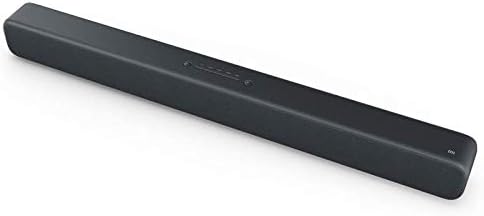
Figure 4.1: The soundbar's top panel, featuring integrated control buttons for power and input selection.
5. സജ്ജീകരണവും ഇൻസ്റ്റാളേഷനും
5.1 പ്ലേസ്മെന്റ് ഓപ്ഷനുകൾ
The MI Soundbar can be placed on a tabletop or mounted on a wall.
ടാബ്ലെറ്റ് പ്ലേസ്മെൻ്റ്:
Place the soundbar on a stable, flat surface in front of your TV or desired listening area. Ensure there is adequate space around the soundbar for proper ventilation.
മതിൽ മൗണ്ടിംഗ്:
The soundbar is designed for easy wall mounting. To mount, determine the desired mounting height. Mark the position for the first wall hole (A1). Then, horizontally to the right of A1, mark the position for the second wall hole (A2) at a distance of 416 mm. Ensure the wall can support the weight of the soundbar (approximately 1.92 kg).
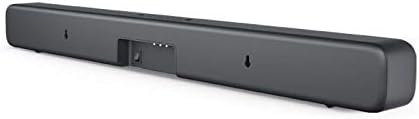
Figure 5.1: The rear of the soundbar, highlighting the input ports and the integrated wall mounting points.
5.2 പ്രാരംഭ സജ്ജീകരണം
- പവർ ബന്ധിപ്പിക്കുക: Plug the power cable into the soundbar's power input and then into a wall outlet.
- ഓഡിയോ ഉറവിടം ബന്ധിപ്പിക്കുക: Choose your preferred audio connection method (S/PDIF, Optical, Aux-in, or Bluetooth) and connect the soundbar to your TV, mobile device, or other audio source. Refer to Section 6 for detailed connectivity instructions.
- പവർ ഓൺ: അത് ഓണാക്കാൻ സൗണ്ട്ബാറിലെ പവർ ബട്ടൺ അമർത്തുക.
6. പ്രവർത്തന നിർദ്ദേശങ്ങൾ
6.1 നിയന്ത്രണങ്ങൾ
The MI Soundbar features integrated controls on its top panel:
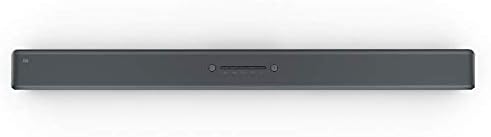
Figure 6.1: Close-up of the soundbar's top-mounted control buttons, including power, volume, and input selection.
- പവർ ബട്ടൺ: Press to turn the soundbar On or Off.
- വോളിയം കൂട്ടുക/താഴ്ത്തുക: Adjust the sound output level.
- ഇൻപുട്ട്/ഉറവിട ബട്ടൺ: Cycle through available input sources (Bluetooth, S/PDIF, Optical, Aux-in, Line-in).
Note: The MI MDZ-27-DI Soundbar does not include a remote control. Volume and source selection must be adjusted directly on the unit or via the connected device (e.g., TV remote for TV volume).
6.2 കണക്റ്റിവിറ്റി ഓപ്ഷനുകൾ
The soundbar offers several ways to connect to your audio sources:
- ബ്ലൂടൂത്ത്:
- സൗണ്ട്ബാർ ഓണാണെന്ന് ഉറപ്പാക്കുക.
- Press the Input/Source button until the Bluetooth indicator light is active.
- On your mobile device or computer, enable Bluetooth and search for "MI Soundbar" (or similar).
- Select the soundbar from the list to pair. Once paired, the indicator light will become solid.
- S/PDIF (Coaxial Digital Audio):
Connect the provided S/PDIF cable from your TV's S/PDIF output to the soundbar's S/PDIF input. Select S/PDIF as the input source on the soundbar.
- ഒപ്റ്റിക്കൽ (ഡിജിറ്റൽ ഓഡിയോ):
Connect an optical audio cable (not included) from your TV's Optical output to the soundbar's Optical input. Select Optical as the input source on the soundbar.
- Aux-in (3.5mm Analog Audio):
Connect a 3.5mm audio cable (not included) from your device's headphone jack or Aux output to the soundbar's Aux-in port. Select Aux-in as the input source on the soundbar.
- Line-in (RCA Analog Audio):
Connect an RCA audio cable (not included) from your device's Line-out to the soundbar's Line-in ports. Select Line-in as the input source on the soundbar.
7. പരിപാലനം
To ensure the longevity and optimal performance of your MI Soundbar, follow these maintenance guidelines:
- വൃത്തിയാക്കൽ: Use a soft, dry cloth to wipe the exterior of the soundbar. Do not use liquid cleaners, aerosols, or abrasive cleaning agents.
- വെൻ്റിലേഷൻ: Ensure that the ventilation openings are not blocked by dust or debris. Periodically clean around these areas.
- സംഭരണം: സൗണ്ട്ബാർ ദീർഘനേരം സൂക്ഷിക്കുകയാണെങ്കിൽ, പവർ ഔട്ട്ലെറ്റിൽ നിന്ന് അത് ഊരിമാറ്റി, നേരിട്ടുള്ള സൂര്യപ്രകാശവും കടുത്ത താപനിലയും ഏൽക്കാത്ത തണുത്തതും വരണ്ടതുമായ സ്ഥലത്ത് സൂക്ഷിക്കുക.
8. പ്രശ്നപരിഹാരം
If you encounter issues with your MI Soundbar, refer to the following common troubleshooting steps:
| പ്രശ്നം | സാധ്യമായ കാരണം | പരിഹാരം |
|---|---|---|
| ശക്തിയില്ല | പവർ കേബിൾ ബന്ധിപ്പിച്ചിട്ടില്ല; പവർ ഔട്ട്ലെറ്റ് പ്രവർത്തിക്കുന്നില്ല. | പവർ കേബിൾ സുരക്ഷിതമായി ബന്ധിപ്പിച്ചിട്ടുണ്ടെന്ന് ഉറപ്പാക്കുക. മറ്റൊരു പവർ ഔട്ട്ലെറ്റ് പരീക്ഷിക്കുക. |
| ശബ്ദമില്ല | Incorrect input source selected; Volume too low; Cable not connected properly. | Press the Input/Source button to select the correct input. Increase the volume on the soundbar and your source device. Check all audio cable connections. |
| ബ്ലൂടൂത്ത് ജോടിയാക്കൽ പ്രശ്നങ്ങൾ | Soundbar not in pairing mode; Device too far; Previous device still connected. | Ensure soundbar is in Bluetooth pairing mode. Move device closer to soundbar. Disconnect from any previously paired devices. |
| Sound distortion at high volumes | Volume set too high; Poor audio source quality. | Reduce the volume. Try a different audio source to check if the issue persists. |
9 സ്പെസിഫിക്കേഷനുകൾ
| ഫീച്ചർ | വിശദാംശങ്ങൾ |
|---|---|
| ഉൽപ്പന്ന അളവുകൾ | 83 x 7.2 x 8.7 സെ.മീ |
| ഭാരം | 1.92 കി.ഗ്രാം |
| മോഡൽ നമ്പർ | MDZ-27-DI |
| ബ്രാൻഡ് | MI |
| കണക്റ്റിവിറ്റി ടെക്നോളജി | Bluetooth (4.2 LE), S/PDIF, Optical, Aux-in, Line-in |
| ഓഡിയോ put ട്ട്പുട്ട് മോഡ് | സ്റ്റീരിയോ |
| മൗണ്ടിംഗ് തരം | വാൾ മൗണ്ട്, ടേബിൾടോപ്പ് മൗണ്ട് |
| മെറ്റീരിയൽ | Fabric mesh exterior |
| നിർമ്മാതാവ് | Xiaomi |
10. വാറൻ്റിയും പിന്തുണയും
For warranty information and technical support, please refer to the warranty card included with your product or visit the official MI webസൈറ്റ്. ഏതെങ്കിലും വാറന്റി ക്ലെയിമുകൾക്ക് വാങ്ങിയതിന്റെ തെളിവായി നിങ്ങളുടെ വാങ്ങൽ രസീത് സൂക്ഷിക്കുക.
For further assistance, you may contact MI customer service through their official channels.