1. ആമുഖം
വാങ്ങിയതിന് നന്ദി.asing the Lenco PDR-031 Portable DAB+ Radio. This manual provides essential information for the safe and efficient operation of your device. Please read it thoroughly before use and retain it for future reference.
സുരക്ഷാ വിവരങ്ങൾ
- മഴ, ഈർപ്പം, അല്ലെങ്കിൽ തീവ്രമായ താപനില എന്നിവയിൽ യൂണിറ്റ് തുറന്നുകാട്ടരുത്.
- താപ സ്രോതസ്സുകൾക്ക് സമീപമോ നേരിട്ടുള്ള സൂര്യപ്രകാശത്തിലോ യൂണിറ്റ് സ്ഥാപിക്കുന്നത് ഒഴിവാക്കുക.
- യൂണിറ്റ് ഡിസ്അസംബ്ലിംഗ് ചെയ്യുകയോ പരിഷ്കരിക്കുകയോ ചെയ്യരുത്. എല്ലാ സേവനങ്ങളും യോഗ്യതയുള്ള ഉദ്യോഗസ്ഥർക്ക് റഫർ ചെയ്യുക.
- യൂണിറ്റിന് ചുറ്റും ശരിയായ വായുസഞ്ചാരം ഉറപ്പാക്കുക.
- ചാർജ് ചെയ്യുന്നതിന് നിർദ്ദിഷ്ട പവർ അഡാപ്റ്റർ മാത്രം ഉപയോഗിക്കുക.
2. പാക്കേജ് ഉള്ളടക്കം
എല്ലാ ഇനങ്ങളും നിലവിലുണ്ടോ എന്നും നല്ല നിലയിലാണെന്നും ദയവായി പരിശോധിക്കുക:
- Lenco PDR-031 Portable DAB+ Radio
- Micro-USB Charging Adapter
- ഉപയോക്തൃ മാനുവൽ (ഈ പ്രമാണം)
3. ഉൽപ്പന്നം കഴിഞ്ഞുview
Familiarize yourself with the various parts and controls of your Lenco PDR-031 radio.
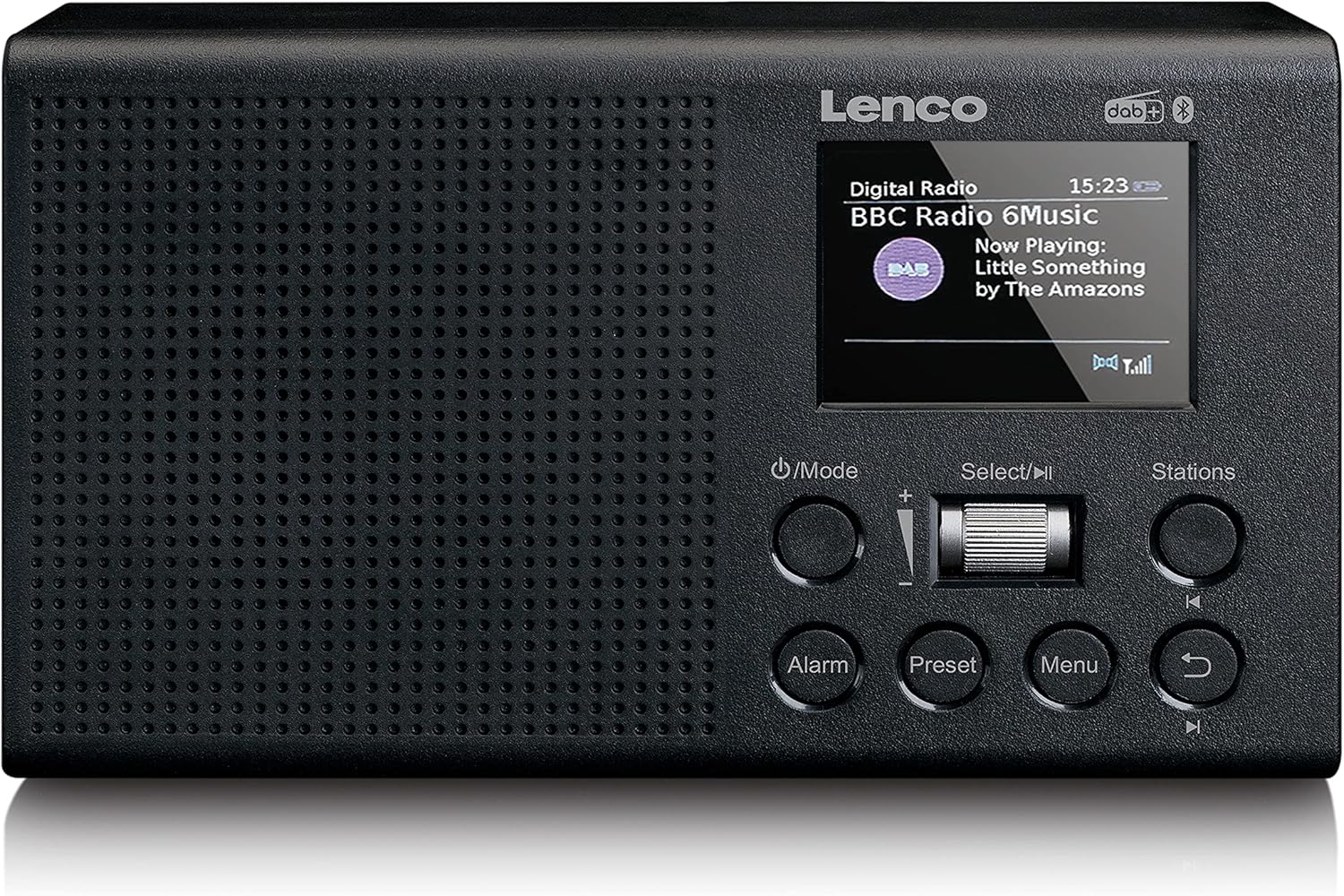

നിയന്ത്രണങ്ങളും തുറമുഖങ്ങളും:
- പവർ / മോഡ് ബട്ടൺ: Press to turn on/off or switch between DAB+, FM, Bluetooth, and AUX modes.
- Select/Play/Pause Dial: Rotate to navigate menus or adjust volume. Press to confirm selection or play/pause audio.
- Stations Button: Access saved stations or station list.
- അലാറം ബട്ടൺ: അലാറങ്ങൾ സജ്ജമാക്കി കൈകാര്യം ചെയ്യുക.
- പ്രീസെറ്റ് ബട്ടൺ: Store and recall favorite radio stations.
- മെനു ബട്ടൺ: Access system settings and options.
- ബാക്ക് ബട്ടൺ: മുമ്പത്തെ മെനുവിലേക്കോ സ്ക്രീനിലേക്കോ മടങ്ങുക.

- DC IN (Micro-USB): For connecting the charging adapter.
- ഓക്സ് ഇൻ: ബാഹ്യ ഓഡിയോ ഉപകരണങ്ങൾ ബന്ധിപ്പിക്കുന്നതിനുള്ള 3.5mm ഇൻപുട്ട്.
- ഓക്സ് ഔട്ട്: 3.5mm output for connecting headphones or external speakers.
- ടെലിസ്കോപ്പിക് ആന്റിന: ഒപ്റ്റിമൽ റേഡിയോ സ്വീകരണത്തിനായി നീട്ടുക.
4. സജ്ജീകരണം
4.1 പവർ ഓണാക്കലും ചാർജ് ചെയ്യലും
The Lenco PDR-031 has a built-in 2200 mAh rechargeable battery. Before first use, it is recommended to fully charge the device.
- Connect the supplied Micro-USB charging adapter to the DC IN port on the back of the radio.
- അനുയോജ്യമായ പവർ ഔട്ട്ലെറ്റിലേക്ക് അഡാപ്റ്റർ പ്ലഗ് ചെയ്യുക.
- ഡിസ്പ്ലേയിലെ ചാർജിംഗ് ഇൻഡിക്കേറ്റർ ചാർജിംഗ് സ്റ്റാറ്റസ് കാണിക്കും.
- പൂർണ്ണമായി ചാർജ് ചെയ്തുകഴിഞ്ഞാൽ, അഡാപ്റ്റർ വിച്ഛേദിക്കുക.
4.2 ആന്റിന സജ്ജീകരണം
For optimal radio reception, fully extend the telescopic antenna located on the back of the unit.

5. പ്രവർത്തന നിർദ്ദേശങ്ങൾ
5.1 അടിസ്ഥാന പ്രവർത്തനം
- പവർ ഓൺ/ഓഫ്: അമർത്തുക പവർ/മോഡ് റേഡിയോ ഓണാക്കാനോ ഓഫാക്കാനോ ഉള്ള ബട്ടൺ.
- മോഡ് തിരഞ്ഞെടുക്കൽ: അമർത്തുക പവർ/മോഡ് button repeatedly to cycle through available modes: DAB+, FM, Bluetooth, and AUX.
- വോളിയം നിയന്ത്രണം: തിരിക്കുക തിരഞ്ഞെടുക്കുക/പ്ലേ/താൽക്കാലികമായി നിർത്തുക dial to adjust the volume.
5.2 DAB+ Radio Operation
- ഉപയോഗിച്ച് DAB+ മോഡിലേക്ക് മാറുക പവർ/മോഡ് ബട്ടൺ.
- The radio will automatically scan for available DAB+ stations upon first use. If not, press the മെനു button and select 'Full Scan'.
- തിരിക്കുക തിരഞ്ഞെടുക്കുക/പ്ലേ/താൽക്കാലികമായി നിർത്തുക dial to browse the list of available stations.
- അമർത്തുക തിരഞ്ഞെടുക്കുക/പ്ലേ/താൽക്കാലികമായി നിർത്തുക dial to select a station.
Storing and Recalling DAB+ Presets:
- To store a station: While listening to a station, press and hold the പ്രീസെറ്റ് button. Rotate the dial to select a preset number (1-20), then press the dial to confirm.
- To recall a station: Press the പ്രീസെറ്റ് button briefly. Rotate the dial to select the desired preset, then press the dial to confirm.
5.3 എഫ്എം റേഡിയോ പ്രവർത്തനം
- ഉപയോഗിച്ച് FM മോഡിലേക്ക് മാറുക പവർ/മോഡ് ബട്ടൺ.
- To auto-scan: Press and hold the തിരഞ്ഞെടുക്കുക/പ്ലേ/താൽക്കാലികമായി നിർത്തുക dial. The radio will scan and stop at the next strong station.
- To manual tune: Briefly press the തിരഞ്ഞെടുക്കുക/പ്ലേ/താൽക്കാലികമായി നിർത്തുക dial, then rotate it to fine-tune the frequency.
Storing and Recalling FM Presets:
- To store a station: While listening to a station, press and hold the പ്രീസെറ്റ് button. Rotate the dial to select a preset number (1-20), then press the dial to confirm.
- To recall a station: Press the പ്രീസെറ്റ് button briefly. Rotate the dial to select the desired preset, then press the dial to confirm.
5.4 ബ്ലൂടൂത്ത് പ്രവർത്തനം
The PDR-031 can connect to external devices via Bluetooth to stream audio.
- ഉപയോഗിച്ച് ബ്ലൂടൂത്ത് മോഡിലേക്ക് മാറുക പവർ/മോഡ് ബട്ടൺ. ഡിസ്പ്ലേ 'ബ്ലൂടൂത്ത് ജോടിയാക്കൽ' കാണിക്കും.
- നിങ്ങളുടെ ബാഹ്യ ഉപകരണത്തിൽ ബ്ലൂടൂത്ത് പ്രവർത്തനക്ഷമമാക്കുക (ഉദാ, സ്മാർട്ട്ഫോൺ, ടാബ്ലെറ്റ്).
- ഇതിനായി തിരയുക 'Lenco PDR-031' in your device's Bluetooth list and select it to pair.
- ജോടിയാക്കിയാൽ, നിങ്ങളുടെ ഉപകരണത്തിൽ നിന്ന് റേഡിയോ വഴി ഓഡിയോ പ്ലേ ചെയ്യാൻ കഴിയും.
5.5 AUX ഇൻപുട്ട് ഉപയോഗം
Connect external audio sources like MP3 players or CD players to the radio.
- ഉപയോഗിച്ച് AUX മോഡിലേക്ക് മാറുക പവർ/മോഡ് ബട്ടൺ.
- Connect one end of a 3.5mm audio cable (not supplied) to the AUX IN port on the radio.
- കേബിളിന്റെ മറ്റേ അറ്റം ഹെഡ്ഫോൺ ജാക്കുമായോ നിങ്ങളുടെ ബാഹ്യ ഉപകരണത്തിന്റെ ഓഡിയോ ഔട്ട്പുട്ടുമായോ ബന്ധിപ്പിക്കുക.
- നിങ്ങളുടെ ബാഹ്യ ഉപകരണത്തിൽ നിന്ന് ഓഡിയോ പ്ലേ ചെയ്യുക.
5.6 AUX Output Usage
Connect headphones or external speakers to the radio for private listening or enhanced sound.
- Connect one end of a 3.5mm audio cable (not supplied) to the AUX OUT port on the radio.
- Connect the other end of the cable to your headphones or the audio input of external speakers.
- Audio will now be routed through the connected device.
5.7 അലാറം പ്രവർത്തനം
Set alarms to wake up to your favorite radio station or a buzzer.
- അമർത്തുക അലാറം ബട്ടൺ.
- Follow the on-screen prompts to set the alarm time, alarm source (DAB+, FM, or Buzzer), and volume.
- അമർത്തുക തിരഞ്ഞെടുക്കുക/പ്ലേ/താൽക്കാലികമായി നിർത്തുക dial to confirm each setting.
6. പരിപാലനം
6.1 വൃത്തിയാക്കൽ
To maintain the appearance of your radio, clean it regularly.
- മൃദുവായതും ഉണങ്ങിയതുമായ തുണി ഉപയോഗിച്ച് ഉപരിതലം തുടയ്ക്കുക.
- അബ്രാസീവ് ക്ലീനറുകൾ, മെഴുക് അല്ലെങ്കിൽ ലായകങ്ങൾ എന്നിവ ഉപയോഗിക്കരുത്, കാരണം അവ ഫിനിഷിന് കേടുവരുത്തും.
6.2 ബാറ്ററി കെയർ
To prolong the life of the built-in Lithium-Ion battery:
- ബാറ്ററി പൂർണമായും ഡിസ്ചാർജ് ചെയ്യുന്നത് ഒഴിവാക്കുക.
- Charge the battery regularly, even if the radio is not in frequent use.
- Store the unit in a cool, dry place if not used for extended periods.
7. പ്രശ്നപരിഹാരം
If you encounter issues with your Lenco PDR-031, refer to the following common problems and solutions:
| പ്രശ്നം | സാധ്യമായ കാരണം | പരിഹാരം |
|---|---|---|
| ശക്തിയില്ല | ബാറ്ററി തീർന്നു; പവർ അഡാപ്റ്റർ ശരിയായി ബന്ധിപ്പിച്ചിട്ടില്ല. | Charge the battery; Ensure the Micro-USB adapter is securely connected. |
| ശബ്ദമില്ല | Volume is too low; Incorrect mode selected; AUX cable not fully inserted. | Increase volume; Select the correct mode (DAB+, FM, Bluetooth, AUX); Re-insert AUX cable firmly. |
| മോശം റേഡിയോ സ്വീകരണം | ആന്റിന നീട്ടിയിട്ടില്ല; ദുർബലമായ സിഗ്നൽ ഏരിയ. | Fully extend the telescopic antenna; Try relocating the radio to an area with better signal. |
| ബ്ലൂടൂത്ത് ജോടിയാക്കൽ പരാജയപ്പെടുന്നു | Radio not in pairing mode; Device too far; Previously paired device connected. | Ensure radio is in Bluetooth mode; Move device closer; Disconnect from other Bluetooth devices. |
8 സ്പെസിഫിക്കേഷനുകൾ
| ഫീച്ചർ | വിശദാംശങ്ങൾ |
|---|---|
| മോഡൽ നമ്പർ | PDR-031BK |
| അളവുകൾ (L x W x H) | 18 x 4.9 x 10.8 സെ.മീ |
| ഭാരം | 390 ഗ്രാം |
| പ്രദർശിപ്പിക്കുക | 2.4-ഇഞ്ച് TFT LCD കളർ ഡിസ്പ്ലേ |
| റേഡിയോ ട്യൂണർ | DAB+, PLL FM |
| ഓഡിയോ ഔട്ട്പുട്ട് | 2W RMS Speaker, Passive Subwoofer |
| കണക്റ്റിവിറ്റി | Bluetooth, AUX In, AUX Out, Micro-USB |
| ബാറ്ററി | 2200 mAh Lithium-Ion (built-in) |
| പവർ ഉറവിടം | ബാറ്ററി പ്രവർത്തിക്കുന്നു |

9. വാറൻ്റിയും പിന്തുണയും
Lenco products are manufactured to high quality standards. This product is covered by a manufacturer's warranty in accordance with applicable laws and regulations in your country of purchase. For detailed warranty terms and conditions, please refer to the documentation provided with your purchase or visit the official Lenco webസൈറ്റ്.
For technical support or service inquiries, please contact Lenco customer service through their official channels. Keep your proof of purchase for warranty claims.


