1. ആമുഖവും അവസാനവുംview
The BRESSER Explore Scientific 7-in-1 WiFi Professional Weather Station is designed to provide comprehensive meteorological data directly from your vicinity. This advanced system measures a wide range of weather parameters and offers connectivity to online weather services like Weather Underground and Weathercloud for remote viewing and data sharing. The station features a new light intensity measurement function, enhancing its capabilities compared to previous models.
പ്രധാന സവിശേഷതകളിൽ ഇവ ഉൾപ്പെടുന്നു:
- 7-ഇൻ-1 സെൻസർ: Measures outdoor temperature, humidity, wind direction, wind speed, rainfall, UV index, and light intensity.
- ഇൻഡോർ മോണിറ്ററിംഗ്: Displays indoor temperature and humidity.
- വൈഫൈ കണക്റ്റിവിറ്റി: Enables internet time synchronization and data publishing to Weather Underground or Weathercloud.
- Advanced Data: Provides air pressure with 24-hour history, graphical weather forecast, 'feels like' function, dew point, heat index, wind chill factor, trend indicators, moon phases, sunrise/sunset times.
- അലേർട്ടുകൾ: Includes alarm with snooze, weekday alarm, and ice/frost warning.
- വിപുലീകരണക്ഷമത: Supports additional optional sensors such as the BRESSER soil temperature and moisture meter (item no. 7009972) and the BRESSER Spa and pool thermometer (item no. 7009973).
2. പാക്കേജ് ഉള്ളടക്കം
Please ensure all components are present and in good condition upon unpacking:
- Main Display Unit (Base Station)
- 7-in-1 Outdoor Multi-Sensor (WSX3001 Wireless Temperature Sensor)
- Mounting Arm and Hardware
- ബേസ് സ്റ്റേഷനുള്ള പവർ അഡാപ്റ്റർ
- ഉപയോക്തൃ മാനുവൽ (ഈ പ്രമാണം)
- Batteries (3 AAA batteries required for the base station, not always included)
3. സജ്ജീകരണം
3.1 ഔട്ട്ഡോർ സെൻസർ അസംബ്ലി
The 7-in-1 outdoor sensor requires minor assembly before installation. Carefully attach the wind cups, wind vane, and mounting pole as instructed in the quick start guide provided in the packaging.

Description: This image displays the individual components of the BRESSER 7-in-1 outdoor sensor, including the black wind cups, the black wind vane, and the rain collector funnel. A small solar panel is integrated into the side of the unit, which powers the sensor and charges its internal battery.

Description: This image shows the fully assembled BRESSER 7-in-1 outdoor sensor from a top-down view. The wind cups and wind vane are clearly visible on the left, while the rain collector is on the right. The solar panel is positioned underneath the main body, indicating its role in powering the device.
3.2 ഔട്ട്ഡോർ സെൻസർ ഇൻസ്റ്റാളേഷൻ
Mount the outdoor sensor in an open area, away from obstructions that could affect wind, rain, or sunlight measurements. Ensure it is securely fastened to a pole or suitable structure using the provided mounting hardware. The solar panel should face south for optimal charging.

Description: This image presents the BRESSER 7-in-1 outdoor sensor fully assembled and mounted on a white vertical pole. The sensor's various components, including the anemometer, wind vane, and rain gauge, are clearly visible, indicating a complete installation ready for operation.

Description: This image shows the BRESSER 7-in-1 outdoor sensor mounted on a pole on a rooftop, with a sunny, natural background of trees. This illustrates a common and ideal placement for the sensor to ensure accurate readings, free from ground-level obstructions.
3.3 Base Station Power and Initial Setup
Insert 3 AAA batteries into the base station (if not already installed) and connect the power adapter. The display will power on. The base station will automatically attempt to synchronize with the outdoor sensor and connect to your WiFi network.

Description: This image displays the front of the BRESSER weather station's main display unit. It features a vibrant color LCD screen showing various weather parameters such as outdoor and indoor temperature and humidity, wind speed and direction, UV index, light intensity, time, date, and a weather forecast icon.
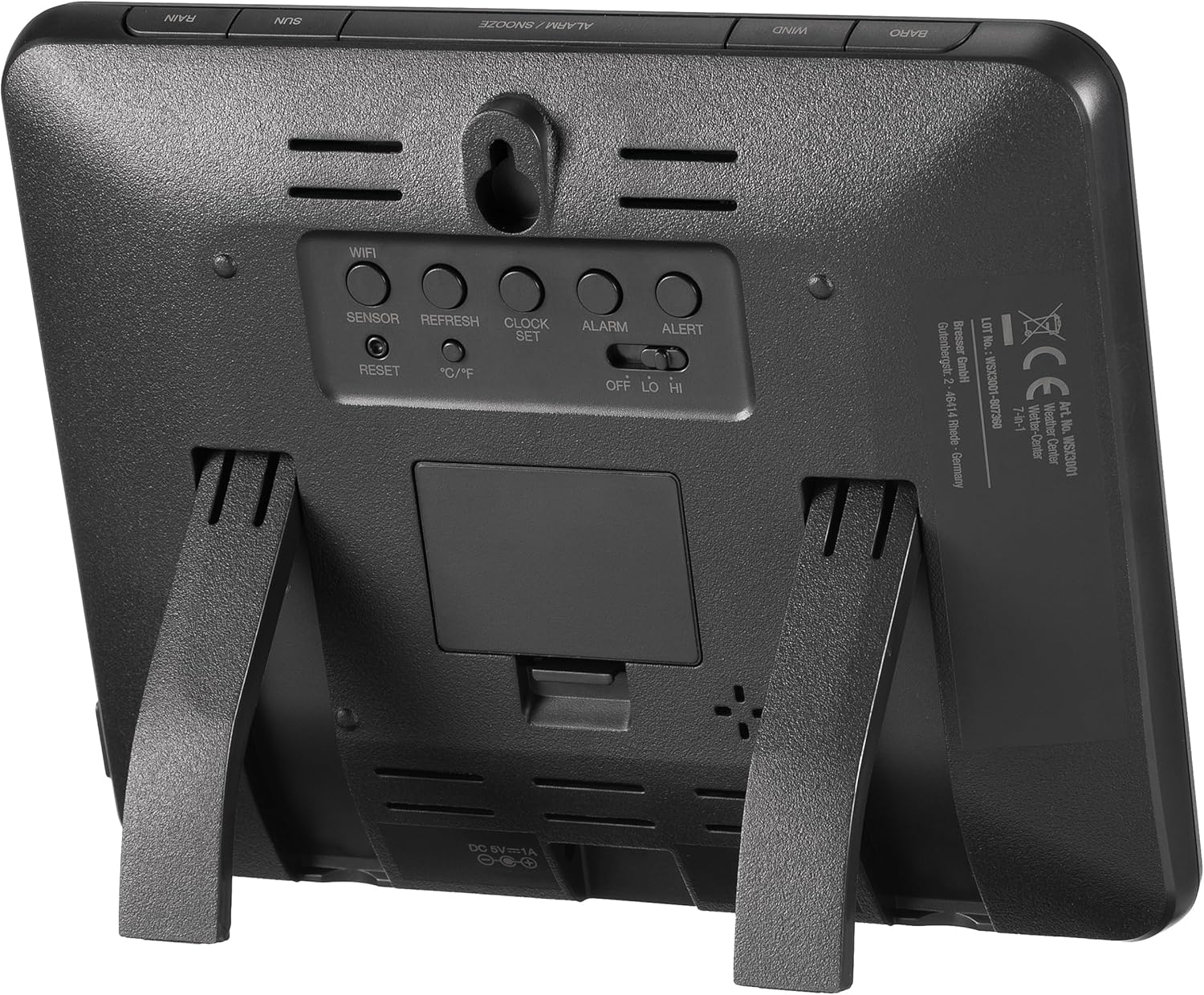
Description: This image shows the back of the BRESSER weather station's main display unit. Visible are several control buttons labeled 'WIFI', 'SENSOR', 'REFRESH', 'CLOCK SET', 'ALARM', 'ALERT', 'RESET', and '°C/°F'. There's also a battery compartment, a DC 5V/1A power input, and a fold-out stand for tabletop use, along with a wall-mounting slot.
3.4 WiFi Connection and Online Services
Follow the on-screen prompts or refer to the detailed instructions in the full manual for connecting the base station to your home WiFi network. Once connected, you can register your station with Weather Underground or Weathercloud to publish your local weather data online. This allows you to view your data remotely via their websites or mobile applications.
4. പ്രവർത്തന നിർദ്ദേശങ്ങൾ
4.1 Display Layout and Information
The main display unit provides a comprehensive overview of current weather conditions. The screen is divided into sections for easy readability:
- ഔട്ട്ഡോർ (ഔട്ട്ഡോർ): പുറത്തെ താപനിലയും ഈർപ്പവും പ്രദർശിപ്പിക്കുന്നു.
- IN (ഇൻഡോർ): Displays indoor temperature and humidity.
- കാറ്റ്: Shows wind direction (compass rose) and speed (m/s, km/h, knots, mph).
- സൂര്യൻ: Indicates UV index, exposure level, recommended protection, and light intensity (Klux / Kfc / W/m²).
- പ്രവചനം: Graphical weather forecast for the next 12-24 hours.
- BARO (Barometric Pressure): Displays air pressure with 24-hour history.
- മഴ: Shows rainfall with daily, weekly, and monthly history.
- ഇൻഡെക്സ്: Includes 'feels like' temperature, dew point, and heat index.
- സമയം/തീയതി: Current time, date, moon phase, sunrise, and sunset times.

Description: This image shows the BRESSER weather station's main display unit mounted on a light-colored wall in a modern living room. The display is clearly visible, showcasing its various weather data readouts, blending seamlessly into the home environment.
Description: This image displays the front of the BRESSER weather station's main display unit. It features a vibrant color LCD screen showing various weather parameters such as outdoor and indoor temperature and humidity, wind speed and direction, UV index, light intensity, time, date, and a weather forecast icon.
4.2 ബട്ടൺ പ്രവർത്തനങ്ങൾ
The buttons on the side and back of the display unit allow for various settings and data access:
- മുകളിലേക്കും താഴേക്കും ഉള്ള അമ്പടയാളങ്ങൾ: Navigate through display modes or adjust settings.
- ഇൻഡെക്സ്: Cycles through weather index values ('feels like', dew point, heat index).
- ചരിത്രം: Access historical data for various parameters.
- പരമാവധി/മിനിറ്റ്: View രേഖപ്പെടുത്തിയ പരമാവധി, കുറഞ്ഞ മൂല്യങ്ങൾ.
- ചാനൽ: If multiple indoor sensors are connected, cycles through their data.
- വൈഫൈ: Initiates or manages WiFi connection.
- സെൻസർ: Manually search for or re-pair with the outdoor sensor.
- പുതുക്കുക: Manually refresh data from sensors.
- ക്ലോക്ക് സെറ്റ്: Enter time and date setting mode.
- അലാറം: അലാറങ്ങൾ സജ്ജമാക്കുക അല്ലെങ്കിൽ സജീവമാക്കുക.
- മുന്നറിയിപ്പ്: Set weather alerts (e.g., high/low temperature).
- °C/°F: Toggle temperature units between Celsius and Fahrenheit.
- പുന SE സജ്ജമാക്കുക: Factory reset the unit (use with caution).
4.3 Setting Alarms and Alerts
ഉപയോഗിക്കുക അലാറം ഒപ്പം അലേർട്ട് buttons to configure time alarms, weekday alarms, and specific weather alerts such as ice/frost warnings or high/low temperature thresholds. Refer to the detailed manual for step-by-step instructions on setting each type of alarm.
5. പരിപാലനം
5.1 ഔട്ട്ഡോർ സെൻസർ വൃത്തിയാക്കൽ
Periodically inspect and clean the outdoor sensor. Ensure the rain collector funnel is free of debris (leaves, insects) to maintain accurate rainfall measurements. Gently wipe the solar panel with a soft, damp cloth to ensure optimal charging efficiency. Avoid using abrasive cleaners.
5.2 ബാറ്ററി മാറ്റിസ്ഥാപിക്കൽ
The base station requires 3 AAA batteries. Replace them when the low battery indicator appears on the display. The outdoor sensor is primarily solar-powered but may contain a backup battery; consult the full manual for specific battery types and replacement procedures for the outdoor unit.
5.3 ഫേംവെയർ അപ്ഡേറ്റുകൾ
The weather station supports firmware updates via its WiFi connection. Check the BRESSER website for available updates and follow their instructions carefully to ensure your station operates with the latest features and improvements.
6. പ്രശ്നപരിഹാരം
6.1 ഔട്ട്ഡോർ സെൻസറിൽ നിന്നുള്ള ഡാറ്റയില്ല.
- ബാറ്ററികൾ പരിശോധിക്കുക: Ensure the outdoor sensor has sufficient power (solar panel clean, backup battery functional).
- പരിധി: Verify the outdoor sensor is within range of the base station.
- ഇടപെടൽ: Move the base station or sensor away from potential sources of electronic interference.
- വീണ്ടും ജോടി: ഉപയോഗിക്കുക സെൻസർ button on the base station to manually re-establish connection.
6.2 തെറ്റായ വായനകൾ
- സെൻസർ പ്ലേസ്മെന്റ്: Ensure the outdoor sensor is correctly installed and free from obstructions (e.g., wind cups spinning freely, rain collector clear).
- കാലിബ്രേഷൻ: Some parameters, like barometric pressure, may require manual calibration to a local official weather source. Refer to the full manual for calibration procedures.
6.3 വൈഫൈ കണക്ഷൻ പ്രശ്നങ്ങൾ
- റൂട്ടർ സാമീപ്യം: Ensure the base station is within range of your WiFi router.
- പാസ്വേഡ്: നിങ്ങളുടെ വൈഫൈ പാസ്വേഡ് രണ്ടുതവണ പരിശോധിക്കുക.
- 2.4GHz Network: The station typically supports 2.4GHz WiFi networks only. Ensure your router is broadcasting on this frequency.
- വൈഫൈ പുനഃസജ്ജമാക്കുക: ഉപയോഗിക്കുക വൈഫൈ ബട്ടൺ അല്ലെങ്കിൽ പുനഃസജ്ജമാക്കുക button (if necessary) to restart the WiFi setup process.
7 സ്പെസിഫിക്കേഷനുകൾ
| ഫീച്ചർ | സ്പെസിഫിക്കേഷൻ |
|---|---|
| മോഡൽ നമ്പർ | WSX3001cm3LC2 |
| ഉൽപ്പന്ന അളവുകൾ | 21.5 x 2.9 x 17.2 സെ.മീ |
| ഇനത്തിൻ്റെ ഭാരം | 0.1 Kilograms (Base Station) |
| പവർ ഉറവിടം | Battery Powered (Base Station: 3 AAA batteries required), Solar Powered (Outdoor Sensor) |
| കണക്റ്റിവിറ്റി ടെക്നോളജി | വൈഫൈ |
| മെറ്റീരിയൽ | പ്ലാസ്റ്റിക് |
| പ്രത്യേക സവിശേഷതകൾ | Alarm, Lightweight |
| ഉൾപ്പെടുത്തിയ ഘടകങ്ങൾ | WSX3001 Wireless Temperature Sensor |
| നിറം | കറുപ്പ്/വെളുപ്പ് |
8. വാറൻ്റി വിവരങ്ങൾ
For detailed warranty information regarding your BRESSER Explore Scientific 7-in-1 WiFi Professional Weather Station, please refer to the manufacturer's official webഉൽപ്പന്നത്തിന്റെ സൈറ്റ് അല്ലെങ്കിൽ പാക്കേജിംഗിൽ ഉൾപ്പെടുത്തിയിരിക്കുന്ന വാറന്റി കാർഡ് എന്നിവയുൾപ്പെടെയുള്ള വിവരങ്ങൾക്ക് വാറന്റി നിബന്ധനകളും വ്യവസ്ഥകളും പ്രദേശത്തിനനുസരിച്ച് വ്യത്യാസപ്പെടാം, റീട്ടെയിലർ.
9. പിന്തുണ
Should you require technical assistance, have questions about setup, operation, or troubleshooting that are not covered in this manual, please contact BRESSER customer service. Contact details, including phone numbers and email addresses, can typically be found on the official BRESSER webസൈറ്റ് (www.bresser.de) or in your product documentation.


