1. ആമുഖം
Welcome to the user manual for your new Baseus Encok W09 Bluetooth Touch Earphones. This guide will help you understand the features, set up your device, operate it effectively, and maintain it for optimal performance. Please read this manual carefully before using the product.
2. ഉൽപ്പന്നം കഴിഞ്ഞുview
The Baseus Encok W09 are wireless in-ear earphones designed for convenience and high-quality audio. They feature touch controls, a built-in microphone for calls, and come with a portable charging case.

Figure 2.1: Earphones and Charging Case
This image shows the Baseus Encok W09 earphones removed from their charging case, highlighting their sleek white design and compact form factor.
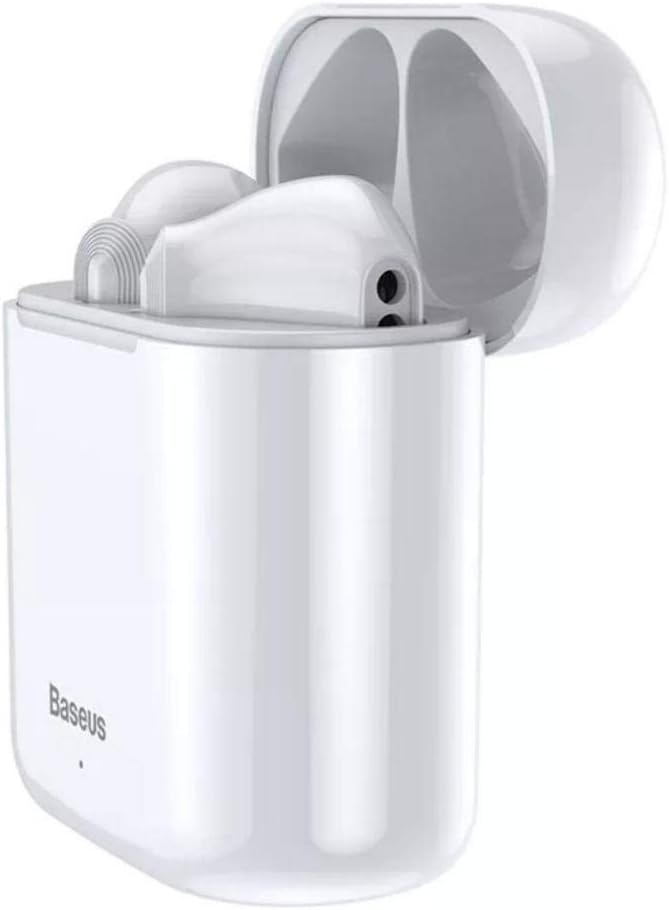
Figure 2.2: Earphones in Open Charging Case
The earphones are shown nestled within their open charging case, demonstrating how they are stored and charged. The case is also white, matching the earphones.

Figure 2.3: Closed Charging Case
This image displays the Baseus Encok W09 charging case in its closed state, showing its compact and portable design. The Baseus logo is visible on the front.
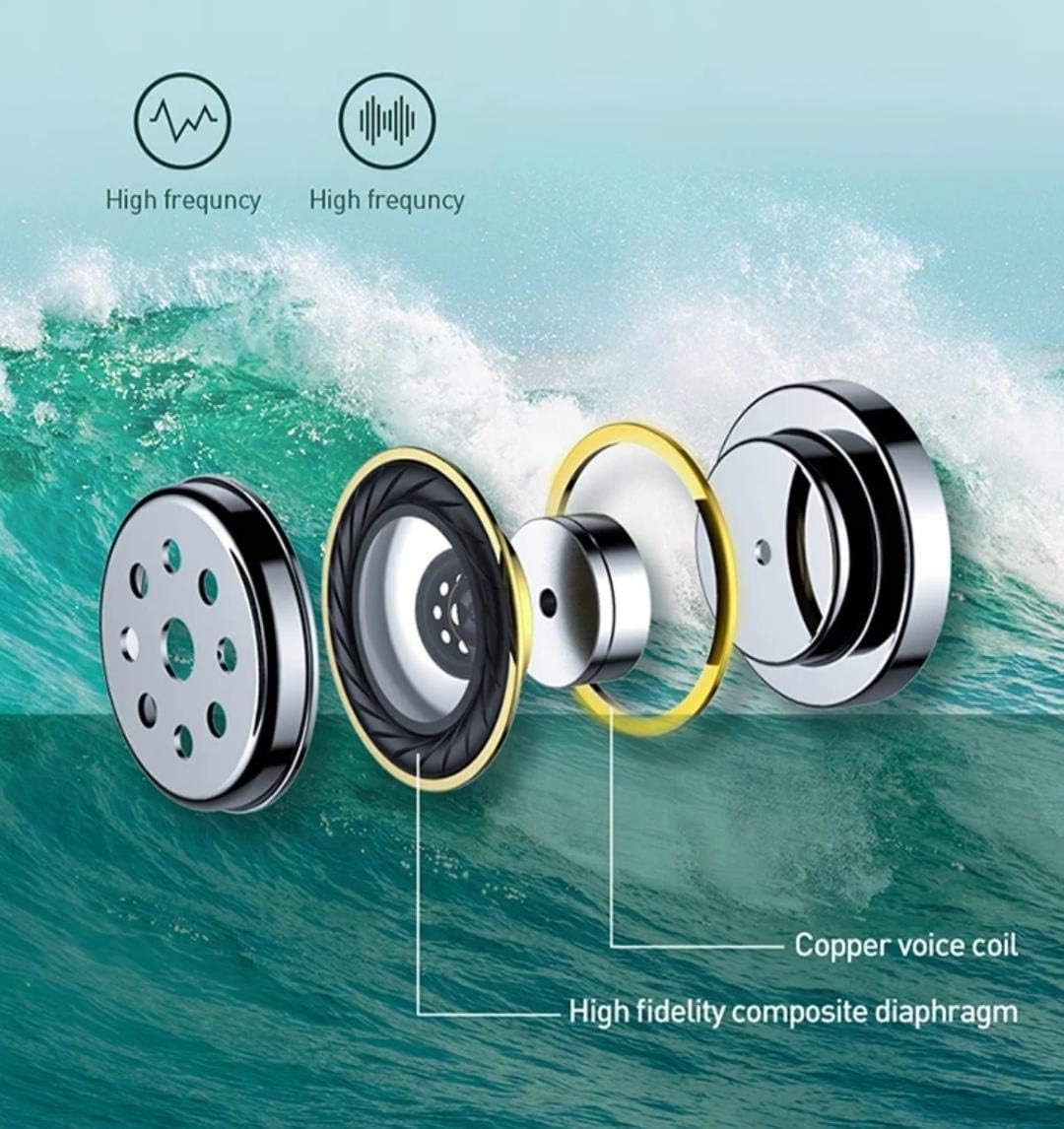
Figure 2.4: Internal Component Diagram
ഒരു പൊട്ടിത്തെറിച്ചു view diagram illustrating the internal components of the earphone, including the copper voice coil and high-fidelity composite diaphragm, which contribute to sound quality.
3. സജ്ജീകരണം
3.1 ഇയർഫോണുകളും കേസും ചാർജ് ചെയ്യുന്നു
Before first use, fully charge the earphones and the charging case. The charging case has a 450mAh battery capacity.
- Place both earphones into the charging case. Ensure they are correctly seated in their respective slots.
- അനുയോജ്യമായ ഒരു USB കേബിൾ ഉപയോഗിച്ച് (ഉൾപ്പെടുത്തിയിട്ടില്ല) ചാർജിംഗ് കേസ് ഒരു പവർ സ്രോതസ്സുമായി ബന്ധിപ്പിക്കുക.
- The indicator light on the charging case will show the charging status. Refer to the indicator light guide in the packaging for specific light behaviors.
- പൂർണ്ണമായി ചാർജ് ചെയ്തുകഴിഞ്ഞാൽ, ചാർജിംഗ് കേബിൾ വിച്ഛേദിക്കുക.
3.2 ബ്ലൂടൂത്ത് ജോടിയാക്കൽ
The Baseus Encok W09 earphones support automatic connection for easy pairing.
- ഇയർഫോണുകൾ ചാർജ് ചെയ്തിട്ടുണ്ടെന്ന് ഉറപ്പാക്കുക.
- ചാർജിംഗ് കേസ് തുറക്കുക. ഇയർഫോണുകൾ സ്വയമേവ ഓണാകുകയും ജോടിയാക്കൽ മോഡിലേക്ക് പ്രവേശിക്കുകയും ചെയ്യും.
- നിങ്ങളുടെ ഉപകരണത്തിൽ (സ്മാർട്ട്ഫോൺ, ടാബ്ലെറ്റ് മുതലായവ), ബ്ലൂടൂത്ത് പ്രവർത്തനക്ഷമമാക്കുക.
- ഇതിനായി തിരയുക available Bluetooth devices. Select "Baseus Encok W09" from the list.
- കണക്റ്റ് ചെയ്തുകഴിഞ്ഞാൽ, ഒരു സ്ഥിരീകരണ ടോൺ നിങ്ങൾ കേൾക്കും, ഇയർഫോണുകൾ ഉപയോഗത്തിന് തയ്യാറാകും.
- For subsequent uses, the earphones will automatically connect to the last paired device when removed from the case and Bluetooth is enabled on your device.
4. പ്രവർത്തന നിർദ്ദേശങ്ങൾ
4.1 പവർ ഓൺ/ഓഫ്
- പവർ ഓൺ: ചാർജിംഗ് കേസ് തുറക്കുക, ഇയർഫോണുകൾ യാന്ത്രികമായി ഓണാകും.
- പവർ ഓഫ്: ഇയർഫോണുകൾ ചാർജിംഗ് കെയ്സിലേക്ക് തിരികെ വയ്ക്കുക, ലിഡ് അടയ്ക്കുക. അവ യാന്ത്രികമായി ഓഫാകുകയും ചാർജ് ചെയ്യാൻ തുടങ്ങുകയും ചെയ്യും.
4.2 ടച്ച് നിയന്ത്രണങ്ങൾ
The Baseus Encok W09 earphones feature intuitive touch controls on each earbud.
- പ്ലേ/താൽക്കാലികമായി നിർത്തുക: ഇയർബഡുകളിൽ ഏതെങ്കിലുമൊന്നിൽ ഒറ്റ ടാപ്പ് ചെയ്യുക.
- അടുത്ത ട്രാക്ക്: വലതുവശത്തെ ഇയർബഡിൽ രണ്ടുതവണ ടാപ്പ് ചെയ്യുക.
- മുമ്പത്തെ ട്രാക്ക്: ഇടതുവശത്തെ ഇയർബഡിൽ രണ്ടുതവണ ടാപ്പ് ചെയ്യുക.
- ഉത്തരം/അവസാന കോൾ: ഇൻകമിംഗ് കോളിലോ സജീവ കോളിലോ ഇയർബഡിൽ ഒറ്റ ടാപ്പ് ചെയ്യുക.
- കോൾ നിരസിക്കുക: ഇൻകമിംഗ് കോൾ വരുമ്പോൾ ഇയർബഡുകളിൽ ഏതെങ്കിലുമൊന്ന് 2 സെക്കൻഡ് അമർത്തിപ്പിടിക്കുക.
- വോയ്സ് അസിസ്റ്റന്റിനെ സജീവമാക്കുക: ഇയർബഡുകളിൽ ഏതെങ്കിലുമൊന്നിൽ മൂന്ന് തവണ ടാപ്പ് ചെയ്യുക.
4.3 കോളുകൾ ചെയ്യലും സ്വീകരിക്കലും
ബിൽറ്റ്-ഇൻ മൈക്രോഫോൺ വ്യക്തമായ ഹാൻഡ്സ്-ഫ്രീ ആശയവിനിമയം അനുവദിക്കുന്നു.
- Ensure earphones are connected to your phone.
- ഇൻകമിംഗ് കോളിന് മറുപടി നൽകാൻ, ഒന്നുകിൽ ഇയർബഡിൽ ഒറ്റ ടാപ്പ് ചെയ്യുക.
- To end an active call, single tap either earbud.
- To reject an incoming call, press and hold either earbud for 2 seconds.
5. പരിപാലനം
ശരിയായ അറ്റകുറ്റപ്പണി നിങ്ങളുടെ ഇയർഫോണുകളുടെ ദീർഘായുസ്സും പ്രകടനവും ഉറപ്പാക്കുന്നു.
- വൃത്തിയാക്കൽ: ഇയർഫോണുകളും ചാർജിംഗ് കെയ്സും വൃത്തിയാക്കാൻ മൃദുവായതും ഉണങ്ങിയതും ലിന്റ് രഹിതവുമായ തുണി ഉപയോഗിക്കുക. അബ്രാസീവ് ക്ലീനറുകൾ, ആൽക്കഹോൾ, കെമിക്കൽ ലായകങ്ങൾ എന്നിവ ഉപയോഗിക്കരുത്.
- സംഭരണം: ഉപയോഗത്തിലില്ലാത്തപ്പോൾ, പൊടിയിൽ നിന്നും കേടുപാടുകളിൽ നിന്നും സംരക്ഷിക്കാൻ ഇയർഫോണുകൾ ചാർജിംഗ് കേസിൽ സൂക്ഷിക്കുക. നേരിട്ടുള്ള സൂര്യപ്രകാശവും കടുത്ത താപനിലയും ഏൽക്കാത്ത തണുത്തതും വരണ്ടതുമായ സ്ഥലത്ത് സൂക്ഷിക്കുക.
- ബാറ്ററി കെയർ: To preserve battery life, avoid fully discharging the earphones and charging case frequently. Charge them regularly, even if not in use for extended periods.
- ജല പ്രതിരോധം: These earphones are not waterproof. Avoid exposure to water, sweat, or high humidity.
6. പ്രശ്നപരിഹാരം
If you encounter issues with your Baseus Encok W09 earphones, try the following solutions:
- ഇയർഫോണുകൾ ജോടിയാക്കുന്നില്ല:
- രണ്ട് ഇയർഫോണുകളും ചാർജ് ചെയ്തിട്ടുണ്ടെന്ന് ഉറപ്പാക്കുക.
- നിങ്ങളുടെ ഉപകരണത്തിലെ ബ്ലൂടൂത്ത് ഓഫാക്കി വീണ്ടും ഓണാക്കുക.
- Forget/delete "Baseus Encok W09" from your device's Bluetooth list and try pairing again.
- ഇയർഫോണുകൾ കെയ്സിൽ തിരികെ വയ്ക്കുക, ലിഡ് അടയ്ക്കുക, കുറച്ച് നിമിഷങ്ങൾ കാത്തിരിക്കുക, തുടർന്ന് ജോടിയാക്കൽ മോഡിൽ വീണ്ടും പ്രവേശിക്കാൻ തുറക്കുക.
- ഒരു ഇയർബഡിൽ നിന്ന് ശബ്ദമില്ല:
- രണ്ട് ഇയർബഡുകളും ചാർജ്ജ് ചെയ്തിട്ടുണ്ടെന്ന് ഉറപ്പാക്കുക.
- Place both earbuds back in the charging case, close the lid, then take them out again.
- Try resetting the earphones (refer to the product packaging or manufacturer's webആവശ്യമെങ്കിൽ നിർദ്ദിഷ്ട റീസെറ്റ് നിർദ്ദേശങ്ങൾക്കായി സൈറ്റ്).
- ചാർജിംഗ് കേസ് ചാർജുചെയ്യുന്നില്ല:
- ചാർജിംഗ് കേബിളും പവർ അഡാപ്റ്ററും പരിശോധിക്കുക. മറ്റൊരു കേബിളോ അഡാപ്റ്ററോ പരീക്ഷിക്കുക.
- കേസിലെ ചാർജിംഗ് പോർട്ട് വൃത്തിയുള്ളതും അവശിഷ്ടങ്ങൾ ഇല്ലാത്തതുമാണെന്ന് ഉറപ്പാക്കുക.
- ടച്ച് നിയന്ത്രണങ്ങൾ പ്രതികരിക്കുന്നില്ല:
- Ensure the earphones are powered on and connected.
- Clean the touch sensitive area on the earbuds.
- Restart the earphones by placing them in the case and taking them out again.
7 സ്പെസിഫിക്കേഷനുകൾ
| ബ്രാൻഡ് | ബേസിയസ് |
| മോഡലിൻ്റെ പേര് | ബേസിയസ് എൻകോക്ക് W09 |
| നിർമ്മാതാവിൻ്റെ ഭാഗം നമ്പർ | TWS-W09 |
| നിറം | വെള്ള |
| കണക്റ്റിവിറ്റി ടെക്നോളജി | വയർലെസ് (ബ്ലൂടൂത്ത്) |
| ഹെഡ്ഫോണുകൾ ഫോം ഫാക്ടർ | ചെവിയിൽ |
| മൈക്രോഫോൺ ഉൾപ്പെടുത്തിയിട്ടുണ്ട് | അതെ |
| ശബ്ദ നിയന്ത്രണം | സജീവ നോയ്സ് റദ്ദാക്കൽ |
| ചാർജിംഗ് കേസ് ബാറ്ററി | 450mAh |
| അനുയോജ്യമായ ഉപകരണങ്ങൾ | All devices with Bluetooth capability |
| മെറ്റീരിയൽ | പ്ലാസ്റ്റിക് |
| ഉൾപ്പെടുത്തിയ ഘടകങ്ങൾ | ചെവി തലയണകൾ |
| ഉൽപ്പന്ന അളവുകൾ | 7.8 x 4.3 x 0.7 സെ.മീ |
| ഇനത്തിൻ്റെ ഭാരം | 20 ഗ്രാം |
8 സുരക്ഷാ വിവരങ്ങൾ
നിങ്ങളുടെ ഉപകരണത്തിന് പരിക്കേൽക്കുകയോ കേടുപാടുകൾ സംഭവിക്കുകയോ ചെയ്യാതിരിക്കാൻ ദയവായി ഈ സുരക്ഷാ മാർഗ്ഗനിർദ്ദേശങ്ങൾ വായിച്ച് പാലിക്കുക:
- ഉൽപ്പന്നം വേർപെടുത്തുകയോ നന്നാക്കുകയോ പരിഷ്കരിക്കുകയോ ചെയ്യരുത്. ഇത് തീ, വൈദ്യുതാഘാതം, അല്ലെങ്കിൽ ഉൽപ്പന്നത്തിന് പൂർണ്ണമായ കേടുപാടുകൾ എന്നിവയ്ക്ക് കാരണമായേക്കാം.
- Keep the product away from extreme temperatures (hot or cold), direct sunlight, and high humidity.
- ഇയർഫോണുകൾ താഴെയിടുകയോ ശക്തമായ ആഘാതങ്ങൾക്ക് വിധേയമാക്കുകയോ ചെയ്യുന്നത് ഒഴിവാക്കുക.
- Do not expose the earphones or charging case to water or other liquids.
- അംഗീകൃത ചാർജിംഗ് കേബിളുകളും അഡാപ്റ്ററുകളും മാത്രം ഉപയോഗിക്കുക.
- ഉച്ചത്തിലുള്ള ശബ്ദങ്ങൾ ദീർഘനേരം കേൾക്കുന്നത് കേൾവിക്ക് കേടുപാടുകൾ വരുത്തിയേക്കാം. സുരക്ഷിതമായ തലത്തിലേക്ക് ശബ്ദം ക്രമീകരിക്കുക.
- കുട്ടികൾക്കും വളർത്തുമൃഗങ്ങൾക്കും എത്താൻ പറ്റാത്ത വിധത്തിൽ സൂക്ഷിക്കുക. ചെറിയ ഭാഗങ്ങൾ ശ്വാസംമുട്ടലിന് കാരണമായേക്കാം.
9. വാറൻ്റിയും പിന്തുണയും
Baseus products are designed with quality and reliability in mind. For warranty information, technical support, or service inquiries, please refer to the warranty card included with your product or visit the official Baseus webവാറന്റി ക്ലെയിമുകൾക്കുള്ള വാങ്ങലിന്റെ തെളിവായി നിങ്ങളുടെ വാങ്ങൽ രസീത് സൂക്ഷിക്കുക.
For further assistance, you may contact Baseus customer support through their official channels.


