1. ആമുഖം
Thank you for choosing the Luby HI3 Robot Vacuum Cleaner. This manual provides essential information for the safe operation, effective use, and proper maintenance of your device. Please read this manual thoroughly before using the product and retain it for future reference.
2. സുരക്ഷാ നിർദ്ദേശങ്ങൾ
പരിക്കിന്റെയോ കേടുപാടുകളുടെയോ സാധ്യത കുറയ്ക്കുന്നതിന്, നിങ്ങളുടെ റോബോട്ട് വാക്വം സജ്ജീകരിക്കുമ്പോഴും ഉപയോഗിക്കുമ്പോഴും പരിപാലിക്കുമ്പോഴും എല്ലാ സുരക്ഷാ മുൻകരുതലുകളും വായിച്ച് പിന്തുടരുക.
- 8 വയസ്സും അതിനുമുകളിലും പ്രായമുള്ള കുട്ടികൾക്കും ശാരീരികമോ ഇന്ദ്രിയപരമോ മാനസികമോ ആയ കഴിവുകൾ കുറഞ്ഞവർക്കും അനുഭവപരിചയവും അറിവും ഇല്ലാത്തവർക്കും സുരക്ഷിതമായ രീതിയിൽ ഉപകരണം ഉപയോഗിക്കുന്നതുമായി ബന്ധപ്പെട്ട മേൽനോട്ടമോ നിർദ്ദേശമോ നൽകുകയും അപകടസാധ്യതകൾ മനസ്സിലാക്കുകയും ചെയ്തിട്ടുണ്ടെങ്കിൽ ഈ ഉപകരണം ഉപയോഗിക്കാൻ കഴിയും. .
- കുട്ടികൾ ഉപകരണം ഉപയോഗിച്ച് കളിക്കുന്നില്ലെന്ന് ഉറപ്പാക്കാൻ മേൽനോട്ടം വഹിക്കണം.
- മേൽനോട്ടമില്ലാതെ കുട്ടികൾ വൃത്തിയാക്കലും ഉപയോക്തൃ പരിപാലനവും നടത്തരുത്.
- നിർമ്മാതാവ് നൽകുന്ന യഥാർത്ഥ പവർ അഡാപ്റ്റർ മാത്രം ഉപയോഗിക്കുക.
- Do not operate the robot vacuum in areas with open flames or explosive materials.
- Avoid using the robot vacuum on wet surfaces or to pick up liquids.
- Ensure all cables, curtains, and small objects are cleared from the cleaning path to prevent entanglement.
- റോബോട്ട് വാക്വമിൽ ഇരിക്കുകയോ അതിൽ ഭാരമുള്ള വസ്തുക്കൾ വയ്ക്കുകയോ ചെയ്യരുത്.
3. പാക്കേജ് ഉള്ളടക്കം
പാക്കേജിൽ എല്ലാ ഘടകങ്ങളും ഉണ്ടെന്ന് ഉറപ്പാക്കുക:
- Luby HI3 Robot Vacuum Cleaner
- ചാർജിംഗ് ഡോക്ക്
- പവർ അഡാപ്റ്റർ
- സൈഡ് ബ്രഷുകൾ (2 ജോഡി)
- ഉയർന്ന കാര്യക്ഷമതയുള്ള ഫിൽട്ടർ (മുൻകൂട്ടി ഇൻസ്റ്റാൾ ചെയ്തത്)
- റിമോട്ട് കൺട്രോൾ
- ഉപയോക്തൃ മാനുവൽ
4. ഉൽപ്പന്നം കഴിഞ്ഞുview
Familiarize yourself with the main components of your Luby HI3 robot vacuum.

ചിത്രം 4.1: Luby HI3 Robot Vacuum Cleaner, showing the main unit, remote control, and mobile application interface.
4.1 പ്രധാന യൂണിറ്റ്
- മുകളിലെ കവർ: ആന്തരിക ഘടകങ്ങളെ സംരക്ഷിക്കുന്നു.
- പവർ/ക്ലീൻ ബട്ടൺ: Initiates or pauses cleaning, powers on/off, and connects to Wi-Fi.
- ഡസ്റ്റ്ബിൻ: Collects debris.
- സൈഡ് ബ്രഷുകൾ: Sweep debris into the vacuum's path.
- ഡ്രൈവിംഗ് വീലുകൾ: വ്യത്യസ്ത പ്രതലങ്ങളിലൂടെ ചലനം അനുവദിക്കുക.
- ചാർജിംഗ് കോൺടാക്റ്റുകൾ: ചാർജിംഗ് ഡോക്കുമായി ബന്ധിപ്പിക്കുക.
- സെൻസറുകൾ: Anti-drop and anti-collision sensors for navigation.
4.2 നിയന്ത്രണ രീതികൾ

ചിത്രം 4.2: കഴിഞ്ഞുview of control options including the Tuya App, remote controller, and the main power button on the robot.
- Tuya App: Offers remote control, mode changes, robot finding, scheduling, and integration with Google Home & Alexa.
- റിമോട്ട് കൺട്രോളർ: Allows scheduling, time setting, mode changes, and direct remote control.
- പവർ ബട്ടൺ: Hold to power On/Off. Press to Start/Stop cleaning. Double tap to initiate Wi-Fi connection.
5. സജ്ജീകരണം
5.1 ചാർജിംഗ് ഡോക്ക് പ്ലേസ്മെന്റ്
Place the charging dock against a wall in an open, uncluttered area. Ensure there is at least 0.5 meters (1.6 feet) of clear space on both sides of the dock and 1.5 meters (4.9 feet) in front of it. Plug the power adapter into the charging dock and then into a wall outlet. Ensure the power indicator on the dock illuminates.
5.2 പ്രാരംഭ ചാർജ്
Before first use, fully charge the robot vacuum. Place the robot onto the charging dock, ensuring the charging contacts align. The indicator light on the robot will show charging status. A full charge typically takes 4-5 hours. The robot will automatically return to the charging dock when its battery level is low (below 20%).
5.3 App Connection (Tuya App)
- Download the 'Tuya Smart' app from your smartphone's app store.
- നിങ്ങളുടെ Tuya Smart അക്കൗണ്ടിൽ രജിസ്റ്റർ ചെയ്യുക അല്ലെങ്കിൽ ലോഗിൻ ചെയ്യുക.
- Ensure your robot vacuum is powered on and near your Wi-Fi router.
- Double tap the power button on the robot to enter Wi-Fi pairing mode (indicator light will flash).
- In the app, tap '+' to add a device, then select 'Small Home Appliance' > 'Robot Vacuum'.
- Follow the on-screen instructions to connect the robot to your home Wi-Fi network (2.4GHz only).
6. പ്രവർത്തന നിർദ്ദേശങ്ങൾ
6.1 ആരംഭിക്കലും നിർത്തലും വൃത്തിയാക്കൽ
- ആരംഭിക്കാൻ: Press the power button on the robot or the 'Clean' button on the remote/app.
- താൽക്കാലികമായി നിർത്താൻ: Press the power button on the robot or the 'Pause' button on the remote/app during cleaning.
- നിർത്താൻ: Press the power button on the robot or the 'Stop' button on the remote/app.
6.2 ക്ലീനിംഗ് മോഡുകൾ
The Luby HI3 offers various cleaning modes for different needs:

ചിത്രം 6.1: Visual representation of the robot vacuum performing Spot Cleaning, Edge Cleaning, and L-Shape Cleaning patterns.
- ഓട്ടോ ക്ലീനിംഗ്: റോബോട്ട് ബുദ്ധിപൂർവ്വം നാവിഗേറ്റ് ചെയ്യുകയും മുഴുവൻ തറയും വൃത്തിയാക്കുകയും ചെയ്യുന്നു.
- സ്പോട്ട് ക്ലീനിംഗ്: Focuses on a specific dirty area, cleaning in a spiral pattern. Ideal for concentrated spills.
- എഡ്ജ് ക്ലീനിംഗ്: സമഗ്രമായ കവറേജ് ഉറപ്പാക്കാൻ ചുവരുകളിലും ഫർണിച്ചറിന്റെ അരികുകളിലും വൃത്തിയാക്കുന്നു.
- L-Shape Cleaning: A specific pattern for cleaning rooms, often used in conjunction with auto cleaning.
6.3 Floor Type Adaptability
The Luby HI3 is designed for versatile cleaning across different floor types, including hard floors and carpets.

ചിത്രം 6.2: The robot vacuum seamlessly moves from a hard floor onto a carpet, illustrating its multi-surface cleaning capability.
Its design allows it to climb over small obstacles, such as carpet edges, up to 20 degrees.
6.4 Slim Design for Under-Furniture Cleaning
With a height of approximately 2.9 inches, the Luby HI3 can easily clean under most furniture, including sofas and beds, reaching hidden areas.
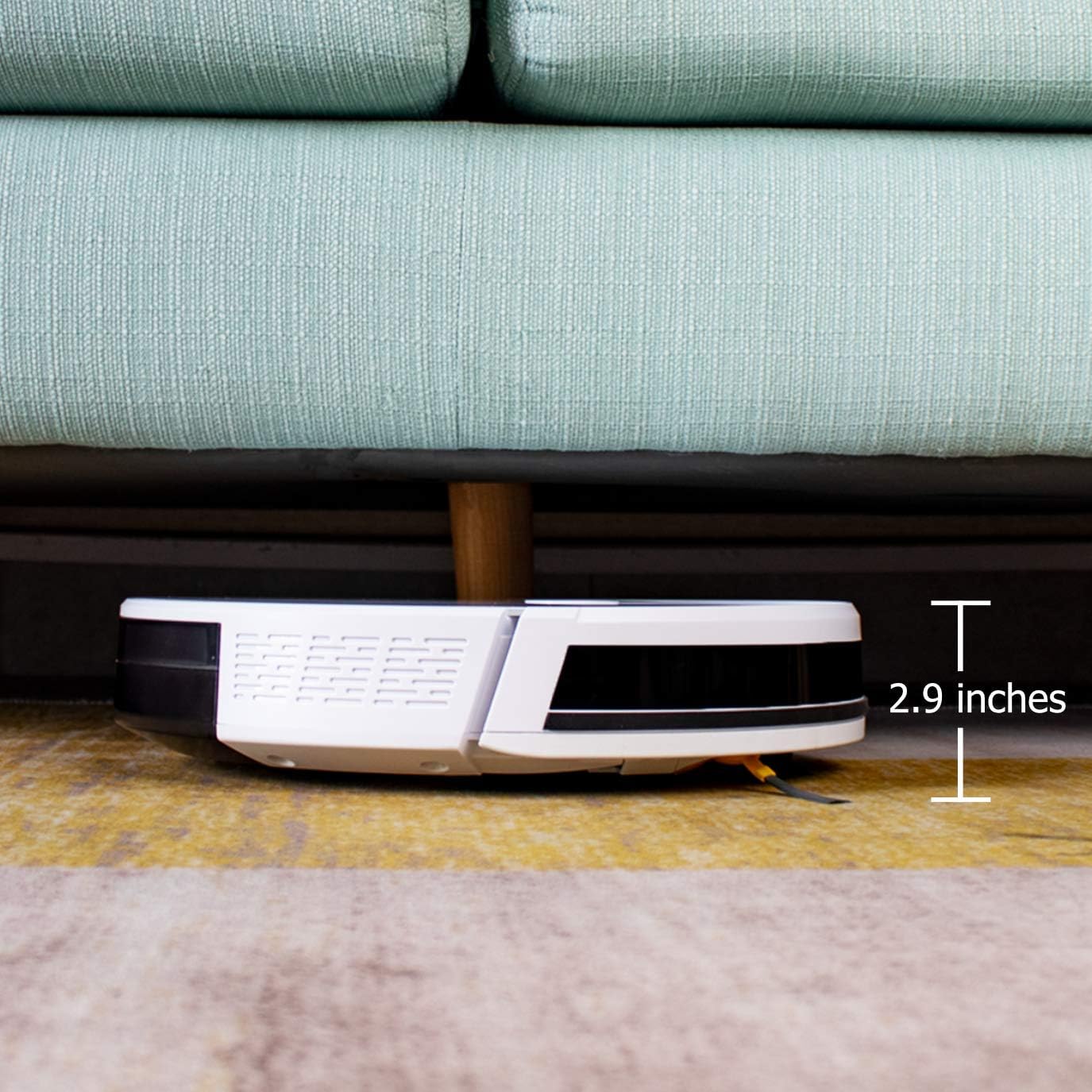
ചിത്രം 6.3: The robot vacuum positioned under a sofa, demonstrating its ability to clean low-clearance areas due to its 2.9-inch height.
6.5 Powerful Suction
The robot vacuum features strong suction power to effectively pick up dirt, dust, crumbs, and pet hair from various surfaces.

ചിത്രം 6.4: The robot vacuum actively collecting various debris from a floor, illustrating its powerful suction capability.
6.6 നിശബ്ദ പ്രവർത്തനം
The Luby HI3 operates at a low noise level, typically under 65 dB, allowing for cleaning without significant disturbance.

ചിത്രം 6.5: The robot vacuum operating in a room while a child sleeps nearby, highlighting its quiet performance (under 65 dB).
7. പരിപാലനം
പതിവ് അറ്റകുറ്റപ്പണികൾ ഒപ്റ്റിമൽ പ്രകടനം ഉറപ്പാക്കുകയും നിങ്ങളുടെ റോബോട്ട് വാക്വമിന്റെ ആയുസ്സ് വർദ്ധിപ്പിക്കുകയും ചെയ്യുന്നു.
7.1 ഡസ്റ്റ്ബിൻ ശൂന്യമാക്കൽ
Empty the dustbin after each cleaning cycle or when the 'Dustbin Full' indicator appears. Open the top cover, remove the dustbin, open its lid, and discard the contents. Rinse the dustbin with water if necessary, ensuring it is completely dry before reinstallation.
7.2 ഫിൽട്ടറുകൾ വൃത്തിയാക്കുന്നു
The robot vacuum uses a multi-layer filtration system. Tap the primary filter to remove loose dirt. The high-efficiency filter should be cleaned with a brush tool. Replace filters every 3-6 months, depending on usage.
7.3 സൈഡ് ബ്രഷുകൾ വൃത്തിയാക്കൽ
Periodically check the side brushes for tangled hair or debris. Gently pull them off, remove any obstructions, and reattach them. Replace worn or damaged brushes.
7.4 സെൻസറുകൾ വൃത്തിയാക്കൽ
Wipe the anti-drop sensors (located on the bottom) and anti-collision sensors (on the bumper) with a clean, dry cloth. Keep them free of dust and debris to ensure proper navigation.
8. പ്രശ്നപരിഹാരം
If you encounter issues with your Luby HI3, refer to the following common problems and solutions:
| പ്രശ്നം | സാധ്യമായ കാരണം | പരിഹാരം |
|---|---|---|
| റോബോട്ട് ഓണാക്കുന്നില്ല. | ബാറ്ററി കുറവാണ്; പവർ സ്വിച്ച് ഓഫ്. | Charge the robot; Ensure power switch is on. |
| റോബോട്ട് ചാർജ് ചെയ്യുന്നില്ല. | ചാർജിംഗ് കോൺടാക്റ്റുകൾ വൃത്തികേടാണ്; ചാർജിംഗ് ഡോക്കിൽ പവർ ഇല്ല. | റോബോട്ടിലെയും ഡോക്കിലെയും ചാർജിംഗ് കോൺടാക്റ്റുകൾ വൃത്തിയാക്കുക; ഡോക്ക് പ്ലഗിൻ ചെയ്തിട്ടുണ്ടെന്ന് ഉറപ്പാക്കുക. |
| റോബോട്ട് ഇടയ്ക്കിടെ കുടുങ്ങിപ്പോകാറുണ്ട്. | Obstacles in path; Sensors dirty. | Clear cables, rugs, and small objects; Clean sensors. |
| മോശം ക്ലീനിംഗ് പ്രകടനം. | മാലിന്യക്കൂമ്പാരം നിറഞ്ഞു; ബ്രഷുകൾ കുരുങ്ങി; ഫിൽറ്റർ അടഞ്ഞുപോയി. | Empty dustbin; Clean/replace brushes; Clean/replace filter. |
| Wi-Fi-ലേക്ക് കണക്റ്റ് ചെയ്യാൻ കഴിയില്ല. | തെറ്റായ വൈഫൈ പാസ്വേഡ്; റൂട്ടർ വളരെ അകലെയാണ്; 5GHz നെറ്റ്വർക്ക്. | പാസ്വേഡ് പരിശോധിക്കുക; റോബോട്ടിനെ റൂട്ടറിന് അടുത്തേക്ക് നീക്കുക; 2.4GHz നെറ്റ്വർക്ക് ഉപയോഗിക്കുന്നുണ്ടെന്ന് ഉറപ്പാക്കുക. |
9 സ്പെസിഫിക്കേഷനുകൾ
Detailed technical specifications for the Luby HI3 Robot Vacuum Cleaner:
| ഫീച്ചർ | സ്പെസിഫിക്കേഷൻ |
|---|---|
| ബ്രാൻഡ് | Luby |
| മോഡൽ നമ്പർ | HI3 |
| നിറം | എല്ലാം വെള്ള |
| പാക്കേജ് അളവുകൾ | 47.75 x 41 x 14 സെ.മീ |
| ഇനത്തിൻ്റെ ഭാരം | 2.7 കിലോഗ്രാം |
| ശബ്ദ നില | 75 Decibels (typically under 65 dB during operation) |
| പ്രത്യേക ഫീച്ചർ | വയർലെസ് |
| ഉപരിതല ശുപാർശ | കാർപെറ്റ്, ഹാർഡ് ഫ്ലോറുകൾ |
| കൺട്രോളർ തരം | ആപ്പ് കൺട്രോൾ, റിമോട്ട് കൺട്രോൾ |
| ഉൾപ്പെടുത്തിയ ഘടകങ്ങൾ | Side Brush, Filter |
| ഫിൽട്ടർ തരം | Fabric and Foam |
| ബാറ്ററി കോമ്പോസിഷൻ | Lithium-ion (2500 mAh capacity) |
10. വാറൻ്റിയും പിന്തുണയും
For warranty information and customer support, please refer to the documentation included with your purchase or contact the retailer/manufacturer directly. Keep your proof of purchase for warranty claims.


