1. ആമുഖം
The Amewi Air Genius is a versatile remote-controlled vehicle designed for multiple environments. It functions as a compact drone, a glider, and a hovercraft, offering a unique 'All in 1' experience. This manual provides essential information for the safe and effective operation, setup, and maintenance of your Air Genius.
Key features include a 6-axis stabilizer for stable flight, 360° rocker mode for acrobatic maneuvers, switchable LED lighting, three adjustable speed levels, and a 2.4GHz interference-free remote control with an entry-level orientation mode.
2 സുരക്ഷാ വിവരങ്ങൾ
- മുതിർന്നവരുടെ മേൽനോട്ടം: This product is recommended for users aged 14 and above. Younger users should always be supervised by an adult.
- നിർദ്ദേശങ്ങൾ വായിക്കുക: Always read the entire instruction manual before operating the device.
- ബാറ്ററി സുരക്ഷ: Use only the specified charging cable and battery. Do not overcharge or short-circuit batteries. Do not expose batteries to extreme temperatures or direct sunlight.
- ഫ്ലൈറ്റ് പരിസ്ഥിതി: Operate the drone in open, clear areas, away from people, animals, buildings, and power lines. Avoid flying in strong winds or adverse weather conditions.
- പ്രൊപ്പല്ലർ സുരക്ഷ: Keep fingers, hair, and loose clothing away from rotating propellers. Always turn off the device before handling or performing maintenance.
- വാട്ടർ എക്സ്പോഷർ: The drone is not waterproof. Avoid contact with water or moisture, especially when operating in hovercraft mode on water surfaces.
- ദൃശ്യരേഖ: Always maintain visual line of sight with the drone during operation.
3. പാക്കേജ് ഉള്ളടക്കം
Carefully unpack all items and ensure all components are present. Refer to the image below for a visual representation of the package contents.

ചിത്രം: All components included in the Amewi Air Genius package. This includes the main drone unit, the 2.4GHz remote control, a USB charging cable, the hovercraft base, and two glider wings.
- Amewi Air Genius Drone Unit
- 2.4GHz റിമോട്ട് കൺട്രോൾ
- Rechargeable Lithium Polymer Battery (for drone)
- യുഎസ്ബി ചാർജിംഗ് കേബിൾ
- Hovercraft Base
- Glider Wings (2 pieces)
- Spare Propellers (not explicitly listed but typically included)
- നിർദ്ദേശ മാനുവൽ (ഈ പ്രമാണം)
4. ഉൽപ്പന്നം കഴിഞ്ഞുview
The Amewi Air Genius offers three distinct modes of operation:
4.1. Drone Mode
In drone mode, the Air Genius operates as a compact quadcopter, ideal for indoor and calm outdoor flight. It features propeller guards for added safety.

ചിത്രം: The Amewi Air Genius main unit configured for drone flight, showcasing its four rotors and protective guards.
4.2. Glider Mode
Attach the glider wings to transform the drone into a fixed-wing glider. This mode allows for different flight dynamics and extended gliding capabilities.

ചിത്രം: The Amewi Air Genius drone unit mounted onto the white glider wings, ready for gliding operation.
4.3. Hovercraft Mode
By attaching the drone to the ground base, the Air Genius converts into an air cushion vehicle, capable of moving across smooth surfaces like floors or calm water.
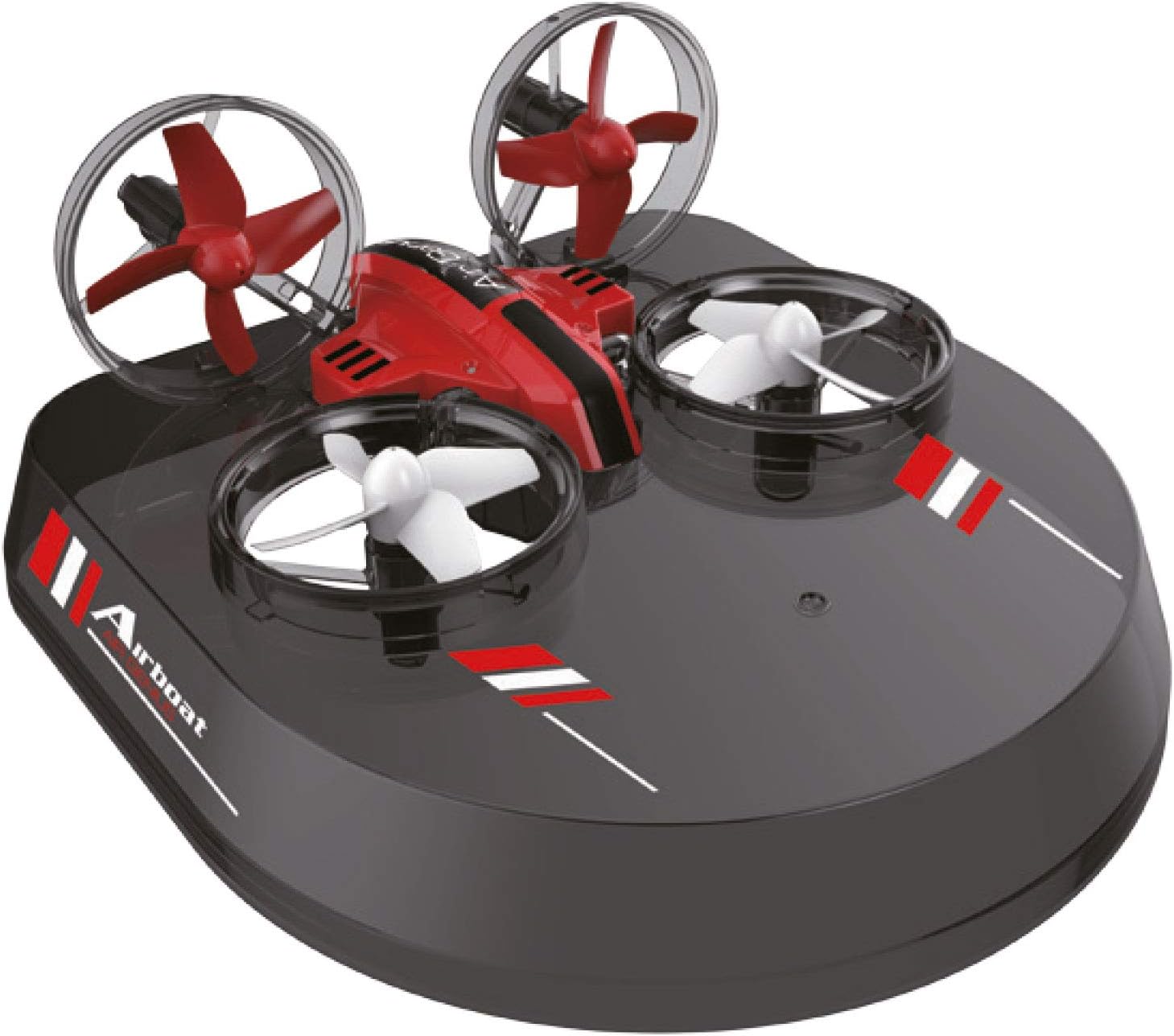
ചിത്രം: The Amewi Air Genius drone unit integrated with the black hovercraft base, demonstrating its air cushion vehicle configuration.
5. സജ്ജീകരണം
5.1. ഡ്രോൺ ബാറ്ററി ചാർജ് ചെയ്യുന്നു
- Connect the USB charging cable to a USB power source (e.g., computer USB port, USB wall adapter).
- Connect the other end of the USB charging cable to the drone's battery port.
- The indicator light on the USB charger will show the charging status (e.g., red for charging, off for fully charged).
- Charging typically takes approximately 30-45 minutes for the 300 mAh battery. Do not leave unattended during charging.
5.2. റിമോട്ട് കൺട്രോൾ ബാറ്ററികൾ ഇൻസ്റ്റാൾ ചെയ്യുന്നു
The remote control requires 3x AAA batteries (not included). Open the battery compartment on the back of the remote control, insert the batteries according to the polarity markings, and close the compartment.
5.3. Attaching Modules
The drone unit can be easily attached to the glider wings or the hovercraft base. Ensure the drone is securely clipped into place on the respective module before operation.
5.4. റിമോട്ട് കൺട്രോൾ ബൈൻഡിംഗ്
- Ensure the drone battery is charged and installed, and the remote control has fresh batteries.
- ഡ്രോൺ പരന്നതും ലെവൽ ഉപരിതലത്തിൽ വയ്ക്കുക.
- Turn on the drone by pressing its power button. The drone's LED lights will flash.
- വിദൂര നിയന്ത്രണം ഓണാക്കുക.
- Push the left joystick (throttle) all the way up, then pull it all the way down. The drone's LED lights will stop flashing and become solid, indicating successful binding.
6. പ്രവർത്തിക്കുന്നു
6.1. Basic Controls (Drone Mode)
- ത്രോട്ടിൽ (ഇടത് ജോയ്സ്റ്റിക്ക് മുകളിലേക്കും താഴേക്കും): ഉയരം നിയന്ത്രിക്കുന്നു.
- യാവ് (ഇടത് ജോയ്സ്റ്റിക്ക് ഇടത്/വലത്): ഡ്രോൺ ഇടത്തോട്ടോ വലത്തോട്ടോ തിരിക്കുന്നു.
- മുന്നോട്ട്/പിന്നോട്ട് (വലത് ജോയ്സ്റ്റിക്ക് മുകളിലേക്ക്/താഴേക്ക്): ഡ്രോൺ മുന്നോട്ടോ പിന്നോട്ടോ നീക്കുന്നു.
- ഇടത്/വലത് വശങ്ങളിലേക്ക് പറക്കൽ (വലത് ജോയ്സ്റ്റിക്ക് ഇടത്/വലത്): Moves the drone sideways.
- One-Key Take-off/Landing: Press the designated button on the remote for automatic take-off or landing.
6.2. സ്പീഡ് അഡ്ജസ്റ്റ്മെന്റ്
The Air Genius features three speed levels (low, medium, high). Press the speed button on the remote control to cycle through the speeds. Start with low speed for beginners.
6.3. 360° Rocker Mode (Flips)
To perform a 360° flip, press the 360° flip button (usually on the right shoulder of the remote), then quickly push the right joystick in the desired flip direction (forward, backward, left, or right).
6.4. Headless Mode (Orientation Mode)
Press the headless mode button to activate. In this mode, the drone's orientation is relative to the remote control, making it easier for beginners to control without worrying about the drone's front or back. Press again to exit.
6.5. Operating in Glider Mode
Once the drone is attached to the glider wings, operate it similarly to drone mode, but focus on maintaining momentum for gliding. Launch by gently throwing it forward while applying throttle.
6.6. Operating in Hovercraft Mode
With the drone attached to the hovercraft base, place it on a smooth, flat surface (e.g., floor, calm water). Use the joysticks to control forward, backward, and turning movements. The propellers generate an air cushion allowing it to glide.
7. പരിപാലനം
- വൃത്തിയാക്കൽ: Use a soft, dry cloth to clean the drone and remote control. Avoid using water or solvents.
- പ്രൊപ്പല്ലർ പരിശോധന: Regularly check propellers for damage (bends, cracks). Replace any damaged propellers immediately to ensure stable flight.
- മോട്ടോർ കെയർ: Keep motors free from dust, hair, and debris. Accumulated debris can cause motors to overheat or fail.
- ബാറ്ററി സംഭരണം: If storing the drone for an extended period, charge the battery to approximately 50% and store it in a cool, dry place. Remove batteries from the remote control if not in use for a long time.
- Module Inspection: Ensure the glider wings and hovercraft base are free from damage and securely attach to the drone unit.
8. പ്രശ്നപരിഹാരം
- ഡ്രോൺ പ്രതികരിക്കുന്നില്ല: Ensure both the drone and remote control are powered on and successfully bound. Check remote control batteries.
- Drone not taking off/unstable flight: Ensure the drone is placed on a flat, level surface before take-off. Check for damaged propellers. Calibrate the gyroscope if necessary (refer to remote control instructions for specific calibration steps).
- കുറഞ്ഞ ഫ്ലൈറ്റ് സമയം: Ensure the drone battery is fully charged. Battery performance may degrade over time.
- LEDs flashing but no response: Re-bind the drone and remote control.
- Motors not spinning: Check for debris obstructing the propellers or motors. Ensure the battery is connected and charged.
9 സ്പെസിഫിക്കേഷനുകൾ
| ഫീച്ചർ | വിശദാംശങ്ങൾ |
|---|---|
| ബ്രാൻഡ് | അമേവി |
| മോഡലിൻ്റെ പേര് | എയർ ജീനിയസ് |
| മോഡൽ നമ്പർ | 25309 |
| ഉൽപ്പന്ന അളവുകൾ | 15.55 x 10.24 x 2.95 ഇഞ്ച് |
| ഇനത്തിൻ്റെ ഭാരം | 24 ഗ്രാം (0.847 ഔൺസ്) |
| മെറ്റീരിയൽ | പ്ലാസ്റ്റിക് |
| നിറം | ചുവപ്പ് |
| ബാറ്ററി ശേഷി | 300 mAh |
| ബാറ്ററി സെൽ കോമ്പോസിഷൻ | ലിഥിയം പോളിമർ |
| റീചാർജ് ചെയ്യാവുന്ന ബാറ്ററി ഉൾപ്പെടുത്തിയിട്ടുണ്ട് | Yes (for drone) |
| റിമോട്ട് കൺട്രോൾ ഉൾപ്പെടുത്തിയിട്ടുണ്ട് | അതെ |
| കണക്റ്റിവിറ്റി ടെക്നോളജി | 2.4GHz റേഡിയോ |
| നിയന്ത്രണ തരം | റിമോട്ട് കൺട്രോൾ |
| പ്രത്യേക സവിശേഷതകൾ | 360° Rocker Mode, Switchable LED Lighting, Three Speed Levels, 2.4GHz Interference-free Remote Control |
| വീഡിയോ ക്യാപ്ചർ റെസല്യൂഷൻ | 720p (if camera module is used) |
| പ്രവർത്തന താപനില | 10 Degrees Celsius (minimum recommended) |
| പ്രായപരിധി (വിവരണം) | Kid (recommended 14+) |
10. വാറൻ്റിയും പിന്തുണയും
For warranty information and customer support, please refer to the documentation provided with your purchase or contact the retailer/manufacturer directly. Keep your proof of purchase for any warranty claims.


