1. ആമുഖം
വാങ്ങിയതിന് നന്ദി.asing the Power Dynamics PPA50 Public Address Ampലൈഫയർ. ഈ ബഹുമുഖ amplifier is designed for a wide range of small to medium-sized installations, offering ease of use, excellent performance, and reliability. It features multiple input options, including microphone and line inputs, an integrated MP3 player with USB/SD card slots, and Bluetooth connectivity for wireless audio streaming. Please read this manual thoroughly before operating the unit to ensure proper use and to prevent damage.
2. സുരക്ഷാ നിർദ്ദേശങ്ങൾ
To reduce the risk of electric shock, do not remove the cover. No user-serviceable parts inside. Refer servicing to qualified service personnel. Read these instructions carefully before use and retain them for future reference.
- ഊർജ്ജ സ്രോതസ്സ്: Connect the unit only to a grounded mains outlet with the correct voltage (100-240V AC, 50/60Hz) or a 12V DC source as specified.
- ജലവും ഈർപ്പവും: യൂണിറ്റ് മഴയിലോ ഈർപ്പത്തിലോ തുറന്നുകാട്ടരുത്. പാത്രങ്ങൾ പോലുള്ള ദ്രാവകങ്ങൾ നിറച്ച വസ്തുക്കൾ യൂണിറ്റിൽ വയ്ക്കരുത്.
- വെൻ്റിലേഷൻ: ആവശ്യത്തിന് വായുസഞ്ചാരം ഉറപ്പാക്കുക. വായുസഞ്ചാര ദ്വാരങ്ങൾ തടയരുത്.
- ചൂട്: റേഡിയേറ്ററുകൾ, ഹീറ്റ് രജിസ്റ്ററുകൾ, സ്റ്റൗകൾ അല്ലെങ്കിൽ മറ്റ് ഉപകരണങ്ങൾ (ഉൾപ്പെടെ) പോലുള്ള താപ സ്രോതസ്സുകൾക്ക് സമീപം യൂണിറ്റ് സ്ഥാപിക്കരുത്. ampലൈഫയറുകൾ) ചൂട് ഉത്പാദിപ്പിക്കുന്നത്.
- വൃത്തിയാക്കൽ: ഉണങ്ങിയ തുണി ഉപയോഗിച്ച് മാത്രം വൃത്തിയാക്കുക.
- സേവനം: യൂണിറ്റ് സ്വയം സർവീസ് ചെയ്യാൻ ശ്രമിക്കരുത്. എല്ലാ സർവീസിംഗും യോഗ്യതയുള്ള സർവീസ് ഉദ്യോഗസ്ഥരെ ഏൽപ്പിക്കുക.
- സ്പീക്കർ കണക്ഷനുകൾ: Ensure correct impedance matching for speakers (8 ohms, 70V, or 100V) to prevent damage to the ampജീവൻ.
3. പാക്കേജ് ഉള്ളടക്കം
പാക്കേജ് തുറക്കുമ്പോൾ എല്ലാ ഇനങ്ങളും നിലവിലുണ്ടെന്നും നല്ല നിലയിലാണെന്നും ഉറപ്പാക്കുക:
- Power Dynamics PPA50 Ampജീവപര്യന്തം
- ഇൻഫ്രാറെഡ് വിദൂര നിയന്ത്രണം
- പവർ കേബിൾ
- ഉപയോക്തൃ മാനുവൽ (ഈ പ്രമാണം)
4. ഉൽപ്പന്നം കഴിഞ്ഞുview
4.1 ഫ്രണ്ട് പാനൽ

The front panel provides access to all primary controls and indicators for the amplifier's operation.
- MIC 1 ഇൻപുട്ട്: 6.3mm jack for microphone connection.
- MIC 1/2 Volume: Rotary controls for adjusting the volume of microphone inputs.
- LINE 1/2 Volume: Rotary controls for adjusting the volume of line inputs.
- MP3 വോളിയം: Rotary control for adjusting the volume of the integrated MP3 player/Bluetooth.
- ബാസ്/ട്രെബിൾ നിയന്ത്രണങ്ങൾ: Tone controls for adjusting low and high frequencies.
- മാസ്റ്റർ വോളിയം: Main volume control for overall output.
- MP3 Player Module: Features USB/SD card slots, LCD display, and control buttons (MODE, Play/Pause, Skip).
- സൂചകങ്ങൾ: Power ON, PROT (Protection), CLIP, and output level indicators (0, 10, 20).
- വൈദ്യുതി സ്വിച്ച്: ഇതിനായുള്ള ഓൺ/ഓഫ് ബട്ടൺ ampജീവൻ.
4.2 പിൻ പാനൽ
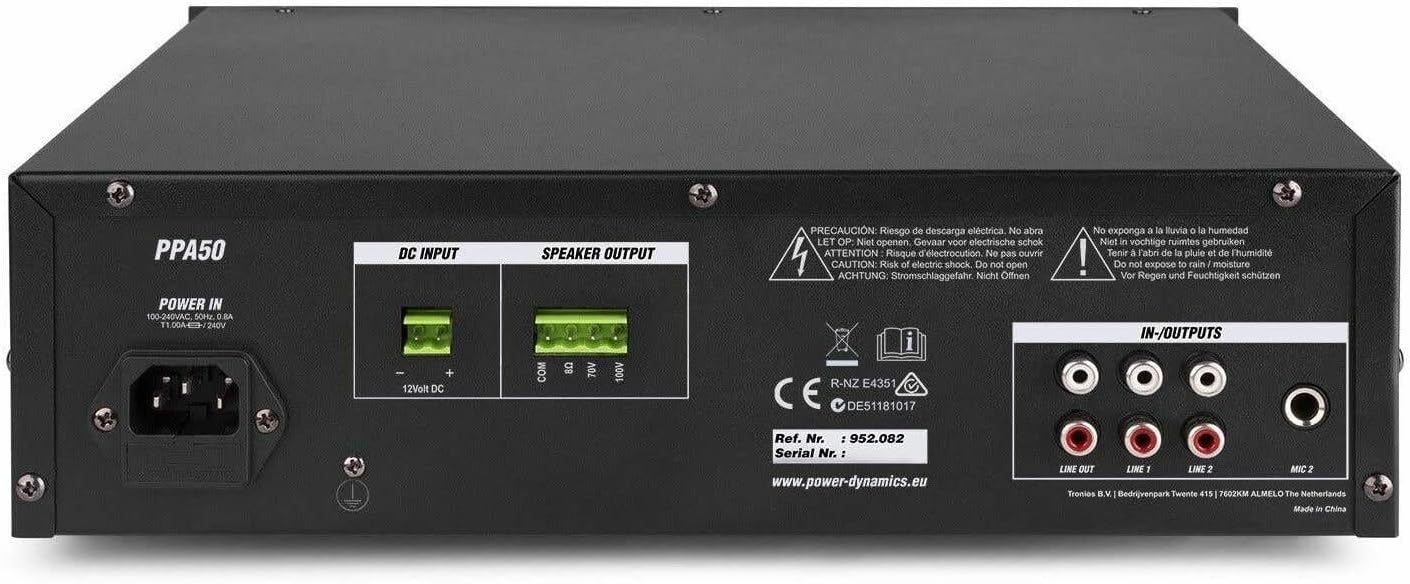
The rear panel houses all necessary connections for power, speakers, and external audio sources.
- പവർ ഇൻ: AC mains input (220-240V) and 12V DC input for flexible operation.
- സ്പീക്കർ ഔട്ട്പുട്ട്: Screw terminals for connecting speakers (COM, 8Ω, 70V, 100V).
- IN-OUTPUTS: RCA stereo line inputs (LINE 1, LINE 2) and a stereo RCA line output (LINE OUT).
- MIC 2 ഇൻപുട്ട്: RCA input for a second microphone.
4.3 വിദൂര നിയന്ത്രണം

The included infrared remote control allows for convenient operation of the MP3 player and other functions from a distance.
- പ്ലേ/താൽക്കാലികമായി നിർത്തുക: നിലവിലെ ട്രാക്ക് പ്ലേ ചെയ്യുക അല്ലെങ്കിൽ താൽക്കാലികമായി നിർത്തുക.
- CH-/CH+: Navigate through channels or folders.
- VOL-/VOL+: Adjust volume of the MP3 player.
- EQ: ഇക്വലൈസർ പ്രീസെറ്റുകളിലൂടെ സൈക്കിൾ ചെയ്യുക.
- മുൻകൂർ/അടുത്തത്: Skip to previous or next track.
- നമ്പർ പാഡ് (0-9): Direct track selection.
- PICK SONG: ഒരു ഗാനം തിരഞ്ഞെടുക്കുക.
- RPT: ആവർത്തിക്കുന്ന മോഡ്.
- വഴികൾ: Switch between USB, SD, and Bluetooth modes.
5. സജ്ജീകരണം
5.1 സ്പീക്കറുകൾ ബന്ധിപ്പിക്കുന്നു
The PPA50 amplifier supports 8 ohm, 70V, and 100V speaker systems. Ensure your speakers match the amplifier's output impedance.
- For 8 Ohm Speakers: Connect the speaker's positive (+) terminal to the 8Ω ടെർമിനൽ amplifier and the speaker's negative (-) terminal to the COM അതിതീവ്രമായ.
- For 70V/100V Line Speakers: Connect the speaker's positive (+) terminal to the 70V or 100V terminal (depending on your speaker type) and the speaker's negative (-) terminal to the COM terminal. Ensure the total wattage of all connected 70V/100V speakers does not exceed the amplifier's output power (50W).
5.2 മൈക്രോഫോണുകൾ ബന്ധിപ്പിക്കുന്നു
ദി amplifier has two microphone inputs.
- ഇതിലേക്ക് ഒരു മൈക്രോഫോൺ ബന്ധിപ്പിക്കുക MIC 1 6.3mm jack on the front panel.
- Connect a second microphone to the MIC 2 RCA input on the rear panel.
5.3 Connecting Line Inputs
Connect external audio sources such as CD players, mixers, or other audio devices to the RCA ലൈൻ 1 or ലൈൻ 2 inputs on the rear panel.
5.4 പവർ കണക്ഷൻ
The PPA50 can be powered by AC mains or a 12V DC source.
- എസി പവർ: വിതരണം ചെയ്ത പവർ കേബിളുമായി ബന്ധിപ്പിക്കുക പവർ ഇൻ socket on the rear panel and then to a suitable mains outlet.
- 12V ഡിസി പവർ: For flexible operation, connect a 12V DC power source (e.g., car battery) to the 12V DC ഇൻപുട്ട് terminals on the rear panel, ensuring correct polarity.
6. പ്രവർത്തന നിർദ്ദേശങ്ങൾ
6.1 പവർ ഓൺ/ഓഫ്
അമർത്തുക പവർ തിരിക്കാൻ മുൻ പാനൽ ഓണാക്കുക amplifier on or off. The 'ON' indicator will illuminate when the unit is powered.
6.2 മാസ്റ്റർ വോളിയം നിയന്ത്രണം
Adjust the overall output volume using the മാസ്റ്റർ വോളിയം knob on the front panel. Start with a low volume and gradually increase it to a comfortable listening level.
6.3 മൈക്രോഫോൺ ഉപയോഗം
After connecting microphones, adjust their individual volume levels using the MIC 1 ഒപ്പം MIC 2 volume knobs on the front panel.
6.4 Line Input Usage
Select the desired line input (LINE 1 or LINE 2) and adjust its volume using the corresponding ലൈൻ 1 or ലൈൻ 2 volume knobs.
6.5 MP3 Player (USB/SD) Operation
Insert a USB drive or SD card into the respective slot on the front panel. The amplifier will automatically switch to MP3 mode and begin playback. Use the control buttons (MODE, Play/Pause, Skip) or the remote control to manage playback. Adjust the MP3 volume using the MP3 വോളിയം നോബ്.
6.6 ബ്ലൂടൂത്ത് ജോടിയാക്കലും പ്ലേബാക്കും
ബ്ലൂടൂത്ത് ഉപയോഗിക്കുന്നതിന്:
- അമർത്തുക മോഡ് button on the MP3 player module (or remote) until 'Bluetooth' or 'BT' is displayed.
- On your Bluetooth-enabled device (smartphone, tablet, etc.), search for available devices and select 'PPA50'.
- ജോടിയാക്കിക്കഴിഞ്ഞാൽ, നിങ്ങൾക്ക് വയർലെസ് ആയി ഓഡിയോ സ്ട്രീം ചെയ്യാൻ കഴിയും amplifier. Adjust volume using the MP3 വോളിയം നോബ് amplifier or your connected device.
6.7 Bass/Treble Control
ഉപയോഗിക്കുക ബാസ്സ് ഒപ്പം ട്രെബിൾ knobs to adjust the low and high frequency response of the audio output to suit your preference.
7. പരിപാലനം
പതിവ് അറ്റകുറ്റപ്പണികൾ നിങ്ങളുടെ ഉപകരണത്തിന്റെ ദീർഘായുസ്സും മികച്ച പ്രകടനവും ഉറപ്പാക്കുന്നു ampജീവൻ.
- വൃത്തിയാക്കൽ: മൃദുവായതും ഉണങ്ങിയതുമായ തുണി ഉപയോഗിച്ച് യൂണിറ്റ് തുടയ്ക്കുക. അബ്രാസീവ് ക്ലീനറുകളോ ലായകങ്ങളോ ഉപയോഗിക്കരുത്.
- വെൻ്റിലേഷൻ: വെന്റിലേഷൻ ഓപ്പണിംഗുകൾ പൊടിയും അവശിഷ്ടങ്ങളും ഇല്ലാതെ വൃത്തിയായി സൂക്ഷിക്കുക.
- സംഭരണം: യൂണിറ്റ് ദീർഘനേരം സൂക്ഷിക്കുകയാണെങ്കിൽ, അത് വൈദ്യുതിയിൽ നിന്ന് വിച്ഛേദിച്ച് തണുത്തതും വരണ്ടതുമായ സ്ഥലത്ത് സൂക്ഷിക്കുക.
8. പ്രശ്നപരിഹാരം
If you encounter issues with your PPA50 ampലിഫയർ, ഇനിപ്പറയുന്ന പൊതുവായ പ്രശ്നങ്ങളും പരിഹാരങ്ങളും കാണുക:
| പ്രശ്നം | സാധ്യമായ കാരണം | പരിഹാരം |
|---|---|---|
| ശക്തിയില്ല | Power cable not connected; Power switch off; No power from outlet. | Check power cable connection; Ensure power switch is ON; Test outlet with another device. |
| ശബ്ദ ഔട്ട്പുട്ട് ഇല്ല | Master volume too low; Incorrect input selected; Speaker connections loose or incorrect; Protection mode activated. | Increase MASTER VOLUME; Select correct input source; Check speaker wiring and impedance; If PROT light is on, turn off unit, check connections, and restart. |
| വികലമായ ശബ്ദം | Input signal too high (clipping); Speaker impedance mismatch; Faulty cable. | Reduce input volume; Verify speaker impedance; Replace cables. |
| ബ്ലൂടൂത്ത് കണക്റ്റ് ചെയ്യുന്നില്ല | Amplifier not in Bluetooth mode; Device too far; Bluetooth not enabled on device. | Press MODE button to select BT; Move device closer; Enable Bluetooth on your device. |
| MP3 പ്ലേയർ പ്രവർത്തിക്കുന്നില്ല | തെറ്റാണ് file format; USB/SD card corrupted; MP3 volume too low. | ഉറപ്പാക്കുക files are MP3 format; Try another USB/SD card; Increase MP3 volume. |
If the problem persists after trying these solutions, please contact your dealer or qualified service personnel.
9 സ്പെസിഫിക്കേഷനുകൾ
| ഫീച്ചർ | സ്പെസിഫിക്കേഷൻ |
|---|---|
| ഔട്ട്പുട്ട് പവർ (RMS) | 50 W |
| സ്പീക്കർ ഔട്ട്പുട്ടുകൾ | 8 Ohm, 70 V, 100 V |
| ഫ്രീക്വൻസി പ്രതികരണം | 50 ഹെർട്സ് - 18,000 ഹെർട്സ് |
| Signal-to-Noise Ratio (Line) | > 80 ഡിബി |
| Signal-to-Noise Ratio (Microphone) | > 72 ഡിബി |
| മൈക്രോഫോൺ ഇൻപുട്ടുകൾ | 2 (1x 6.3mm Jack, 1x RCA) |
| ലൈൻ ഇൻപുട്ടുകൾ | 2 (RCA Stereo) |
| ലൈൻ put ട്ട്പുട്ട് | 1 (RCA Stereo) |
| മീഡിയ പ്ലെയർ | USB, SD, Bluetooth, MP3 Equalizer |
| ടോൺ നിയന്ത്രണങ്ങൾ | ബാസ്, ട്രെബിൾ |
| വൈദ്യുതി വിതരണം | 100-240 V AC, 50/60 Hz or 12 V DC |
| അളവുകൾ (L x W x H) | 270 x 320 x 86 മിമി |
| ഭാരം | 3.3 കി.ഗ്രാം |
10. വാറൻ്റിയും പിന്തുണയും
This product is covered by the standard warranty provided by your retailer. Please refer to your purchase documentation for specific warranty terms and conditions. For technical support, troubleshooting assistance beyond this manual, or warranty claims, please contact your point of purchase or the official Power Dynamics customer support channels.
You may find additional information and support on the manufacturer's webസൈറ്റ്: www.power-dynamics.eu


