ആമുഖം
Thank you for choosing the Mcdodo N2 Active Noise Cancelling Wireless Earbuds. This manual provides essential information for the safe and efficient use of your device. Please read it thoroughly before use and retain it for future reference.
പാക്കേജ് ഉള്ളടക്കം
പാക്കേജ് തുറക്കുമ്പോൾ, എല്ലാ ഇനങ്ങളും ഉണ്ടെന്നും നല്ല നിലയിലാണെന്നും ഉറപ്പാക്കുക:
- Mcdodo N2 Wireless Earbuds (Left and Right)
- ചാർജിംഗ് കേസ്
- Eartips (Various Sizes)
- USB Charging Cable (Type-C, assumed)
- ഉപയോക്തൃ മാനുവൽ (ഈ പ്രമാണം)

Image: The Mcdodo N2 wireless earbuds, black in color, resting next to their matching charging case. The case features an LED display.
സജ്ജമാക്കുക
1. ഇയർബഡുകളും കേസും ചാർജ് ചെയ്യുന്നു
Before first use, fully charge the earbuds and the charging case. Connect the charging case to a power source using a compatible USB cable. The LED power display on the case will indicate the charging status and battery level.
- A single earbud provides approximately 6 hours of music playback on a full charge.
- The fully charged case provides up to 24 hours of additional battery life for the earbuds.

Image: The Mcdodo N2 charging case open, revealing the earbuds inside. The case features a digital LED display showing battery levels for both the case and individual earbuds.
2. Selecting Eartips
For optimal sound quality and comfort, choose the eartips that best fit your ears. The package includes multiple sizes. A proper seal is crucial for effective Active Noise Cancellation.
3. ഒരു ഉപകരണവുമായി ജോടിയാക്കൽ
- ചാർജിംഗ് കേസ് തുറക്കുക. ഇയർബഡുകൾ സ്വയമേവ ജോടിയാക്കൽ മോഡിലേക്ക് പ്രവേശിക്കും.
- നിങ്ങളുടെ ഉപകരണത്തിൽ (സ്മാർട്ട്ഫോൺ, ടാബ്ലെറ്റ്, ലാപ്ടോപ്പ്), ബ്ലൂടൂത്ത് പ്രവർത്തനക്ഷമമാക്കുക.
- ഇതിനായി തിരയുക available Bluetooth devices and select "Mcdodo N2" from the list.
- കണക്റ്റ് ചെയ്തുകഴിഞ്ഞാൽ, നിങ്ങൾക്ക് ഒരു ഓഡിയോ പ്രോംപ്റ്റ് കേൾക്കാൻ കഴിയും, ഇയർബഡുകൾ ഉപയോഗത്തിന് തയ്യാറാകും.
- സ്ഥിരവും കാര്യക്ഷമവുമായ കണക്ഷനായി ഇയർബഡുകൾ ബ്ലൂടൂത്ത് 5.3 ഉപയോഗിക്കുന്നു.
പ്രവർത്തന നിർദ്ദേശങ്ങൾ
1. ടച്ച് നിയന്ത്രണങ്ങൾ
The Mcdodo N2 earbuds feature intuitive touch controls. Specific functions may vary slightly depending on your device and application. Common controls include:
- പ്ലേ/താൽക്കാലികമായി നിർത്തുക: ഇയർബഡുകളിൽ ഏതെങ്കിലുമൊന്നിൽ ഒറ്റ ടാപ്പ് ചെയ്യുക.
- അടുത്ത ട്രാക്ക്: വലതുവശത്തെ ഇയർബഡിൽ രണ്ടുതവണ ടാപ്പ് ചെയ്യുക.
- മുമ്പത്തെ ട്രാക്ക്: ഇടതുവശത്തെ ഇയർബഡിൽ രണ്ടുതവണ ടാപ്പ് ചെയ്യുക.
- ഉത്തരം/അവസാന കോൾ: ഇയർബഡുകളിൽ ഏതെങ്കിലുമൊന്നിൽ ഒറ്റ ടാപ്പ് ചെയ്യുക.
- കോൾ നിരസിക്കുക: ഇയർബഡുകളിൽ ഏതെങ്കിലുമൊന്ന് അമർത്തിപ്പിടിക്കുക.
- Activate Voice Assistant (Siri, Google Assistant, Alexa): ഇയർബഡുകളിൽ ഏതെങ്കിലുമൊന്നിൽ മൂന്ന് തവണ ടാപ്പ് ചെയ്യുക.
2. ആക്ടീവ് നോയ്സ് റദ്ദാക്കൽ (ANC), ട്രാൻസ്പരൻസി മോഡ്
The Mcdodo N2 earbuds feature Active Noise Cancellation to reduce ambient noise and a Transparency Mode to allow you to hear your surroundings.
- ANC സജീവമാക്കുന്നു: Press and hold the touch area on either earbud for approximately 2 seconds to cycle through ANC On, Transparency Mode, and ANC Off.
- സുതാര്യത മോഡ്: Allows you to hear your environment without removing the earbuds, useful for quick conversations or situational awareness.

Image: A close-up of a Mcdodo N2 earbud, illustrating sound waves being cancelled, representing the Active Noise Cancellation feature.
3. കോൾ മാനേജ്മെന്റ്
The earbuds are equipped with dual-mic AI call noise reduction (4 ENC microphones total) to ensure clear communication even in noisy environments.
- കോളുകൾക്ക് മറുപടി / അവസാനിപ്പിക്കുക: മുകളിൽ വിവരിച്ചതുപോലെ ടച്ച് നിയന്ത്രണങ്ങൾ ഉപയോഗിക്കുക.
- The dual microphones accurately pick up your voice while blocking out background noise.
4. ഓഡിയോ അനുഭവം
Experience high-quality audio with 13mm large dynamic drivers, delivering surging bass, rich midrange, and clear treble for an immersive listening experience.

Image: A woman wearing a Mcdodo N2 earbud in her right ear, demonstrating the in-ear fit and discreet design.

Image: A man wearing Mcdodo N2 earbuds while walking outdoors in an urban setting, highlighting their use in daily life.
മെയിൻ്റനൻസ്
- വൃത്തിയാക്കൽ: ഇയർബഡുകളും ചാർജിംഗ് കെയ്സും മൃദുവായതും ഉണങ്ങിയതും ലിന്റ് രഹിതവുമായ തുണി ഉപയോഗിച്ച് പതിവായി വൃത്തിയാക്കുക. കഠിനമായ രാസവസ്തുക്കളോ ഉരച്ചിലുകളോ ഉള്ള വസ്തുക്കൾ ഉപയോഗിക്കരുത്.
- ഇയർടിപ്പുകൾ: Remove and clean eartips periodically with water and mild soap, then dry thoroughly before reattaching.
- ജല പ്രതിരോധം: The earbuds are water resistant. Avoid submerging them in water or exposing them to excessive moisture for prolonged periods.
- സംഭരണം: ഉപയോഗത്തിലില്ലാത്തപ്പോൾ, ഇയർബഡുകൾ സംരക്ഷിക്കുന്നതിനും ചാർജ്ജ് ചെയ്ത നിലയിൽ നിലനിർത്തുന്നതിനും അവ ചാർജിംഗ് കേസിൽ സൂക്ഷിക്കുക.
- താപനില: ഉപകരണം തീവ്രമായ താപനിലയിലോ (ചൂടോ തണുപ്പോ) നേരിട്ടുള്ള സൂര്യപ്രകാശത്തിലോ ഏൽക്കുന്നത് ഒഴിവാക്കുക.
ട്രബിൾഷൂട്ടിംഗ്
If you encounter issues with your Mcdodo N2 earbuds, please refer to the following common solutions:
- ഇയർബഡുകൾ ജോടിയാക്കുന്നില്ല:
- രണ്ട് ഇയർബഡുകളും ചാർജ്ജ് ചെയ്തിട്ടുണ്ടെന്ന് ഉറപ്പാക്കുക.
- ഇയർബഡുകൾ കെയ്സിൽ തിരികെ വയ്ക്കുക, അടയ്ക്കുക, തുടർന്ന് ജോടിയാക്കൽ മോഡിൽ വീണ്ടും പ്രവേശിക്കാൻ വീണ്ടും തുറക്കുക.
- നിങ്ങളുടെ ഉപകരണത്തിൽ ബ്ലൂടൂത്ത് ഓഫാക്കി ഓണാക്കുക.
- Forget "Mcdodo N2" from your device's Bluetooth list and attempt to pair again.
- ശബ്ദമില്ല:
- നിങ്ങളുടെ ഉപകരണത്തിലെയും ഇയർബഡുകളിലെയും വോളിയം ലെവൽ പരിശോധിക്കുക.
- ഇയർബഡുകൾ നിങ്ങളുടെ ഉപകരണവുമായി ശരിയായി ബന്ധിപ്പിച്ചിട്ടുണ്ടെന്ന് ഉറപ്പാക്കുക.
- വ്യത്യസ്തമായ ഒരു ആപ്ലിക്കേഷനിൽ നിന്നോ ഉറവിടത്തിൽ നിന്നോ ഓഡിയോ പ്ലേ ചെയ്യാൻ ശ്രമിക്കുക.
- ചാർജിംഗ് പ്രശ്നങ്ങൾ:
- ചാർജിംഗ് കേബിൾ കേസിലേക്കും പവർ സ്രോതസ്സിലേക്കും സുരക്ഷിതമായി ബന്ധിപ്പിച്ചിട്ടുണ്ടെന്ന് ഉറപ്പാക്കുക.
- മറ്റൊരു ചാർജിംഗ് കേബിളോ പവർ അഡാപ്റ്ററോ പരീക്ഷിച്ചുനോക്കൂ.
- ഇയർബഡുകളിലെയും കെയ്സിലെയും ചാർജിംഗ് കോൺടാക്റ്റുകൾ വൃത്തിയാക്കുക.
- ANC ഫലപ്രദമായി പ്രവർത്തിക്കുന്നില്ല:
- Ensure you have selected the correct size eartips for a proper seal.
- Verify that ANC mode is activated via touch controls.
സ്പെസിഫിക്കേഷനുകൾ
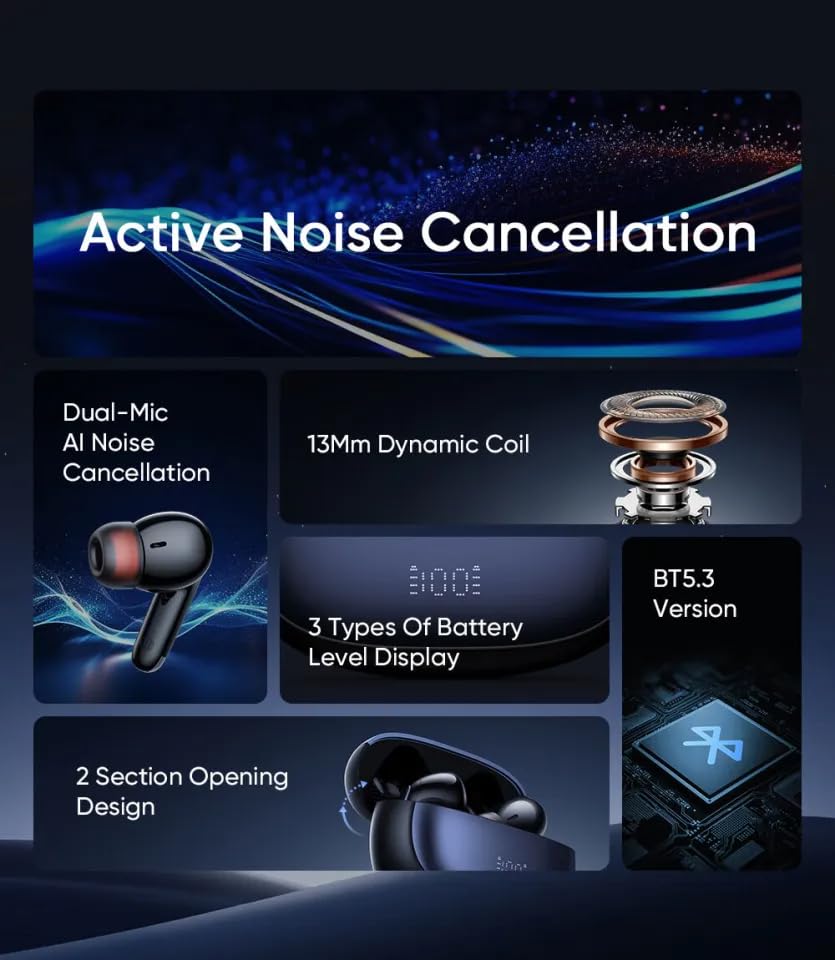
Image: An infographic detailing key features of the Mcdodo N2 earbuds, including Active Noise Cancellation, Dual-Mic AI Noise Cancellation, 13mm Dynamic Coil, 3 Types of Battery Level Display, Bluetooth 5.3 Version, and 2 Section Opening Design.
| ഫീച്ചർ | വിശദാംശങ്ങൾ |
|---|---|
| മോഡലിൻ്റെ പേര് | N2 series ANC+ENC in-ear digital display TWS headphones |
| മോഡൽ നമ്പർ | HP-3300 |
| ശബ്ദ നിയന്ത്രണം | സജീവ ശബ്ദ റദ്ദാക്കൽ (ANC) |
| കണക്റ്റിവിറ്റി ടെക്നോളജി | വയർലെസ്സ് (ബ്ലൂടൂത്ത് 5.3) |
| ഓഡിയോ ഡ്രൈവർ തരം | ഡൈനാമിക് ഡ്രൈവർ |
| ഓഡിയോ ഡ്രൈവർ വലിപ്പം | 13 മില്ലിമീറ്റർ |
| നിയന്ത്രണ തരം | ടച്ച് നിയന്ത്രണം |
| അനുയോജ്യമായ ഉപകരണങ്ങൾ | സെൽഫോണുകൾ, ഡെസ്ക്ടോപ്പുകൾ, ഗെയിമിംഗ് കൺസോളുകൾ, ലാപ്ടോപ്പുകൾ, ടാബ്ലെറ്റുകൾ |
| ഇയർബഡ് ബാറ്ററി ലൈഫ് | 6 hours (music playback) |
| കെയ്സ് ബാറ്ററി ലൈഫ് വഹിക്കുന്നു | 24 hours (additional charge) |
| ജല പ്രതിരോധ നില | വെള്ളത്തെ പ്രതിരോധിക്കുന്ന |
| മെറ്റീരിയൽ | പ്ലാസ്റ്റിക് |
| ഇനത്തിൻ്റെ ഭാരം | 179 ഗ്രാം (ആകെ പാക്കേജ് ഭാരം) |
| ഉൽപ്പന്ന അളവുകൾ | 7 x 4.8 x 2.2 സെ.മീ |
വാറൻ്റി വിവരങ്ങൾ
The Mcdodo N2 Active Noise Cancelling Wireless Earbuds come with a 1 വർഷത്തെ വാറൻ്റി from the date of purchase. This warranty covers manufacturing defects. Please retain your proof of purchase for warranty claims. For detailed terms and conditions, please refer to the official Mcdodo webസൈറ്റ് അല്ലെങ്കിൽ ഉപഭോക്തൃ പിന്തുണയുമായി ബന്ധപ്പെടുക.
ഉപഭോക്തൃ പിന്തുണ
For further assistance, technical support, or warranty inquiries, please contact Mcdodo customer service. You can typically find contact information on the official Mcdodo webസൈറ്റ് അല്ലെങ്കിൽ നിങ്ങൾ ഉൽപ്പന്നം വാങ്ങിയ റീട്ടെയിലർ വഴി.
Mcdodo Official Store: Visit Mcdodo Store on Amazon


