ആമുഖം
The BRIO 33971 Smart Tech Sound Record & Play Engine is an interactive wooden toy train designed to enhance creative play and skill development for children aged 3 and up. This manual provides essential information for setting up, operating, maintaining, and troubleshooting your new engine and Sound Action Tunnel.
സുരക്ഷാ വിവരങ്ങൾ
മുന്നറിയിപ്പ്: ശ്വാസംമുട്ടൽ അപകടം -- ചെറിയ ഭാഗങ്ങൾ. 3 വയസ്സിന് താഴെയുള്ള കുട്ടികൾക്ക് വേണ്ട.
ബോക്സിൽ എന്താണുള്ളത്
- 1x Battery-powered Record & Play Engine
- 1x Sound Action Tunnel

സജ്ജമാക്കുക
ബാറ്ററി ഇൻസ്റ്റാളേഷൻ
The BRIO 33971 engine requires 2 AAA batteries (not included). To install, locate the battery compartment on the underside of the engine. Use a small Phillips head screwdriver to open the compartment, insert the batteries according to the polarity markings, and securely close the cover.
ട്രാക്ക് അസംബ്ലി
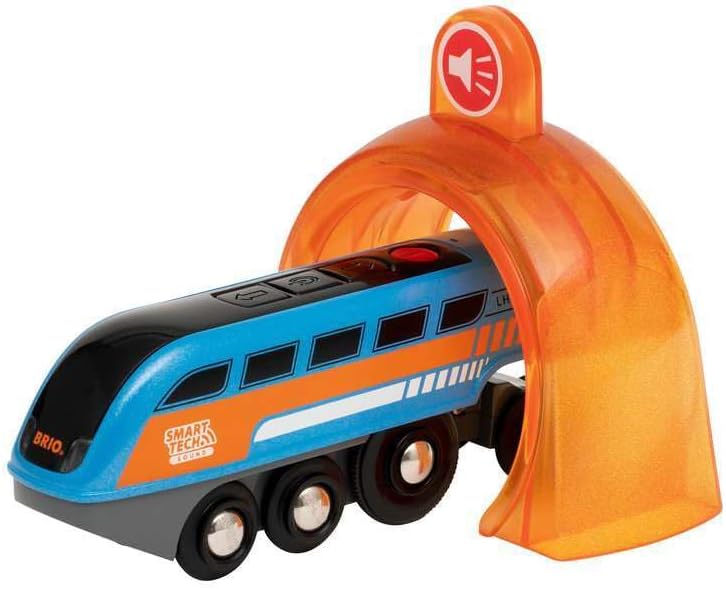
Connect your BRIO wooden railway tracks to form a layout. Ensure the Sound Action Tunnel is placed on a straight section of the track where the engine can pass through smoothly. The engine is compatible with all other BRIO railway tracks and vehicles.
പ്രവർത്തന നിർദ്ദേശങ്ങൾ
അടിസ്ഥാന ചലനം
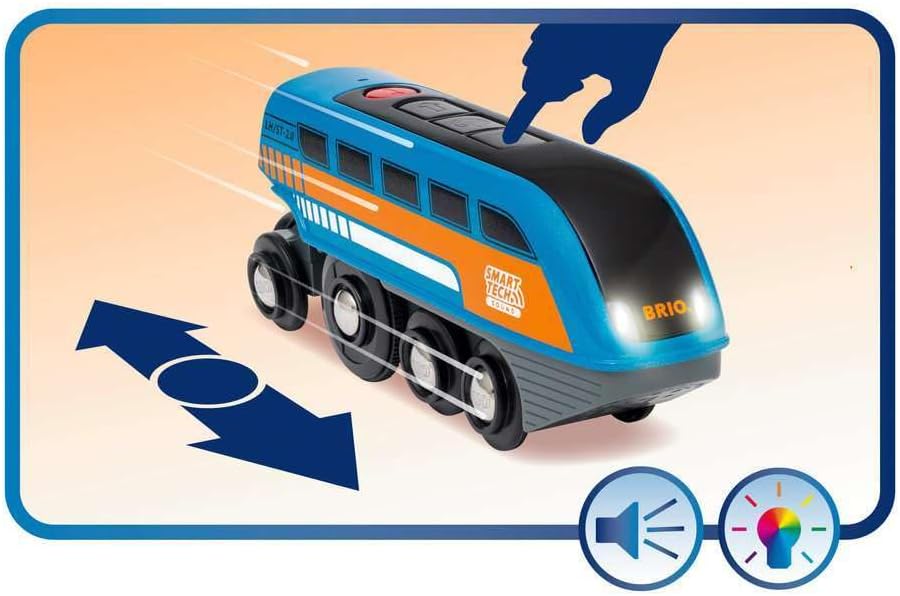
To start the engine, press the main button on top. Press it again to stop. The engine will move forward along the tracks.
Record & Play Feature
- റെക്കോർഡിംഗ്: Press and hold the red button on the top of the engine. Speak clearly into the microphone located near the button to record your desired sound. Release the button when finished.
- കളിക്കുന്നു: As the engine passes through the orange Sound Action Tunnel, it will automatically play the last recorded sound.

Smart Tech Sound App Integration
For enhanced customization, download the Smart Tech Sound app. The app allows you to:
- Control the engine's movement.
- Change the headlight colors.
- Customize the sounds played by the engine and through the Sound Action Tunnel.
- Update the engine's firmware for optimal performance and new features.


ഉൽപ്പന്ന വീഡിയോകൾ
മെയിൻ്റനൻസ്
വൃത്തിയാക്കൽ
Wipe the engine and tunnel with a damp cloth to remove dust and dirt. Do not immerse in water. Ensure all parts are dry before use.
ബാറ്ററി മാറ്റിസ്ഥാപിക്കൽ
When the engine's performance decreases or lights dim, it's time to replace the batteries. Follow the battery installation steps in the Setup section. Always use fresh AAA batteries.
ട്രബിൾഷൂട്ടിംഗ്
| ഇഷ്യൂ | പരിഹാരം |
|---|---|
| Engine not moving or moving slowly. | Check if batteries are correctly installed and fully charged. Replace if necessary. Ensure the on/off switch is in the 'on' position. |
| No sound from the Sound Action Tunnel. | Ensure a sound has been recorded using the red button. Verify the engine passes directly through the tunnel. Check engine batteries. |
| Engine not interacting with Smart Tech accessories. | Ensure the engine's firmware is up to date via the Smart Tech Sound app. Check battery levels. Confirm accessories are correctly placed on the track. |
| Difficulty connecting to the Smart Tech Sound app. | Ensure Bluetooth is enabled on your device. Restart both the engine and your device. Try pairing again. |
സ്പെസിഫിക്കേഷനുകൾ
- ഉൽപ്പന്ന അളവുകൾ: 11.42 x 4.33 x 5.91 ഇഞ്ച്
- ഇനത്തിൻ്റെ ഭാരം: 6.9 ഔൺസ്
- ഇനം മോഡൽ നമ്പർ: 63397100
- നിർമ്മാതാവ് ശുപാർശ ചെയ്യുന്ന പ്രായം: 36 മാസം - 10 വർഷം
- ബാറ്ററികൾ: 2 AAA ബാറ്ററികൾ ആവശ്യമാണ് (ഉൾപ്പെടുത്തിയിട്ടില്ല)
- മെറ്റീരിയലുകൾ: Wood & Plastic
വാറൻ്റിയും പിന്തുണയും
For warranty information or further support, please refer to the product packaging or contact BRIO customer service directly. Details can typically be found on the manufacturer's official webസൈറ്റ് അല്ലെങ്കിൽ ഉൽപ്പന്നം വാങ്ങിയ റീട്ടെയിലർ വഴി.


