1. ഉൽപ്പന്നം കഴിഞ്ഞുview
This Panasonic Car AV Interface Cord PZ32 is a genuine accessory designed to expand the connectivity of your Panasonic CN-F1XVD navigation system. It enables the connection of external video and audio devices, such as rear-seat monitors (e.g., flip-down monitors) and video cameras, to enhance your in-car entertainment and safety features.
The cord includes dedicated inputs for video/audio, an optional camera input, and a video output, providing versatile integration options for your vehicle's AV system.
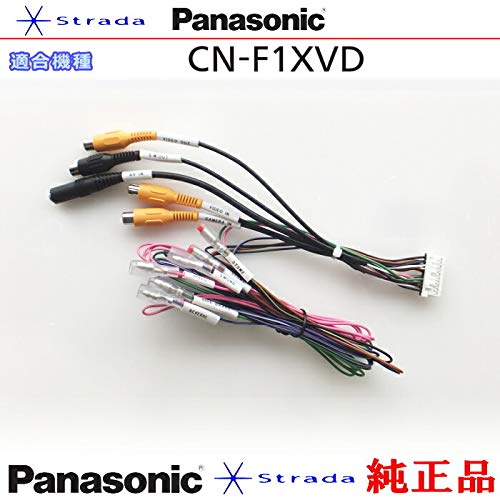
ചിത്രം 1: കഴിഞ്ഞുview of the Panasonic CN-F1XVD Car AV Interface Cord PZ32, displaying its various RCA and multi-pin connectors for comprehensive AV integration.
2. സജ്ജീകരണവും ഇൻസ്റ്റാളേഷനും
Proper installation of the interface cord is crucial for optimal performance. It is recommended that installation be performed by a qualified professional.
2.1. അനുയോജ്യതാ പരിശോധന
Ensure your Panasonic navigation system is the CN-F1XVD model or a compatible unit as specified by Panasonic. The usage of the cable may vary depending on the specific model of your head unit.
2.2. Connection Points
The interface cord features several connectors:
- Multi-pin Connector: This connects directly to the dedicated port on the rear of your Panasonic CN-F1XVD navigation system.
- Video/Audio Input (RCA): Typically yellow for video, red for right audio, white for left audio. Connect external AV sources here.
- Optional Camera Input (RCA): Usually a yellow RCA connector labeled for camera input. Connect your rearview or front-view ഇവിടെ ക്യാമറ.
- Video Output (RCA): Typically a yellow RCA connector. Connect this to the video input of your rear monitor.
- Power/Signal Wires: Individual wires for reverse signal, parking brake, and other control signals. These must be correctly wired to the vehicle's electrical system.
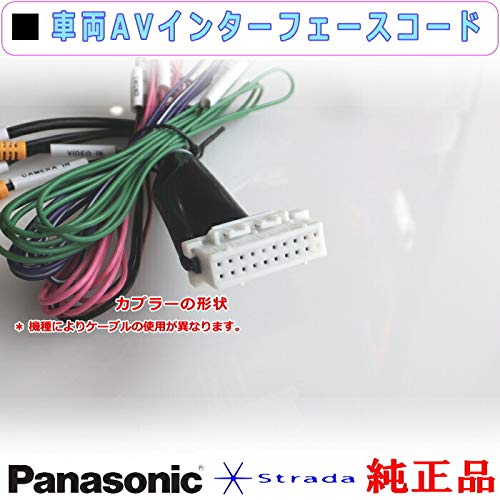
ചിത്രം 2: വിശദമായ view of the multi-pin coupler and associated wiring, highlighting the specific shape and individual wires for connection to the main unit and vehicle's electrical system.
2.3. ഇൻസ്റ്റലേഷൻ ഘട്ടങ്ങൾ (പൊതുവായത്)
- പവർ വിച്ഛേദിക്കുക: Before starting, disconnect the vehicle's battery to prevent electrical shorts.
- ആക്സസ് ഹെഡ് യൂണിറ്റ്: Carefully remove the vehicle's dashboard trim and the Panasonic CN-F1XVD navigation system to access its rear ports.
- Connect Interface Cord: Plug the multi-pin connector of the interface cord into the corresponding port on the back of the CN-F1XVD unit. Ensure a secure connection.
- Wire Control Signals: Connect the individual power and signal wires (e.g., reverse signal, parking brake) to the appropriate wires in your vehicle's harness. Refer to your vehicle's wiring diagram and the CN-F1XVD manual for specific connections.
- ബാഹ്യ ഉപകരണങ്ങൾ ബന്ധിപ്പിക്കുക: Connect your rear monitor's video input to the video output RCA on the interface cord. Connect your video camera to the camera input RCA. Connect any additional AV sources to the video/audio input RCAs.
- സുരക്ഷിതമായ കേബിളിംഗ്: Route all cables neatly and securely, ensuring they are not pinched or exposed to excessive heat or sharp edges.
- വീണ്ടും കൂട്ടിച്ചേർക്കുക: Carefully reassemble the dashboard trim and reinstall the navigation system.
- പവർ വീണ്ടും ബന്ധിപ്പിക്കുക: വാഹനത്തിന്റെ ബാറ്ററി വീണ്ടും ബന്ധിപ്പിക്കുക.
3. പ്രവർത്തന നിർദ്ദേശങ്ങൾ
Once the interface cord is installed, the functionality of connected devices will be controlled through your Panasonic CN-F1XVD navigation system.
- Rear Monitor Display: ലേക്ക് view content on a connected rear monitor, refer to your CN-F1XVD manual for instructions on activating the video output function. This typically involves selecting a specific source or enabling a dual-zone output mode.
- ക്യാമറ ഡിസ്പ്ലേ: When a camera is connected to the camera input, the CN-F1XVD system should automatically display the camera feed when the vehicle is shifted into reverse (if the reverse signal wire is correctly connected). For manual camera activation, consult your CN-F1XVD manual.
- External AV Input: To use external AV sources connected to the video/audio input, select the corresponding AV input source on your CN-F1XVD navigation system.
4. പരിപാലനം
The Panasonic Car AV Interface Cord PZ32 requires minimal maintenance. Follow these guidelines to ensure its longevity:
- കേബിൾ സമഗ്രത: Periodically check for any signs of wear, cuts, or damage to the cable insulation. If damage is found, replace the cord immediately.
- കണക്ഷൻ സുരക്ഷ: Ensure all connectors remain firmly seated. Loose connections can lead to intermittent signal loss.
- പരിസ്ഥിതി സംരക്ഷണം: Keep the cord away from excessive heat, moisture, and direct sunlight. Avoid bending or crimping the cables sharply.
- വൃത്തിയാക്കൽ: If necessary, gently wipe the connectors with a dry, lint-free cloth. Do not use liquid cleaners or solvents.
5. പ്രശ്നപരിഹാരം
If you encounter issues with your interface cord, try the following troubleshooting steps:
- No Video/Audio Output to Rear Monitor:
- Verify that the video output RCA from the interface cord is securely connected to the video input of the rear monitor.
- Ensure the rear monitor is powered on and set to the correct input source.
- Check the settings on your CN-F1XVD navigation system to confirm video output is enabled and configured correctly.
- ക്യാമറ പ്രദർശിപ്പിക്കുന്നില്ല:
- Confirm the camera is properly connected to the camera input RCA on the interface cord.
- Check the camera's power supply and ensure it is functioning correctly.
- Verify that the reverse signal wire from the interface cord is correctly connected to the vehicle's reverse light circuit.
- Consult your CN-F1XVD manual for camera input settings and activation procedures.
- No Signal from External AV Source:
- Ensure the external AV device is powered on and playing content.
- Check the RCA connections from the external device to the video/audio input on the interface cord.
- Select the correct AV input source on your CN-F1XVD navigation system.
- ഇടവിട്ടുള്ള സിഗ്നൽ:
- എല്ലാ കണക്ഷനുകളിലും അയവ് അല്ലെങ്കിൽ നാശനത്തിനായി പരിശോധിക്കുക.
- Check the cable for any physical damage or kinks.
If problems persist after performing these checks, contact a qualified service technician or Panasonic customer support.
6 സ്പെസിഫിക്കേഷനുകൾ
| നിർമ്മാതാവ് | പാനസോണിക് |
| ഭാഗം നമ്പർ | PZ32-F1XVD |
| അനുയോജ്യമായ മോഡൽ | Panasonic CN-F1XVD (and other compatible models) |
| ASIN | B086C7LNK2 |
| ആദ്യം ലഭ്യമായ തീയതി | 25 മാർച്ച് 2020 |
7. വാറൻ്റിയും പിന്തുണയും
As a genuine Panasonic accessory, this interface cord is covered by the standard warranty terms applicable to Panasonic products. Please refer to the warranty information provided with your Panasonic CN-F1XVD navigation system or visit the official Panasonic webവിശദമായ വാറന്റി പോളിസികൾക്കായി സൈറ്റ്.
For technical support, installation assistance, or warranty claims, please contact Panasonic customer service or an authorized Panasonic service center.


