ആമുഖം
Thank you for choosing the RockJam SingCube Karaoke Machine. This versatile and portable system is designed to provide hours of entertainment for all ages. Featuring Bluetooth connectivity, dual microphones, and dynamic lighting, it's perfect for parties, family gatherings, or just practicing your singing skills. This manual provides essential information for setting up, operating, and maintaining your karaoke machine.
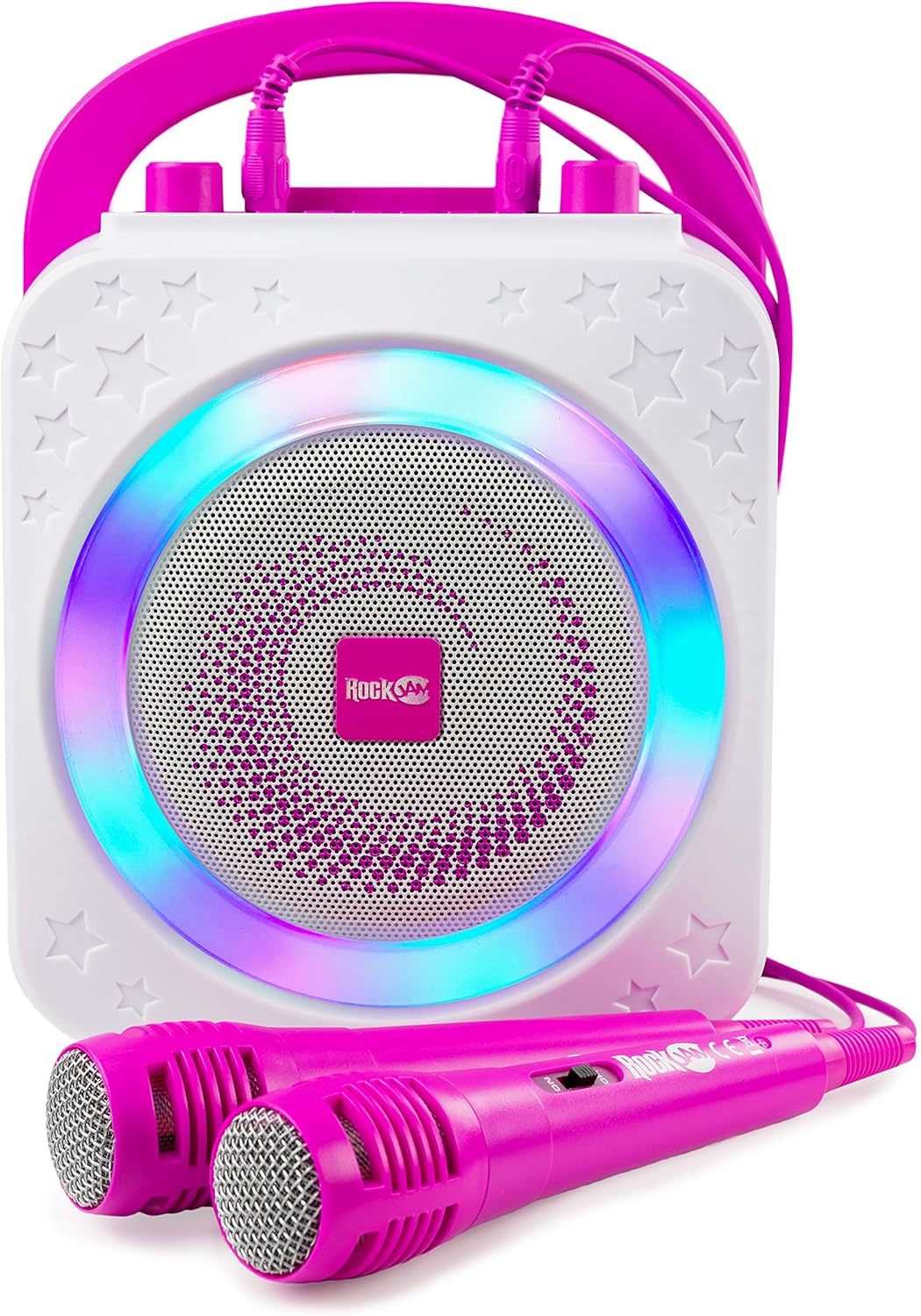
ചിത്രം: മുൻഭാഗം view of the RockJam SingCube Karaoke Machine in pink, showcasing its main speaker and two wired microphones.
ബോക്സിൽ എന്താണുള്ളത്
- RockJam SingCube Karaoke Machine
- രണ്ട് വയർഡ് മൈക്രോഫോണുകൾ
- യുഎസ്ബി ചാർജിംഗ് കേബിൾ
- സഹായ കേബിൾ

Image: Close-up of the two pink wired microphones included with the karaoke machine.

Image: The USB charging cable with a standard USB-A connector on one end and a barrel connector on the other.

Image: A white auxiliary audio cable with 3.5mm jacks on both ends.
സവിശേഷതകൾ കഴിഞ്ഞുview
- 10 Watt Output: Powerful sound for clear audio.
- റീചാർജ് ചെയ്യാവുന്ന ബാറ്ററി: Enjoy portable entertainment without constant power connection.
- ബ്ലൂടൂത്ത് കണക്റ്റിവിറ്റി: Wirelessly stream music from your smartphone, tablet, or other Bluetooth-enabled devices.
- ഇരട്ട മൈക്രോഫോൺ ഇൻപുട്ടുകൾ: Sing duets with the two included wired microphones.
- ഡൈനാമിക് ഡിസ്കോ ലൈറ്റുകൾ: Integrated LED lights sync with the music for an immersive experience.
- വോയ്സ് ചേഞ്ചർ ഇഫക്റ്റുകൾ: Experiment with different vocal effects for added fun.
- ഒന്നിലധികം പ്ലേബാക്ക് ഓപ്ഷനുകൾ: Supports Bluetooth, USB, and Auxiliary (AUX) input.
- സ്മാർട്ട്ഫോൺ ഹോൾഡർ: Convenient slot for displaying lyrics from your device.

Image: The RockJam SingCube Karaoke Machine with a smartphone placed in its integrated holder, displaying lyrics.
സജ്ജമാക്കുക
1. യൂണിറ്റ് ചാർജ് ചെയ്യുന്നു
Before first use, fully charge the karaoke machine. Connect the provided USB charging cable to the DC 5V port on the unit and the other end to a USB power adapter (not included) or a computer USB port. The LED indicator will show charging status.
2. മൈക്രോഫോണുകൾ ബന്ധിപ്പിക്കുന്നു
Plug the wired microphones into the MIC1 and MIC2 input jacks on the top panel of the karaoke machine.
3. പവർ ചെയ്യുന്നു
തിരിയുക പവർ/വോളിയം knob clockwise to power on the unit. The disco lights will illuminate, and you will hear an audible prompt indicating it's ready for use.

Image: Close-up of the top control panel, showing the microphone inputs, USB port, AUX input, LED indicator, and control buttons/knobs.
പ്രവർത്തന നിർദ്ദേശങ്ങൾ
1. ശബ്ദവും എക്കോയും ക്രമീകരിക്കൽ
- മാസ്റ്റർ വോളിയം: ഉപയോഗിക്കുക പവർ/വോളിയം knob to adjust the overall volume of the music and microphones.
- മൈക്രോഫോൺ വോളിയം: ഉപയോഗിക്കുക MIC.VOL knob to adjust the volume of the microphones independently.
- എക്കോ ഇഫക്റ്റ്: ഉപയോഗിക്കുക ECHO knob to add or reduce echo to your vocals.
2. Changing Playback Modes
അമർത്തുക മോഡ് button to switch between different input sources: Bluetooth, USB, and AUX.
3. ബ്ലൂടൂത്ത് കണക്ഷൻ
- Ensure the karaoke machine is in Bluetooth mode (indicated by an audible prompt).
- On your smartphone, tablet, or other Bluetooth device, enable Bluetooth and search for "RockJam SingCube" (or similar name).
- Select the device to pair. Once connected, you will hear a confirmation sound.
- You can now stream music wirelessly from your device.
4. USB പ്ലേബാക്ക്
MP3 ഓഡിയോ അടങ്ങിയ ഒരു USB ഫ്ലാഷ് ഡ്രൈവ് ഇടുക. files into the USB port. The unit will automatically detect and begin playing the music. Use the മുമ്പത്തേത്/അടുത്തത് ഒപ്പം പ്ലേ/താൽക്കാലികമായി നിർത്തുക പ്ലേബാക്ക് നിയന്ത്രിക്കുന്നതിനുള്ള ബട്ടണുകൾ.
5. AUX ഇൻപുട്ട്
Connect an external audio device (e.g., MP3 player, computer) to the AUX input jack using the provided auxiliary cable. Switch the unit to AUX mode using the മോഡ് button. Audio will play through the karaoke machine's speaker.
6. Voice Changer Effects
അമർത്തുക ശബ്ദം button to cycle through different voice changer effects. Experiment to find your favorite!
7. ഡിസ്കോ ലൈറ്റുകൾ
The integrated disco lights automatically sync with the music. Press the ലൈറ്റുകൾ button to turn the lights on or off.
Video: An official product video demonstrating the features of the RockJam Party Karaoke Machine, including Bluetooth connectivity, dual microphones, portability, USB compatibility, and use with tablets and smart TVs.
മെയിൻ്റനൻസ്
- വൃത്തിയാക്കൽ: മൃദുവായതും ഉണങ്ങിയതുമായ തുണി ഉപയോഗിച്ച് യൂണിറ്റ് തുടയ്ക്കുക. അബ്രാസീവ് ക്ലീനറുകളോ ലായകങ്ങളോ ഉപയോഗിക്കരുത്.
- സംഭരണം: Store the karaoke machine in a cool, dry place away from direct sunlight and extreme temperatures.
- ബാറ്ററി കെയർ: ബാറ്ററി ലൈഫ് വർദ്ധിപ്പിക്കാൻ, ബാറ്ററി ഇടയ്ക്കിടെ പൂർണ്ണമായും ഡിസ്ചാർജ് ചെയ്യുന്നത് ഒഴിവാക്കുക. ദീർഘനേരം ഉപയോഗത്തിലില്ലെങ്കിൽ പോലും യൂണിറ്റ് പതിവായി ചാർജ് ചെയ്യുക.
- മൈക്രോഫോണുകൾ: മൈക്രോഫോണുകൾ ശ്രദ്ധയോടെ കൈകാര്യം ചെയ്യുക. അവ താഴെയിടുകയോ ഈർപ്പം ഏൽപ്പിക്കുകയോ ചെയ്യരുത്.
ട്രബിൾഷൂട്ടിംഗ്
| പ്രശ്നം | പരിഹാരം |
|---|---|
| യൂണിറ്റ് പവർ ഓണാക്കുന്നില്ല. | Ensure the unit is charged. Connect the USB charging cable and allow it to charge for a few hours. Check the power knob is turned on. |
| സ്പീക്കറിൽ നിന്ന് ശബ്ദമില്ല. | Check the master volume (പവർ/വോളിയം knob) and microphone volume (MIC.VOL knob). Ensure the correct input mode (Bluetooth, USB, AUX) is selected. |
| മൈക്രോഫോൺ പ്രവർത്തിക്കുന്നില്ല. | Ensure the microphone is securely plugged into the MIC input jack. Check the microphone's ON/OFF switch (if applicable). Adjust the MIC.VOL മുട്ട്. |
| ബ്ലൂടൂത്ത് ഉപകരണം ജോടിയാക്കില്ല. | Ensure the karaoke machine is in Bluetooth mode. Make sure Bluetooth is enabled on your device and it's within range. Try unpairing and re-pairing the device. |
| യുഎസ്ബി പ്ലേബാക്ക് പ്രവർത്തിക്കുന്നില്ല. | Ensure the USB drive is inserted correctly and contains compatible MP3 audio files. Switch the unit to USB mode. |
സ്പെസിഫിക്കേഷനുകൾ
- മോഡൽ: RJPS150-PK
- ഔട്ട്പുട്ട് പവർ: 10 വാട്ട്സ്
- കണക്റ്റിവിറ്റി: ബ്ലൂടൂത്ത്, യുഎസ്ബി, ഓക്സ്
- ഊർജ്ജ സ്രോതസ്സ്: Rechargeable Battery, DC 5V via USB
- ഉൽപ്പന്ന അളവുകൾ: 5.51 x 8.07 x 10.24 ഇഞ്ച്
- ഇനത്തിൻ്റെ ഭാരം: 2.76 പൗണ്ട്
- നിറം: പിങ്ക്
- പ്രത്യേക സവിശേഷതകൾ: Portable, Light Up Speaker, PA System, Voice Changer, Rechargeable
വാറൻ്റിയും പിന്തുണയും
For warranty information or technical support, please refer to the official RockJam website or contact their customer service. A digital version of the user guide is also available for download:
ഉപയോക്തൃ ഗൈഡ് (PDF) ഡൗൺലോഡ് ചെയ്യുക
കൂടുതൽ സഹായത്തിന്, ദയവായി സന്ദർശിക്കുക RockJam Store on Amazon.


