ആമുഖം
This manual provides comprehensive instructions for the safe and efficient use of your TUINYO TP19 Bluetooth Wireless Over-Ear Headphones. Please read this manual thoroughly before operating the device and retain it for future reference.

Image: TUINYO TP19 Bluetooth Wireless Over-Ear Headphones, showcasing the sleek design in black and blue.
സുരക്ഷാ വിവരങ്ങൾ
- കേൾവിക്ക് കേടുപാടുകൾ സംഭവിക്കുന്നത് തടയാൻ, ഉയർന്ന അളവിലുള്ള അളവിൽ ദീർഘനേരം എക്സ്പോഷർ ചെയ്യുന്നത് ഒഴിവാക്കുക.
- Do not use headphones while driving, cycling, or in situations where inability to hear ambient sounds could be dangerous.
- വെള്ളം, ഈർപ്പം, തീവ്രമായ താപനില എന്നിവയിൽ നിന്ന് ഉപകരണം അകറ്റി നിർത്തുക.
- ഹെഡ്ഫോണുകൾ വേർപെടുത്താനോ പരിഷ്ക്കരിക്കാനോ ശ്രമിക്കരുത്. ഇത് വാറന്റി അസാധുവാക്കുകയും കേടുപാടുകൾ വരുത്തുകയും ചെയ്തേക്കാം.
- Clean the headphones with a soft, dry cloth. Avoid using harsh chemicals.
പാക്കേജ് ഉള്ളടക്കം
- TUINYO TP19 Bluetooth Wireless Over-Ear Headphones
- മൈക്രോ യുഎസ്ബി ചാർജിംഗ് കേബിൾ
- 3.5 എംഎം ഓഡിയോ കേബിൾ
- സംരക്ഷണ കേസ്
- ഉപയോക്തൃ മാനുവൽ (ഈ പ്രമാണം)

Image: All items included in the TUINYO TP19 headphone package: the headphones, a protective case, a micro USB charging cable, and a 3.5mm audio cable.
ഉൽപ്പന്നം കഴിഞ്ഞുview
The TUINYO TP19 headphones feature a comfortable over-ear design with soft memory-protein earmuffs and an adjustable stainless steel headband for a perfect fit. Controls are intuitively placed on the earcup.

ചിത്രം: വിശദമായത് view of the headphone's ergonomic features: leather-padded headband, adjustable headband mechanism, soft memory-protein earmuffs, and the equalizer (EQ) button.
പ്രധാന സവിശേഷതകൾ:
- High Fidelity Stereo Sound: Powered by 40mm neodymium drivers for immersive audio.
- സുഖപ്രദമായ ഡിസൈൻ: Memory-protein ear cushions and adjustable headband for extended wear.
- ഡ്യുവൽ മോഡ്: Supports both wireless Bluetooth and wired 3.5mm audio connections.
- നീണ്ട ബാറ്ററി ലൈഫ്: ഒറ്റ ചാർജിൽ 40 മണിക്കൂർ വരെ പ്ലേടൈം.
- ബിൽറ്റ്-ഇൻ മൈക്രോഫോൺ: For hands-free calls and voice commands.
- മടക്കാവുന്ന ഡിസൈൻ: എളുപ്പത്തിലുള്ള പോർട്ടബിലിറ്റിക്കും സംഭരണത്തിനും.
സജ്ജമാക്കുക
1. ഹെഡ്ഫോണുകൾ ചാർജ് ചെയ്യുന്നു
- Connect the micro USB charging cable to the charging port on the headphones.
- കേബിളിന്റെ മറ്റേ അറ്റം ഒരു USB പവർ അഡാപ്റ്ററുമായി (ഉൾപ്പെടുത്തിയിട്ടില്ല) അല്ലെങ്കിൽ ഒരു കമ്പ്യൂട്ടറിന്റെ USB പോർട്ടുമായി ബന്ധിപ്പിക്കുക.
- The LED indicator will show charging status (typically red while charging, off or blue when fully charged).
- A full charge takes approximately 2-2.5 hours and provides up to 40 hours of music playtime.

Image: Graphic illustrating the impressive battery duration, highlighting up to 35 hours of battery life and a quick charge feature where 15 minutes of charging provides 3 hours of playtime.
2. പവർ ഓൺ/ഓഫ്
- പവർ ഓൺ: Press and hold the Power button (usually the multi-function button) for a few seconds until the LED indicator lights up and you hear a power-on prompt.
- പവർ ഓഫ്: Press and hold the Power button again for a few seconds until the LED indicator turns off and you hear a power-off prompt.
3. ബ്ലൂടൂത്ത് ജോടിയാക്കൽ
- ഹെഡ്ഫോണുകൾ ഓഫാണെന്ന് ഉറപ്പാക്കുക.
- എൽഇഡി ഇൻഡിക്കേറ്റർ ചുവപ്പും നീലയും മാറിമാറി മിന്നുന്നതുവരെ ഏകദേശം 5-7 സെക്കൻഡ് നേരത്തേക്ക് പവർ ബട്ടൺ അമർത്തിപ്പിടിക്കുക, ഇത് ജോടിയാക്കൽ മോഡിനെ സൂചിപ്പിക്കുന്നു.
- നിങ്ങളുടെ ഉപകരണത്തിൽ (സ്മാർട്ട്ഫോൺ, ടാബ്ലെറ്റ്, പിസി), ബ്ലൂടൂത്ത് പ്രവർത്തനക്ഷമമാക്കി ലഭ്യമായ ഉപകരണങ്ങൾക്കായി തിരയുക.
- Select "TP 19" from the list of devices.
- Once paired, the LED indicator will flash blue slowly, and you will hear a connection confirmation.
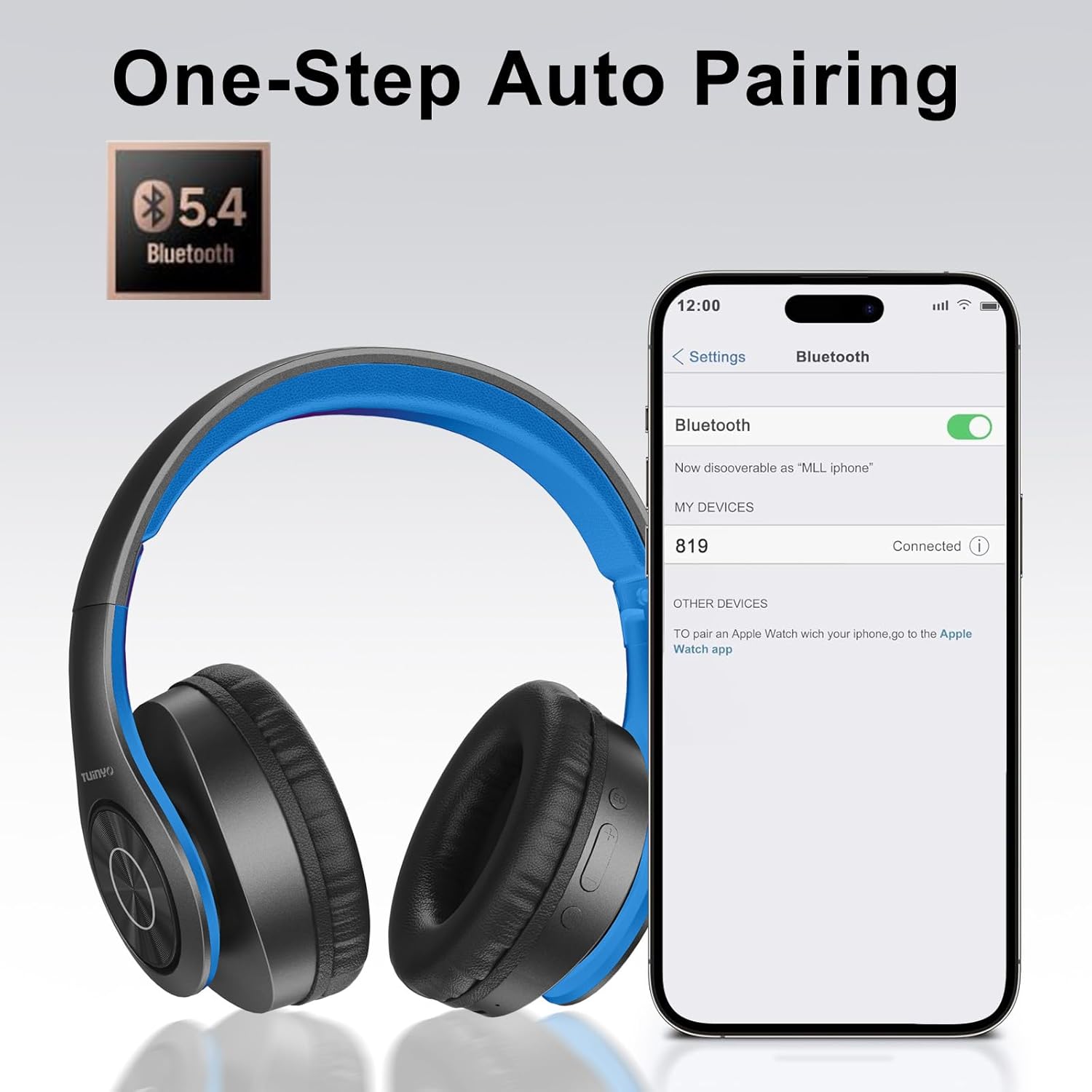
Image: A smartphone screen displaying the Bluetooth settings, showing the "819" (representing the TP19 headphones) successfully connected, illustrating the one-step auto pairing feature.
Video: An official TUINYO video demonstrating the Bluetooth pairing process and showing the headphones in use. This video highlights the ease of connecting the headphones to a device.
പ്രവർത്തന നിർദ്ദേശങ്ങൾ
1. Wireless Mode
- പ്ലേ/താൽക്കാലികമായി നിർത്തുക: മൾട്ടി-ഫംഗ്ഷൻ ബട്ടൺ ഒരിക്കൽ അമർത്തുക.
- വോളിയം കൂട്ടുക: "+" ബട്ടൺ അമർത്തുക.
- വോളിയം താഴേക്ക്: "-" ബട്ടൺ അമർത്തുക.
- അടുത്ത ട്രാക്ക്: "+" ബട്ടൺ അമർത്തിപ്പിടിക്കുക.
- മുമ്പത്തെ ട്രാക്ക്: "-" ബട്ടൺ അമർത്തിപ്പിടിക്കുക.
2. വയേർഡ് മോഡ്
When the battery is low or if you prefer a wired connection, you can use the included 3.5mm audio cable.
- 3.5mm ഓഡിയോ കേബിളിന്റെ ഒരറ്റം ഹെഡ്ഫോണുകളിലെ ഓഡിയോ ഇൻപുട്ട് പോർട്ടുമായി ബന്ധിപ്പിക്കുക.
- Connect the other end to your audio device's 3.5mm jack.
- In wired mode, controls on the headphones may be limited, and playback will be controlled by your connected device.
3. കോൾ പ്രവർത്തനങ്ങൾ
- ഉത്തരം/അവസാന കോൾ: മൾട്ടി-ഫംഗ്ഷൻ ബട്ടൺ ഒരിക്കൽ അമർത്തുക.
- കോൾ നിരസിക്കുക: മൾട്ടി-ഫംഗ്ഷൻ ബട്ടൺ 2 സെക്കൻഡ് അമർത്തിപ്പിടിക്കുക.
- അവസാന നമ്പർ വീണ്ടും ഡയൽ ചെയ്യുക: മൾട്ടി-ഫംഗ്ഷൻ ബട്ടൺ ഇരട്ട-അമർത്തുക.
4. വോയ്സ് അസിസ്റ്റൻ്റ്
The headphones support voice-enabled assistants like Siri. Press the Multi-function button twice to activate your device's voice assistant.
5. Sound Effects (EQ Mode)
The headphones feature multiple sound effects (EQ modes) to customize your listening experience. Press the EQ button (often labeled "EQ" or a similar icon) to cycle through available modes such as Normal, Rock, Pop, Classic, Jazz, and Country.
Video: An official TUINYO video showcasing the various sound modes and controls on the headphones, demonstrating how to switch between different equalizer settings.
മെയിൻ്റനൻസ്
- Store the headphones in the protective case when not in use to prevent damage.
- ചാർജിംഗ് പോർട്ടും ഓഡിയോ ജാക്കും പൊടിയും അവശിഷ്ടങ്ങളും ഇല്ലാതെ സൂക്ഷിക്കുക.
- Avoid exposing the headphones to direct sunlight or extreme heat for extended periods.
- Do not use abrasive cleaners or solvents on the headphones.
ട്രബിൾഷൂട്ടിംഗ്
| പ്രശ്നം | പരിഹാരം |
|---|---|
| ഹെഡ്ഫോണുകൾ ഓണാകില്ല. | ഹെഡ്ഫോണുകൾ പൂർണ്ണമായും ചാർജ് ചെയ്തിട്ടുണ്ടെന്ന് ഉറപ്പാക്കുക. ഒരു പവർ സ്രോതസ്സിലേക്ക് കണക്റ്റ് ചെയ്ത് വീണ്ടും ശ്രമിക്കുക. |
| ഉപകരണവുമായി ജോടിയാക്കാൻ കഴിയില്ല. |
|
| വയർലെസ് മോഡിൽ ശബ്ദമില്ല. |
|
| വയേർഡ് മോഡിൽ ശബ്ദമില്ല. |
|
സ്പെസിഫിക്കേഷനുകൾ
| ഫീച്ചർ | വിശദാംശങ്ങൾ |
|---|---|
| മോഡലിൻ്റെ പേര് | TP 19 |
| കണക്റ്റിവിറ്റി ടെക്നോളജി | വയർലെസ് (ബ്ലൂടൂത്ത്) |
| വയർലെസ് കമ്മ്യൂണിക്കേഷൻ ടെക്നോളജി | ബ്ലൂടൂത്ത് 5.1 |
| ബ്ലൂടൂത്ത് ശ്രേണി | 10 മീറ്റർ |
| ഓഡിയോ ഡ്രൈവർ തരം | ഡൈനാമിക് ഡ്രൈവർ |
| ഓഡിയോ ഡ്രൈവർ വലിപ്പം | 40 മില്ലിമീറ്റർ |
| ഫ്രീക്വൻസി പ്രതികരണം | 20 KHz |
| പ്രതിരോധം | 32 ഓം |
| ബാറ്ററി ലൈഫ് | 40 മണിക്കൂർ |
| ചാർജിംഗ് സമയം | 2.5 മണിക്കൂർ |
| ഹെഡ്ഫോണുകൾ ജാക്ക് | 3.5 mm ജാക്ക് |
| നിയന്ത്രണ തരം | ശബ്ദ നിയന്ത്രണം, സ്പർശനം |
| പ്രത്യേക ഫീച്ചർ | മടക്കാവുന്ന |
| ഇനത്തിൻ്റെ ഭാരം | 8.9 ഔൺസ് (251 ഗ്രാം) |
| ഉൽപ്പന്ന അളവുകൾ | 6.85 x 3.9 x 9.72 ഇഞ്ച് |
| മെറ്റീരിയൽ | പ്ലാസ്റ്റിക് |
| ഉൾപ്പെടുത്തിയ ഘടകങ്ങൾ | Cable, Protective Case, micro usb cable |
വാറൻ്റിയും പിന്തുണയും
By choosing TUINYO, you are covered by a 30-day hassle-free return policy and a one-year warranty. For any inquiries or assistance, please contact our prompt and friendly customer service, available 24/7.
For further support, visit the official TUINYO store: TUINYO Store


