1. ആമുഖം
Thank you for choosing the Tronsmart Onyx Ace True Wireless Earbuds. These earbuds are designed to provide a high-quality audio experience with advanced features such as Bluetooth 5.0, Qualcomm aptX audio, environmental noise cancellation, and intuitive touch controls. This manual will guide you through the setup, operation, and maintenance of your new earbuds.
2. പാക്കേജ് ഉള്ളടക്കം
- Tronsmart Onyx Ace True Wireless Earbuds (L/R)
- ചാർജിംഗ് കേസ്
- USB-C ചാർജിംഗ് കേബിൾ
- ഉപയോക്തൃ മാനുവൽ
- വാറൻ്റി കാർഡ്
3. ഉൽപ്പന്നം കഴിഞ്ഞുview
Familiarize yourself with the components of your Tronsmart Onyx Ace earbuds and charging case.

Image: Earbud Internal Components. This image displays the internal structure of the Tronsmart Onyx Ace earbud, emphasizing the Qualcomm QCC3020 chip responsible for stable Bluetooth connectivity and efficient performance.
- ഇയർബഡുകൾ: Left and Right earbuds with touch control areas and microphones.
- ചാർജിംഗ് കേസ്: Houses the earbuds for charging and storage, with LED indicators for battery status and a USB-C charging port.
- മൈക്രോഫോണുകൾ: Each earbud features multiple microphones for clear call quality and environmental noise cancellation.
4. സജ്ജീകരണം
4.1. ഇയർബഡുകളും കേസും ചാർജ് ചെയ്യുന്നു
ആദ്യമായി ഉപയോഗിക്കുന്നതിന് മുമ്പ്, ഇയർബഡുകളും ചാർജിംഗ് കേസും പൂർണ്ണമായും ചാർജ് ചെയ്യുക.
- ഇയർബഡുകൾ ചാർജിംഗ് കേസിൽ വയ്ക്കുക. അവ ശരിയായി സ്ഥാപിച്ചിട്ടുണ്ടെന്ന് ഉറപ്പാക്കുക.
- USB-C ചാർജിംഗ് കേബിൾ കേസിലെ ചാർജിംഗ് പോർട്ടിലേക്കും ഒരു പവർ സ്രോതസ്സിലേക്കും (ഉദാ: USB വാൾ അഡാപ്റ്റർ, കമ്പ്യൂട്ടർ USB പോർട്ട്) ബന്ധിപ്പിക്കുക.
- The LED indicators on the charging case will illuminate to show charging status.
- Charging time for earbuds is approximately 1 hour 20 minutes. The charging case takes approximately 1 hour 30 minutes to fully charge.
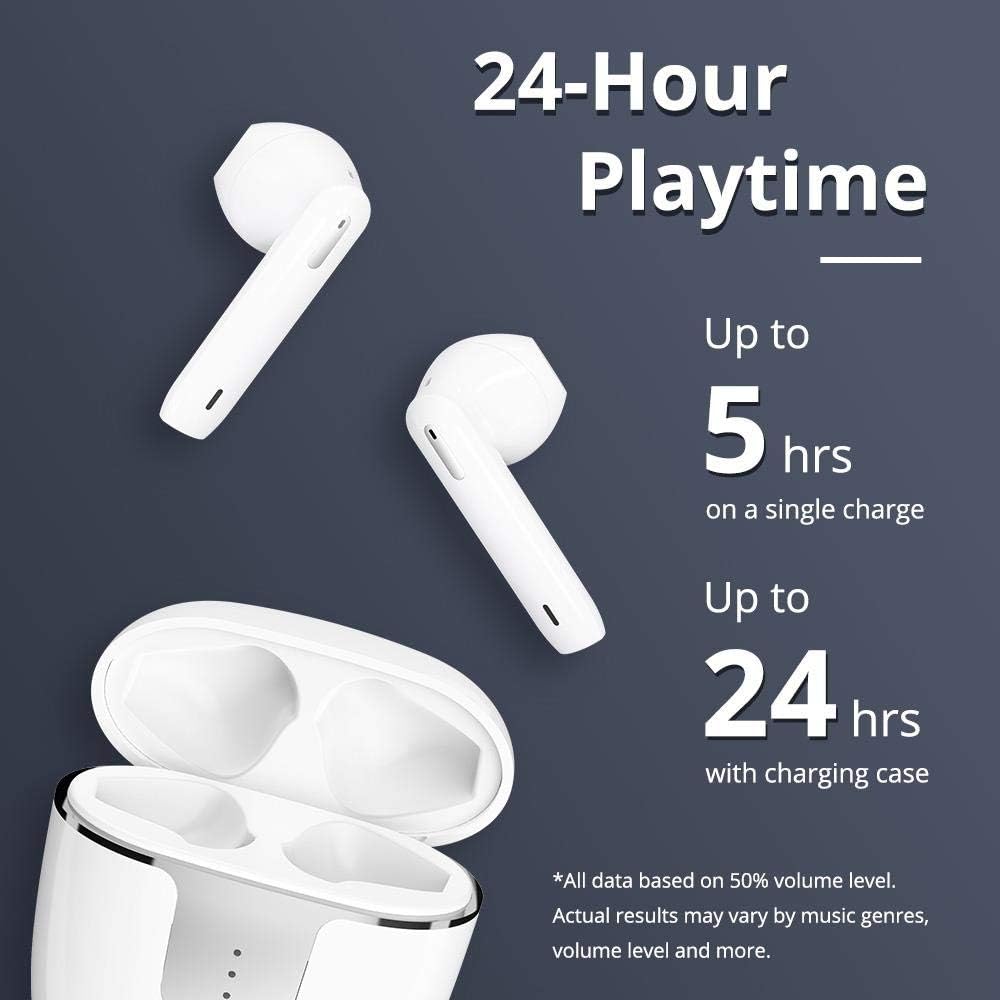
Image: Charging and Playtime. This image highlights the extended playtime of the Onyx Ace earbuds, offering up to 5 hours on a single charge and up to 24 hours with the charging case.
4.2. നിങ്ങളുടെ ഉപകരണവുമായി ജോടിയാക്കുന്നു
ചാർജിംഗ് കേസിൽ നിന്ന് പുറത്തെടുക്കുമ്പോൾ ഇയർബഡുകൾ യാന്ത്രികമായി പെയറിംഗ് മോഡിലേക്ക് പ്രവേശിക്കും.
- Open the charging case. The earbuds will power on and enter pairing mode.
- നിങ്ങളുടെ ഉപകരണത്തിൽ (സ്മാർട്ട്ഫോൺ, ടാബ്ലെറ്റ് മുതലായവ), ബ്ലൂടൂത്ത് പ്രവർത്തനക്ഷമമാക്കുക.
- ഇതിനായി തിരയുക "Tronsmart Onyx Ace" in the list of available Bluetooth devices.
- Select "Tronsmart Onyx Ace" to connect. Once connected, you will hear an audible confirmation.
- ഉപകരണത്തിൽ ബ്ലൂടൂത്ത് പ്രവർത്തനക്ഷമമാക്കിയിട്ടുണ്ടെങ്കിൽ, കേസിൽ നിന്ന് പുറത്തെടുക്കുമ്പോൾ ഇയർബഡുകൾ അവസാനം ജോടിയാക്കിയ ഉപകരണവുമായി യാന്ത്രികമായി വീണ്ടും കണക്റ്റുചെയ്യും.
5. പ്രവർത്തന നിർദ്ദേശങ്ങൾ
5.1. പവർ ഓൺ/ഓഫ്
- പവർ ഓൺ: Open the charging case, or press and hold the touch panel on either earbud for 3 seconds.
- പവർ ഓഫ്: Place the earbuds back into the charging case and close the lid, or press and hold the touch panel on either earbud for 5 seconds.
5.2. ഇയർബഡുകൾ ധരിക്കുന്നു
The Onyx Ace earbuds feature a semi-in-ear design for comfortable wear.

Image: Pressure-Free Design. This image demonstrates the comfortable semi-in-ear design of the earbuds, which reduces pressure and allows for extended wear without discomfort.
Gently insert the earbuds into your ears. Adjust them for a secure and comfortable fit. The semi-in-ear design allows for some ambient sound awareness.
5.3. ടച്ച് നിയന്ത്രണങ്ങൾ
The earbuds feature intuitive touch controls for various functions.
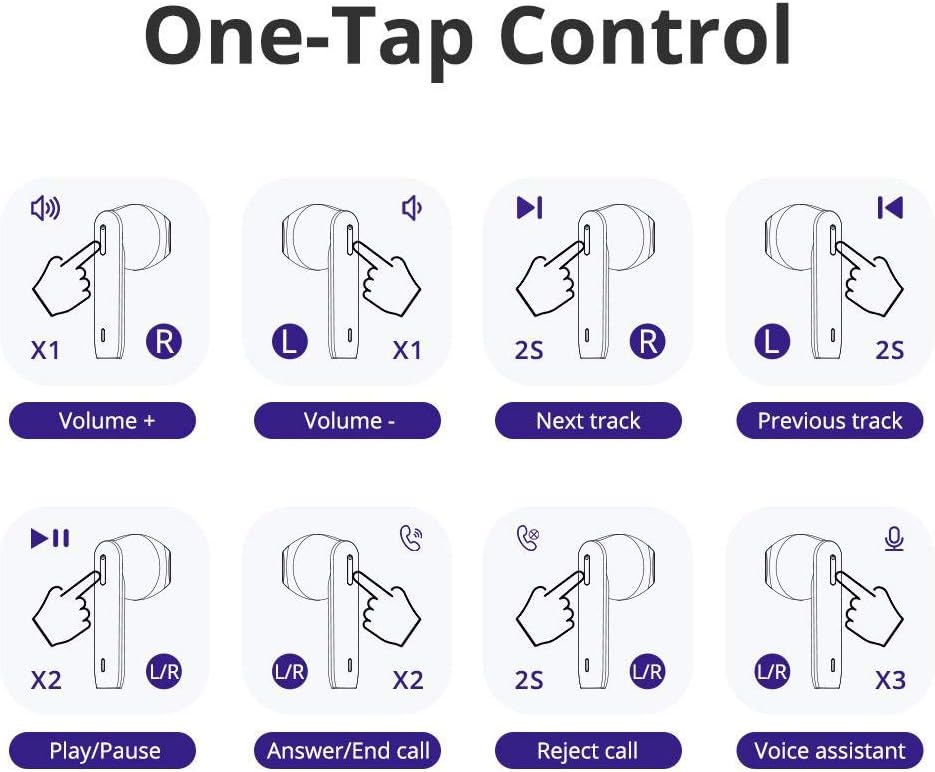
Image: One-Tap Control. This diagram illustrates the various touch gestures for controlling music playback, calls, and activating the voice assistant on the Onyx Ace earbuds.
- വോളിയം കൂട്ടുക: Single tap on the Right earbud.
- വോളിയം താഴേക്ക്: Single tap on the Left earbud.
- അടുത്ത ട്രാക്ക്: വലതുവശത്തെ ഇയർബഡിൽ രണ്ടുതവണ ടാപ്പ് ചെയ്യുക.
- മുമ്പത്തെ ട്രാക്ക്: ഇടതുവശത്തെ ഇയർബഡിൽ രണ്ടുതവണ ടാപ്പ് ചെയ്യുക.
- പ്ലേ/താൽക്കാലികമായി നിർത്തുക: ഏതെങ്കിലും ഇയർബഡിൽ രണ്ടുതവണ ടാപ്പ് ചെയ്യുക.
- ഉത്തരം/അവസാന കോൾ: ഏതെങ്കിലും ഇയർബഡിൽ രണ്ടുതവണ ടാപ്പ് ചെയ്യുക.
- കോൾ നിരസിക്കുക: ഏതെങ്കിലും ഇയർബഡിൽ 2 സെക്കൻഡ് അമർത്തിപ്പിടിക്കുക.
- വോയ്സ് അസിസ്റ്റന്റ് (സിരി/ഗൂഗിൾ അസിസ്റ്റന്റ്) സജീവമാക്കുക: ഇയർബഡുകളിൽ ഏതെങ്കിലുമൊന്നിൽ മൂന്ന് തവണ ടാപ്പ് ചെയ്യുക.

Image: Voice Access. This image shows how to activate your device's voice assistant (Siri, Google Assistant, Cortana) directly from the earbuds with a simple tap.
5.4. Mono or Stereo Mode
You can use either earbud independently (mono mode) or both together (stereo mode).

Image: Mono or Stereo Use. This image illustrates the flexibility of using either a single earbud (mono mode) or both earbuds (stereo mode) for audio playback and calls.
- To use in mono mode, simply take one earbud out of the charging case. It will automatically connect to your device.
- To switch to stereo mode, take the second earbud out of the case. It will automatically pair with the first earbud.
6. പരിപാലനം
6.1. വൃത്തിയാക്കൽ
- ഇയർബഡുകളും ചാർജിംഗ് കെയ്സും മൃദുവായതും ഉണങ്ങിയതും ലിന്റ് രഹിതവുമായ തുണി ഉപയോഗിച്ച് പതിവായി വൃത്തിയാക്കുക.
- കഠിനമായ രാസവസ്തുക്കൾ, ക്ലീനിംഗ് ലായകങ്ങൾ അല്ലെങ്കിൽ ശക്തമായ ഡിറ്റർജന്റുകൾ ഉപയോഗിക്കരുത്.
- ശരിയായ ചാർജിംഗിനായി ഇയർബഡുകളിലെയും കെയ്സിലെയും ചാർജിംഗ് കോൺടാക്റ്റുകൾ വൃത്തിയുള്ളതും അവശിഷ്ടങ്ങളില്ലാത്തതുമാണെന്ന് ഉറപ്പാക്കുക.
6.2. സംഭരണം
- ഉപയോഗത്തിലില്ലാത്തപ്പോൾ, ഇയർബഡുകൾ സംരക്ഷിക്കുന്നതിനും ചാർജ്ജ് ചെയ്ത നിലയിൽ നിലനിർത്തുന്നതിനും അവ ചാർജിംഗ് കേസിൽ സൂക്ഷിക്കുക.
- തീവ്രമായ താപനിലയിൽ നിന്നും നേരിട്ടുള്ള സൂര്യപ്രകാശത്തിൽ നിന്നും അകന്ന്, തണുത്തതും വരണ്ടതുമായ സ്ഥലത്ത് സൂക്ഷിക്കുക.
6.3. ജല പ്രതിരോധം (IPX5)
The Tronsmart Onyx Ace earbuds are rated IPX5 water-resistant, meaning they are protected against splashing water from any angle. This makes them suitable for workouts and light rain.
- ഇയർബഡുകൾ വെള്ളത്തിൽ മുക്കരുത്.
- ചാർജിംഗ് കേസ് വെള്ളം പ്രതിരോധിക്കുന്നില്ല.
- കേടുപാടുകൾ സംഭവിക്കാതിരിക്കാൻ ചാർജിംഗ് കെയ്സിലേക്ക് തിരികെ വയ്ക്കുന്നതിന് മുമ്പ് ഇയർബഡുകൾ ഉണങ്ങിയിട്ടുണ്ടെന്ന് ഉറപ്പാക്കുക.
7. പ്രശ്നപരിഹാരം
| പ്രശ്നം | പരിഹാരം |
|---|---|
| ഇയർബഡുകൾ ഉപകരണവുമായി ജോടിയാക്കുന്നില്ല. |
|
| ഒരു ഇയർബഡ് മാത്രമേ ശബ്ദം പ്ലേ ചെയ്യുന്നുള്ളൂ. |
|
| ഇയർബഡുകൾ ചാർജ് ചെയ്യുന്നില്ല. |
|
| മോശം കോൾ നിലവാരം. |
|
8 സ്പെസിഫിക്കേഷനുകൾ
| ഫീച്ചർ | വിശദാംശങ്ങൾ |
|---|---|
| മോഡൽ | ഫീനിക്സ് ഐസ് |
| ചിപ്പ് | ക്വാൽകോം QCC3020 |
| ബ്ലൂടൂത്ത് പതിപ്പ് | 5.0 |
| ബ്ലൂടൂത്ത് പ്രോfiles | HFP / HSP / AVRCP / A2DP |
| ഓഡിയോ കോഡെക്കുകൾ | aptX, AAC, SBC |
| കണക്ഷൻ ദൂരം | 15 മീറ്റർ വരെ (50 അടി) |
| സ്പീക്കർ വ്യാസം | 13 മി.മീ |
| മൈക്രോഫോൺ സെൻസിറ്റിവിറ്റി | -42dB ± 1dB |
| പ്രതിരോധം | 32 Ω |
| ഫ്രീക്വൻസി റേഞ്ച് | 20 - 20K Hz |
| കളിസമയം (ഇയർബഡുകൾ) | 5 മണിക്കൂർ വരെ (50% വോളിയം) |
| പ്ലേടൈം (ചാർജിംഗ് കേസിനൊപ്പം) | 24 മണിക്കൂർ വരെ (50% വോളിയം) |
| ഇയർബഡ് ബാറ്ററി | 40 mAh |
| ചാർജിംഗ് കേസ് ബാറ്ററി | 400 mAh |
| ഇയർബഡ് ചാർജിംഗ് സമയം | ഏകദേശം 1 മണിക്കൂർ 20 മിനിറ്റ് |
| കേസ് ചാർജിംഗ് സമയം | ഏകദേശം 1 മണിക്കൂർ 30 മിനിറ്റ് |
| Standby Time (Earbuds) | ഏകദേശം 60 മണിക്കൂർ |
| സ്റ്റാൻഡ്ബൈ സമയം (ചാർജിംഗ് കേസ്) | ഏകദേശം. 90 ദിവസം |
| ഇയർബഡ് ഭാരം | ഏകദേശം 4 ഗ്രാം |
| ചാർജിംഗ് കേസ് ഭാരം | ഏകദേശം 37 ഗ്രാം |
| ജല പ്രതിരോധം | IPX5 |
| നിയന്ത്രണ രീതി | സ്പർശിക്കുക, ശബ്ദം |
| ചാർജിംഗ് പോർട്ട് | USB-C |
9. വാറൻ്റിയും പിന്തുണയും
The Tronsmart Onyx Ace earbuds come with a warranty card included in the package. Please refer to the warranty card for detailed terms and conditions.
For technical support, product inquiries, or warranty claims, please contact Tronsmart customer service through their official webസൈറ്റ് അല്ലെങ്കിൽ നിങ്ങൾ ഉൽപ്പന്നം വാങ്ങിയ റീട്ടെയിലർ.