1. ആമുഖം
This manual provides comprehensive instructions for the installation, operation, and maintenance of your ORACLE Lighting ColorSHIFT BC1 Bluetooth Controller. Please read this manual thoroughly before installation and use to ensure proper function and longevity of the product.
The ORACLE Lighting ColorSHIFT BC1 Bluetooth Controller is designed to manage RGB LED ColorSHIFT lights, offering customizable lighting effects via a Bluetooth-enabled application.
2. ഉൽപ്പന്നം കഴിഞ്ഞുview
2.1 പാക്കേജ് ഉള്ളടക്കം
- (1) BC1 Bluetooth ColorSHIFT RGB LED Controller
- (4) Accessory Plugs with Waterproof Connections
- (3) Waterproof End Caps for Unused Plugs
2.2 പ്രധാന സവിശേഷതകൾ
- Bluetooth connectivity for app control
- 4 outputs with waterproof connections
- ColorSHIFT technology for customizable RGB LED lighting
- Adjustable brightness and strobing effects
- Music synchronization capability
- Universal fitment for various vehicles
- Waterproof design (IP67 rating)
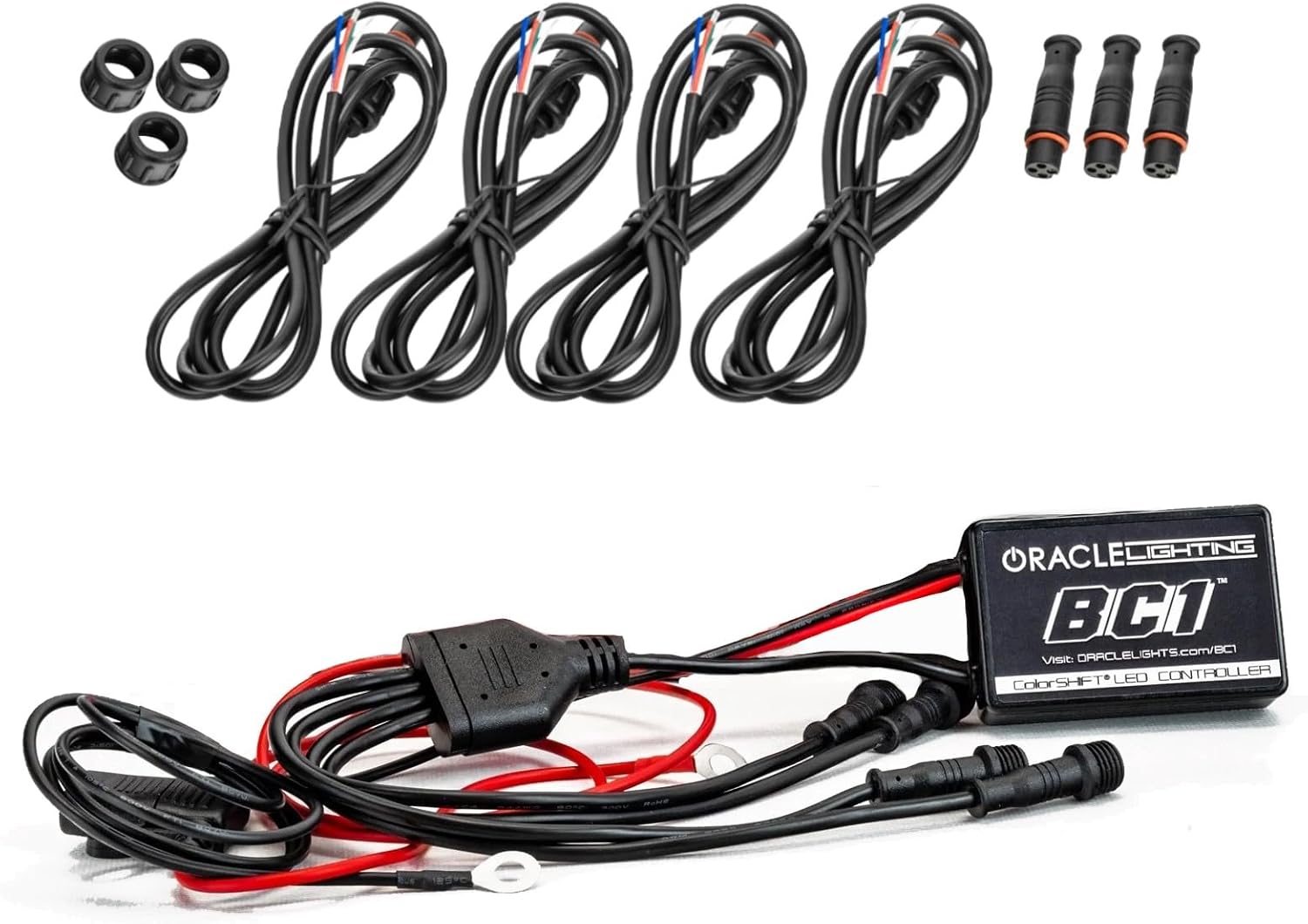
Figure 1: ORACLE Lighting BC1 Bluetooth Controller and included accessories, including the main controller unit, four accessory plugs with waterproof connections, and three waterproof end caps.
3 സുരക്ഷാ വിവരങ്ങൾ
Always disconnect the vehicle's battery before performing any electrical work. Ensure all connections are secure and properly insulated to prevent short circuits. This product is designed for 12VDC automotive systems. Do not exceed the maximum current output of 10A per channel.
നിർദ്ദേശം 65 മുന്നറിയിപ്പ്: ഈ ഉൽപ്പന്നത്തിൽ കാലിഫോർണിയ സംസ്ഥാനത്തിന് അറിയപ്പെടുന്ന രാസവസ്തുക്കൾ അടങ്ങിയിരിക്കാം, അത് കാൻസറിനും ജനന വൈകല്യങ്ങൾക്കും അല്ലെങ്കിൽ മറ്റ് പ്രത്യുൽപാദന വൈകല്യങ്ങൾക്കും കാരണമാകും. കൂടുതൽ വിവരങ്ങൾക്ക്, സന്ദർശിക്കുക www.P65Warnings.ca.gov.
4. ഇൻസ്റ്റലേഷൻ
4.1 പ്രീ-ഇൻസ്റ്റലേഷൻ ചെക്ക്ലിസ്റ്റ്
- വാഹനത്തിന്റെ ബാറ്ററി വിച്ഛേദിച്ചിട്ടുണ്ടെന്ന് ഉറപ്പാക്കുക.
- ആവശ്യമായ ഉപകരണങ്ങൾ ശേഖരിക്കുക: വയർ സ്ട്രിപ്പറുകൾ, ക്രിമ്പറുകൾ, ഇലക്ട്രിക്കൽ ടേപ്പ്, സിപ്പ് ടൈകൾ, മൾട്ടിമീറ്റർ.
- Identify the mounting location for the controller. It can be mounted inside or outside the vehicle cabin.
- Plan the wiring path to avoid moving parts, heat sources, and sharp edges.
4.2 വയറിംഗ് നിർദ്ദേശങ്ങൾ
- പവർ കണക്ഷൻ: Connect the positive (+) wire (typically red) from the BC1 controller to a constant 12V power source. It is recommended to use an inline 10A fuse within 12 inches of this connection.
- ഗ്രൗണ്ട് കണക്ഷൻ: Connect the negative (-) wire (typically black) from the BC1 controller to a reliable chassis ground point on the vehicle.
- LED ലൈറ്റ് കണക്ഷനുകൾ: Connect your RGB LED ColorSHIFT lights to the four output ports on the BC1 controller. Each output port is waterproof. Ensure the connections are secure.
- Unused Ports: If not all four output ports are used, install the provided waterproof end caps on the unused ports to protect them from moisture and debris.

Figure 2: The ORACLE Lighting BC1 Bluetooth Controller showing its main unit and the four output wires with waterproof connections, ready for installation.
4.3 കൺട്രോളർ മൌണ്ട് ചെയ്യുന്നു
Secure the BC1 controller in a location that is protected from extreme heat and direct physical damage. Use zip ties or mounting screws (not included) to firmly attach the controller. Ensure the location allows for proper cable routing and access if needed.
5. ഓപ്പറേഷൻ
5.1 അപ്ലിക്കേഷൻ ഇൻസ്റ്റാളേഷൻ
The ORACLE Lighting ColorSHIFT BC1 Controller is operated via a dedicated mobile application. Download the "ColorSHIFT" app from your device's app store (available for iOS and Android).
5.2 കൺട്രോളറുമായി ബന്ധിപ്പിക്കുന്നു
- Ensure your vehicle's battery is reconnected and the controller is powered.
- നിങ്ങളുടെ മൊബൈൽ ഉപകരണത്തിൽ ബ്ലൂടൂത്ത് പ്രവർത്തനക്ഷമമാക്കുക.
- Open the ColorSHIFT app. The app will automatically scan for and connect to nearby BC1 controllers.
- Once connected, the app interface will display controls for your lights.
5.3 അടിസ്ഥാന പ്രവർത്തനങ്ങൾ
- വർണ്ണ തിരഞ്ഞെടുപ്പ്: Use the color wheel or preset options within the app to choose your desired light color.
- തെളിച്ച ക്രമീകരണം: ബ്രൈറ്റ്നെസ് സ്ലൈഡർ ഉപയോഗിച്ച് ലൈറ്റുകളുടെ തീവ്രത ക്രമീകരിക്കുക.
- സ്ട്രോബ് ഇഫക്റ്റുകൾ: Activate and customize strobing patterns.
- സംഗീത സമന്വയം: Synchronize your lights with music playing on your device or through the app's microphone input.
- Custom Themes: Create and save personalized lighting themes for quick access.

ചിത്രം 3: ഉദാample of ColorSHIFT LED lighting installed in a vehicle interior, demonstrating customizable color options.
6. പരിപാലനം
The ORACLE Lighting BC1 Bluetooth Controller requires minimal maintenance. Periodically inspect all wiring connections for corrosion or damage. Ensure the controller unit is free from excessive dirt or moisture buildup. Clean the unit with a soft, dry cloth if necessary.
Due to its waterproof design (IP67), the controller is protected against dust ingress and temporary immersion in water. However, prolonged submersion or high-pressure water jets should be avoided.
7. പ്രശ്നപരിഹാരം
| പ്രശ്നം | സാധ്യമായ കാരണം | പരിഹാരം |
|---|---|---|
| ലൈറ്റുകൾ കത്തുന്നില്ല. | No power to controller; loose wiring; blown fuse; faulty LED lights. | Check power and ground connections. Verify fuse. Test LED lights independently. |
| ബ്ലൂടൂത്ത് വഴി ബന്ധിപ്പിക്കാൻ കഴിയില്ല. | Bluetooth disabled on device; app not open; controller out of range; interference. | Ensure Bluetooth is on. Open the ColorSHIFT app. Move closer to the controller. Restart app/device. |
| Lights do not respond to app commands. | Poor Bluetooth connection; app malfunction; controller malfunction. | Verify strong Bluetooth connection. Restart the app. If issues persist, contact support. |
| Lights reset to default color upon vehicle startup. | Controller wired to switched power instead of constant power for memory retention. | The BC1 controller does not retain settings if power is cut. For memory retention, the controller's positive wire needs constant 12V power. A relay can be used to switch the LED power while keeping the controller powered (refer to advanced wiring diagrams or professional installation). |
8 സ്പെസിഫിക്കേഷനുകൾ
- മോഡൽ: 1720-504
- ഇൻപുട്ട് വോളിയംtage: 12VDC
- Max Current Output: 10എ
- പ്രവർത്തനം: Ground-Switched RGB
- വെതർപ്രൂഫ് റേറ്റിംഗ്: IP67
- Dimensions (Controller): ഏകദേശം 4 x 9 x 9 ഇഞ്ച് (L x W x H)
- മെറ്റീരിയൽ: പ്ലാസ്റ്റിക്
- ഫിറ്റ്മെൻ്റ്: യൂണിവേഴ്സൽ

Figure 4: Visual representation of the ORACLE Lighting BC1 Bluetooth Controller and its key specifications, including input voltage, current output, operation type, and weatherproof rating.
9. വാറൻ്റിയും പിന്തുണയും
9.1 വാറൻ്റി വിവരങ്ങൾ
ORACLE Lighting products are manufactured to high standards. For specific warranty details, please refer to the warranty information provided with your purchase or visit the official ORACLE Lighting webസൈറ്റ്.
9.2 ഉപഭോക്തൃ പിന്തുണ
If you encounter any issues or have questions regarding your ORACLE Lighting ColorSHIFT BC1 Bluetooth Controller, please contact ORACLE Lighting customer support through their official webസൈറ്റ് അല്ലെങ്കിൽ നിങ്ങളുടെ ഉൽപ്പന്ന പാക്കേജിംഗിൽ നൽകിയിരിക്കുന്ന ബന്ധപ്പെടാനുള്ള വിവരങ്ങൾ.
ORACLE Lighting Webസൈറ്റ്: www.oraclelights.com


