1. ആമുഖം
This manual provides instructions for the proper use and maintenance of your Phomemo M02 Mini Bluetooth Thermal Photo Printer. Please read this manual thoroughly before operating the device to ensure optimal performance and longevity.
2. പാക്കേജ് ഉള്ളടക്കം
നിങ്ങളുടെ പാക്കേജിൽ എല്ലാ ഇനങ്ങളും ഉണ്ടെന്ന് ഉറപ്പാക്കുക:
- Phomemo M02 മിനി പ്രിൻ്റർ
- യുഎസ്ബി ചാർജിംഗ് കേബിൾ
- Thermal Printing Paper (rolls)
- ഉപയോക്തൃ മാനുവൽ (ഈ പ്രമാണം)
- പാക്കിംഗ് ബോക്സ്
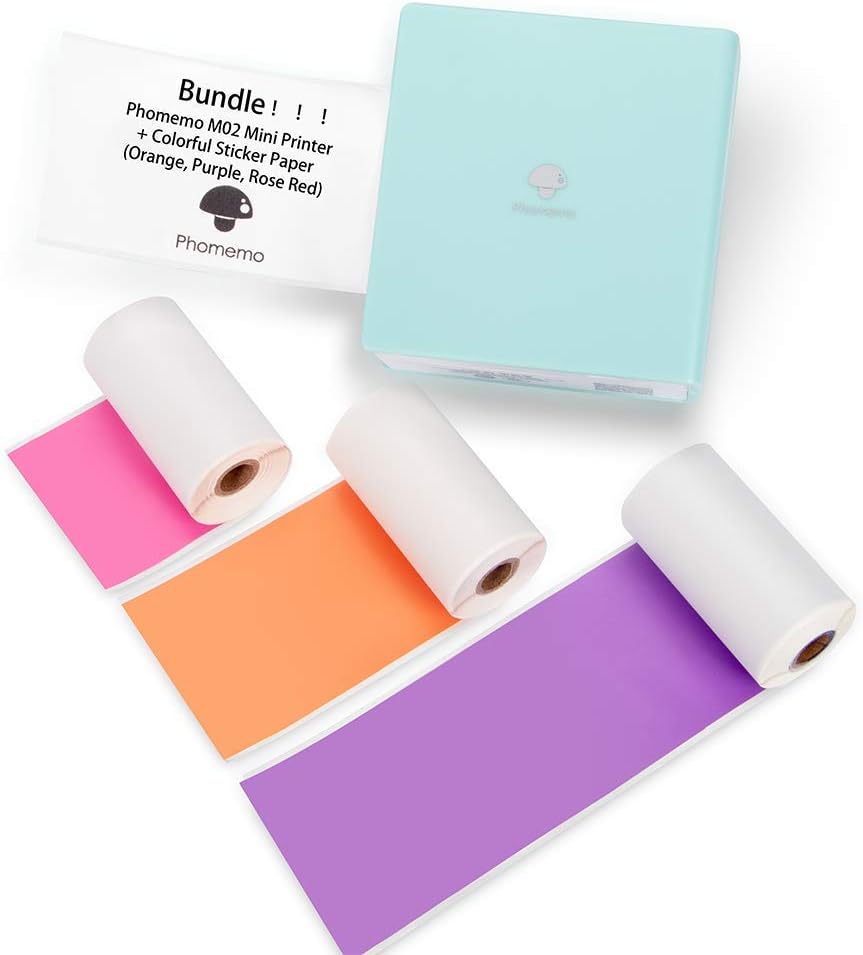
Image: The Phomemo M02 Mini Printer in light blue, shown with three rolls of colorful thermal sticker paper (orange, purple, and pink).
3. സജ്ജീകരണം
3.1 പ്രിന്റർ ചാർജ് ചെയ്യുന്നു
Before first use, fully charge the printer using the provided USB cable. Connect the USB cable to the printer's charging port and a standard USB power adapter (not included). The indicator light will show charging status.
3.2 തെർമൽ പേപ്പർ ലോഡുചെയ്യുന്നു
- Open the printer cover by sliding the latch or pressing the release button.
- Insert a roll of thermal paper into the paper compartment, ensuring the printing side faces the print head.
- Pull a small amount of paper out beyond the print head.
- പ്രിൻ്റർ കവർ സുരക്ഷിതമായി അടയ്ക്കുക.

Image: Three rolls of Phomemo thermal paper, one orange, one purple, and one pink, with a measurement indicating a width of 53mm.
3.3 ആപ്പ് ഇൻസ്റ്റാളേഷനും ബ്ലൂടൂത്ത് പെയറിംഗും
- Download the Phomemo APP from the App Store (for iOS devices) or Google Play (for Android devices).
- നിങ്ങളുടെ മൊബൈൽ ഉപകരണത്തിൽ ബ്ലൂടൂത്ത് പ്രവർത്തനക്ഷമമാക്കിയിട്ടുണ്ടെന്ന് ഉറപ്പാക്കുക.
- Open the Phomemo APP.
- ഫോമെമോ M02 പ്രിന്റർ ഓണാക്കുക.
- Within the app, search for and connect to your M02 printer via Bluetooth. The app will guide you through the pairing process.

Image: A Phomemo M02 Mini Printer next to a smartphone displaying the Phomemo app interface, with icons for Notes, Scan, Print Images, Templates, Micro Print, and Toolbox. Instructions for downloading from App Store and Google Play are also visible.
4. പ്രവർത്തന നിർദ്ദേശങ്ങൾ
4.1 അടിസ്ഥാന പ്രിന്റിംഗ്
Once connected to the Phomemo APP, you can print various content:
- Text Printing: Use the 'Notes' or 'Micro Print' features to input text and print.
- ഫോട്ടോ പ്രിന്റിംഗ്: Select 'Print Images' to choose photos from your device's gallery. The app allows for basic editing and filter application before printing.

Image: A Phomemo M02 Mini Printer printing a black and white photo, which is then being pasted into a journal. A hand is writing 'Puppy Love' next to the photo.

Image: A Phomemo M02 Mini Printer printing a list of words, demonstrating text printing capability. Also shown are small printed labels with words like 'observe' and 'accountant'.
4.2 Using App Features
The Phomemo APP offers several features to enhance your printing experience:
- ടെംപ്ലേറ്റുകൾ: Access pre-designed templates for various uses like lists, labels, and decorative frames.
- Graphic Printing: Print various graphics and illustrations available within the app.
- നിന്ന് പ്രിൻ്റ് ചെയ്യുക Web: Print content directly from web പേജുകൾ.
- Banner Print: Create and print extended banners.

Image: A collage of smartphone screens demonstrating various functions of the Phomemo M02 app, including Photo Printing, Do do List, Scan, Graphic Printing, Print from Web, and Banner Print.
5. പരിപാലനം
5.1 പ്രിന്റ് ഹെഡ് വൃത്തിയാക്കൽ
To maintain print quality, periodically clean the print head. Use a cotton swab lightly dampened with isopropyl alcohol to gently wipe the print head. Ensure the printer is off and dry before use.
5.2 ബാറ്ററി കെയർ
To prolong battery life, avoid fully discharging the printer frequently. Charge the printer regularly, even if not in use for extended periods.
5.3 പേപ്പർ സംഭരണം
Store thermal paper in a cool, dry place away from direct sunlight and heat to prevent premature fading or damage to the paper's thermal coating.
6. പ്രശ്നപരിഹാരം
- പ്രിന്റർ ബ്ലൂടൂത്ത് വഴി കണക്റ്റ് ചെയ്യുന്നില്ല: Ensure the printer is turned on and within range. Restart both the printer and your mobile device. Verify Bluetooth is enabled on your device and try re-pairing through the Phomemo APP.
- മോശം പ്രിന്റ് നിലവാരം: Check if the thermal paper is loaded correctly with the printing side facing the print head. Clean the print head as described in Section 5.1. Ensure the paper is not old or damaged.
- പേപ്പർ ജാം: Turn off the printer, open the cover, and carefully remove any jammed paper. Ensure the paper roll is properly seated and not too tight.
- പ്രിന്റർ ഓണാകുന്നില്ല: Ensure the printer is charged. Connect it to a power source and check if the charging indicator light appears.
7 സ്പെസിഫിക്കേഷനുകൾ
| ഫീച്ചർ | സ്പെസിഫിക്കേഷൻ |
|---|---|
| ബ്രാൻഡ് | ഫേമോമോ |
| മോഡലിൻ്റെ പേര് | എം 02 മിനി |
| പ്രിൻ്റിംഗ് ടെക്നോളജി | തെർമൽ |
| കണക്റ്റിവിറ്റി ടെക്നോളജി | ബ്ലൂടൂത്ത്, യുഎസ്ബി |
| പ്രിൻ്റർ ഔട്ട്പുട്ട് | മോണോക്രോം |
| പരമാവധി കറുപ്പും വെളുപ്പും പ്രിന്റ് റെസല്യൂഷൻ | 203 ഡിപിഐ |
| പരമാവധി മീഡിയ വലുപ്പം | 53 മിമി x 30 മിമി |
| അനുയോജ്യമായ ഉപകരണങ്ങൾ | Smartphones (iOS 8.0+, Android 4.0+) |
| നിയന്ത്രണ രീതി | ആപ്പ് |
| ബാറ്ററി | ബിൽറ്റ്-ഇൻ 1000mAh |
8. വാറൻ്റിയും പിന്തുണയും
The Phomemo M02 Mini Printer comes with a limited warranty. For detailed warranty information and customer support, please refer to the warranty card included in your package or visit the official Phomemo website. For technical assistance, please contact Phomemo customer service.


