1. ആമുഖം
The OnePlus 8 Glacial Green (Model IN2015) is an advanced Android smartphone designed for high performance and a smooth user experience. It features a 90Hz Fluid AMOLED display, a powerful Qualcomm Snapdragon 865 processor with 5G connectivity, and a versatile triple camera system.
This manual provides essential information for setting up, operating, maintaining, and troubleshooting your device.
2. ബോക്സിൽ എന്താണുള്ളത്?
Upon unboxing your OnePlus 8, verify that all the following items are included:
- OnePlus 8 Glacial Green Smartphone
- Warp Charge 30 Power Adapter
- Warp Type-C Cable (Supports USB 2.0)
- ദ്രുത ആരംഭ ഗൈഡ്
- സ്വാഗത കത്ത്
- സുരക്ഷാ വിവരങ്ങളും വാറൻ്റി കാർഡും
- LOGO Sticker
- Screen Protector (pre-applied)
- സിം ട്രേ എജക്ടർ
3. ഡിവൈസ് ഓവർview

ചിത്രം 1: മുന്നിലും പിന്നിലും view of the OnePlus 8 Glacial Green smartphone.
3.1 ഭൗതിക അളവുകളും ഭാരവും
- അളവുകൾ: 6.31 x 2.87 x 0.31 ഇഞ്ച്
- ഭാരം: 6.3 ഔൺസ് (180 ഗ്രാം)
- നിറം: Glacial Green
3.2 ബട്ടണുകളും പോർട്ടുകളും

ചിത്രം 2: താഴെ view showing the USB-C port, speaker, and SIM tray.
- വലത് വശം: Power button, Alert Slider (for Ring/Vibrate/Silent modes).
- ഇടത് വശം: Volume rocker.
- താഴെ: USB-C port, single SIM card tray, primary microphone, bottom-firing speaker.
- മുകളിൽ: സെക്കൻഡറി മൈക്രോഫോൺ.
- No dedicated 3.5mm audio jack.
3.3 ക്യാമറ സിസ്റ്റം
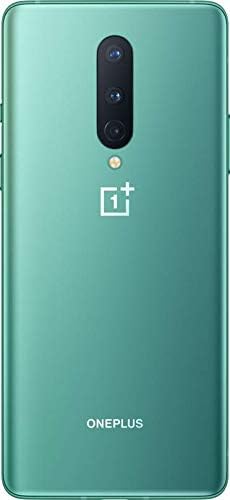
ചിത്രം 3: പിന്നിലേക്ക് view highlighting the triple camera setup.
- പിൻ ക്യാമറകൾ: Triple camera setup including a 48MP main sensor, a 16MP ultra-wide angle lens, and a 2MP macro lens. Features include Nightscape 2.0, Studio Lighting, Super Slow Motion (up to 460 FPS), RAW image capture, and AI Scene Detection.
- മുൻ ക്യാമറ: 16MP ഫ്രണ്ട് ക്യാമറ.
4. സജ്ജീകരണം
4.1 സിം കാർഡ് ചേർക്കൽ
- Locate the SIM tray on the bottom edge of the device.
- സിം ട്രേയിലെ ചെറിയ ദ്വാരത്തിലേക്ക് സിം എജക്റ്റർ ഉപകരണം തിരുകുക.
- ട്രേ പുറത്തുവരുന്നതുവരെ സൌമ്യമായി തള്ളുക.
- Place your Nano-SIM card into the tray with the gold contacts facing down. This model supports a single SIM card.
- സിം ട്രേ ശ്രദ്ധാപൂർവ്വം ഉപകരണത്തിലേക്ക് വീണ്ടും ചേർക്കുക.
4.2 പവർ ഓൺ/ഓഫ്
- പവർ ഓണാക്കാൻ: Press and hold the Power button on the right side until the OnePlus logo appears.
- പവർ ഓഫ് ചെയ്യാൻ: Press and hold the Power button, then tap
അനുബന്ധ രേഖകൾ - IN2015

OnePlus Nord ഉപയോക്തൃ മാനുവൽ: നിങ്ങളുടെ സ്മാർട്ട്ഫോണിലേക്കുള്ള സമഗ്ര ഗൈഡ്
നിങ്ങളുടെ OnePlus Nord സ്മാർട്ട്ഫോണിനായുള്ള സജ്ജീകരണം, സവിശേഷതകൾ, ക്രമീകരണങ്ങൾ, ആപ്പ് ഉപയോഗം, സുരക്ഷാ മുൻകരുതലുകൾ, നിയന്ത്രണ പാലിക്കൽ എന്നിവയെക്കുറിച്ചുള്ള വിശദമായ നിർദ്ദേശങ്ങൾക്ക് OnePlus Nord ഉപയോക്തൃ മാനുവൽ പര്യവേക്ഷണം ചെയ്യുക.
OnePlus 10T 5G Användarhandbok: കോം ഇഗോംഗ്, ഇൻസ്റ്റോൾ ചെയ്യുക അല്ലെങ്കിൽ ഫംഗ്ഷണർ
OnePlus 10T 5G-യ്ക്കായി കോംപ്ലറ്റ് ലഭ്യമാക്കുക. വൺപ്ലസ്-സ്മാർട്ട്ഫോണിനായി എല്ലാ ഇൻസ്റ്റാളേഷനും ഫങ്ക്ഷനർ, ഇൻസ്റ്റാളേഷൻ, അപ്പാർ, സെക്കർഹെറ്റ് ഓച്ച് ഫെൽസോക്നിങ്ങ് എന്നിവയെല്ലാം ഡിഗ് ചെയ്യുക.
OnePlus 7T Brugervejledning: Omfattende guide til din smartphone
വൺപ്ലസ് 7T നൽകുന്നവർ ഡെൻനെ ബ്രൂഗർവെജ്ലെഡ്നിങ്ങിൽ ഡെൽജെറിഡ് ഇൻസ്ട്രക്ഷനർ ഓം ഓപ്സെറ്റ്നിംഗ്, ബ്രഗ് ഓഫ് ഫങ്ക്ഷനർ, ഇൻഡ്സ്റ്റില്ലിംഗർ, ആപ്ലിക്കേഷനുകൾ, ക്യാമറ, സിക്കർഹെഡ്, വെഡ്ലിഗെഹോൾഡൽസ്, വൺപ്ലസ് സ്മാർട്ട്ഫോണിനായി റെഗുലേറ്ററിസ്ക് ഓവർഹോൾഡൽസ് എന്നിവയുണ്ട്.
OnePlus 15 (CPH2747) Repair Manual: Disassembly, Assembly, and Troubleshooting
Official repair manual for the OnePlus 15 (CPH2747) smartphone, detailing disassembly, assembly, component identification, calibration, and fault diagnosis procedures.
OnePlus 10 Pro ക്വിക്ക് സ്റ്റാർട്ട് ഗൈഡ്
OnePlus 10 Pro സ്മാർട്ട്ഫോണിന്റെ സവിശേഷതകൾ സജ്ജീകരിക്കുന്നതിനും മനസ്സിലാക്കുന്നതിനുമുള്ള സംക്ഷിപ്ത ഗൈഡ്, ഉപകരണ ഘടകങ്ങളും അടിസ്ഥാന പ്രവർത്തനങ്ങളും ഉൾക്കൊള്ളുന്നു.
OnePlus 9 ഉപയോഗിക്കൂ
കോംപ്ലെക്സ്നി യൂസിവാറ്റെൽസ്ക പ്രോ സ്മാർട്ട്ഫോൺ വൺപ്ലസ് 9, കെറ്റെർ പോക്റിവ് നസ്റ്റേവനി, ഫങ്ക്സ്, അപ്ലിക്കസ് എ ബെസ്പെക്നോസ്നി പോക്കിനി പ്രോ ഒപ്റ്റിമാൽനി വ്യുസിറ്റി സാരിസെനി.