ആമുഖം
This manual provides comprehensive instructions for the setup, operation, and maintenance of your Perixx PERIBOARD-426 Wired Mini Low Profile Keyboard. Please read this manual thoroughly before using the product to ensure proper functionality and longevity.
The Perixx PERIBOARD-426 is a compact, low-profile keyboard designed for efficiency and comfort in various computing environments. It features a wired USB connection for reliable performance and integrated multimedia keys for enhanced control.
പാക്കേജ് ഉള്ളടക്കം
- Perixx PERIBOARD-426 Wired Mini Low Profile കീബോർഡ്
- ഉപയോക്തൃ മാനുവൽ (ഈ പ്രമാണം)
സിസ്റ്റം ആവശ്യകതകൾ
- Operating System: Windows 7, Windows 8, Windows 10, or later
- യുഎസ്ബി പോർട്ട് ലഭ്യമാണ്
സജ്ജമാക്കുക
The Perixx PERIBOARD-426 is a plug-and-play device, requiring no additional driver installation for basic functionality.
- കീബോർഡ് അൺപാക്ക് ചെയ്യുക: കീബോർഡ് അതിന്റെ പാക്കേജിംഗിൽ നിന്ന് ശ്രദ്ധാപൂർവ്വം നീക്കം ചെയ്യുക.
- കമ്പ്യൂട്ടറുമായി ബന്ധിപ്പിക്കുക: Locate an available USB port on your computer. Insert the USB connector of the PERIBOARD-426 into the USB port.
- സിസ്റ്റം തിരിച്ചറിയൽ: നിങ്ങളുടെ ഓപ്പറേറ്റിംഗ് സിസ്റ്റം ആവശ്യമായ ഡ്രൈവറുകൾ സ്വയമേവ കണ്ടെത്തി ഇൻസ്റ്റാൾ ചെയ്യും. ഈ പ്രക്രിയയ്ക്ക് കുറച്ച് നിമിഷങ്ങൾ എടുത്തേക്കാം.
- ഉപയോഗം ആരംഭിക്കുക: ഇൻസ്റ്റാളേഷൻ പൂർത്തിയായിക്കഴിഞ്ഞാൽ, കീബോർഡ് ഉപയോഗത്തിന് തയ്യാറാണ്.

പ്രവർത്തന നിർദ്ദേശങ്ങൾ
General Typing
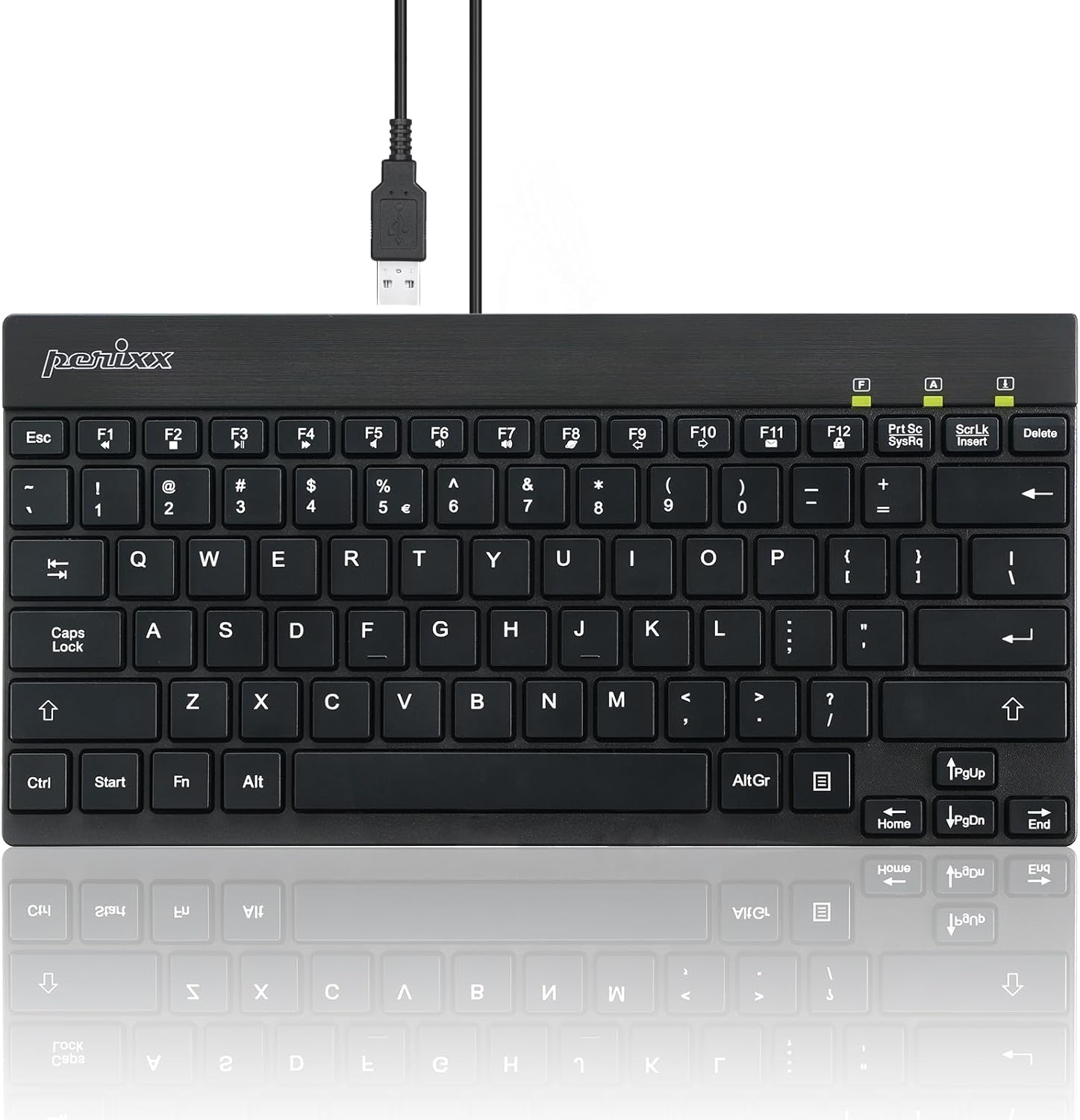
The PERIBOARD-426 features a standard US English layout with low-profile keys for a comfortable typing experience. The responsive key mechanism ensures accurate input.
മൾട്ടിമീഡിയ കീകൾ
The keyboard includes dedicated multimedia function keys (F1-F12) that can be accessed by pressing the Fn key in combination with the desired function key. These keys provide quick access to common media controls and system functions.
| കീ കോമ്പിനേഷൻ | ഫംഗ്ഷൻ |
|---|---|
| Fn + F1 | മീഡിയ പ്ലെയർ തുറക്കുക |
| Fn + F2 | വോളിയം ഡൗൺ |
| Fn + F3 | വോളിയം കൂട്ടുക |
| Fn + F4 | നിശബ്ദമാക്കുക |
| Fn + F5 | മുമ്പത്തെ ട്രാക്ക് |
| Fn + F6 | അടുത്ത ട്രാക്ക് |
| Fn + F7 | പ്ലേ/താൽക്കാലികമായി നിർത്തുക |
| Fn + F8 | നിർത്തുക |
| Fn + F9 | തുറക്കുക Web ബ്രൗസർ |
| Fn + F10 | ഇമെയിൽ ക്ലയന്റ് തുറക്കുക |
| Fn + F11 | എൻ്റെ കമ്പ്യൂട്ടർ |
| Fn + F12 | കാൽക്കുലേറ്റർ |
Note: Specific multimedia functions may vary slightly depending on your operating system and installed software.
പരിപാലനവും പരിചരണവും
- വൃത്തിയാക്കൽ: കീബോർഡ് വൃത്തിയാക്കാൻ, നിങ്ങളുടെ കമ്പ്യൂട്ടറിൽ നിന്ന് അത് വിച്ഛേദിക്കുക. മൃദുവായ, ലിന്റ് രഹിത തുണി ഉപയോഗിച്ച് ചെറുതായി വൃത്തിയാക്കുക.ampവെള്ളമോ നേരിയ ക്ലീനിംഗ് ലായനിയോ ഉപയോഗിച്ച് നനയ്ക്കുക. കഠിനമായ രാസവസ്തുക്കളോ ഉരച്ചിലുകളോ ഉള്ള വസ്തുക്കൾ ഒഴിവാക്കുക.
- പൊടി നീക്കം: താക്കോലുകൾക്കിടയിൽ നിന്ന് പൊടിയും അവശിഷ്ടങ്ങളും നീക്കം ചെയ്യാൻ കംപ്രസ് ചെയ്ത വായു ഉപയോഗിക്കുക.
- സംഭരണം: When not in use, store the keyboard in a clean, dry environment away from extreme temperatures.
- ദ്രാവക എക്സ്പോഷർ: Avoid spilling liquids on the keyboard. In case of accidental spills, immediately disconnect the keyboard and allow it to dry completely before reconnecting.
ട്രബിൾഷൂട്ടിംഗ്
കീബോർഡ് പ്രതികരിക്കുന്നില്ല
- യുഎസ്ബി കണക്ഷൻ പരിശോധിക്കുക: Ensure the USB cable is securely plugged into a functional USB port on your computer. Try a different USB port.
- കമ്പ്യൂട്ടർ പുനരാരംഭിക്കുക: ചിലപ്പോൾ ഒരു ലളിതമായ സിസ്റ്റം പുനരാരംഭിക്കൽ കണക്റ്റിവിറ്റി പ്രശ്നങ്ങൾ പരിഹരിക്കും.
- മറ്റൊരു കമ്പ്യൂട്ടറിൽ പരീക്ഷിക്കുക: കഴിയുമെങ്കിൽ, പ്രശ്നം കീബോർഡിലാണോ അതോ നിങ്ങളുടെ സിസ്റ്റത്തിലാണോ എന്ന് നിർണ്ണയിക്കാൻ മറ്റൊരു കമ്പ്യൂട്ടറിൽ കീബോർഡ് പരീക്ഷിച്ചു നോക്കുക.
- ഡ്രൈവർ വീണ്ടും ഇൻസ്റ്റാൾ ചെയ്യുന്നു: Although plug-and-play, you can try uninstalling the keyboard driver from Device Manager (Windows) and then reconnecting the keyboard to allow the system to reinstall it.
കീകൾ ശരിയായി പ്രവർത്തിക്കുന്നില്ല.
- ക്ലീൻ കീകൾ: Ensure no debris is lodged under the affected keys. Use compressed air to clear any obstructions.
- സോഫ്റ്റ്വെയർ ഇടപെടൽ: Check if any software or system settings are interfering with keyboard input.
Multimedia Keys Not Working
- Fn Key Usage: നിങ്ങൾ അമർത്തുന്നത് ഉറപ്പാക്കുക Fn ആവശ്യമുള്ള ഫംഗ്ഷൻ കീയ്ക്കൊപ്പം ഒരേസമയം കീ അമർത്തുക.
- ഓപ്പറേറ്റിംഗ് സിസ്റ്റം പിന്തുണ: Verify that your operating system and media player software support the standard multimedia key commands.
സ്പെസിഫിക്കേഷനുകൾ
| ഫീച്ചർ | വിശദാംശങ്ങൾ |
|---|---|
| മോഡൽ | PERIBOARD-426 (11665) |
| കണക്റ്റിവിറ്റി | വയർഡ് യുഎസ്ബി |
| ലേഔട്ട് | യുഎസ് ഇംഗ്ലീഷ് |
| കീ തരം | കുറഞ്ഞ പ്രോfile, Membrane Switch |
| മെറ്റീരിയൽ | എബിഎസ് (അക്രിലോണിട്രൈൽ ബ്യൂട്ടാഡീൻ സ്റ്റൈറൈൻ) |
| അളവുകൾ (L x W x H) | 10.87 x 5.43 x 0.55 ഇഞ്ച് (27.6 x 13.8 x 1.4 സെ.മീ) |
| ഭാരം | 0.84 lb (381 ഗ്രാം) |
| കേബിൾ നീളം | ഏകദേശം 4.9 അടി (1.5 മീറ്റർ) |
| നിറം | കറുപ്പ് |
| അനുയോജ്യമായ OS | Windows 7/8/10 അല്ലെങ്കിൽ അതിനുശേഷമുള്ളത് |
വാറൻ്റിയും പിന്തുണയും
The Perixx PERIBOARD-426 comes with a one-year limited warranty from the date of purchase. This warranty covers manufacturing defects and workmanship under normal use.
For technical support, warranty claims, or further assistance, please visit the official Perixx website or contact their customer service department. Contact information can typically be found on the Perixx brand store page or product packaging.
You can visit the Perixx Store for more information: Perixx Official Store
സുരക്ഷാ വിവരങ്ങൾ
- തീവ്രമായ ഊഷ്മാവ്, ഈർപ്പം, നേരിട്ടുള്ള സൂര്യപ്രകാശം എന്നിവയിൽ ഉപകരണം തുറന്നുകാട്ടരുത്.
- ഉപകരണം വെള്ളത്തിൽ നിന്നും മറ്റ് ദ്രാവകങ്ങളിൽ നിന്നും അകറ്റി നിർത്തുക.
- ഉപകരണം ഡിസ്അസംബ്ലിംഗ് ചെയ്യാനോ പരിഷ്ക്കരിക്കാനോ ശ്രമിക്കരുത്. ഇത് വാറന്റി അസാധുവാക്കും.
- കുട്ടികൾക്ക് ലഭ്യമാകാതെ സൂക്ഷിക്കുക.


