ആമുഖം
This manual provides detailed instructions for the MageGee K1 RGB Gaming Keyboard and Mouse combo. Please read this manual carefully before using the product to ensure proper setup and operation. This product is designed for use with personal computers and laptops, offering a full-size keyboard with RGB backlighting and a high-resolution gaming mouse.

Image: The MageGee K1 RGB Gaming Keyboard and Mouse set, featuring a pink keyboard with RGB backlighting and a matching pink mouse.
പാക്കേജ് ഉള്ളടക്കം
പാക്കേജിൽ എല്ലാ ഇനങ്ങളും ഉണ്ടെന്ന് ഉറപ്പാക്കുക:
- MageGee K1 RGB Gaming Keyboard
- MageGee K1 Gaming Mouse
- ഉപയോക്തൃ മാനുവൽ (ഈ പ്രമാണം)
സജ്ജമാക്കുക
ഉപകരണം ബന്ധിപ്പിക്കുന്നു
- Locate an available USB 2.0 port on your computer or laptop.
- Plug the USB connector of the MageGee K1 Keyboard into the USB port.
- Plug the USB connector of the MageGee K1 Mouse into another available USB port.
- The keyboard and mouse are plug-and-play devices. Your operating system should automatically detect and install the necessary drivers. No additional software or drivers are typically required.
അനുയോജ്യത
The MageGee K1 RGB Gaming Keyboard and Mouse are compatible with the following operating systems:
- Windows XP
- വിൻഡോസ് വിസ്ത
- വിൻഡോസ് 7
- വിൻഡോസ് 8
- വിൻഡോസ് 10
- Mac OS
- ലിനക്സ്
Operating the Keyboard and Mouse
കീബോർഡ് സവിശേഷതകൾ
The K1 keyboard features a full-size 104-key layout with ergonomic design for comfortable use. It includes a numeric keypad and function keys.

Image: Illustration of the ergonomic design of the MageGee K1 keyboard, showing the keycap profile for comfortable typing.
RGB ബാക്ക്ലൈറ്റ് നിയന്ത്രണം
The keyboard features RGB backlighting with multiple customization options:
- ഇളം നിറങ്ങൾ: 8 distinct colors.
- ലൈറ്റിംഗ് മോഡുകൾ: 5 different lighting effects.
- തെളിച്ച നിലകൾ: Adjustable to suit your preference.
- വേഗത നിയന്ത്രണം: ഡൈനാമിക് ലൈറ്റിംഗ് ഇഫക്റ്റുകളുടെ വേഗത ക്രമീകരിക്കുക.
ബാക്ക്ലൈറ്റ് നിയന്ത്രിക്കാൻ:
- Refer to the keyboard's dedicated backlight control keys or FN key combinations for specific adjustments.
- The backlight can be turned on or off as needed.

Image: Diagram illustrating the RGB backlight features of the MageGee K1 keyboard, including 5 light modes, 8 light colors, adjustable speed/brightness, and light on/off functionality.
മൾട്ടിമീഡിയ പ്രവർത്തനങ്ങൾ
The keyboard includes multimedia shortcut keys accessible via the FN കീ:
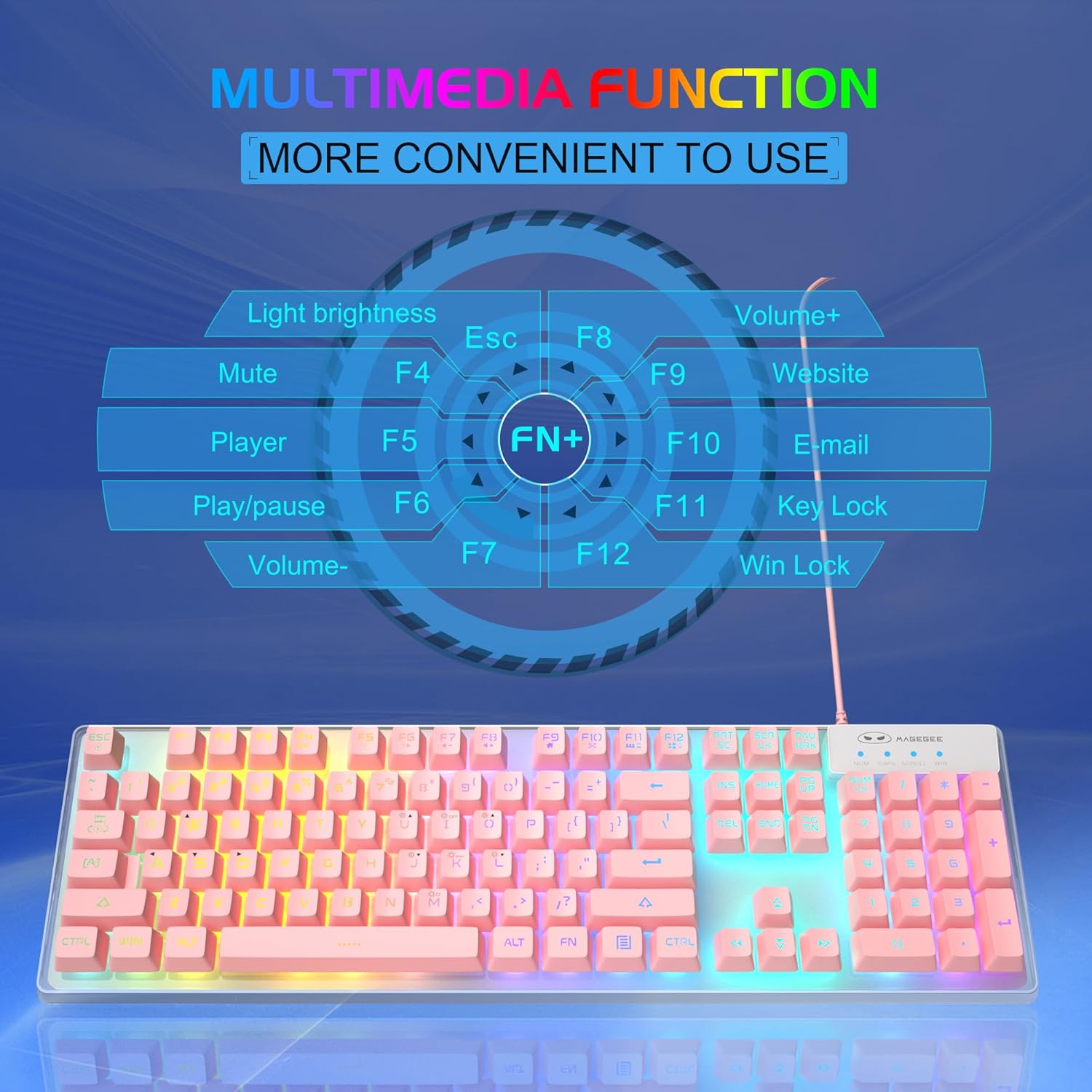
Image: A visual guide to the multimedia functions of the MageGee K1 keyboard, showing FN key combinations for mute, volume control, media playback, website, email, and key lock.
- FN + F1: നിശബ്ദമാക്കുക
- FN + F2: വോളിയം ഡൗൺ
- FN + F3: വോളിയം കൂട്ടുക
- FN + F4: കളിക്കാരൻ
- FN + F5: പ്ലേ/താൽക്കാലികമായി നിർത്തുക
- FN + F6: മുമ്പത്തെ ട്രാക്ക്
- FN + F7: അടുത്ത ട്രാക്ക്
- FN + F8: നിർത്തുക
- FN + F9: ഇമെയിൽ
- FN + F10: Web ബ്രൗസർ
- FN + F11: കീ ലോക്ക്
- FN + F12: Win Lock (disables Windows key)
മൗസ് സവിശേഷതകൾ
The K1 mouse offers high resolution and responsive tracking for gaming and general computing.
DPI ക്രമീകരണം
The mouse features 6 adjustable DPI (Dots Per Inch) levels to match your precision and speed requirements:
- DPI ലെവലുകൾ: 600 / 800 / 1200 / 1600 / 2400 / 3200
To change DPI, press the dedicated DPI button on the mouse. Each press cycles through the available DPI settings.

Image: Diagram showing the MageGee K1 mouse with its 6 DPI levels (600-3200) and instructions for changing and locking the 7-color LED backlight.
LED Backlight Control (Mouse)
The mouse features a 7-color LED backlight with a breathing effect. To lock the mouse LED backlight to a specific color:
- While the mouse cycles through colors, press the സൈഡ് ബട്ടൺ (forward button) and the മധ്യ ബട്ടൺ (scroll wheel click) simultaneously. This will lock the current color.

Image: Display of the MageGee K1 mouse showing its 7-color cycled breathing LED lights in green, yellow, purple, cyan, red, and white.
മെയിൻ്റനൻസ്
വൃത്തിയാക്കൽ
To maintain the performance and appearance of your MageGee K1 keyboard and mouse:
- വൃത്തിയാക്കുന്നതിനുമുമ്പ് നിങ്ങളുടെ കമ്പ്യൂട്ടറിൽ നിന്ന് ഉപകരണങ്ങൾ വിച്ഛേദിക്കുക.
- മൃദുവായ, ലിൻ്റ് രഹിത തുണി ഉപയോഗിക്കുകampവെള്ളം അല്ലെങ്കിൽ മൃദുവായ ക്ലീനിംഗ് ലായനി ഉപയോഗിച്ചാണ്.
- Avoid using harsh chemicals, abrasive cleaners, or solvents, as these can damage the surface and keycap legends.
- കീബോർഡിനായി, കീകൾക്കിടയിലുള്ള പൊടിയും അവശിഷ്ടങ്ങളും നീക്കം ചെയ്യാൻ കംപ്രസ് ചെയ്ത വായു ഉപയോഗിക്കാം.
- For the mouse, gently wipe the surface and the optical sensor area.
ജനറൽ കെയർ
- Avoid exposing the devices to extreme temperatures, direct sunlight, or high humidity.
- Do not drop or subject the devices to strong impacts.
- Keep liquids away from the keyboard and mouse. While the keyboard has some water-resistant features, it is not fully waterproof.
ട്രബിൾഷൂട്ടിംഗ്
If you encounter issues with your MageGee K1 keyboard and mouse, refer to the following common solutions:
| പ്രശ്നം | സാധ്യമായ പരിഹാരം |
|---|---|
| കീബോർഡ്/മൗസ് പ്രതികരിക്കുന്നില്ല |
|
| Backlight not working (Keyboard) |
|
| മൗസ് ട്രാക്കിംഗ് പ്രശ്നങ്ങൾ |
|
| മൾട്ടിമീഡിയ കീകൾ പ്രവർത്തിക്കുന്നില്ല |
|
സ്പെസിഫിക്കേഷനുകൾ
Below are the technical specifications for the MageGee K1 RGB Gaming Keyboard and Mouse:

Image: Detailed dimensions of the MageGee K1 keyboard (438mm x 137mm x 35mm) and mouse (123mm x 63mm x 39mm).
| ഫീച്ചർ | വിശദാംശങ്ങൾ |
|---|---|
| ബ്രാൻഡ് | മേജ്ഗീ |
| മോഡൽ നമ്പർ | K1 |
| നിറം | K1 Pink |
| കണക്റ്റിവിറ്റി ടെക്നോളജി | Wired USB 2.0 (Gold-plated interface, Anti-interference magnetic ring) |
| കീബോർഡ് ലേഔട്ട് | Full-size 104 keys |
| കീബോർഡ് ബാക്ക്ലൈറ്റ് | RGB (8 colors, 5 modes, adjustable brightness/speed) |
| കീക്യാപ്പ് തരം | Double-shot injection molded, Membrane style |
| Special Keyboard Features | Ergonomic, Backlit, Shortcut and Multimedia keys, Anti-ghosting (19 keys) |
| മൗസ് സെൻസർ സാങ്കേതികവിദ്യ | ഒപ്റ്റിക്കൽ |
| മൗസ് DPI ലെവലുകൾ | 600/800/1200/1600/2400/3200 |
| മൗസ് ബാക്ക്ലൈറ്റ് | 7-color cycled breathing LED |
| അനുയോജ്യമായ ഓപ്പറേറ്റിംഗ് സിസ്റ്റങ്ങൾ | Windows XP/Vista/7/8/10, Mac, Linux |
| മെറ്റീരിയൽ | എബിഎസ് എഞ്ചിനീയറിംഗ് പ്ലാസ്റ്റിക് |
| പവർ ഉറവിടം | യുഎസ്ബി പവർഡ് (ബാറ്ററികൾ ആവശ്യമില്ല) |
വാറൻ്റിയും പിന്തുണയും
Information regarding specific warranty terms and customer support contact details for the MageGee K1 RGB Gaming Keyboard and Mouse is not available in this document. Please refer to the product packaging or the official MageGee webവാറന്റി വിവരങ്ങൾക്കും ഉപഭോക്തൃ സേവന കോൺടാക്റ്റുകൾക്കുമുള്ള സൈറ്റ്.


