ആമുഖം
ലോജിടെക് Z407 ബ്ലൂടൂത്ത് കമ്പ്യൂട്ടർ സ്പീക്കേഴ്സ് സിസ്റ്റം നിങ്ങളുടെ ഡെസ്ക്ടോപ്പ് സജ്ജീകരണത്തിന് ആഴത്തിലുള്ള ശബ്ദം നൽകുന്നു. ശക്തമായ ഡൗൺ-ഫയറിംഗ് സബ് വൂഫറും ഡിജിറ്റൽ സിഗ്നൽ പ്രോസസ്സിംഗും ഉള്ള ഇത്, ഉയർന്ന ശബ്ദങ്ങൾ മുതൽ ആഴത്തിലുള്ളതും സമ്പന്നവുമായ ബാസ് വരെയുള്ള മുഴുവൻ ശബ്ദ സ്പെക്ട്രത്തിലും വ്യക്തമായ ഓഡിയോ ഉറപ്പാക്കുന്നു. നിങ്ങളുടെ സ്ഥലത്തിന് അനുയോജ്യമായ രീതിയിൽ തിരശ്ചീനമായോ ലംബമായോ സ്ഥാപിക്കാൻ കഴിയുന്ന സ്റ്റൈലിഷ് ഓവൽ സാറ്റലൈറ്റ് സ്പീക്കറുകളും ഓഡിയോ ക്രമീകരണങ്ങൾ എളുപ്പത്തിൽ കൈകാര്യം ചെയ്യുന്നതിനുള്ള സൗകര്യപ്രദമായ വയർലെസ് കൺട്രോൾ ഡയലും സിസ്റ്റത്തിൽ ഉൾപ്പെടുന്നു.
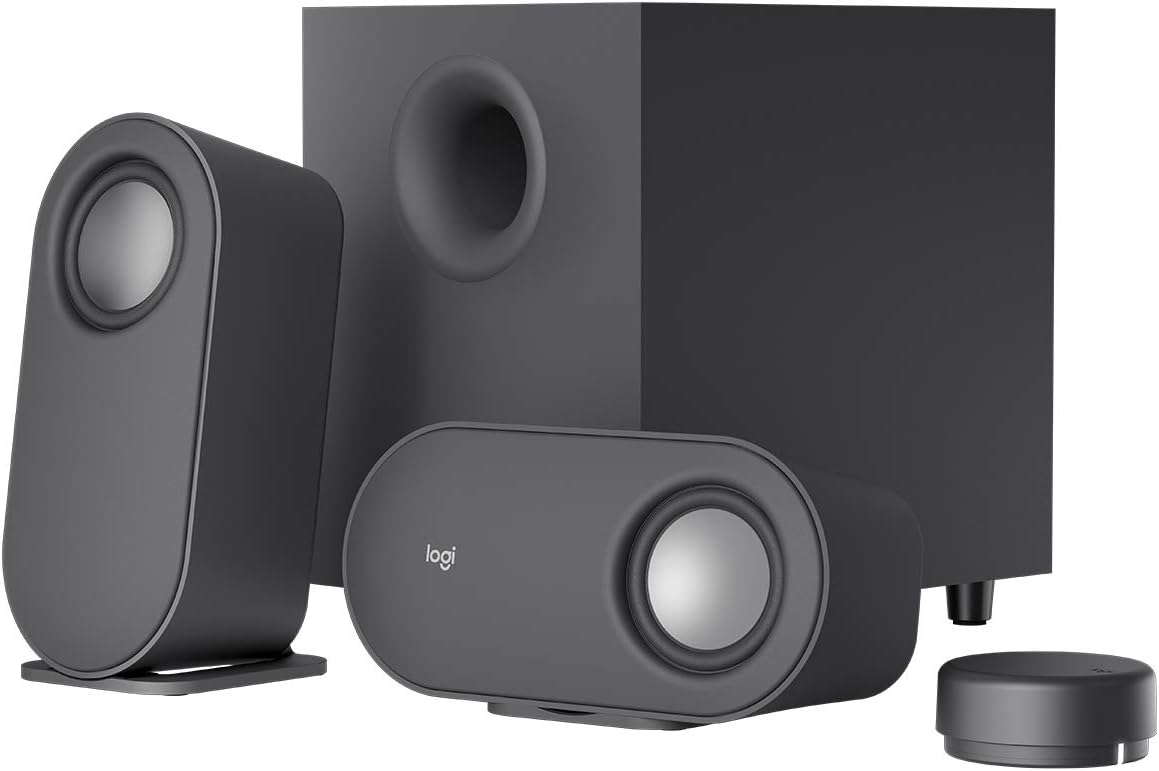
ചിത്രം: പൂർണ്ണമായ ലോജിടെക് Z407 സ്പീക്കർ സിസ്റ്റം, showcasinരണ്ട് സാറ്റലൈറ്റ് സ്പീക്കറുകൾ, സെൻട്രൽ സബ് വൂഫർ, കോംപാക്റ്റ് വയർലെസ് കൺട്രോൾ ഡയൽ എന്നിവ ഉൾക്കൊള്ളുന്നു.
ഒപ്റ്റിമൽ പ്രകടനവും ദീർഘായുസ്സും ഉറപ്പാക്കുന്നതിന് നിങ്ങളുടെ Z407 സ്പീക്കർ സിസ്റ്റം സജ്ജീകരിക്കുന്നതിനും പ്രവർത്തിപ്പിക്കുന്നതിനും പരിപാലിക്കുന്നതിനും ട്രബിൾഷൂട്ട് ചെയ്യുന്നതിനുമുള്ള വിശദമായ നിർദ്ദേശങ്ങൾ ഈ മാനുവൽ നൽകുന്നു.
ബോക്സിൽ എന്താണുള്ളത്
ആരംഭിക്കുന്നതിന് മുമ്പ്, പാക്കേജിംഗിൽ എല്ലാ ഘടകങ്ങളും ഉണ്ടെന്ന് ദയവായി ഉറപ്പാക്കുക:
- രണ്ട് (2) സാറ്റലൈറ്റ് സ്പീക്കറുകൾ
- ഒരു (1) സബ് വൂഫർ
- ഒരു (1) വയർലെസ് BLE കൺട്രോൾ ഡയൽ (2 AAA ബാറ്ററികൾ ആവശ്യമാണ്, ഉൾപ്പെടുത്തിയിരിക്കുന്നു)
- ഒരു (1) 3.5 എംഎം ഓഡിയോ കേബിൾ
- ഉപയോക്തൃ ഡോക്യുമെൻ്റേഷൻ

ചിത്രം: ലോജിടെക് Z407 പാക്കേജിൽ ഉൾപ്പെടുത്തിയിരിക്കുന്ന എല്ലാ ഘടകങ്ങളും, പരിശോധനയ്ക്കായി ഭംഗിയായി ക്രമീകരിച്ചിരിക്കുന്നു.
സജ്ജമാക്കുക
1. സ്പീക്കർ പ്ലേസ്മെൻ്റ്
സബ് വൂഫർ തറയിലോ ഉറപ്പുള്ള ഒരു പ്രതലത്തിലോ സ്ഥാപിക്കുക, ഡൗൺ-ഫയറിംഗ് പോർട്ട് തടസ്സമില്ലാതെ പ്രവർത്തിക്കുന്നുവെന്ന് ഉറപ്പാക്കുക. രണ്ട് സാറ്റലൈറ്റ് സ്പീക്കറുകൾ നിങ്ങളുടെ ഡെസ്ക്ടോപ്പിലോ ആവശ്യമുള്ള പ്രതലത്തിലോ സ്ഥാപിക്കുക. നിങ്ങളുടെ സജ്ജീകരണത്തിനും സൗന്ദര്യാത്മക മുൻഗണനയ്ക്കും ഏറ്റവും അനുയോജ്യമായ രീതിയിൽ സാറ്റലൈറ്റ് സ്പീക്കറുകൾ ലംബമായോ തിരശ്ചീനമായോ ക്രമീകരിക്കാം.

ചിത്രം: Z407 സിസ്റ്റത്തിന്റെ വൈവിധ്യമാർന്ന സാറ്റലൈറ്റ് സ്പീക്കറുകൾ, ലംബവും തിരശ്ചീനവുമായ ഓറിയന്റേഷനുകളിൽ കാണിച്ചിരിക്കുന്നു.
2. ഘടകങ്ങൾ ബന്ധിപ്പിക്കുന്നു
- സബ് വൂഫറിന്റെ പിൻഭാഗത്തുള്ള അനുബന്ധ ഇടത് (L), വലത് (R) ഓഡിയോ ഔട്ട്പുട്ട് പോർട്ടുകളിലേക്ക് സാറ്റലൈറ്റ് സ്പീക്കറുകൾ ബന്ധിപ്പിക്കുക.
- സബ് വൂഫറിന്റെ പവർ കേബിൾ ഒരു മതിൽ ഔട്ട്ലെറ്റിൽ പ്ലഗ് ചെയ്യുക.
- ഉൾപ്പെടുത്തിയിരിക്കുന്ന AAA ബാറ്ററികൾ വയർലെസ് കൺട്രോൾ ഡയലിൽ ചേർക്കുക.

ചിത്രം: Z407 സബ് വൂഫറിന്റെ പിൻ പാനൽ, കണക്റ്റിവിറ്റിക്കായി വിവിധ ഇൻപുട്ട്, ഔട്ട്പുട്ട് പോർട്ടുകൾ എടുത്തുകാണിക്കുന്നു.
3. ഓഡിയോ ഉറവിടങ്ങളുമായി ബന്ധിപ്പിക്കുന്നു
Z407 ഒന്നിലധികം കണക്റ്റിവിറ്റി ഓപ്ഷനുകൾ വാഗ്ദാനം ചെയ്യുന്നു:
- ബ്ലൂടൂത്ത്:
- LED ഇൻഡിക്കേറ്റർ വേഗത്തിൽ മിന്നുന്നത് വരെ വയർലെസ് കൺട്രോൾ ഡയലിലെ ബ്ലൂടൂത്ത് ബട്ടൺ അമർത്തിപ്പിടിക്കുക.
- നിങ്ങളുടെ ഉപകരണത്തിൽ (കമ്പ്യൂട്ടർ, സ്മാർട്ട്ഫോൺ, ടാബ്ലെറ്റ്), ബ്ലൂടൂത്ത് ക്രമീകരണങ്ങളിലേക്ക് പോയി ലഭ്യമായ ഉപകരണങ്ങളുടെ ലിസ്റ്റിൽ നിന്ന് "ലോജിടെക് Z407" തിരഞ്ഞെടുക്കുക.
- കണക്റ്റ് ചെയ്തുകഴിഞ്ഞാൽ, ഡയലിലെ LED കടും നീലയായി മാറും.
- USB-A: നിങ്ങളുടെ കമ്പ്യൂട്ടറിന്റെ USB പോർട്ടിൽ നിന്ന് ഒരു USB-A കേബിൾ (ഉൾപ്പെടുത്തിയിട്ടില്ല) സബ് വൂഫറിന്റെ പിൻഭാഗത്തുള്ള USB ഇൻപുട്ടിലേക്ക് ബന്ധിപ്പിക്കുക.
- 3.5 എംഎം ഓഡിയോ ജാക്ക് (AUX): നിങ്ങളുടെ ഉപകരണത്തിന്റെ ഹെഡ്ഫോൺ ജാക്ക് സബ്വൂഫറിന്റെ പിൻഭാഗത്തുള്ള AUX ഇൻപുട്ടിലേക്ക് ബന്ധിപ്പിക്കുന്നതിന് ഉൾപ്പെടുത്തിയിരിക്കുന്ന 3.5 mm ഓഡിയോ കേബിൾ ഉപയോഗിക്കുക.
വയർലെസ് കൺട്രോൾ ഡയലിലെ ഇൻപുട്ട് സെലക്ഷൻ ബട്ടണുകൾ ഉപയോഗിച്ച് നിങ്ങൾക്ക് ഒരേസമയം മൂന്ന് ഉപകരണങ്ങൾ വരെ കണക്റ്റുചെയ്യാനും അവയ്ക്കിടയിൽ മാറാനും കഴിയും.
പ്രവർത്തന നിർദ്ദേശങ്ങൾ
വയർലെസ് കൺട്രോൾ ഡയൽ ഫംഗ്ഷനുകൾ
വയർലെസ് കൺട്രോൾ ഡയൽ നിങ്ങളുടെ ഓഡിയോയിൽ 20 മീറ്റർ വരെ ദൂരത്തിൽ നിന്ന് സൗകര്യപ്രദമായ നിയന്ത്രണം നൽകുന്നു. ഡയൽ പരിധിക്കുള്ളിലാണെന്നും പുതിയ ബാറ്ററികൾ ഉണ്ടെന്നും ഉറപ്പാക്കുക.

ചിത്രം: അവബോധജന്യമായ ഓഡിയോ മാനേജ്മെന്റിനായി രൂപകൽപ്പന ചെയ്തിരിക്കുന്ന, മിനുസമാർന്നതും ഒതുക്കമുള്ളതുമായ വയർലെസ് കൺട്രോൾ ഡയൽ.
- പവർ ഓൺ/ഓഫ്: ഡയലിലെ പ്രധാന ബട്ടൺ 3 സെക്കൻഡ് അമർത്തിപ്പിടിക്കുക.
- വോളിയം നിയന്ത്രണം: വോളിയം കൂട്ടാൻ ഡയലിന്റെ പുറം വളയം ഘടികാരദിശയിലും, കുറയ്ക്കാൻ എതിർ ഘടികാരദിശയിലും തിരിക്കുക.
- പ്ലേ/താൽക്കാലികമായി നിർത്തുക: ഓഡിയോ പ്ലേ ചെയ്യാനോ താൽക്കാലികമായി നിർത്താനോ പ്രധാന ബട്ടൺ ഒരിക്കൽ അമർത്തുക.
- ട്രാക്ക് ഒഴിവാക്കുക: അടുത്ത ട്രാക്കിലേക്ക് പോകാൻ പ്രധാന ബട്ടൺ രണ്ടുതവണ അമർത്തുക.
- മുമ്പത്തെ ട്രാക്ക്: മുമ്പത്തെ ട്രാക്കിലേക്ക് പോകാൻ പ്രധാന ബട്ടൺ മൂന്ന് തവണ അമർത്തുക.
- ബാസ് അഡ്ജസ്റ്റ്മെൻ്റ്: ബാസ് ബട്ടൺ (ഡയലിന്റെ വശത്ത് സ്ഥിതിചെയ്യുന്നത്) ഒരിക്കൽ അമർത്തുക. LED നിറം മാറും. ബാസ് ലെവൽ ക്രമീകരിക്കാൻ ഡയൽ തിരിക്കുക. വോളിയം നിയന്ത്രണത്തിലേക്ക് മടങ്ങാൻ ബാസ് ബട്ടൺ വീണ്ടും അമർത്തുക.
- ഇൻപുട്ട് തിരഞ്ഞെടുക്കൽ: ബ്ലൂടൂത്ത്, യുഎസ്ബി, 3.5 എംഎം ഇൻപുട്ടുകൾ എന്നിവയിലൂടെ കടന്നുപോകാൻ ഇൻപുട്ട് ബട്ടൺ (ഡയലിന്റെ വശത്ത് സ്ഥിതിചെയ്യുന്നു) അമർത്തുക. സജീവ ഇൻപുട്ട് പ്രതിഫലിപ്പിക്കുന്നതിന് LED ഇൻഡിക്കേറ്റർ നിറം മാറ്റും.
മെയിൻ്റനൻസ്
ശരിയായ പരിചരണം നിങ്ങളുടെ ലോജിടെക് Z407 സ്പീക്കറുകളുടെ ആയുസ്സും പ്രകടനവും വർദ്ധിപ്പിക്കാൻ സഹായിക്കും:
- വൃത്തിയാക്കൽ: സ്പീക്കറുകൾ, സബ് വൂഫർ, കൺട്രോൾ ഡയൽ എന്നിവ തുടയ്ക്കാൻ മൃദുവായതും ഉണങ്ങിയതുമായ തുണി ഉപയോഗിക്കുക. അബ്രാസീവ് ക്ലീനറുകൾ, ലായകങ്ങൾ അല്ലെങ്കിൽ എയറോസോൾ സ്പ്രേകൾ എന്നിവ ഉപയോഗിക്കുന്നത് ഒഴിവാക്കുക, കാരണം ഇവ പ്രതലങ്ങൾക്ക് കേടുവരുത്തും.
- പ്ലേസ്മെൻ്റ്: സ്പീക്കറുകളും സബ് വൂഫറും നേരിട്ടുള്ള സൂര്യപ്രകാശം, താപ സ്രോതസ്സുകൾ, അമിതമായ ഈർപ്പം എന്നിവയിൽ നിന്ന് അകറ്റി നിർത്തുക. സബ് വൂഫറിന് ചുറ്റും മതിയായ വായുസഞ്ചാരം ഉറപ്പാക്കുക.
- വയർലെസ് കൺട്രോൾ ഡയൽ ബാറ്ററികൾ: ഇൻഡിക്കേറ്റർ ലൈറ്റ് മങ്ങാൻ തുടങ്ങുമ്പോഴോ ഡയൽ പ്രതികരിക്കുന്നില്ലാതാകുമ്പോഴോ വയർലെസ് കൺട്രോൾ ഡയലിലെ AAA ബാറ്ററികൾ മാറ്റിസ്ഥാപിക്കുക.
- കേബിൾ മാനേജുമെന്റ്: കാലക്രമേണ കേബിളുകൾക്ക് കേടുപാടുകൾ സംഭവിച്ചേക്കാം, അതിനാൽ കേബിളുകൾ വളയുകയോ പിഞ്ച് ചെയ്യുകയോ ചെയ്യുന്നില്ലെന്ന് ഉറപ്പാക്കുക.
ട്രബിൾഷൂട്ടിംഗ്
| പ്രശ്നം | സാധ്യമായ പരിഹാരം |
|---|---|
| സ്പീക്കറുകളിൽ നിന്ന് ശബ്ദമില്ല. |
|
| ബ്ലൂടൂത്ത് കണക്ഷൻ പ്രശ്നങ്ങൾ. |
|
| വയർലെസ് കൺട്രോൾ ഡയൽ പ്രതികരിക്കുന്നില്ല. |
|
| വികലമായ അല്ലെങ്കിൽ മോശം ശബ്ദ നിലവാരം. |
|
സ്പെസിഫിക്കേഷനുകൾ
| ഫീച്ചർ | വിശദാംശങ്ങൾ |
|---|---|
| മോഡലിൻ്റെ പേര് | Z407 |
| ഇനം മോഡൽ നമ്പർ | 980-001347 |
| സ്പീക്കർ തരം | സബ് വൂഫർ, സാറ്റലൈറ്റ് (2.1 സിസ്റ്റം) |
| കണക്റ്റിവിറ്റി ടെക്നോളജി | ബ്ലൂടൂത്ത്, യുഎസ്ബി, 3.5 എംഎം ഓക്സ് |
| വയർലെസ് കമ്മ്യൂണിക്കേഷൻ ടെക്നോളജി | ബ്ലൂടൂത്ത് |
| ബ്ലൂടൂത്ത് ശ്രേണി | 65 അടി വരെ (20 മീറ്റർ ലൈൻ ഓഫ് സൈറ്റ്) |
| സ്പീക്കർ പരമാവധി ഔട്ട്പുട്ട് പവർ | 80 വാട്ട്സ് പീക്ക് / 40 വാട്ട്സ് ആർഎംഎസ് |
| ഫ്രീക്വൻസി പ്രതികരണം | 40 Hz (കുറഞ്ഞത്) |
| സബ്വൂഫർ കണക്റ്റിവിറ്റി | വയേർഡ് (ഉപഗ്രഹങ്ങളിലേക്ക്), വയർലെസ്സ് (നിയന്ത്രണ ഡയൽ) |
| നിയന്ത്രണ രീതി | വയർലെസ് കൺട്രോൾ ഡയൽ (ബട്ടൺ, ടച്ച്) |
| ഉൽപ്പന്ന അളവുകൾ (സബ്വൂഫർ) | 12.4"D x 9.6"W x 7.3"H |
| ഇനത്തിൻ്റെ ഭാരം | 1.83 ഔൺസ് (ഒരു ഘടകത്തിന് വേണ്ടിയാകാം, മുഴുവൻ സിസ്റ്റത്തിനും അല്ല) |
| ബാറ്ററികൾ ആവശ്യമാണ് | 2 AAA ബാറ്ററികൾ (കൺട്രോൾ ഡയലിനായി ഉൾപ്പെടുത്തിയിരിക്കുന്നു) |
| നിറം | കറുപ്പ് |
വാറൻ്റിയും പിന്തുണയും
വാറൻ്റി വിവരങ്ങൾ
ലോജിടെക് Z407 ബ്ലൂടൂത്ത് കമ്പ്യൂട്ടർ സ്പീക്കറുകൾക്ക് പരിമിതമായ വാറണ്ടിയുണ്ട്. നിർദ്ദിഷ്ട നിബന്ധനകൾക്കും വ്യവസ്ഥകൾക്കും, നിങ്ങളുടെ ഉൽപ്പന്നത്തിനൊപ്പം ഉൾപ്പെടുത്തിയിരിക്കുന്ന വാറന്റി ഡോക്യുമെന്റേഷൻ പരിശോധിക്കുകയോ ഔദ്യോഗിക ലോജിടെക് പിന്തുണ സന്ദർശിക്കുകയോ ചെയ്യുക. webസൈറ്റ്.
കൂടുതൽ സഹായം
കൂടുതൽ പിന്തുണയ്ക്ക്, പതിവായി ചോദിക്കുന്ന ചോദ്യങ്ങൾക്ക്, അല്ലെങ്കിൽ ഔദ്യോഗിക ഉപയോക്തൃ മാനുവൽ PDF ഫോർമാറ്റിൽ ഡൗൺലോഡ് ചെയ്യുന്നതിന്, ദയവായി ലോജിടെക് പിന്തുണ പേജ് അല്ലെങ്കിൽ ഉൽപ്പന്നത്തിന്റെ ആമസോൺ പേജ് സന്ദർശിക്കുക.
- ഔദ്യോഗിക ഉപയോക്തൃ മാനുവൽ (PDF): PDF ഡൗൺലോഡ് ചെയ്യുക
- ലോജിടെക് സ്റ്റോർ സന്ദർശിക്കുക: ലോജിടെക് ആമസോൺ സ്റ്റോർ