1. ആമുഖം
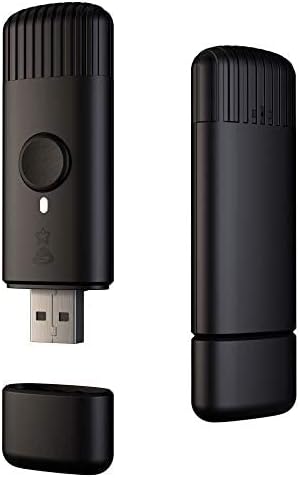
The Twinkly Music sound sensor is an accessory designed to enhance your Twinkly LED lighting experience by synchronizing light effects with ambient sound and music. This device connects to your existing Twinkly smart LED lights (sold separately) via Bluetooth and Wi-Fi, allowing for dynamic audio-visual displays controlled through the Twinkly App.
2. ബോക്സിൽ എന്താണുള്ളത്?
- Twinkly Music Sound Sensor (USB device)
- ഇൻസ്ട്രക്ഷൻ മാനുവൽ

3. സജ്ജീകരണം
- പവർ ഓൺ: Plug the Twinkly Music USB device into any standard USB power source. Ensure it is placed close to your desired music source for optimal sound detection.
- ആപ്പ് ഇൻസ്റ്റാളേഷൻ: Download the official Twinkly App from the iOS App Store or Google Play Store on your smartphone or tablet.
- ഉപകരണ ജോടിയാക്കൽ: Open the Twinkly App and follow the on-screen instructions to pair your Twinkly Music device via Bluetooth and Wi-Fi. Ensure the device is connected to the same network as your Twinkly lights.
- Light Grouping (Optional): If you have multiple Twinkly lights, you can group them within the app to synchronize effects across selected devices.


വീഡിയോ ഗൈഡ് സജ്ജീകരിക്കുക
Video 1: Detailed guide on setting up Twinkly lights and the Twinkly Music device, including app pairing and mapping lights for optimal effects.
4. പ്രവർത്തന നിർദ്ദേശങ്ങൾ
- സംഗീത മോഡ് സജീവമാക്കുക: Once connected, the Twinkly Music device will analyze nearby music using its highly sensitive digital microphone and powerful multicore DSP.
- Change Effects via Button: Press the physical button on the Twinkly Music USB device to cycle through various pre-programmed music effects.
- ആപ്പ് നിയന്ത്രണം: Use the Twinkly App to browse and select from a wide array of music-synchronized effects. The app allows for customization of colors, patterns, and intensity.
- Real-time Reaction: The device decodes any sound source in real-time, offering a dynamic sensory experience on your Twinkly lights.


Music Effects Demonstration
Video 2: A demonstration of various music-synchronized lighting effects available with Twinkly Music, showcasing dynamic patterns and color changes.
5. സവിശേഷതകൾ
- Musical Lights: Activates Twinkly LED lights based on ambient sound, managed directly from the Twinkly App (iOS and Android). Compatible only with Twinkly smart LED lights.
- Unique Experience: Features a highly sensitive digital microphone and powerful multicore DSP to analyze music and apply synchronized light effects.
- ലളിതമായ ഇൻസ്റ്റാളേഷൻ: Easy setup in seconds via Bluetooth and Wi-Fi through the Twinkly App.
- ഉപയോഗിക്കാൻ എളുപ്പമാണ്: A single button on the USB device allows for changing effects and music lights.
- അനുയോജ്യത: Designed for optimal use with Twinkly II generation products. Supports light groups and selection of specific devices.
6 സ്പെസിഫിക്കേഷനുകൾ
| ആട്രിബ്യൂട്ട് | വിശദാംശങ്ങൾ |
|---|---|
| മോഡൽ നമ്പർ | TMD01USB |
| ബ്രാൻഡ് | മിന്നിത്തിളങ്ങി |
| നിറം | കറുപ്പ് |
| പവർ ഉറവിടം | USB |
| നിയന്ത്രണ രീതി | അപ്ലിക്കേഷൻ നിയന്ത്രണം |
| കണക്റ്റിവിറ്റി | ബ്ലൂടൂത്ത്, വൈഫൈ |
| ഇനത്തിൻ്റെ ഭാരം | 60 ഗ്രാം (2.12 ഔൺസ്) |
| പരിധി | 10 മീ / 32.8 ഇഞ്ച് |
| ഇൻഡോർ/ഔട്ട്ഡോർ ഉപയോഗം | ഔട്ട്ഡോർ |
7. പ്രശ്നപരിഹാരം
- ഉപകരണം കണക്റ്റുചെയ്യുന്നില്ല: Ensure the Twinkly Music device is powered on and within range of your Wi-Fi network and Twinkly lights. Verify that your smartphone's Bluetooth is enabled and that the device is connected to the same Wi-Fi network as your lights. Try restarting the device and the app.
- Lights Not Syncing with Music: Check that the Twinkly Music device is placed near the sound source. Adjust the microphone sensitivity settings within the Twinkly App if available. Ensure the music mode is activated in the app or via the device button.
- ആപ്പ് പ്രശ്നങ്ങൾ: Ensure your Twinkly App is updated to the latest version. Try force-closing and reopening the app, or reinstalling it if problems persist.
- ഫേംവെയർ അപ്ഡേറ്റുകൾ: Regularly check the Twinkly App for available firmware updates for your Twinkly Music device and lights to ensure optimal performance and compatibility.
8. പരിപാലനം
- വൃത്തിയാക്കൽ: Use a soft, dry cloth to clean the Twinkly Music device. Avoid using liquid cleaners or abrasive materials.
- സംഭരണം: ഉപയോഗിക്കാത്തപ്പോൾ, നേരിട്ട് സൂര്യപ്രകാശത്തിൽ നിന്നും തീവ്രമായ താപനിലയിൽ നിന്നും അകലെ തണുത്തതും വരണ്ടതുമായ സ്ഥലത്ത് ഉപകരണം സൂക്ഷിക്കുക.
- പരിസ്ഥിതി വ്യവസ്ഥകൾ: The device is rated for outdoor use, but prolonged exposure to harsh weather conditions may affect its lifespan.
9. വാറൻ്റിയും പിന്തുണയും
For warranty information, technical support, or further assistance, please refer to the official Twinkly website or contact Twinkly customer service directly. Details can typically be found in the product packaging or on the manufacturer's webസൈറ്റ്.
- ഓൺലൈൻ ഉറവിടങ്ങൾ: സന്ദർശിക്കുക Twinkly Store on Amazon ഉൽപ്പന്ന വിവരങ്ങൾക്കും പിന്തുണയ്ക്കും.
- നിർമ്മാതാവ് Webസൈറ്റ്: Consult the official Twinkly website for the most up-to-date support documentation, FAQs, and contact information.


