1. ആമുഖം
The PeakTech 4095 is a newly developed, high-precision digital bench multimeter designed for professional use. It features a graphical TFT display for high-resolution visualization of measured values, trend curves, function graphs, and more. Capable of up to 150 measurements per second, this device incorporates advanced technical standards and a wide array of special functions, making it an indispensable tool for accurate electrical measurements and data analysis.
This manual provides comprehensive instructions for the safe and efficient operation, setup, maintenance, and troubleshooting of your PeakTech 4095 Digital Bench Multimeter. Please read it thoroughly before using the device.
2. പാക്കേജ് ഉള്ളടക്കം
എല്ലാ ഇനങ്ങളും ഉണ്ടെന്നും കേടുപാടുകൾ സംഭവിച്ചിട്ടില്ലെന്നും ഉറപ്പാക്കാൻ നിങ്ങളുടെ പാക്കേജിന്റെ ഉള്ളടക്കങ്ങൾ പരിശോധിക്കുക:
- PeakTech 4095 Digital Bench Multimeter
- പവർ കേബിൾ
- Interface Cable (USB/RS-232)
- CD-ROM (with software and manual)
- ടെസ്റ്റ് ലീഡുകൾ
- താപനില സെൻസർ
- User Manual (on CD-ROM)
ഏതെങ്കിലും ഇനങ്ങൾ നഷ്ടപ്പെട്ടാലോ കേടുപാടുകൾ സംഭവിച്ചാലോ, ദയവായി നിങ്ങളുടെ വിതരണക്കാരനെ ഉടൻ ബന്ധപ്പെടുക.
3 സുരക്ഷാ വിവരങ്ങൾ
വ്യക്തിപരമായ പരിക്കുകളോ ഉപകരണത്തിന് കേടുപാടുകളോ ഉണ്ടാകാതിരിക്കാൻ ഇനിപ്പറയുന്ന സുരക്ഷാ മുൻകരുതലുകൾ എപ്പോഴും പാലിക്കുക:
- This device complies with safety standards EN 61010-1; CAT I 1000V / CAT II 600 V.
- Do not exceed the maximum input values for any measurement range.
- Ensure the device is properly grounded before operation.
- ഉപകരണം കേടായതായി തോന്നുകയോ ഇൻസുലേഷനിൽ ബലഹീനത അനുഭവപ്പെടുകയോ ചെയ്താൽ അത് പ്രവർത്തിപ്പിക്കരുത്.
- Use only the specified test leads and accessories.
- Avoid contact with live circuits.
- വെറ്റ് അല്ലെങ്കിൽ ഡിയിൽ ഉപകരണം ഉപയോഗിക്കരുത്amp പരിസരങ്ങൾ.
- ഉപകരണം വൃത്തിയാക്കുന്നതിനോ സർവീസ് ചെയ്യുന്നതിനോ മുമ്പ് വൈദ്യുതി വിച്ഛേദിക്കുക.
4. ഉൽപ്പന്ന സവിശേഷതകൾ
The PeakTech 4095 offers a comprehensive set of features for precise and versatile measurements:
- Graphical TFT Display: 4 1/2 digit (60,000 counts) 4-inch display (480x320 pixels) for high-resolution data visualization.
- High Measurement Speed: Up to 150 measured values per second.
- യഥാർത്ഥ RMS അളവ്: Accurate True RMS measurements up to 100 kHz, depending on the measurement function.
- ഡാറ്റ ലോഗർ: Internal memory for up to 1 million points or external logging to a USB stick for up to 100 million points, with a 5 ms interval.
- Dual Measurement Function: Simultaneously measure two different functions.
- Advanced Display Modes: Histogram, Barometer, Trend display, Pass/Fail function.
- അളക്കൽ പ്രവർത്തനങ്ങൾ: DCV, ACV, DCA, ACA, Resistance, Frequency, Capacitance, Diode Test, Continuity Test, Temperature.
- താപനില അളക്കൽ: Supports 2- or 3-wire resistance/thermocouple measurements via types B/E/J/K/N/R/S/T or PT100/PT385.
- കണക്റ്റിവിറ്റി: RS-232, LAN network connection, and USB interfaces for PC control and data retrieval via SCPI protocol.
- ശ്രേണി തിരഞ്ഞെടുക്കൽ: Automatic and manual range selection.
- അധിക പ്രവർത്തനങ്ങൾ: AVG, MIN/MAX, and relative value measurement.
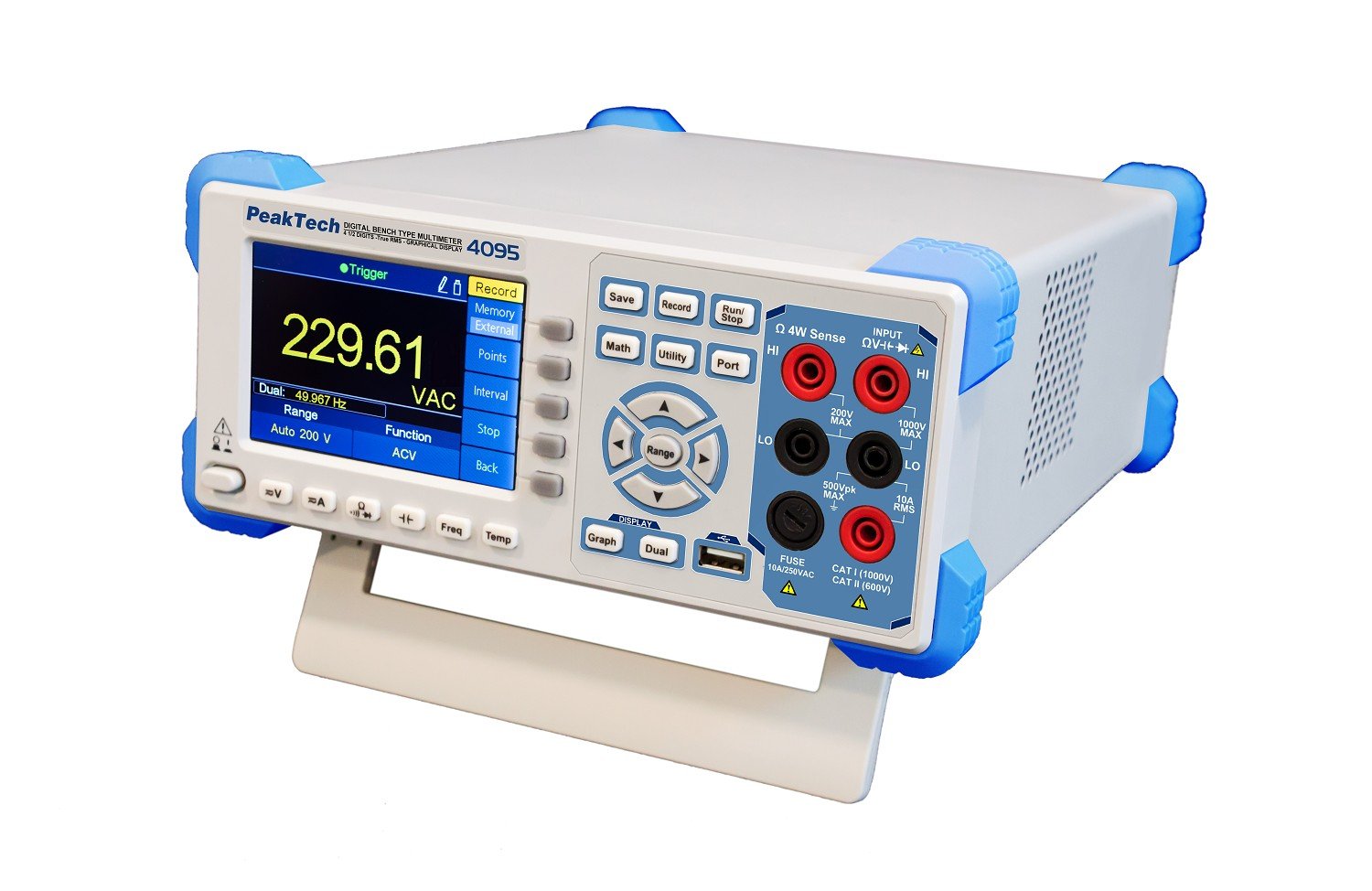 ചിത്രം 1: മുൻഭാഗം view of the PeakTech 4095 Digital Bench Multimeter.
 Figure 2: Close-up of the PeakTech 4095 front panel showing the graphical TFT display in trend mode.
 Figure 3: Rear panel of the PeakTech 4095, displaying the power input, LAN, USB, RS-232, and auxiliary ports.
 Figure 4: The PeakTech 4095 Digital Bench Multimeter in a typical laboratory or workshop environment, connected for measurement.
5. സജ്ജീകരണം
Follow these steps to set up your PeakTech 4095 Multimeter:
- അൺപാക്ക് ചെയ്യുന്നു: Carefully remove the multimeter and all accessories from the packaging. Retain the packaging for future storage or transport.
- പവർ കണക്ഷൻ: Locate the power input on the rear panel. Ensure the voltage selector switch (110V/240V) matches your local power supply. Connect the provided power cable to the multimeter and then to a suitable AC outlet.
- പ്രാരംഭ പവർ ഓൺ: Press the power button on the front panel. The TFT display should illuminate, and the device will perform a self-test.
- ടെസ്റ്റ് ലീഡുകൾ ബന്ധിപ്പിക്കുന്നു: Insert the red test lead into the 'HI' input terminal and the black test lead into the 'LO' input terminal for most voltage, resistance, and frequency measurements. For current measurements, refer to the specific input terminals (e.g., 10A, mA/µA).
- Interface Connection (Optional):
- USB: Connect the USB cable from the multimeter's rear USB port to your computer.
- ആർഎസ് -232: Connect the RS-232 cable from the multimeter's rear RS-232 port to your computer's serial port (or a USB-to-serial adapter).
- ലാൻ: Connect an Ethernet cable from the multimeter's LAN port to your network router or switch.
Install the provided software from the CD-ROM on your computer to enable remote control and data logging via these interfaces.
6. പ്രവർത്തന നിർദ്ദേശങ്ങൾ
This section outlines the basic operation and various measurement functions of the PeakTech 4095.
6.1 അടിസ്ഥാന അളവുകൾ
- വാല്യംtage (DCV/ACV): ആവശ്യമുള്ള വോള്യം തിരഞ്ഞെടുക്കുകtage function (DCV or ACV) using the function buttons. Connect the test leads in parallel to the circuit under test. The display will show the measured voltage.
- Current (DCA/ACA): Select the desired current function (DCA or ACA). Ensure the test leads are connected to the appropriate current input terminals (e.g., 10A, mA/µA). Connect the multimeter in series with the circuit.
- Resistance (Ohm): Select the Ohm function. Connect the test leads across the component to measure its resistance. Ensure the circuit is de-energized before measuring resistance.
- കപ്പാസിറ്റൻസ്: Select the Capacitance function. Connect the test leads across the capacitor. Ensure the capacitor is discharged before measurement.
- ആവൃത്തി: Select the Frequency function. Connect the test leads to the signal source.
- താപനില: Connect the provided temperature sensor or a compatible thermocouple/RTD to the appropriate input terminals. Select the Temperature function and choose the correct sensor type (e.g., Type K, PT100).
6.2 പ്രത്യേക പ്രവർത്തനങ്ങൾ
- ശ്രേണി തിരഞ്ഞെടുക്കൽ: Use the 'Range' button to switch between auto-ranging and manual ranging. In manual mode, press 'Range' repeatedly to cycle through available ranges.
- MIN/MAX/AVG: Press the 'Math' button and navigate to MIN/MAX/AVG to display the minimum, maximum, or average values recorded during a measurement session.
- ആപേക്ഷിക അളവ്: Use the 'Math' button to activate the relative measurement function, which displays the difference between the current reading and a stored reference value.
- ഡാറ്റ ലോഗിംഗ്: Press the 'Record' button to start/stop data logging. Configure logging parameters (interval, internal/external memory) via the 'Record' menu. Data can be saved to internal memory or an external USB stick.
- Graphical Display Modes: Use the 'Graph' and 'Dual' buttons to switch between numerical display, trend graphs, histograms, and dual measurement displays.
7. പരിപാലനം
Proper maintenance ensures the longevity and accuracy of your PeakTech 4095 Multimeter.
7.1 വൃത്തിയാക്കൽ
ഒരു സോഫ്റ്റ്, ഡി ഉപയോഗിച്ച് ഉപകരണത്തിൻ്റെ പുറംഭാഗം പതിവായി വൃത്തിയാക്കുകamp cloth. Do not use abrasive cleaners or solvents. Ensure no moisture enters the device.
7.2 ഫ്യൂസ് മാറ്റിസ്ഥാപിക്കൽ
If the current measurement function fails, the fuse may need replacement. Refer to the specifications for the correct fuse type and rating. Disconnect the power cable and all test leads before attempting to replace the fuse. Fuse access is typically on the rear panel or under a designated cover.
7.3 കാലിബ്രേഷൻ
For continued accuracy, periodic calibration by a qualified service center is recommended. Refer to the PeakTech website or contact customer support for calibration services.
8. പ്രശ്നപരിഹാരം
If you encounter issues with your PeakTech 4095, refer to the following common problems and solutions:
| പ്രശ്നം | സാധ്യമായ കാരണം | പരിഹാരം |
|---|---|---|
| ഉപകരണം പവർ ഓണാക്കുന്നില്ല. | No power supply; power cable loose; incorrect voltage selector; blown fuse. | Check power cable connection; verify voltage selector setting; check and replace power fuse if necessary. |
| Incorrect or no readings. | Incorrect function selected; test leads not properly connected; circuit issue; out of range. | Select correct measurement function; ensure test leads are securely connected; verify circuit integrity; switch to auto-ranging or a higher manual range. |
| കറന്റ് അളക്കൽ പ്രവർത്തിക്കുന്നില്ല. | Blown current fuse; incorrect input terminal. | Check and replace the internal current fuse; ensure test leads are connected to the correct current input (e.g., 10A, mA/µA). |
| PC software cannot connect. | Incorrect interface cable; driver not installed; wrong COM port selected; firewall blocking connection. | Ensure correct USB/RS-232/LAN cable is used; install drivers from CD-ROM; verify COM port settings in software; check firewall settings. |
If the problem persists after attempting these solutions, please contact PeakTech customer support.
9 സ്പെസിഫിക്കേഷനുകൾ
Detailed technical specifications for the PeakTech 4095 Digital Bench Multimeter:
| പരാമീറ്റർ | സ്പെസിഫിക്കേഷൻ |
|---|---|
| പ്രദർശിപ്പിക്കുക | 4 1/2 digits (60,000 counts) TFT graphical display, 4" (480x320 pixels) |
| അളക്കൽ വേഗത | Up to 150 values/second |
| ഡിസി വോളിയംtagഇ (DCV) | 600mV / 6/60/600/1000 V; ± 0.02% + 0.01 |
| എസി വോളിയംtagഇ (ACV) | 600 mV / 6/60/600/750 V; ± 0.2% + 0.06 (TRMS Frequency: 20 Hz - 100 kHz) |
| DC കറന്റ് (DCA) | 600µA / 6/60/600 mA / 6/10 A; ± 0.06% + 0.02 |
| എസി കറന്റ് (എസിഎ) | 60 / 600mA / 6/10 A; ± 0.5% + 0.10 (TRMS Frequency: 20 Hz - 10 kHz) |
| പ്രതിരോധം (ഓം) | 600 Ω / 6/60/600 kΩ / 6/60/100 MΩ; ± 0.03% + 0.01 |
| ആവൃത്തി | 20 Hz… 1 MHz ± 0.01% + 0.003 |
| കപ്പാസിറ്റൻസ് | 2/20/200 nF / 2/200 / 10000 µF; ± 1% + 0.5 |
| Temperature (RTD) | -200 °C… +660 °C; ± 0.08% + 0.002 |
| താപനില (തരം കെ) | -200 °C… +1372 °C; ± 0.5 °C |
| ഡാറ്റ ലോഗർ മെമ്മറി | Internal: 1 million points; External (USB): 100 million points |
| ഓപ്പറേറ്റിംഗ് വോളിയംtage | 110 V / 240 V; 50/60 Hz (switchable) |
| അളവുകൾ (LxHxD) | 235 x 110 x 295 മിമി |
| ഭാരം | 3 കി.ഗ്രാം |
| സുരക്ഷാ റേറ്റിംഗ് | EN 61010-1; CAT I 1000V / CAT II 600 V |
| മാതൃരാജ്യം | ചൈന |
10. വാറൻ്റിയും പിന്തുണയും
PeakTech products are manufactured with high quality standards and are subject to strict quality control. This device is covered by a standard manufacturer's warranty against defects in materials and workmanship.
For warranty claims, technical support, or service inquiries, please contact PeakTech customer service or your local distributor. Please have your model number (P 4095) and purchase information ready when contacting support.
For the most up-to-date information, drivers, and software, please visit the official PeakTech webസൈറ്റ്.


