1. ഉൽപ്പന്നം കഴിഞ്ഞുview
The Eaton WFSW15-LA-SP-L Wi-Fi Smart Switch is designed to provide convenient control over your lighting and other connected devices. This smart switch integrates directly with the Amazon Alexa App, eliminating the need for a separate hub. It offers voice control capabilities, scheduling options, and enhanced safety features.
പ്രധാന സവിശേഷതകളിൽ ഇവ ഉൾപ്പെടുന്നു:
- ഹബ് ആവശ്യമില്ല: Control devices directly through the Amazon Alexa App.
- എളുപ്പമുള്ള ഇൻസ്റ്റാളേഷൻ: Simple setup process with LED indicators for proper installation.
- ശബ്ദ നിയന്ത്രണം: Compatible with Amazon Alexa for hands-free operation.
- ഷെഡ്യൂളിംഗും ദിനചര്യകളും: Program lights to adjust according to your daily schedule.
- ചേർത്ത സുരക്ഷ: Features a Delay OFF function to keep lights on for a set period after activation.
- സോഫ്റ്റ്വെയർ അപ്ഡേറ്റുകൾ: Receives over-the-air updates for continuous feature enhancements and performance.

ചിത്രം 1.1: മുൻഭാഗം view of the Eaton WFSW15-LA-SP-L Wi-Fi Smart Switch.
2. സജ്ജീകരണവും ഇൻസ്റ്റാളേഷനും
2.1 സുരക്ഷാ വിവരങ്ങൾ
മുന്നറിയിപ്പ്: Risk of electric shock. Installation requires working with high voltage wiring. If you are unsure about any part of these instructions, consult a qualified electrician. Ensure power is turned off at the circuit breaker before installation.
2.2 പ്രീ-ഇൻസ്റ്റലേഷൻ ചെക്ക്ലിസ്റ്റ്
- A neutral wire is required for installation. Verify its presence in your electrical box.
- Compatible with LED/CFL up to 600W and INC/HAL/FLR/ELV/MLV up to 1800W.
- Supports 1/2 HP motor loads.
- Tools required: Screwdriver, wire strippers (if needed).
2.3 വയറിംഗ് നിർദ്ദേശങ്ങൾ
- പവർ ഓഫ് ചെയ്യുക: നിങ്ങൾ മാറ്റിസ്ഥാപിക്കുന്ന സ്വിച്ച് നിയന്ത്രിക്കുന്ന സർക്യൂട്ട് ബ്രേക്കർ കണ്ടെത്തി അത് ഓഫ് ചെയ്യുക. ഒരു വോള്യം ഉപയോഗിച്ച് പവർ ഓഫാണെന്ന് ഉറപ്പാക്കുക.tagഇ ടെസ്റ്റർ.
- പഴയ സ്വിച്ച് നീക്കം ചെയ്യുക: Carefully remove the existing wall plate and switch. Disconnect the wires.
- വയറുകൾ തിരിച്ചറിയുക: Identify the Line (hot), Load, Neutral, and Ground wires. The smart switch requires a neutral wire.
- Connect new switch: Connect the wires to the Eaton Wi-Fi Smart Switch using the quick connect terminals or screw terminals as follows:
- ബന്ധിപ്പിക്കുക ഗ്രൗണ്ട് wire to the green terminal.
- ബന്ധിപ്പിക്കുക നിഷ്പക്ഷ wire to the white terminal.
- ബന്ധിപ്പിക്കുക ലൈൻ wire to the black terminal labeled 'Line'.
- ബന്ധിപ്പിക്കുക ലോഡ് ചെയ്യുക wire to the black terminal labeled 'Load'.
- For 3-way installations, refer to the detailed wiring diagrams provided in the product packaging. The smart switch can be wired with a standard 3-way switch.
- Mount switch: വയേർഡ് സ്വിച്ച് ശ്രദ്ധാപൂർവ്വം ഇലക്ട്രിക്കൽ ബോക്സിലേക്ക് തിരുകുക. നൽകിയിരിക്കുന്ന സ്ക്രൂകൾ ഉപയോഗിച്ച് അത് ഉറപ്പിക്കുക.
- വാൾ പ്ലേറ്റ് ഇൻസ്റ്റാൾ ചെയ്യുക: പുതിയ വാൾ പ്ലേറ്റ് ഘടിപ്പിക്കുക.
- പവർ പുനഃസ്ഥാപിക്കുക: Turn the power back ON at the circuit breaker. LED indicators on the switch will confirm proper installation.
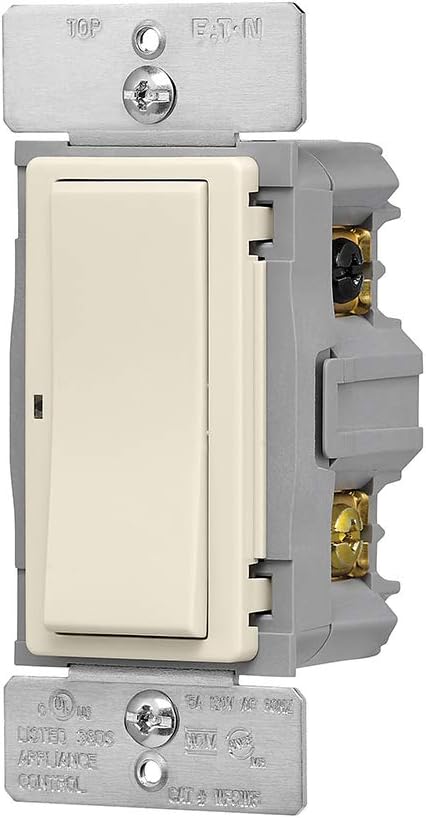
ചിത്രം 2.1: വശം view of the smart switch showing wiring terminals.
2.4 App Setup (Amazon Alexa App)
After physical installation, set up your smart switch using the Amazon Alexa App:
- Download the Amazon Alexa App: If you don't already have it, download the Amazon Alexa App from your device's app store.
- ആപ്പ് തുറക്കുക: Launch the Alexa App and log in with your Amazon account.
- ഉപകരണം ചേർക്കുക: The app should automatically detect your new Eaton Wi-Fi Smart Switch. If not, navigate to the 'Devices' section, tap the '+' icon, and follow the on-screen instructions to add a new device.
- സജ്ജീകരണം പൂർത്തിയാക്കുക: Follow the prompts to name your switch and assign it to a room.

Image 2.2: Visual guide for the three easy steps to set up your Wi-Fi smart device.
3. പ്രവർത്തന നിർദ്ദേശങ്ങൾ
3.1 മാനുവൽ നിയന്ത്രണം
Press the top of the rocker switch to turn the connected lights/device ON. Press the bottom of the rocker switch to turn the connected lights/device OFF.
3.2 ആമസോൺ അലക്സ ഉപയോഗിച്ചുള്ള ശബ്ദ നിയന്ത്രണം
Once your smart switch is connected to the Amazon Alexa App, you can use voice commands to control it. Ensure your Alexa-enabled device is powered on and connected to the internet.
- To turn lights ON: "Alexa, turn on [device name]." (e.g., "Alexa, turn on living room lights.")
- To turn lights OFF: "Alexa, turn off [device name]."
3.3 ഷെഡ്യൂളിംഗും ദിനചര്യകളും
Use the Amazon Alexa App to create schedules and routines for your smart switch:
- ഷെഡ്യൂളുകൾ: Set specific times for your lights to turn ON or OFF automatically.
- ദിനചര്യകൾ: Combine multiple actions with a single command or trigger. For example, create a "Good Morning" routine that turns on your lights and plays news.
3.4 Delay OFF Feature
The Delay OFF feature allows you to set a duration for the lights to remain on before automatically turning off. This can be configured within the Amazon Alexa App settings for the device, providing convenience for safe exits.
3.5 പവർ ഔtagഇ പ്രീസെറ്റ്
You can configure the smart switch's behavior after a power outage. This setting allows you to choose whether the device comes on or stays off once power is restored. This option is typically found in the device settings within the Amazon Alexa App.
4. പരിപാലനം
4.1 വൃത്തിയാക്കൽ
To clean the smart switch, ensure power is turned off at the circuit breaker. Use a soft, damp cloth to wipe the surface. Do not use abrasive cleaners or solvents, as these can damage the finish.
4.2 സോഫ്റ്റ്വെയർ അപ്ഡേറ്റുകൾ
The Eaton Wi-Fi Smart Switch receives over-the-air (OTA) software updates. These updates ensure your device has the latest features, security enhancements, and optimal performance. Updates are typically managed automatically through the Amazon Alexa App or your Wi-Fi network connection.
5. പ്രശ്നപരിഹാരം
- പ്രതികരിക്കുന്നില്ല എന്ന സ്വിച്ച്:
- സർക്യൂട്ട് ബ്രേക്കർ ഓണാണോ എന്ന് പരിശോധിക്കുക.
- Ensure the switch is properly wired and the LED indicators confirm correct installation.
- Verify your Wi-Fi network is active and the smart switch is within range.
- Restart the smart switch by turning off power at the breaker for 30 seconds, then turning it back on.
- Connectivity issues with Alexa:
- Ensure your Alexa-enabled device is connected to the internet.
- Check the Amazon Alexa App to confirm the smart switch is still listed and online.
- If the switch frequently disconnects, try re-linking it through the Alexa App.
- Ensure your Wi-Fi network is 2.4 GHz, as this device may not support 5 GHz networks.
- Difficulty with 3-way wiring:
Wiring a 3-way switch can be complex. If you encounter difficulties, especially with identifying traveler wires or connecting the line and load, it is recommended to consult a qualified electrician for assistance to ensure correct and safe installation.
- Lights flickering or not working correctly:
- Verify that the connected bulbs are compatible with the smart switch's wattage ratings (LED/CFL up to 600W, INC/HAL/FLR/ELV/MLV up to 1800W).
- എല്ലാ വയർ കണക്ഷനുകളും സുരക്ഷിതമാണെന്ന് ഉറപ്പാക്കുക.
6 സ്പെസിഫിക്കേഷനുകൾ
| ഫീച്ചർ | സ്പെസിഫിക്കേഷൻ |
|---|---|
| മോഡൽ നമ്പർ | WFSW15-LA-SP-L |
| ഓപ്പറേഷൻ മോഡ് | ഓഫ്-നൺ-ഓൺ |
| നിലവിലെ റേറ്റിംഗ് | 15 Amps |
| ഓപ്പറേറ്റിംഗ് വോളിയംtage | 120 വോൾട്ട് |
| ബന്ധപ്പെടാനുള്ള തരം | സാധാരണയായി തുറന്നിരിക്കുന്നു |
| കണക്റ്റർ തരം | ദ്രുത കണക്ഷൻ |
| ബ്രാൻഡ് | ഈറ്റൺ |
| അതിതീവ്രമായ | ദ്രുത കണക്ഷൻ |
| ഇനത്തിന്റെ അളവുകൾ (L x W x H) | 2.42 x 3.77 x 5.04 ഇഞ്ച് |
| സർക്യൂട്ട് തരം | Decorator/Rocker |
| ആക്യുവേറ്റർ തരം | റോക്കർ |
| കോൺടാക്റ്റ് മെറ്റീരിയൽ | ചെമ്പ് |
| അന്താരാഷ്ട്ര സംരക്ഷണ റേറ്റിംഗ് | IP02 |
| സ്ഥാനങ്ങളുടെ എണ്ണം | 3 |
| കൺട്രോളർ തരം | ആമസോൺ അലക്സ, വെറ |
| നിയന്ത്രണ രീതി | ശബ്ദം |
| കണക്റ്റിവിറ്റി പ്രോട്ടോക്കോൾ | വൈഫൈ |
| നിറം | ഇളം ബദാം |
| യൂണിറ്റ് എണ്ണം | 1 എണ്ണം |
| ഇനത്തിൻ്റെ ഭാരം | 5.6 ഔൺസ് |
| അനുയോജ്യമായ ഉപകരണങ്ങൾ | ആമസോൺ അലക്സ, വെറ |
| യു.പി.സി | 032664760907 |
| സ്മാർട്ട് ഹോം അനുയോജ്യത | Smart Home Compatible |
7. വാറൻ്റി വിവരങ്ങൾ
Specific warranty details for the Eaton WFSW15-LA-SP-L Wi-Fi Smart Switch are typically provided with the product packaging or can be found on the official Eaton webസൈറ്റ്. ഏറ്റവും കൃത്യവും കാലികവുമായ വാറന്റി നിബന്ധനകൾക്കും വ്യവസ്ഥകൾക്കും ദയവായി ഈ ഉറവിടങ്ങൾ പരിശോധിക്കുക.
8. പിന്തുണ
For technical assistance, troubleshooting beyond this manual, or product inquiries, please contact Eaton customer support. Contact information can usually be found on the product packaging, the official Eaton webസൈറ്റ്, അല്ലെങ്കിൽ നിങ്ങളുടെ റീട്ടെയിലർ വഴി.
When contacting support, please have your product model number (WFSW15-LA-SP-L) and purchase information readily available.


