1. ആമുഖം
Thank you for choosing the EnginStar R300 Portable Power Station. This device is a versatile and reliable power solution designed to provide electricity for various applications, including outdoor camping, emergency backup, and mobile work. Featuring a 296Wh capacity and 110V Pure Sine Wave AC output, the R300 ensures stable and safe power for your electronic devices. Please read this manual carefully before using the product to ensure proper operation and maximize its lifespan.
2. സുരക്ഷാ നിർദ്ദേശങ്ങൾ
- യൂണിറ്റ് ഡിസ്അസംബ്ലിംഗ്, റിപ്പയർ അല്ലെങ്കിൽ പരിഷ്ക്കരിക്കരുത്.
- Keep the unit away from fire or high temperatures.
- വെള്ളം അല്ലെങ്കിൽ ഈർപ്പം എക്സ്പോഷർ ഒഴിവാക്കുക.
- നേരിട്ടുള്ള സൂര്യപ്രകാശത്തിലോ ചൂടുള്ള അന്തരീക്ഷത്തിലോ യൂണിറ്റ് ഉപയോഗിക്കുകയോ സൂക്ഷിക്കുകയോ ചെയ്യരുത്.
- അമിതമായി ചൂടാക്കുന്നത് തടയാൻ ഉപയോഗ സമയത്ത് ശരിയായ വായുസഞ്ചാരം ഉറപ്പാക്കുക.
- കുട്ടികൾക്കും വളർത്തുമൃഗങ്ങൾക്കും ലഭ്യമാകാതെ സൂക്ഷിക്കുക.
- പ്രാദേശിക ചട്ടങ്ങൾക്കനുസൃതമായി ഉൽപ്പന്നം വിനിയോഗിക്കുക.
3. പാക്കേജ് ഉള്ളടക്കം
എല്ലാ ഇനങ്ങളും നിങ്ങളുടെ പാക്കേജിൽ ഉൾപ്പെടുത്തിയിട്ടുണ്ടെന്ന് ദയവായി പരിശോധിക്കുക:
- EnginStar R300 Portable Power Station
- എസി പവർ അഡാപ്റ്റർ
- കാർ ചാർജർ കേബിൾ
- ഉപയോക്തൃ മാനുവൽ
4. ഉൽപ്പന്നം കഴിഞ്ഞുview
Familiarize yourself with the various ports and features of your EnginStar R300 Portable Power Station.
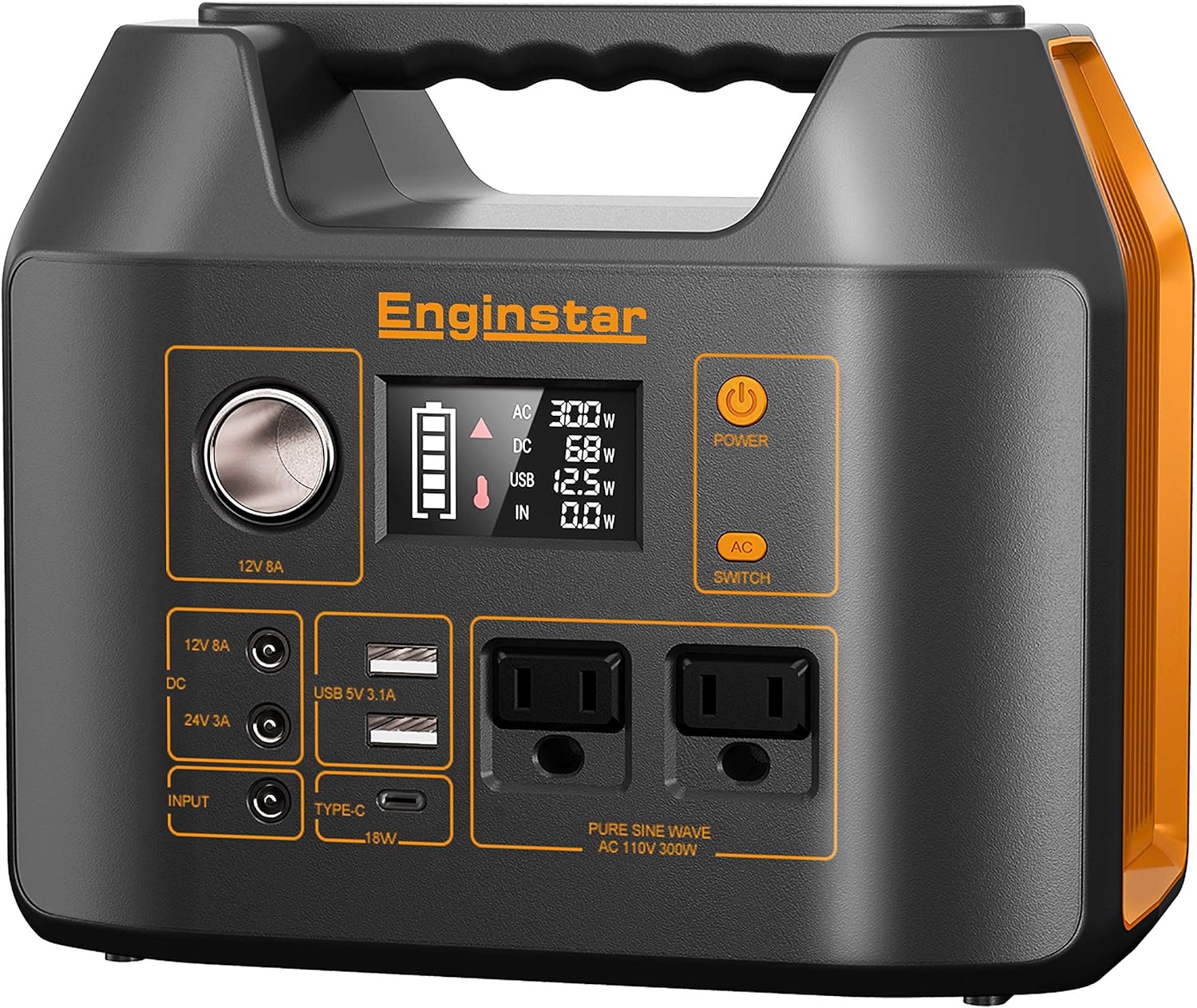
ചിത്രം 4.1: Front panel of the EnginStar R300 Portable Power Station, showing the main display, AC outlets, DC ports, USB ports, and power buttons.
- പവർ ബട്ടൺ: യൂണിറ്റ് ഓൺ/ഓഫ് ചെയ്യുന്നു.
- LCD ഡിസ്പ്ലേ: ബാറ്ററി ലെവൽ, ഇൻപുട്ട്/ഔട്ട്പുട്ട് വാട്ട് എന്നിവ കാണിക്കുന്നുtage, സ്റ്റാറ്റസ് സൂചകങ്ങൾ.
- എസി ഔട്ട്പുട്ട് സോക്കറ്റുകൾ: Two 110V Pure Sine Wave AC outlets.
- ഡിസി ഔട്ട്പുട്ട് പോർട്ടുകൾ: 12V 8A car port and 24V 3A DC ports.
- യുഎസ്ബി ഔട്ട്പുട്ട് പോർട്ടുകൾ: USB 5V 3.1A and Type-C 18W ports.
- ഡിസി ഇൻപുട്ട് പോർട്ട്: For charging the power station via AC adapter or solar panel.
5. സജ്ജീകരണം
5.1 പ്രാരംഭ ചാർജിംഗ്
Before first use, fully charge your EnginStar R300. Connect the provided AC power adapter to the DC Input Port on the power station and plug the adapter into a wall outlet. The LCD display will show the charging status. Charging time varies depending on the power source.
5.2 സോളാർ ചാർജിംഗ്
To charge using solar power, connect a compatible solar panel (not included) to the DC Input Port. Ensure the solar panel is placed in direct sunlight for optimal charging efficiency. The LCD display will indicate solar input wattage.
6. പ്രവർത്തന നിർദ്ദേശങ്ങൾ
6.1 പവർ ഓൺ/ഓഫ്
Press and hold the main Power Button for 3 seconds to turn the unit on or off. The LCD display will illuminate when the unit is on.
6.2 Using AC Output
Press the 'AC Switch' button to activate the AC outlets. The AC indicator on the display will light up. Plug your 110V devices into the AC sockets. Press the 'AC Switch' again to turn off AC output when not in use.
6.3 Using DC Output
The DC output ports (12V car port and 24V DC ports) are typically active when the unit is powered on. Plug your 12V or 24V DC devices into the appropriate ports. Ensure your device's voltage matches the port's output.
6.4 Using USB Output
The USB-A and Type-C ports are active when the unit is powered on. Connect your USB-powered devices for charging. The Type-C port supports 18W fast charging.
6.5 ഡിസ്പ്ലേ മനസ്സിലാക്കുന്നു
എൽസിഡി ഡിസ്പ്ലേ തത്സമയ വിവരങ്ങൾ നൽകുന്നു:
- ബാറ്ററി ലെവൽ ഇൻഡിക്കേറ്റർ: ശേഷിക്കുന്ന ബാറ്ററി ശേഷി കാണിക്കുന്നു.
- ഇൻപുട്ട് വാട്ട്tage: Displays the power being drawn into the unit (e.g., from AC adapter or solar panel).
- ഔട്ട്പുട്ട് വാട്ട്tage: Shows the power being consumed by connected devices from AC, DC, and USB outputs.
- സ്റ്റാറ്റസ് ഐക്കണുകൾ: Indicators for AC, DC, USB active, and warning symbols.
7. പരിപാലനം
7.1 വൃത്തിയാക്കൽ
Wipe the unit with a dry, soft cloth. Do not use abrasive cleaners or solvents. Ensure all ports are free from dust and debris.
7.2 സംഭരണം
നേരിട്ടുള്ള സൂര്യപ്രകാശത്തിൽ നിന്നും കടുത്ത താപനിലയിൽ നിന്നും അകന്ന്, തണുത്തതും വരണ്ടതുമായ സ്ഥലത്ത് പവർ സ്റ്റേഷൻ സൂക്ഷിക്കുക. ദീർഘകാല സംഭരണത്തിനായി, ബാറ്ററിയുടെ ആരോഗ്യം നിലനിർത്താൻ ഓരോ 3-6 മാസത്തിലും യൂണിറ്റ് 50-80% വരെ ചാർജ് ചെയ്യുക.
7.3 ബാറ്ററി കെയർ
To prolong battery life, avoid fully discharging the unit frequently. It is recommended to recharge the unit when the battery level drops below 20%.
8. പ്രശ്നപരിഹാരം
- യൂണിറ്റ് ഓണാക്കുന്നില്ല: ബാറ്ററി ചാർജ്ജ് ചെയ്തിട്ടുണ്ടെന്ന് ഉറപ്പാക്കുക. ഇല്ലെങ്കിൽ, ഒരു പവർ സ്രോതസ്സിലേക്ക് കണക്റ്റ് ചെയ്യുക.
- പോർട്ടുകളിൽ നിന്ന് ഔട്ട്പുട്ട് ഇല്ല: Check if the specific output (AC, DC) is activated. Ensure the device connected is within the power station's wattagഇ പരിധികൾ.
- ഓവർലോഡ് മുന്നറിയിപ്പ്: Disconnect some devices to reduce the load. The unit will automatically shut down if overloaded to prevent damage.
- സാവധാനം ചാർജ് ചെയ്യുന്നു: Verify the charging adapter or solar panel is functioning correctly and providing sufficient power. Ensure solar panels are in direct sunlight.
9 സ്പെസിഫിക്കേഷനുകൾ
| ഫീച്ചർ | വിശദാംശങ്ങൾ |
|---|---|
| ബ്രാൻഡ് | എഞ്ചിൻസ്റ്റാർ |
| മോഡൽ | R300 |
| വാട്ട്tage | 300 watts (Starting) |
| ഇന്ധന തരം | സോളാർ |
| പവർ ഉറവിടം | സൗരോർജ്ജം |
| ഉൽപ്പന്ന അളവുകൾ | 9.5"L x 7.5"W x 9.5"H |
| ഇനത്തിൻ്റെ ഭാരം | 12.8 ഔൺസ് |
| യു.പി.സി | 703063608458 |
| എസി ഔട്ട്പുട്ട് | 110V Pure Sine Wave |
| ബാറ്ററി ശേഷി | 296Wh / 80000mAh |
10. വാറണ്ടിയും പിന്തുണയും
The EnginStar R300 Portable Power Station comes with a 10-day warranty from the date of purchase. This warranty covers manufacturing defects under normal use. It does not cover damage caused by misuse, accidents, or unauthorized modifications.
For technical support, warranty claims, or any questions regarding your product, please refer to the contact information provided on the EnginStar official webസൈറ്റ് അല്ലെങ്കിൽ നിങ്ങളുടെ വാങ്ങൽ പ്ലാറ്റ്ഫോം. പിന്തുണയുമായി ബന്ധപ്പെടുമ്പോൾ നിങ്ങളുടെ മോഡൽ നമ്പറും വാങ്ങൽ വിശദാംശങ്ങളും തയ്യാറായി വയ്ക്കുക.


