1. ആമുഖം
This manual provides detailed instructions for the proper use and maintenance of your Tronsmart T6 Plus Upgraded Bluetooth Speaker. Please read this manual thoroughly before using the product to ensure safe operation and optimal performance. Keep this manual for future reference.
2. പാക്കേജ് ഉള്ളടക്കം
- Tronsmart T6 Plus Upgraded Bluetooth Speaker
- ചാർജിംഗ് കേബിൾ
- 3.5mm AUX Cable (if included with your specific package)
- ഉപയോക്തൃ മാനുവൽ (ഈ പ്രമാണം)
3. ഉൽപ്പന്ന സവിശേഷതകൾ
- 40W Output with SoundPulse™ Technology: Delivers powerful audio with enhanced bass and clear vocals.
- 360° HD Surround Sound: Provides immersive audio experience from all directions.
- IPX6 വാട്ടർ റെസിസ്റ്റൻ്റ്: Designed to resist heavy splashes, rain, and sweat, making it suitable for outdoor use.
- 15-മണിക്കൂർ കളിസമയം: Extended battery life for prolonged listening on a single charge (at 50% volume).
- Tri-Bass Effects: Three distinct equalizer audio effects (Balanced, 3D, Deep Bass) to suit various music genres.
- NFC കണക്റ്റിവിറ്റി: Quick and easy pairing with NFC-enabled devices.
- USB Charge Out: Functions as a power bank to charge your smart devices in emergencies.
- ട്രൂ വയർലെസ് സ്റ്റീരിയോ (TWS) ജോടിയാക്കൽ: Connect two T6 Plus speakers for a true stereo sound experience.
- Intuitive Control Wheel: Easy-to-use rotary control for volume adjustment and multi-function button for playback and calls.
4. നിയന്ത്രണങ്ങളും സൂചകങ്ങളും

ചിത്ര വിവരണം: A black Tronsmart T6 Plus speaker shown vertically, highlighting its cylindrical shape and the control panel on its side. The top features a rotary control wheel with a blue LED ring. Below it are buttons for NFC, previous track, play/pause, next track, EQ, Mode, and Power. At the bottom, there are ports for TF Card, USB, and AUX input.

ചിത്ര വിവരണം: A series of three images demonstrating the intuitive control wheel. The first shows rotating the wheel for volume control. The second shows tapping the center for play/pause and hands-free calls. The third shows pressing and holding the center to activate the voice assistant.
നിയന്ത്രണ പാനൽ ലേഔട്ട്:
- Rotary Control Wheel: Rotate clockwise to increase volume, counter-clockwise to decrease volume.
- Multi-function Button (Center of wheel): Tap to play/pause music or answer/end calls. Press and hold to activate voice assistant.
- NFC Icon: Tap NFC-enabled device here for quick pairing.
- Previous Track Button (◀◀): മുമ്പത്തെ ട്രാക്കിലേക്ക് പോകാൻ അമർത്തുക.
- Next Track Button (▶▶): അടുത്ത ട്രാക്കിലേക്ക് പോകാൻ അമർത്തുക.
- ഇക്യു ബട്ടൺ: Press to cycle through Tri-Bass Effects (Balanced, 3D, Deep Bass).
- മോഡ് ബട്ടൺ (M): ബ്ലൂടൂത്ത്, TF കാർഡ്, AUX മോഡുകൾക്കിടയിൽ മാറാൻ അമർത്തുക.
- പവർ ബട്ടൺ (⑂): പവർ ഓൺ/ഓഫ് ചെയ്യാൻ അമർത്തിപ്പിടിക്കുക.
LED സൂചകങ്ങൾ:
- ബ്ലൂടൂത്ത് സൂചകം: Blue light flashes when pairing, solid blue when connected.
- ചാർജിംഗ് സൂചകം: ചുവന്ന ലൈറ്റ് ചാർജ് ചെയ്യുന്നതിനെ സൂചിപ്പിക്കുന്നു, പൂർണ്ണമായി ചാർജ് ചെയ്യുമ്പോൾ അത് ഓഫാകും.
- ബാറ്ററി കുറഞ്ഞ സൂചകം: Red light flashes when battery is low.
5. സജ്ജീകരണം
5.1 സ്പീക്കർ ചാർജ് ചെയ്യുന്നു
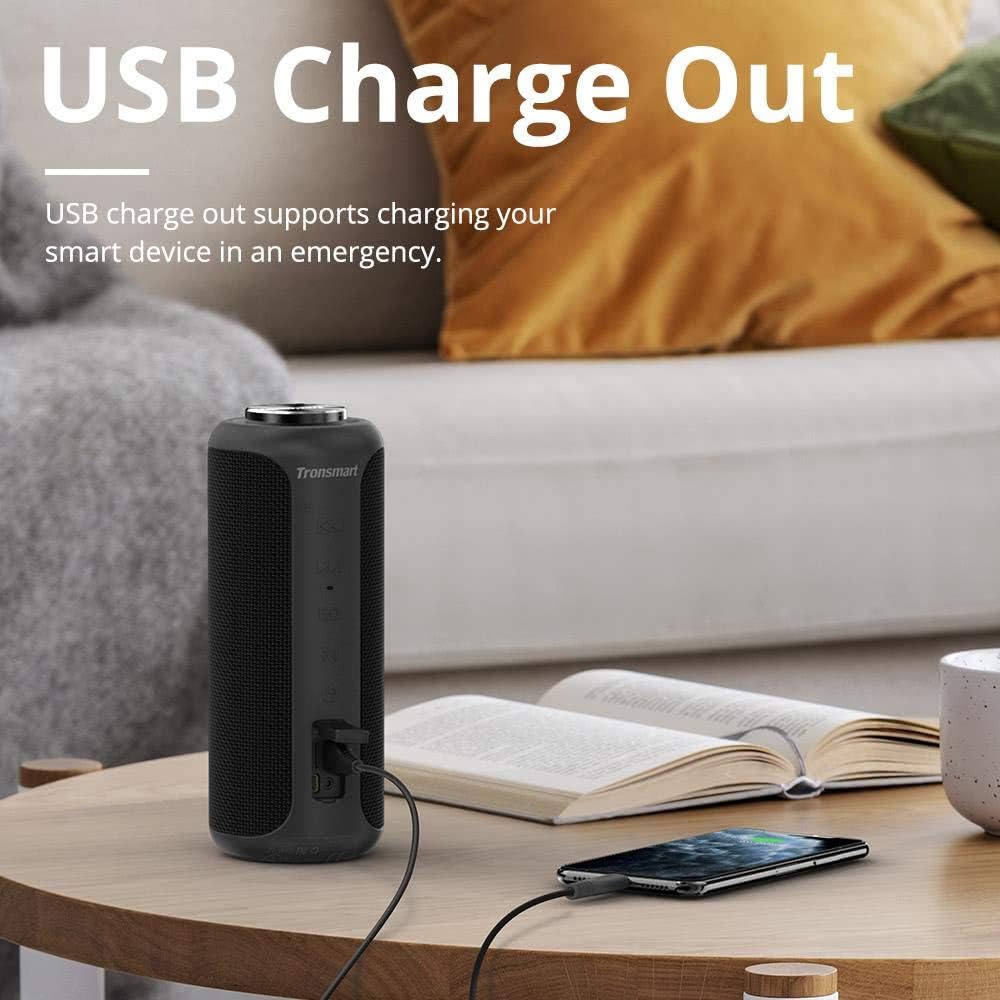
ചിത്ര വിവരണം: The Tronsmart T6 Plus speaker standing on a wooden table, connected via a USB cable to a smartphone that is being charged. This illustrates the USB charge out feature.
- Connect the provided charging cable to the speaker's charging port and a USB power adapter (not included) or a computer's USB port.
- ചാർജ് ചെയ്യുമ്പോൾ ചാർജിംഗ് ഇൻഡിക്കേറ്റർ ലൈറ്റ് ചുവപ്പ് നിറത്തിൽ പ്രകാശിക്കും.
- The light will turn off once the speaker is fully charged.
- A full charge provides up to 15 hours of playtime at 50% volume.
5.2 പവർ ഓൺ/ഓഫ്
- പവർ ഓൺ: Press and hold the Power button (⑂) for 2-3 seconds until the indicator light illuminates.
- പവർ ഓഫ്: Press and hold the Power button (⑂) for 2-3 seconds until the indicator light turns off.
5.3 ബ്ലൂടൂത്ത് ജോടിയാക്കൽ
- Ensure the speaker is powered on and the Bluetooth indicator is flashing blue, indicating it's in pairing mode.
- നിങ്ങളുടെ ഉപകരണത്തിൽ (സ്മാർട്ട്ഫോൺ, ടാബ്ലെറ്റ്, ലാപ്ടോപ്പ്), ബ്ലൂടൂത്ത് പ്രവർത്തനക്ഷമമാക്കി ലഭ്യമായ ഉപകരണങ്ങൾക്കായി തിരയുക.
- Select "Tronsmart T6 Plus" from the list of devices.
- Once connected, the Bluetooth indicator will turn solid blue.
NFC Pairing (Optional):
- Ensure NFC is enabled on your device and the speaker is powered on.
- Tap your NFC-enabled device gently against the NFC icon on the speaker.
- Confirm the pairing request on your device.
5.4 ട്രൂ വയർലെസ് സ്റ്റീരിയോ (TWS) ജോടിയാക്കൽ

ചിത്ര വിവരണം: Two Tronsmart T6 Plus speakers, one black and one red, are shown on steps with blue circular waves emanating from them, symbolizing their wireless stereo connection. This illustrates the True Wireless Stereo (TWS) pairing feature.
To pair two T6 Plus speakers for a stereo sound experience:
- രണ്ട് സ്പീക്കറുകളും ഓണാക്കിയിട്ടുണ്ടെന്നും ഏതെങ്കിലും ബ്ലൂടൂത്ത് ഉപകരണവുമായി ബന്ധിപ്പിച്ചിട്ടില്ലെന്നും ഉറപ്പാക്കുക.
- On one speaker (this will be the primary speaker), press and hold the Mode button (M) for 3 seconds until you hear a prompt sound.
- The two speakers will automatically connect to each other. Once connected, the primary speaker's Bluetooth indicator will flash blue, and the secondary speaker's indicator will be solid blue.
- Now, connect your device to the primary speaker via Bluetooth as described in section 5.3.
6. പ്രവർത്തന നിർദ്ദേശങ്ങൾ
6.1 മ്യൂസിക് പ്ലേബാക്ക്
- പ്ലേ/താൽക്കാലികമായി നിർത്തുക: Tap the Multi-function button (center of the control wheel).
- അടുത്ത ട്രാക്ക്: Press the Next Track button (▶▶).
- മുമ്പത്തെ ട്രാക്ക്: Press the Previous Track button (◀◀).
- വോളിയം കൂട്ടുക: Rotate the control wheel clockwise.
- വോളിയം താഴേക്ക്: Rotate the control wheel counter-clockwise.
6.2 കോൾ മാനേജ്മെന്റ്
- ഉത്തരം/അവസാന കോൾ: മൾട്ടി-ഫംഗ്ഷൻ ബട്ടൺ ടാപ്പുചെയ്യുക.
- കോൾ നിരസിക്കുക: മൾട്ടി-ഫംഗ്ഷൻ ബട്ടൺ 2 സെക്കൻഡ് അമർത്തിപ്പിടിക്കുക.
6.3 വോയ്സ് അസിസ്റ്റന്റ്
- വോയ്സ് അസിസ്റ്റന്റിനെ സജീവമാക്കുക: മൾട്ടി-ഫംഗ്ഷൻ ബട്ടൺ 2 സെക്കൻഡ് അമർത്തിപ്പിടിക്കുക.
6.4 Tri-Bass Effects

ചിത്ര വിവരണം: A graphic illustrating the three Tri-Bass Effects available on the speaker: Balanced (Default), 3D, and Deep Bass. Each effect is represented by a hexagonal icon with a play button, suggesting different audio profiles for various music genres.
- അമർത്തുക EQ button to cycle through the three available sound modes: Balanced (Default), 3D, and Deep Bass.
6.5 TF കാർഡ് പ്ലേബാക്ക്
- Insert a TF (microSD) card with music files into the TF Card slot. The speaker will automatically switch to TF Card mode and begin playback.
- Use the playback controls (Play/Pause, Next/Previous Track) as described above.
6.6 AUX ഇൻപുട്ട്
- Connect an audio device to the speaker's AUX port using a 3.5mm audio cable.
- സ്പീക്കർ സ്വയമേവ AUX മോഡിലേക്ക് മാറും.
- Control playback from your connected audio device.
7. പരിപാലനവും പരിചരണവും
- സ്പീക്കർ ഒരു സോഫ്റ്റ്, ഡി ക്ലീനർ ഉപയോഗിച്ച് വൃത്തിയാക്കുക.amp തുണി. കഠിനമായ രാസവസ്തുക്കളോ ഉരച്ചിലുകളോ ഉപയോഗിക്കരുത്.
- The speaker is IPX6 water resistant, meaning it can withstand heavy splashes and rain. Do not submerge the speaker in water. Ensure the port cover is securely closed when exposed to water.
- തീവ്രമായ താപനിലയിൽ നിന്നും നേരിട്ടുള്ള സൂര്യപ്രകാശത്തിൽ നിന്നും മാറി തണുത്തതും വരണ്ടതുമായ സ്ഥലത്ത് സ്പീക്കർ സൂക്ഷിക്കുക.
- സ്പീക്കറെ ശക്തമായ ആഘാതങ്ങൾക്ക് വിധേയമാക്കുകയോ താഴെയിടുകയോ ചെയ്യുന്നത് ഒഴിവാക്കുക.
- If the speaker will not be used for an extended period, charge it at least once every three months to preserve battery life.
8. പ്രശ്നപരിഹാരം
| പ്രശ്നം | സാധ്യമായ കാരണം | പരിഹാരം |
|---|---|---|
| സ്പീക്കർ പവർ ഓൺ ചെയ്യുന്നില്ല. | ബാറ്ററി തീർന്നു. | സ്പീക്കർ പൂർണ്ണമായും ചാർജ് ചെയ്യുക. |
| ശബ്ദമില്ല. | Volume is too low; device not connected; incorrect mode. | Increase volume on speaker and device; ensure Bluetooth is connected or correct mode (TF/AUX) is selected. |
| ബ്ലൂടൂത്ത് കണക്ഷൻ അസ്ഥിരമാണ് അല്ലെങ്കിൽ പരാജയപ്പെടുന്നു. | സ്പീക്കർ ഉപകരണത്തിൽ നിന്ന് വളരെ അകലെയാണ്; തടസ്സം; ഉപകരണ ബ്ലൂടൂത്ത് പ്രശ്നം. | Move speaker closer to device; avoid obstacles; restart speaker and device's Bluetooth. |
| TWS ജോടിയാക്കൽ പരാജയപ്പെടുന്നു. | സ്പീക്കറുകൾ മറ്റ് ഉപകരണങ്ങളുമായി ഇതിനകം ബന്ധിപ്പിച്ചിരിക്കുന്നു; തെറ്റായ ജോടിയാക്കൽ നടപടിക്രമം. | Ensure both speakers are disconnected from other devices; follow TWS pairing steps carefully. |
| വികലമായ ശബ്ദം. | Volume too high; low battery; poor audio source. | Reduce volume; charge speaker; try a different audio source. |
9 സ്പെസിഫിക്കേഷനുകൾ
| ഫീച്ചർ | വിശദാംശങ്ങൾ |
|---|---|
| മോഡലിൻ്റെ പേര് | ടി 6 പ്ലസ് |
| സ്പീക്കർ തരം | ഔട്ട്ഡോർ |
| പ്രത്യേക ഫീച്ചർ | വാട്ടർപ്രൂഫ് |
| സ്പീക്കർ പരമാവധി ഔട്ട്പുട്ട് പവർ | 40 വാട്ട്സ് |
| ഓഡിയോ put ട്ട്പുട്ട് മോഡ് | ചുറ്റുക |
| കണക്റ്റിവിറ്റി ടെക്നോളജി | ബ്ലൂടൂത്ത്, എൻഎഫ്സി, യുഎസ്ബി |
| വയർലെസ് കമ്മ്യൂണിക്കേഷൻ ടെക്നോളജി | ബ്ലൂടൂത്ത് |
| ബ്ലൂടൂത്ത് പതിപ്പ് | 5.0 (Inferred from Surround Sound Channel Configuration) |
| നിയന്ത്രണ രീതി | സ്പർശിക്കുക |
| ബാറ്ററി ലൈഫ് | 15 മണിക്കൂർ |
| പവർ ഉറവിടം | ബാറ്ററി പവർ (1 ലിഥിയം പോളിമർ ബാറ്ററി ഉൾപ്പെടുത്തിയിട്ടുണ്ട്) |
| ഉൽപ്പന്ന അളവുകൾ | 3.31"D x 3.31"W x 8.27"H |
| ഇനത്തിൻ്റെ ഭാരം | 1.6 പൗണ്ട് |
| നിറം | കറുപ്പ് |
| നിർമ്മാതാവ് | ട്രോൺസ്മാർട്ട് |
10. വാറൻ്റിയും പിന്തുണയും
The Tronsmart T6 Plus Upgraded Bluetooth Speaker comes with a limited warranty. For detailed warranty information, technical support, or service inquiries, please visit the official Tronsmart webസൈറ്റിൽ ബന്ധപ്പെടുകയോ അവരുടെ ഉപഭോക്തൃ സേവനവുമായി നേരിട്ട് ബന്ധപ്പെടുകയോ ചെയ്യുക. വാറന്റി ക്ലെയിമുകൾക്കുള്ള വാങ്ങലിന്റെ തെളിവായി നിങ്ങളുടെ വാങ്ങൽ രസീത് സൂക്ഷിക്കുക.
Tronsmart Official Webസൈറ്റ്: www.tronsmart.com


