ആമുഖം
This manual provides detailed instructions for the installation, operation, and maintenance of your GIGABYTE B460 AORUS PRO AC motherboard. Please read this manual thoroughly before beginning the installation process to ensure proper setup and to maximize the performance and longevity of your system.
The GIGABYTE B460 AORUS PRO AC is an ATX form factor motherboard designed for Intel LGA1200 processors, featuring the Intel B460 chipset. It supports DDR4 memory, dual M.2 slots, SATA 6Gb/s, USB 3.2 Gen 2, Intel 802.11ac wireless, and 2.5 GbE LAN, providing a robust foundation for your personal computer.
പാക്കേജ് ഉള്ളടക്കം
Verify that all items listed below are present in your motherboard package. If any items are missing or damaged, contact your retailer.
- GIGABYTE B460 AORUS PRO AC Motherboard
- SATA കേബിളുകൾ
- ഉപയോക്തൃ മാനുവൽ
- വൈഫൈ ആന്റിന
- I/O Shield (if not pre-mounted)
- എം.2 സ്ക്രൂ പാക്കേജ്
- ഡ്രൈവർ സിഡി/ഡിവിഡി (അല്ലെങ്കിൽ ഡ്രൈവറുകൾ ഡൗൺലോഡ് ചെയ്യുന്നതിനുള്ള ലിങ്ക്)
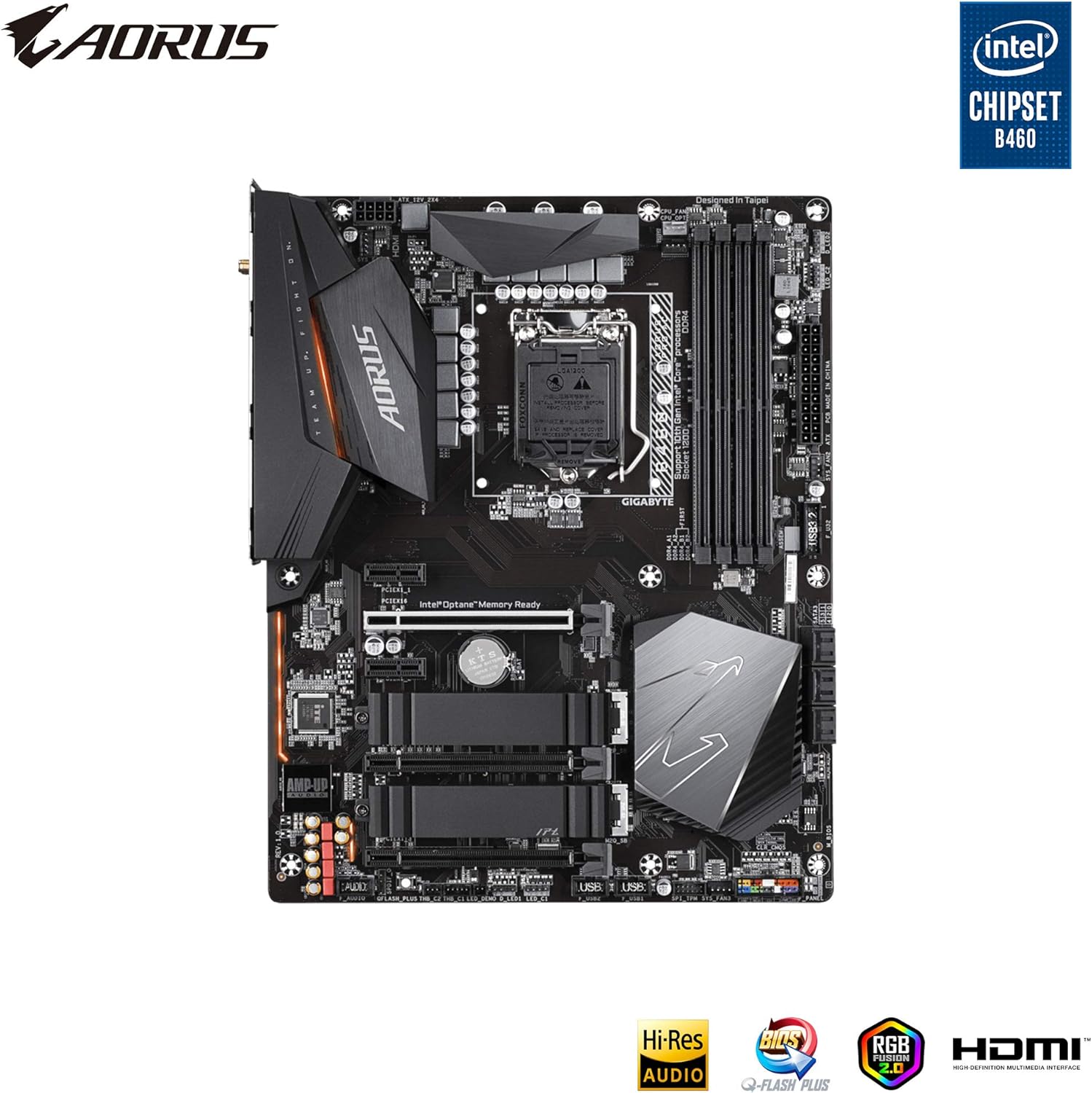
ചിത്രം 1: മുകളിൽ നിന്ന് താഴേക്ക് view of the GIGABYTE B460 AORUS PRO AC Motherboard, showing CPU socket, RAM slots, and M.2 slots.
സജ്ജീകരണവും ഇൻസ്റ്റാളേഷനും
Before installing the motherboard, ensure your workspace is clean, well-lit, and free of static electricity. Use an anti-static wrist strap or frequently touch a grounded metal object to discharge static electricity.
1. Prepare the Chassis
Install the I/O shield into the chassis's rear opening. If your chassis has a pre-mounted I/O shield, skip this step.
2. സിപിയു ഇൻസ്റ്റാൾ ചെയ്യുക
- മദർബോർഡിൽ LGA1200 CPU സോക്കറ്റ് കണ്ടെത്തുക.
- ലോഡ് ലിവർ പതുക്കെ താഴേക്ക് തള്ളി സിപിയു സോക്കറ്റ് കവർ തുറക്കാൻ അത് പുറത്തെടുക്കുക.
- സിപിയുവിലെ ത്രികോണാകൃതിയിലുള്ള അടയാളം സോക്കറ്റിലെ അനുബന്ധ അടയാളവുമായി വിന്യസിക്കുക. നിർബന്ധിക്കാതെ സിപിയു സോക്കറ്റിൽ ശ്രദ്ധാപൂർവ്വം വയ്ക്കുക.
- ലോഡ് പ്ലേറ്റ് അടച്ച്, ക്ലിക്ക് ചെയ്യുന്നതുവരെ ലോഡ് ലിവർ തിരികെ അതിന്റെ സ്ഥാനത്തേക്ക് തള്ളുക.
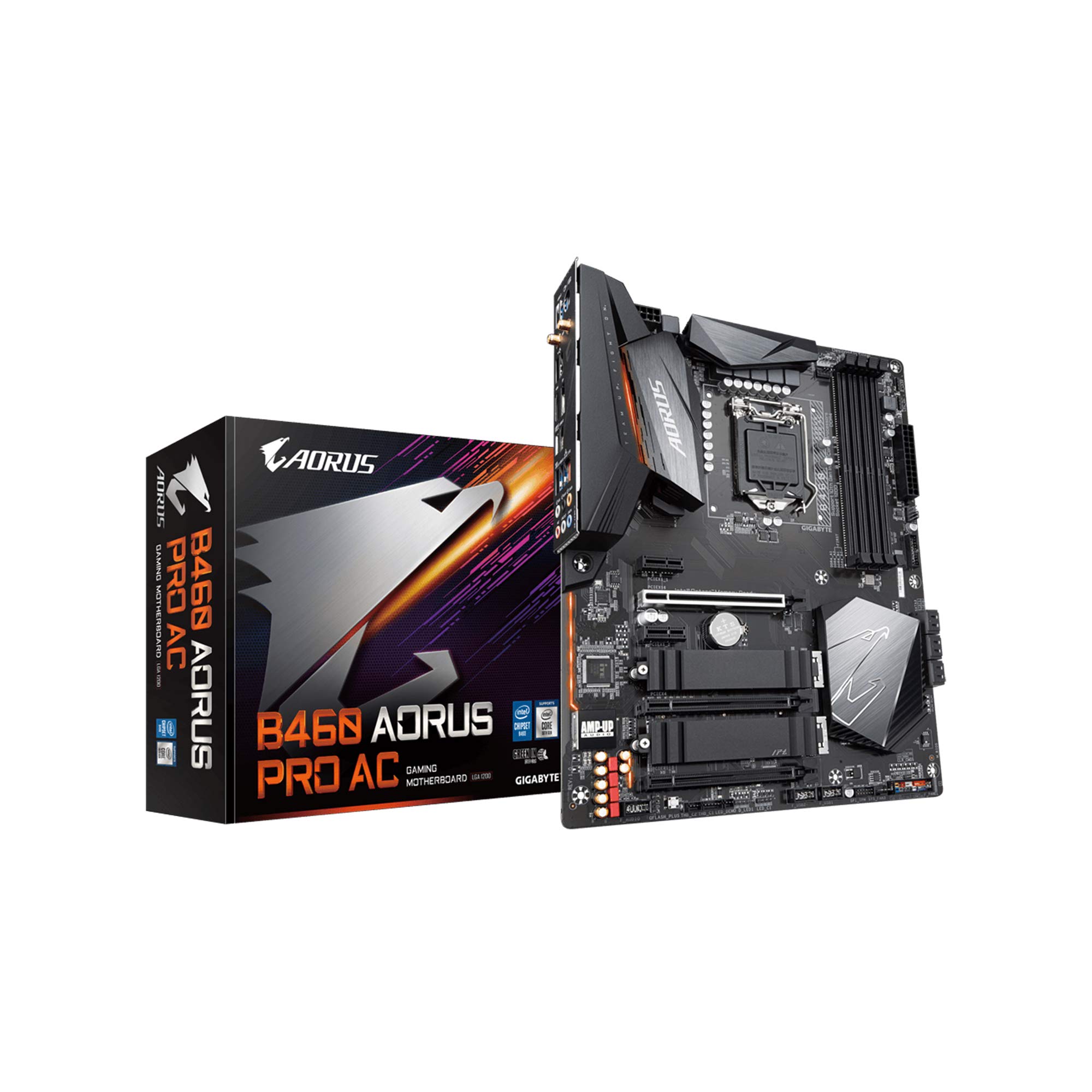
Figure 2: Close-up of the motherboard showing the LGA1200 CPU socket area.
3. Install the CPU Cooler
Follow the instructions provided with your CPU cooler to install it securely onto the motherboard. Ensure proper thermal paste application for optimal cooling.
4. Install Memory Modules (RAM)
- DIMM സ്ലോട്ടുകളുടെ രണ്ടറ്റത്തും ക്ലിപ്പുകൾ തുറക്കുക.
- DIMM സ്ലോട്ടിലെ കീ ഉപയോഗിച്ച് DDR4 മെമ്മറി മൊഡ്യൂളിലെ നോച്ച് വിന്യസിക്കുക.
- Insert the module firmly into the slot until the clips snap into place. Install modules in the recommended slots for dual-channel operation (refer to the motherboard's printed manual for specific slot order).
5. M.2 SSD-കൾ ഇൻസ്റ്റാൾ ചെയ്യുക
- മദർബോർഡിൽ M.2 സ്ലോട്ടുകൾ കണ്ടെത്തുക.
- Remove the M.2 heatsink (if present) and the standoff screw from the desired M.2 slot.
- സ്ലോട്ടിലേക്ക് 30 ഡിഗ്രി കോണിൽ M.2 SSD തിരുകുക.
- Gently push down the SSD and secure it with the standoff screw. Reinstall the M.2 heatsink if applicable.
6. മദർബോർഡ് മൌണ്ട് ചെയ്യുക
Carefully place the motherboard into the chassis, aligning the screw holes with the standoffs. Secure the motherboard with screws, ensuring it is firmly seated but not overtightened.
7. പവർ കേബിളുകൾ ബന്ധിപ്പിക്കുക
- നിങ്ങളുടെ പവർ സപ്ലൈയിൽ നിന്ന് മദർബോർഡിലേക്ക് 24-പിൻ ATX മെയിൻ പവർ കണക്ടർ ബന്ധിപ്പിക്കുക.
- Connect the 8-pin (or 4+4-pin) ATX 12V CPU power connector to the motherboard.
8. ഫ്രണ്ട് പാനൽ കേബിളുകൾ ബന്ധിപ്പിക്കുക
Connect the power switch, reset switch, HDD LED, and power LED cables from your chassis to the corresponding pins on the motherboard's front panel header. Refer to the motherboard's printed manual for the exact pin layout.
9. സ്റ്റോറേജ് ഡിവൈസുകൾ ബന്ധിപ്പിക്കുക
Connect SATA data cables from your storage drives (HDDs, SSDs) to the SATA ports on the motherboard. Connect the power cables from your power supply to these drives.
10. Install Expansion Cards (e.g., Graphics Card)
Insert your graphics card into the primary PCIe x16 slot. Ensure it is fully seated and secured with the chassis latch or screw. Connect any required PCIe power cables from your power supply to the graphics card.

ചിത്രം 3: കോണാകൃതിയിലുള്ളത് view of the motherboard, showing PCIe slots for expansion cards.
പ്രവർത്തന നിർദ്ദേശങ്ങൾ
1. ആദ്യ ബൂട്ടും ബയോസ് സജ്ജീകരണവും
- എല്ലാ ഘടകങ്ങളും പെരിഫറലുകളും ബന്ധിപ്പിച്ച ശേഷം, നിങ്ങളുടെ സിസ്റ്റം ഓൺ ചെയ്യുക.
- അമർത്തുക DEL BIOS/UEFI സജ്ജീകരണ യൂട്ടിലിറ്റിയിൽ പ്രവേശിക്കുന്നതിന് സ്റ്റാർട്ടപ്പ് സമയത്ത് ആവർത്തിച്ച് കീ അമർത്തുക.
- Configure essential settings such as boot order, date/time, and enable XMP for memory if desired. Save changes and exit.
2. ഓപ്പറേറ്റിംഗ് സിസ്റ്റം ഇൻസ്റ്റലേഷൻ
Insert your operating system installation media (USB drive or DVD) and follow the on-screen prompts to install your preferred operating system.
3. ഡ്രൈവർ ഇൻസ്റ്റാളേഷൻ
After OS installation, install the necessary drivers for your motherboard components. You can find the latest drivers on the official GIGABYTE website for the B460 AORUS PRO AC model. Install chipset drivers, LAN drivers, audio drivers, and Wi-Fi drivers.

Figure 4: Rear I/O panel, showing various ports including USB, LAN, Wi-Fi antenna connectors, and audio jacks.
മെയിൻ്റനൻസ്
Regular maintenance helps ensure the stability and longevity of your motherboard and system.
- പൊടി നീക്കം: മദർബോർഡിലെയും ഘടകങ്ങളിലെയും പൊടി ഇടയ്ക്കിടെ കംപ്രസ് ചെയ്ത വായു ഉപയോഗിച്ച് വൃത്തിയാക്കുക. വൃത്തിയാക്കുന്നതിന് മുമ്പ് സിസ്റ്റം ഓഫ് ചെയ്തിട്ടുണ്ടെന്നും പ്ലഗ് ഇൻ ചെയ്തിട്ടുണ്ടെന്നും ഉറപ്പാക്കുക.
- ബയോസ് അപ്ഡേറ്റുകൾ: GIGABYTE പരിശോധിക്കുക website for the latest BIOS updates. BIOS updates can improve system stability, compatibility, and performance. Follow the instructions carefully when updating the BIOS.
- ഡ്രൈവർ അപ്ഡേറ്റുകൾ: പുതിയ സോഫ്റ്റ്വെയറുമായും ഹാർഡ്വെയറുമായും ഒപ്റ്റിമൽ പ്രകടനവും അനുയോജ്യതയും ഉറപ്പാക്കാൻ നിങ്ങളുടെ ഡ്രൈവറുകൾ അപ്ഡേറ്റ് ചെയ്ത് സൂക്ഷിക്കുക.
- കേബിൾ മാനേജുമെന്റ്: വായുസഞ്ചാരം മെച്ചപ്പെടുത്തുന്നതിനും തടസ്സങ്ങൾ തടയുന്നതിനും ആന്തരിക കേബിളുകൾ വൃത്തിയായി റൂട്ട് ചെയ്തിട്ടുണ്ടെന്ന് ഉറപ്പാക്കുക.
ട്രബിൾഷൂട്ടിംഗ്
If you encounter issues with your system, refer to the following common troubleshooting steps:
- ശക്തിയില്ല:
- എല്ലാ പവർ കണക്ഷനുകളും പരിശോധിക്കുക (24-പിൻ ATX, 8-പിൻ CPU, GPU പവർ).
- പവർ സപ്ലൈ സ്വിച്ച് ഓൺ സ്ഥാനത്താണെന്ന് ഉറപ്പാക്കുക.
- മറ്റൊരു സിസ്റ്റം അല്ലെങ്കിൽ ഒരു പവർ സപ്ലൈ ടെസ്റ്റർ ഉപയോഗിച്ച് പവർ സപ്ലൈ പരിശോധിക്കുക.
- ഡിസ്പ്ലേ ഇല്ല:
- Ensure the monitor is connected to the graphics card (not the motherboard's integrated graphics ports if a dedicated GPU is installed).
- ഗ്രാഫിക്സ് കാർഡും റാം മൊഡ്യൂളുകളും വീണ്ടും ഇൻസ്റ്റാൾ ചെയ്യുക.
- ഒരു റാം സ്റ്റിക്ക് മാത്രം ഉപയോഗിച്ച് ബൂട്ട് ചെയ്യാൻ ശ്രമിക്കുക.
- സിസ്റ്റം അസ്ഥിരത/ക്രാഷുകൾ:
- സിപിയു, ജിപിയു താപനിലകൾ പരിശോധിക്കുക.
- റാം പിശകുകൾ പരിശോധിക്കാൻ മെമ്മറി ഡയഗ്നോസ്റ്റിക് ഉപകരണങ്ങൾ പ്രവർത്തിപ്പിക്കുക.
- എല്ലാ ഡ്രൈവർമാരും കാലികമാണെന്ന് ഉറപ്പാക്കുക.
- Verify BIOS settings are stable (e.g., disable XMP temporarily).
- പെരിഫറൽ കണ്ടെത്തിയില്ല:
- പെരിഫറൽ മറ്റൊരു പോർട്ടിലേക്ക് ബന്ധിപ്പിക്കാൻ ശ്രമിക്കുക.
- പ്രസക്തമായ ഡ്രൈവറുകൾ ഇൻസ്റ്റാൾ ചെയ്യുക അല്ലെങ്കിൽ അപ്ഡേറ്റ് ചെയ്യുക.
- പോർട്ട് പ്രാപ്തമാക്കുന്നതിനായി ബയോസ് ക്രമീകരണങ്ങൾ പരിശോധിക്കുക.
For more advanced troubleshooting or persistent issues, consult the comprehensive user manual provided with your motherboard or visit the GIGABYTE support webസൈറ്റ്.
സ്പെസിഫിക്കേഷനുകൾ
Key technical specifications for the GIGABYTE B460 AORUS PRO AC Motherboard:
| ഫീച്ചർ | സ്പെസിഫിക്കേഷൻ |
|---|---|
| ബ്രാൻഡ് | ജിഗാബൈറ്റ് |
| മോഡൽ നമ്പർ | B460 AORUS PRO AC |
| സിപിയു സോക്കറ്റ് | LGA1200 |
| ചിപ്സെറ്റ് | ഇൻ്റൽ B460 |
| ഫോം ഫാക്ടർ | ATX |
| റാം തരം | DDR4 SDRAM |
| മെമ്മറി സ്പീഡ് | Up to 2933 MHz (with compatible CPU) |
| വയർലെസ് തരം | 802.11ac |
| ലാൻ | 2.5 ജിഗാബൈറ്റ് ഇഥർനെറ്റ് |
| USB പോർട്ടുകൾ | യുഎസ്ബി 3.2 ജെൻ 2, യുഎസ്ബി 2.0 |
| സ്റ്റോറേജ് ഇൻ്റർഫേസ് | Dual M.2, SATA 6Gb/s |
| ഉൽപ്പന്ന അളവുകൾ (LxWxH) | 13.18 x 10.62 x 3.14 ഇഞ്ച് |
| ഇനത്തിൻ്റെ ഭാരം | 4.41 പൗണ്ട് |
വാറൻ്റിയും പിന്തുണയും
For warranty information, technical support, driver downloads, and BIOS updates, please visit the official GIGABYTE website. You can find detailed support resources specific to the B460 AORUS PRO AC model.
ജിഗാബൈറ്റ് പിന്തുണ Webസൈറ്റ്: www.gigabyte.com/support (www.gigabyte.com/support) എന്ന വെബ്സൈറ്റ് സന്ദർശിക്കുക.
നിർമ്മാതാവിന്റെ വെബ്സൈറ്റിൽ ലഭ്യമായ ഏറ്റവും പുതിയ വിവരങ്ങൾ എപ്പോഴും പരിശോധിക്കുക. website for the most accurate and up-to-date support details.


