COMTEC HDR963GW

COMTEC HDR963GW Drive Recorder User Manual

Model: HDR963GW

ബ്രാൻഡ്: COMTEC

1. ആമുഖം

This manual provides instructions for the COMTEC HDR963GW Drive Recorder. Please read this manual thoroughly before use to ensure correct operation and to maximize the product's features. This device features front and rear Full HD recording, GPS functionality, advanced driving support, and parking surveillance capabilities.

2 പ്രധാന സവിശേഷതകൾ

2.1. Front and Rear 2-Camera Recording

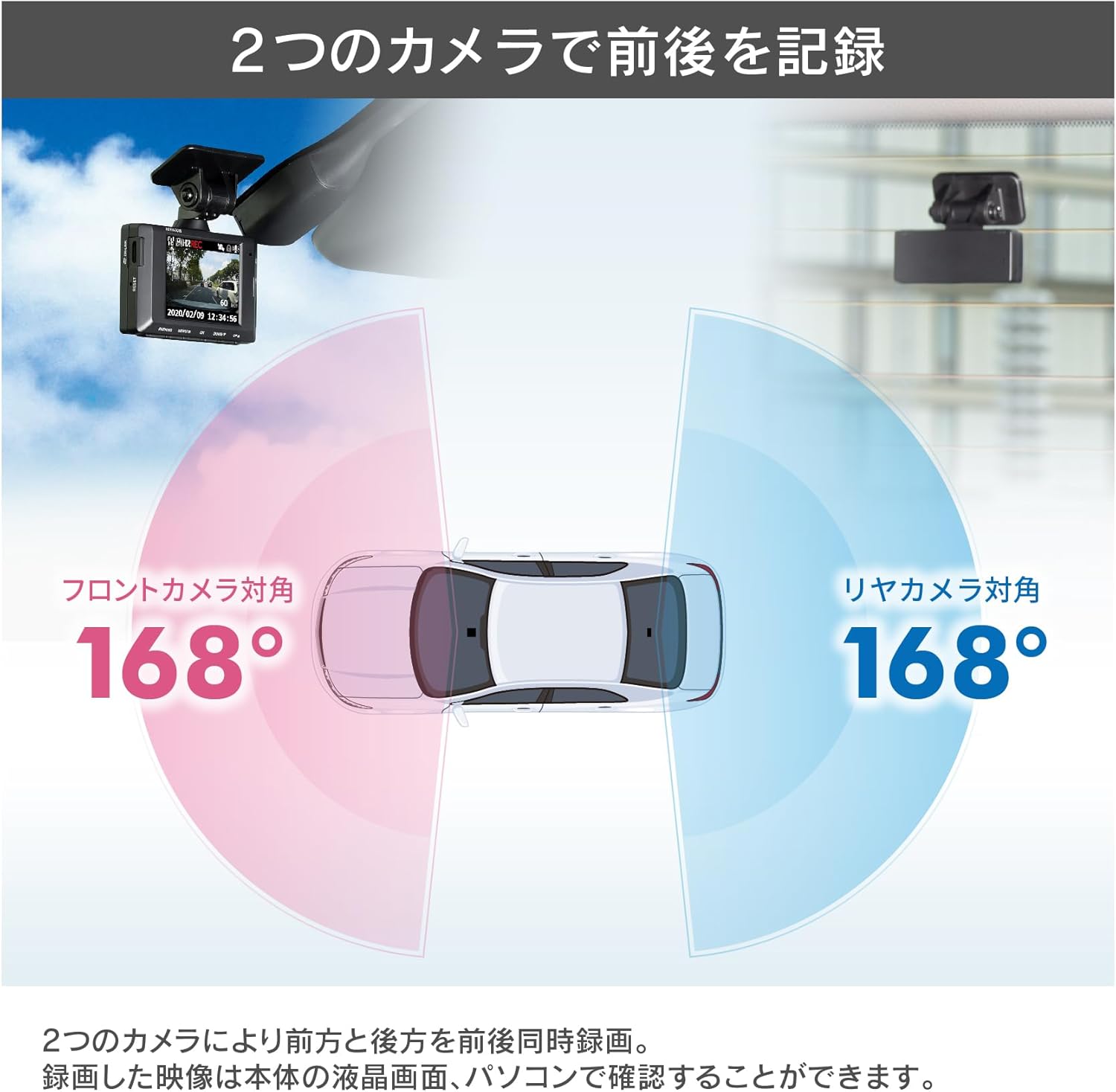
The HDR963GW records in Full HD (2 million pixels) for both front and rear views. This allows for comprehensive recording during driving and parking surveillance. Recorded images can be reviewed on the main unit's LCD screen or on a computer using dedicated software.
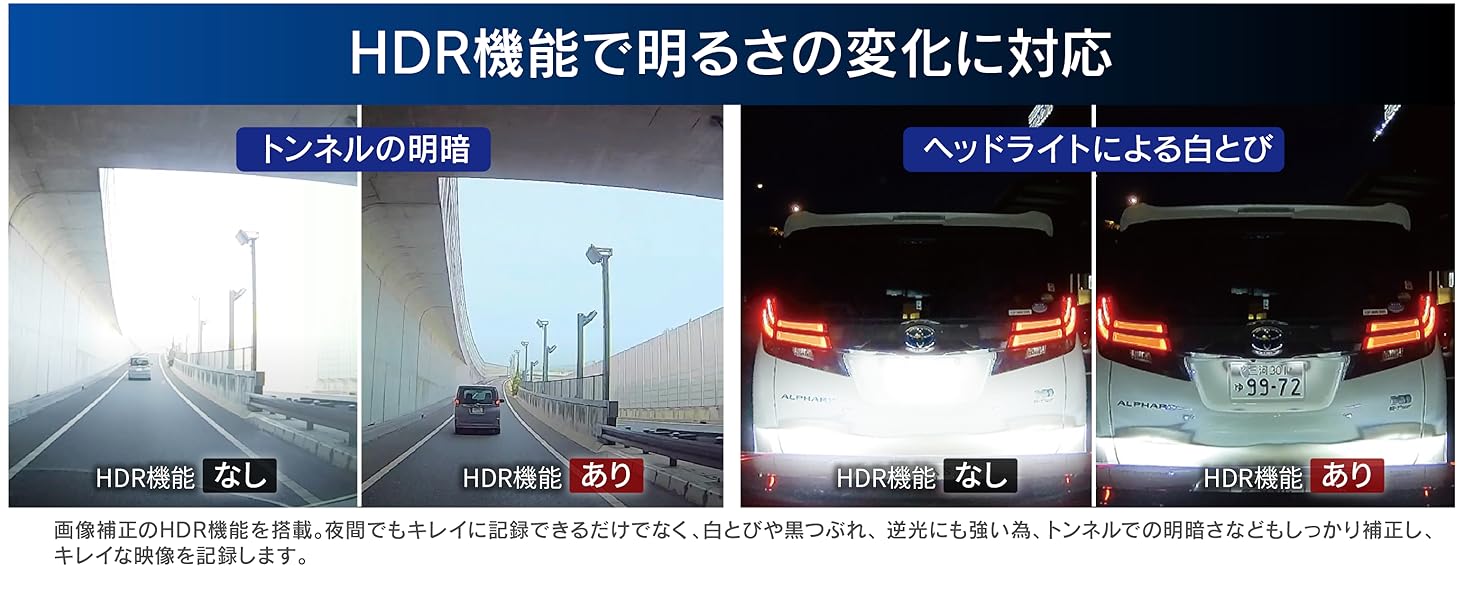
Diagram showing the 168-degree diagonal field of view for both front and rear cameras.

Image: Diagram illustrating the 168-degree diagonal field of view for both the front and rear cameras, ensuring wide coverage.

2.2. Driving Support Functions

The device includes five driving support functions designed to enhance safety:

  • Forward Vehicle Start Notification: Alerts when the vehicle in front starts moving.
  • Forward Vehicle Proximity Notification: Warns if you are approaching the vehicle in front too closely.
  • Lane Departure Notification: Alerts if the vehicle deviates from its lane.
  • ഡ്രൈവ് സപ്പോർട്ട് ഫംഗ്ഷൻ: Detects and alerts for sudden acceleration, deceleration, or sharp turns.
  • വാഹന വേഗത അലാറം: Notifies if a preset speed limit is exceeded.

കുറിപ്പ്: These functions are aids and do not prevent accidents. Always pay attention to actual traffic conditions and drive safely. Some functions require a stable GPS signal. Performance may vary depending on surrounding conditions, weather, vehicle shape, color, and mounting position.

2.3. GPS Warning Function

The built-in GPS warning function supports safe driving by providing various alerts based on registered data. This data can be updated for free from the COMTEC website (data current as of December 2019).

  • Wrong-way Alerts: Notifies when passing through areas on highways (IC/JCT, SA/PA) or urban expressways where wrong-way driving is possible.
  • Accident Points: Alerts when approaching locations with a high incidence of past accidents.
  • Hiyari-Hatto Points: Warns when nearing accident-prone areas, sharp curves, or steep descents on highways.
  • Speed Surveillance Routes: Notifies when approaching automatic speed enforcement cameras nationwide.

2.4. Parking Surveillance Function (Optional)

By connecting the optional direct wiring cord [HDROP-14], the parking surveillance function can be activated. This feature detects impacts while parked and records video before and after the event, or provides continuous recording. The rear camera also records during parking surveillance. Recorded images are saved to a dedicated parking surveillance folder for easy review.

Diagram illustrating the parking surveillance function detecting impact around the vehicle.

Image: Diagram showing the parking surveillance function detecting an impact around the vehicle, triggering recording from both front and rear cameras.

  • One-time Parking Surveillance Mode: Allows temporary activation of parking surveillance even if it's normally set to OFF. Useful for specific situations when away from home.
  • പാർക്കിംഗ് സർവൈലൻസ് മോഡ് പാസ് ഫംഗ്ഷൻ: Temporarily disables parking surveillance mode when parking in locations prone to false triggers, such as mechanical parking lots, vibrating areas, or on windy days.
  • സമയക്കുറവ് റെക്കോർഡിംഗ്: Records still images at 1-second intervals, compressing them into a short video for extended surveillance periods.

കുറിപ്പ്: Depending on the main unit settings and microSD card capacity, images may be overwritten.

2.5. Normal Recording & Time-Lapse Recording

In addition to parking surveillance mode, time-lapse recording is also available during normal driving. By recording only one frame per second, extended recording times are possible. This also simplifies reviewing long periods of footage.

2.6. Clear Night Images with HDR/WDR

Equipped with HDR (High Dynamic Range) and WDR (Wide Dynamic Range) functions, the device records clear images even in challenging lighting conditions such as bright sunlight, dark tunnels, or strong backlighting. This prevents overexposed whites and underexposed blacks.

Comparison of night recording with and without HDR function, showing improved clarity.

Image: Comparison of night recording with and without HDR function, demonstrating enhanced clarity and detail in low-light conditions.

Illustrations demonstrating HDR function's effectiveness in tunnels and against headlights.

Image: Illustrations demonstrating the HDR function's effectiveness in maintaining clear visibility when entering/exiting tunnels and when facing bright headlights.

കുറിപ്പ്: The rear camera supports HDR only.

2.7. MicroSD Card Maintenance-Free

The product's proprietary file system is designed to minimize data fragmentation on the microSD card compared to standard file systems (e.g., FAT). This allows for use without frequent formatting. However, periodic formatting is still recommended to extend the lifespan of the microSD card, as it is a consumable item.

2.8. Three Image Protection Functions

  • ബാക്കപ്പ് പ്രവർത്തനം: In the event of a power interruption due to an accident, the built-in super capacitor prevents file corruption, protecting recorded images.
  • SD കാർഡ് പരിശോധന പ്രവർത്തനം: Upon startup, the device checks the microSD card. If damage is detected, an alert is displayed on the LCD, preventing missed recordings.
  • അടിയന്തര റെക്കോർഡിംഗ് സ്റ്റോപ്പ് പ്രവർത്തനം: Automatically stops recording when a significant impact from an accident is detected. This prevents important accident footage from being overwritten if the vehicle is moved or repaired afterwards. Impact detection sensitivity is adjustable (11 levels, including OFF).

2.9. ഫംഗ്ഷൻ സ്വിച്ച്

The device features a function switch that allows quick access to three modes:

  • പ്ലേബാക്ക്: One-touch playback of recently recorded video.
  • റെക്കോർഡ്: Used as a manual recording switch.
  • വോയിസ് റെക്കോർഡിംഗ്: One-touch toggle for audio recording ON/OFF.

2.10. മറ്റ് സവിശേഷതകൾ

  • Compatible with National LED Traffic Lights: Ensures clear recording of LED traffic signals across Japan, regardless of regional power frequency differences.
  • Noise Countermeasures: Designed to minimize interference with digital terrestrial television reception and car navigation GPS signals.

3. സജ്ജീകരണം

Follow these steps for proper installation of your COMTEC HDR963GW Drive Recorder:

  1. മൗണ്ടിംഗ് ഉപരിതലം തയ്യാറാക്കുക: Clean the inside of your windshield (for the front camera) and rear window (for the rear camera) with the provided degreasing cleaner. Ensure the surfaces are dry and free of dust.
  2. മുൻ ക്യാമറ മൌണ്ട് ചെയ്യുക: Attach the front camera mounting bracket to the windshield using the provided double-sided tape. Position it where it does not obstruct the driver's view and has a clear view of the road. Secure the main unit to the bracket.
  3. പിൻ ക്യാമറ മൌണ്ട് ചെയ്യുക: Attach the rear camera mounting bracket to the rear window using its double-sided tape. Ensure it has a clear view പിൻഭാഗത്തിന്റെ.
  4. Connect the Camera Cable: Connect the rear camera to the front camera main unit using the provided 9m camera cable. Route the cable carefully along the vehicle's interior trim to avoid interference.
  5. പവർ കേബിൾ ബന്ധിപ്പിക്കുക: Plug the 12V cigarette lighter power cord into your vehicle's cigarette lighter socket and connect the other end to the main unit. Alternatively, use the optional HDROP-14 direct wiring cord for a cleaner installation and to enable parking surveillance.
  6. മൈക്രോ എസ്ഡി കാർഡ് ചേർക്കുക: Insert the provided 32GB Class 10 microSD card into the designated slot on the main unit.
  7. പ്രാരംഭ ക്രമീകരണങ്ങൾ: Once powered on, set the date, time, and adjust G-sensor sensitivity as needed through the device's menu.
COMTEC HDR963GW Drive Recorder main unit and rear camera.

Image: The COMTEC HDR963GW Drive Recorder, showing the main unit (front camera) and the separate rear camera.

Front camera of the COMTEC HDR963GW Drive Recorder installed on a car windshield.

Image: The front camera of the COMTEC HDR963GW Drive Recorder installed on the interior of a car's windshield.
Rear camera of the COMTEC HDR963GW Drive Recorder installed on a car rear window.

Image: The rear camera of the COMTEC HDR963GW Drive Recorder installed on the interior of a car's rear window.

4. പ്രവർത്തന നിർദ്ദേശങ്ങൾ

4.1. അടിസ്ഥാന റെക്കോർഡിംഗ്

The device automatically starts recording when the vehicle ignition is turned on and stops when the ignition is turned off. Continuous loop recording overwrites the oldest files when the microSD card is full.

4.2. Manual Recording

Press the 'Record' button on the function switch to initiate a manual recording. This recording will be saved as an event file and protected from being overwritten by normal loop recording.

4.3. Event Recording

When the G-sensor detects an impact (e.g., sudden braking, collision), the device automatically saves the footage before and after the event as a protected file. The sensitivity of the G-sensor can be adjusted in the settings menu.

4.4. Parking Surveillance (with optional HDROP-14)

If the optional HDROP-14 direct wiring cord is installed, parking surveillance activates automatically when the engine is turned off. You can configure settings such as impact detection sensitivity, continuous recording duration, and time-lapse recording in the menu.

4.5. പ്ലേബാക്ക്

You can play back recorded videos directly on the device's LCD screen. For more detailed analysis, transfer the microSD card to a computer and use the dedicated COMTEC viewഎർ സോഫ്റ്റ്വെയർ.

4.6. വോയ്സ് റെക്കോർഡിംഗ്

Toggle audio recording ON or OFF by pressing the 'Voice Recording' button on the function switch. The current status will be indicated on the screen.

4.7. മെനു നാവിഗേഷൻ

Access the device's settings menu by pressing the menu button. Use the navigation buttons to scroll through options and the select button to confirm changes. Refer to the on-screen prompts for specific adjustments.

5. പരിപാലനം

5.1. മൈക്രോ എസ്ഡി കാർഡ്

Although the HDR963GW features a maintenance-free file system, periodic formatting of the microSD card is recommended to ensure optimal performance and extend its lifespan. MicroSD cards are consumable items and should be replaced periodically.

5.2. വൃത്തിയാക്കൽ

Gently clean the camera lenses and the main unit's screen with a soft, dry cloth. Avoid using abrasive cleaners or solvents that could damage the surfaces.

5.3. ഫേംവെയർ അപ്ഡേറ്റുകൾ

Check the official COMTEC website regularly for any available firmware updates. Keeping your device's firmware up-to-date ensures the best performance and access to new features.

5.4. GPS Data Updates

GPS warning data can be updated for free from the COMTEC website. Ensure your device has the latest data for accurate alerts.

6. പ്രശ്‌നപരിഹാരം

If you encounter issues with your HDR963GW, refer to the following common problems and solutions:

പ്രശ്നംസാധ്യമായ കാരണം / പരിഹാരം
ഉപകരണം പവർ ഓണാക്കുന്നില്ല.Check if the power cable is securely connected to both the device and the vehicle's power source. Ensure the vehicle's ignition is on.
No recording is taking place.Verify that a microSD card is inserted correctly. Check if the card is full or damaged (the SD Card Check Function will alert you). Format the microSD card if necessary.
മോശം ഇമേജ് നിലവാരം.Clean the camera lenses. Ensure the HDR/WDR functions are enabled in settings, especially for night driving or high-contrast environments.
GPS not working or inaccurate.ഉപകരണത്തിന് വ്യക്തത ഉണ്ടെന്ന് ഉറപ്പാക്കുക view of the sky. Avoid mounting near metallic objects that could block the signal. Check GPS signal status on the device.
Driving support alerts are too frequent or not occurring.Adjust the sensitivity settings for each driving support function in the menu. Ensure the camera lens is clean and unobstructed.
Parking surveillance is not working.Confirm that the optional HDROP-14 direct wiring cord is correctly installed. Ensure parking surveillance mode is activated in the settings. Check the 'Parking Surveillance Mode Pass Function' if it's temporarily disabled.

7 സ്പെസിഫിക്കേഷനുകൾ

ഫീച്ചർവിവരണം
നിർമ്മാതാവ്കോംടെക്
മോഡൽ നമ്പർHDR963GW
ഉൽപ്പന്ന അളവുകൾ (D x W x H)27 x 90 x 56 മിമി
ഉൽപ്പന്ന ഭാരം560 ഗ്രാം
നിറംകറുപ്പ്
വീഡിയോ ക്യാപ്ചർ റെസല്യൂഷൻ1080p (പൂർണ്ണ HD)
ഫ്രണ്ട് ക്യാമറ സെൻസർ1/2.7 inch CMOS, Max 2 million pixels
Front Camera Lens Angleതിരശ്ചീനം 136°, ലംബം 70° (ഡയഗണൽ 168°)
Front Camera F-value2.0
പിൻ ക്യാമറ സെൻസർ1/2.7 inch CMOS, Max 2 million pixels
Rear Camera Lens Angleതിരശ്ചീനം 136°, ലംബം 70° (ഡയഗണൽ 168°)
Rear Camera F-value2.0
പ്രത്യേക സവിശേഷതകൾBuilt-in GPS, HDR/WDR (Front), HDR (Rear), MicroSD Card Maintenance-Free File System, Function Switch
കണക്റ്റിവിറ്റി ടെക്നോളജിവയർഡ്
മൗണ്ടിംഗ് തരംപശ
നിയന്ത്രണ രീതിസ്പർശിക്കുക
ഉൾപ്പെടുത്തിയ ഘടകങ്ങൾFront camera x1, Rear camera x1, Camera cable (approx. 9m) x1, Front camera mounting bracket x1, Front camera mounting bracket double-sided tape x1, Rear camera mounting bracket double-sided tape x1, Degreasing cleaner x1, 12V Cigarette lighter plug cord (approx. 4m/1A fuse built-in) x1, Sticker [HDROP-06] x1, Hex wrench (for bracket angle adjustment) x1, Cord clamp x3, microSD card (32GB/class10) x1, SD card conversion adapter x1, Instruction manual (with warranty) x1

8. വാറൻ്റിയും പിന്തുണയും

8.1. ഉൽപ്പന്ന വാറൻ്റി

The COMTEC HDR963GW Drive Recorder comes with a 3 വർഷത്തെ വാറൻ്റി from the date of purchase. Please note that accessories such as mounting brackets, cigarette lighter plug cords, built-in batteries, and microSD cards are considered consumables and are not covered under this warranty. Proof of purchase date is required for warranty claims. The warranty is void if the product is used outside of Japan.

8.2. Data Recovery Service

A free data recovery service is included for 1 വർഷം from the date of purchase. This service aims to repair unreadable recorded data from a damaged main unit or SD card so that it can be played back. Please note that overwritten recorded data or data from an SD card that has reached its end-of-life cannot be recovered. For detailed information, please refer to the COMTEC homepage.

8.3. Accident Compensation Service

This product includes an accident compensation service. Upon registration, COMTEC will pay a uniform amount of 20,000 ജാപ്പനീസ് യെൻ for 1 year in the event of an accident. Registration is required within one month of purchase. This service is valid for one year from registration and can be renewed annually for a fee (up to a maximum of 3 years). However, if compensation has been received once, renewal is not possible. For detailed information, please refer to the COMTEC homepage.

8.4. Support and Downloads

For detailed product information, firmware updates, GPS data updates, and to download the dedicated viewer software, please visit the official COMTEC homepage. The viewer software allows you to check recorded video, audio, and G-sensor information on your computer, and convert data to video or still images.

COMTEC Official Webസൈറ്റ്: www.comtec.co.jp

അനുബന്ധ രേഖകൾ - HDR963GW

പ്രീview COMTEC ZDR-015 ドライブレコーダー 取付・取扱説明書
COMTEC ZDR-015ドライブレコーダーの公式取付説明書、取扱説明書、および保証書。設置方法、操作手順、機能、安全上の注意について詳しく解説しています。
പ്രീview CTI PLA-800 ലീനിയർ Ampലിഫയറും PSL 1000 പവർ സപ്ലൈ യൂസർ മാനുവലും
CTI PLA-800 ലീനിയറിനായുള്ള സമഗ്ര ഉപയോക്തൃ മാനുവൽ Ampലൈഫയറും PSL 1000 പവർ സപ്ലൈയും, സുരക്ഷാ മുൻകരുതലുകൾ, ഘടകങ്ങളുടെ ആമുഖം, ട്യൂണിംഗ് നടപടിക്രമങ്ങൾ, പവർ ചേഞ്ച്ഓവർ, പാർട്സ് ലിസ്റ്റുകൾ, വാറന്റി വിവരങ്ങൾ, റിട്ടേൺ നടപടിക്രമങ്ങൾ എന്നിവ വിശദമാക്കുന്നു.
പ്രീview സ്വിസ്ബിറ്റ് ഐഷീൽഡ് ആർക്കൈവ് കാർഡ് അനുയോജ്യതാ പട്ടിക
ഡാഷ്‌ക്യാമുകൾ, ഡ്രോണുകൾ, ഫോട്ടോ ക്യാമറകൾ, ആക്ഷൻ ക്യാമറകൾ, ട്രെയിൽ ക്യാമറകൾ, വീഡിയോ ക്യാമറകൾ, സെൽഫോണുകൾ എന്നിവയുൾപ്പെടെ വിവിധ ഉപകരണങ്ങൾക്കും സ്വിസ്ബിറ്റ് ഐഷീൽഡ് ആർക്കൈവ് കാർഡുകൾക്കും വേണ്ടിയുള്ള സമഗ്രമായ അനുയോജ്യതാ പട്ടിക ഈ പ്രമാണം നൽകുന്നു. ഇത് നിർമ്മാതാവ്, മോഡൽ എന്നിവയെക്കുറിച്ചും ലിസ്റ്റുചെയ്തിരിക്കുന്ന ഓരോ ഇനത്തിന്റെയും പൂർണ്ണ അനുയോജ്യത സ്ഥിരീകരിക്കുന്നു.
പ്രീview Slovenský adresár poskytovateľov služieb - Elektronika a Telekomunikácie
Komplexný adresár poskytovateľov elektronických a telekomunikačných služieb po celom Slovensku, vrátane kontaktných údajov, adries a emailov.
പ്രീview കാഡെക്സ് C7000ER, C7200, C7400 അഡാപ്റ്റർ അനുയോജ്യതാ ഗൈഡ്
കാര്യക്ഷമമായ പവർ മാനേജ്മെന്റിനായി നിർമ്മാതാക്കൾ, ബാറ്ററി മോഡലുകൾ, അനുയോജ്യമായ ഉപകരണങ്ങൾ എന്നിവയുടെ സമഗ്രമായ ഒരു വിശദീകരണം ഉൾക്കൊള്ളുന്ന Cadex C7000ER, C7200, C7400 അഡാപ്റ്റർ അനുയോജ്യതാ പട്ടിക പര്യവേക്ഷണം ചെയ്യുക.