1. ആമുഖം
This manual provides detailed instructions for the safe and efficient use of your Maxcom MM471 Senior Portable Phone. Designed with ease of use in mind, this device features large characters, big buttons, and an ergonomic design, making it ideal for seniors. Please read this manual thoroughly before operating your phone.

ചിത്രം 1: മുൻഭാഗം view of the Maxcom MM471 Senior Portable Phone.
2. സജ്ജീകരണം
2.1 പാക്കേജ് ഉള്ളടക്കം
പാക്കേജിൽ എല്ലാ ഇനങ്ങളും ഉണ്ടെന്ന് ഉറപ്പാക്കുക:
- Maxcom MM471 Senior Portable Phone
- ബാറ്ററി
- ചാർജിംഗ് അഡാപ്റ്റർ
- ഉപയോക്തൃ മാനുവൽ
2.2 സിം കാർഡും ബാറ്ററിയും ചേർക്കൽ
The Maxcom MM471 supports dual SIM cards. Follow these steps to install your SIM card(s) and battery:
- Turn off the phone and disconnect it from any power source.
- ഫോണിന്റെ പിൻ കവർ ശ്രദ്ധാപൂർവ്വം നീക്കം ചെയ്യുക.
- സ്വർണ്ണ കോൺടാക്റ്റുകൾ താഴേക്ക് അഭിമുഖമായി വരുന്ന തരത്തിൽ നിയുക്ത സ്ലോട്ടിലേക്ക് (കളിൽ) നിങ്ങളുടെ സിം കാർഡ്(കൾ) തിരുകുക.
- കോൺടാക്റ്റുകൾ ശരിയായി വിന്യസിക്കുന്നുണ്ടെന്ന് ഉറപ്പാക്കി ബാറ്ററി ഇടുക.
- സുരക്ഷിതമായി സ്ഥലത്ത് ക്ലിക്ക് ചെയ്യുന്നതുവരെ പിൻ കവർ മാറ്റിസ്ഥാപിക്കുക.

ചിത്രം 2: പിന്നിലേക്ക് view with battery and SIM card area.
2.3 ബാറ്ററി ചാർജ് ചെയ്യുന്നു
ആദ്യ ഉപയോഗത്തിന് മുമ്പ്, ഫോണിന്റെ ബാറ്ററി പൂർണ്ണമായും ചാർജ് ചെയ്യുക:
- Connect the charging adapter to the phone's charging port or place the phone in its charging dock.
- ഒരു പവർ ഔട്ട്ലെറ്റിൽ അഡാപ്റ്റർ പ്ലഗ് ചെയ്യുക.
- സ്ക്രീനിലെ ബാറ്ററി ഇൻഡിക്കേറ്റർ ചാർജിംഗ് സ്റ്റാറ്റസ് കാണിക്കും.
- പൂർണ്ണമായി ചാർജ് ചെയ്തുകഴിഞ്ഞാൽ, ചാർജർ വിച്ഛേദിക്കുക.
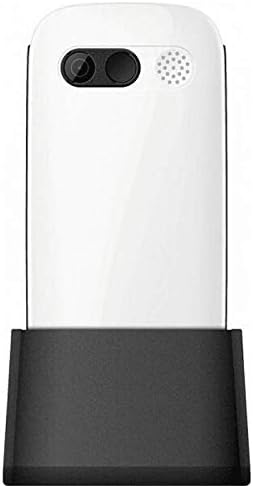
Figure 3: Phone in charging dock.
3. പ്രവർത്തന നിർദ്ദേശങ്ങൾ
3.1 പവർ ഓൺ/ഓഫ്
- പവർ ഓണാക്കാൻ: അമർത്തിപ്പിടിക്കുക പവർ/എൻഡ് കോൾ സ്ക്രീൻ പ്രകാശിക്കുന്നത് വരെ ബട്ടൺ.
- പവർ ഓഫ് ചെയ്യാൻ: അമർത്തിപ്പിടിക്കുക പവർ/എൻഡ് കോൾ button until the power-off options appear, then select 'Power Off'.
3.2 കോളുകൾ ചെയ്യുന്നു
- ഹോം സ്ക്രീനിൽ നിന്ന്, കീപാഡ് ഉപയോഗിച്ച് ഫോൺ നമ്പർ നൽകുക.
- അമർത്തുക വിളിക്കൂ കോൾ ആരംഭിക്കാൻ ബട്ടൺ (പച്ച ബട്ടൺ).
- കോൾ അവസാനിപ്പിക്കാൻ, അമർത്തുക പവർ/എൻഡ് കോൾ ബട്ടൺ (ചുവപ്പ് ബട്ടൺ).
3.3 കോളുകൾ സ്വീകരിക്കുന്നു
- When a call comes in, the phone will ring and display the caller's number or name.
- അമർത്തുക വിളിക്കൂ button (green button) to answer.
- കോൾ നിരസിക്കാൻ, അമർത്തുക പവർ/എൻഡ് കോൾ ബട്ടൺ (ചുവപ്പ് ബട്ടൺ).
3.4 സന്ദേശങ്ങൾ അയയ്ക്കുകയും സ്വീകരിക്കുകയും ചെയ്യുന്നു
- Navigate to the 'Messages' menu from the main screen.
- ഒരു ടെക്സ്റ്റ് സന്ദേശം രചിക്കാൻ 'പുതിയ സന്ദേശം' തിരഞ്ഞെടുക്കുക.
- Enter the recipient's number and your message.
- 'അയയ്ക്കുക' അമർത്തുക.
- Received messages will appear in your 'Inbox'.
3.5 കോൺടാക്റ്റുകൾ കൈകാര്യം ചെയ്യൽ
The phonebook can store up to 300 names.
- Go to the 'Contacts' or 'Phonebook' menu.
- Select 'Add New Contact' to save a new number.
- പേരും ഫോൺ നമ്പറും നൽകുക, തുടർന്ന് സേവ് ചെയ്യുക.
- To call a contact, select their name from the list and press the വിളിക്കൂ ബട്ടൺ.
3.6 ബ്ലൂടൂത്ത് ഉപയോഗിക്കുന്നു
ബ്ലൂടൂത്ത് ഉപകരണങ്ങളിലേക്ക് കണക്റ്റുചെയ്യാൻ:
- 'ക്രമീകരണങ്ങൾ' > 'ബ്ലൂടൂത്ത്' എന്നതിലേക്ക് പോകുക.
- ബ്ലൂടൂത്ത് 'ഓൺ' ചെയ്യുക.
- 'തിരഞ്ഞെടുക്കുക'ഇതിനായി തിരയുക devices' to find available Bluetooth accessories.
- Select the desired device and pair them.
3.7 ഫ്ലാഷ്ലൈറ്റ് ഉപയോഗിക്കുന്നു
The phone includes a built-in flashlight for convenience.
- To turn on the flashlight, locate the dedicated flashlight button (if available) or access it through the 'Tools' menu.
- Press the button or select the option again to turn it off.
4. പരിപാലനവും പരിചരണവും
To ensure the longevity and optimal performance of your Maxcom MM471 phone, follow these maintenance guidelines:
- വൃത്തിയാക്കൽ: ഫോണിന്റെ ഉപരിതലം വൃത്തിയാക്കാൻ മൃദുവായതും ഉണങ്ങിയതുമായ തുണി ഉപയോഗിക്കുക. ലിക്വിഡ് ക്ലീനറുകളോ ഉരച്ചിലുകളുള്ള വസ്തുക്കളോ ഉപയോഗിക്കരുത്.
- താപനില: Do not expose the phone to extreme temperatures (hot or cold) or direct sunlight for extended periods.
- ഈർപ്പം: Keep the phone dry. Do not immerse it in water or expose it to high humidity.
- സംഭരണം: When not in use for a long time, store the phone in a cool, dry place with the battery partially charged.
- ആഘാതം: ഫോൺ താഴെയിടുകയോ ശക്തമായ ആഘാതങ്ങൾക്ക് വിധേയമാക്കുകയോ ചെയ്യുന്നത് ഒഴിവാക്കുക.
5. പ്രശ്നപരിഹാരം
If you encounter issues with your phone, refer to the table below for common problems and solutions:
| പ്രശ്നം | സാധ്യമായ കാരണം | പരിഹാരം |
|---|---|---|
| ഫോൺ ഓണാക്കുന്നില്ല | ബാറ്ററി തീർന്നു അല്ലെങ്കിൽ ശരിയായി ചേർത്തിട്ടില്ല. | ബാറ്ററി ചാർജ് ചെയ്യുക. ബാറ്ററി ശരിയായി ചേർത്തിട്ടുണ്ടെന്ന് ഉറപ്പാക്കുക. |
| കോളുകൾ വിളിക്കാനോ സ്വീകരിക്കാനോ കഴിയില്ല | No network signal, SIM card not inserted, or SIM card faulty. | Check network coverage. Reinsert SIM card(s). Contact your service provider. |
| മോശം കോൾ നിലവാരം | Weak network signal, interference. | മെച്ചപ്പെട്ട സിഗ്നൽ ലഭിക്കുന്ന സ്ഥലത്തേക്ക് നീങ്ങുക. തടസ്സങ്ങൾ ഒഴിവാക്കുക. |
| ബാറ്ററി പെട്ടെന്ന് തീരുന്നു | Excessive usage, background applications, old battery. | സ്ക്രീൻ തെളിച്ചം കുറയ്ക്കുക. ഉപയോഗിക്കാത്ത ആപ്ലിക്കേഷനുകൾ അടയ്ക്കുക. ബാറ്ററി പഴയതാണെങ്കിൽ അത് മാറ്റിസ്ഥാപിക്കുന്നത് പരിഗണിക്കുക. |
| കീപാഡ് പ്രതികരിക്കുന്നില്ല | സോഫ്റ്റ്വെയർ തകരാർ, ഭൗതിക ക്ഷതം. | Restart the phone. If the problem persists, contact support. |
6 സാങ്കേതിക സവിശേഷതകൾ
Key technical details of the Maxcom MM471 Senior Portable Phone:
- മോഡൽ: MM471
- ബ്രാൻഡ്: മാക്സ്കോം
- നിറം: വെള്ള
- കണക്റ്റിവിറ്റി: ബ്ലൂടൂത്ത്
- സിം പിന്തുണ: ഡ്യുവൽ സിം
- ഫോൺബുക്ക് ശേഷി: 300 names
- സംസാര സമയം: 14 മണിക്കൂർ വരെ
- ഇൻ്റർഫേസ്: ഫിസിക്കൽ ബട്ടണുകൾ
- പ്രത്യേക സവിശേഷതകൾ: Large characters, Big buttons, Ergonomic design, Speaker, Flashlight
7. വാറന്റി, പിന്തുണ വിവരങ്ങൾ
For detailed warranty information, please refer to the warranty card included with your product or visit the official Maxcom website. For technical support or service inquiries, please contact your retailer or the manufacturer's customer service department.


