1. ഉൽപ്പന്നം കഴിഞ്ഞുview
This manual provides instructions for the assembly, operation, and maintenance of your Walker Edison Industrial Wood Computer Desk. This desk is designed to enhance your home office or gaming setup with its urban industrial style. It features a built-in USB port and AC plug-in for convenient power access, open side shelving, and a pull-out drawer for storage. The desk is constructed from warp-resistant MDF and powder-coated metal legs, ensuring durability and stability.

Image 1.1: The Walker Edison Industrial Wood Computer Desk, showcasinഒരു സാധാരണ ഹോം ഓഫീസ് പരിതസ്ഥിതിയിൽ അതിന്റെ രൂപകൽപ്പനയും പ്രവർത്തനക്ഷമതയും.
2 സുരക്ഷാ വിവരങ്ങൾ
ഈ ഉൽപ്പന്നം കൂട്ടിച്ചേർക്കുന്നതിനോ ഉപയോഗിക്കുന്നതിനോ മുമ്പ് എല്ലാ സുരക്ഷാ വിവരങ്ങളും വായിച്ച് മനസ്സിലാക്കുക. ഈ നിർദ്ദേശങ്ങൾ പാലിക്കുന്നതിൽ പരാജയപ്പെടുന്നത് ഉൽപ്പന്നത്തിന് പരിക്കോ കേടുപാടുകളോ ഉണ്ടാക്കാൻ കാരണമായേക്കാം.
- ഭാരം ശേഷി: Do not exceed the maximum weight capacity for the desktop (100 lbs), shelves (50 lbs each), or drawer (20 lbs). Overloading can cause structural failure.
- അസംബ്ലി: Assemble the desk on a soft, clean surface to prevent scratches. Ensure all hardware is securely tightened before use. Periodically check and retighten hardware as needed.
- സ്ഥിരത: Place the desk on a level surface. Do not stand or sit on the desk.
- ഇലക്ട്രിക്കൽ സുരക്ഷ: The integrated power supply unit contains electrical components. Do not expose it to liquids. Ensure the power cord is not pinched or damaged. Only plug into a properly grounded outlet.
- കുട്ടികൾ: അസംബ്ലി സമയത്ത് ചെറിയ ഭാഗങ്ങളും പാക്കേജിംഗ് വസ്തുക്കളും കുട്ടികളിൽ നിന്ന് അകറ്റി നിർത്തുക.
3. സജ്ജീകരണവും അസംബ്ലിയും
Assembly of this desk requires careful attention to detail. It is recommended to have two people for assembly. Please review all steps and parts before beginning.
3.1. ആവശ്യമായ ഉപകരണങ്ങൾ (ഉൾപ്പെടുത്തിയിട്ടില്ല)
- ഫിലിപ്സ് ഹെഡ് സ്ക്രൂഡ്രൈവർ
- ചുറ്റിക (ഓപ്ഷണൽ, ഡോവലുകൾക്ക്)
3.2. അൺപാക്കിംഗും ഭാഗം തിരിച്ചറിയലും
Carefully unpack all components and hardware. Compare them against the parts list provided in your packaging to ensure all items are present and undamaged. If any parts are missing or damaged, contact customer support before proceeding.
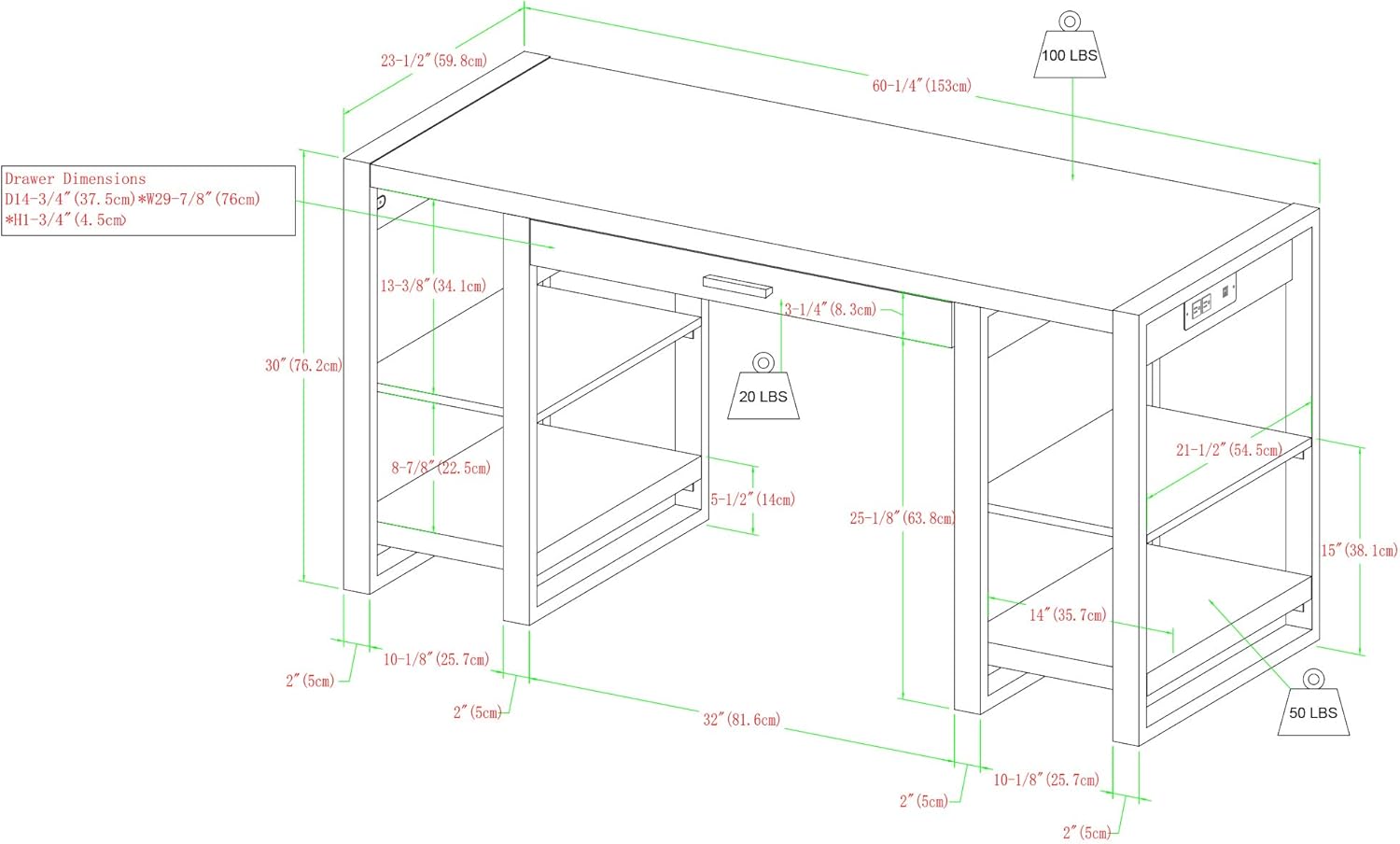
Image 3.1: Dimensional diagram of the desk, illustrating overall measurements and individual component sizes, along with recommended weight limits for the desktop, shelves, and drawer.
3.3. അസംബ്ലി ഘട്ടങ്ങൾ (പൊതു മാർഗ്ഗനിർദ്ദേശങ്ങൾ)
- ഫ്രെയിം അസംബ്ലി: Begin by assembling the metal frame components. Ensure that the side plates and metal legs are oriented correctly as per the detailed instructions in your product packaging. Incorrect orientation in early steps can make later corrections difficult due to the desk's weight.
- ഷെൽഫുകൾ ഘടിപ്പിക്കുക: Secure the wooden shelves to the metal frame using the provided hardware. Ensure they are level and firmly attached.
- ഡ്രോയർ സ്ലൈഡുകൾ ഇൻസ്റ്റാൾ ചെയ്യുക: Attach the drawer slides to the desk frame and the drawer box. Pay close attention to alignment. If the drawer does not fit correctly or slides smoothly, check for any misaligned welds or consider using small spacers (e.g., washers) behind the rail where screws attach to adjust the fit.
- ഡ്രോയർ കൂട്ടിച്ചേർക്കുക: Construct the pull-out drawer according to the instructions. Insert the drawer into the installed slides.
- ഡെസ്ക്ടോപ്പ് അറ്റാച്ചുചെയ്യുക: Carefully place the desktop onto the assembled frame and secure it with the designated hardware.
- പവർ യൂണിറ്റ് ഇൻസ്റ്റാൾ ചെയ്യുക: Integrate the USB port and AC plug-in unit into the designated slot on the desktop. Ensure all connections are secure.
- അന്തിമ പരിശോധന: Verify that all screws, cam locks, and fasteners are tightened. Gently test the stability of the desk before placing items on it.
4. പ്രവർത്തന നിർദ്ദേശങ്ങൾ
The Walker Edison Industrial Wood Computer Desk features an integrated power supply for convenient charging and power access.
4.1. Using the Integrated Power Outlet
- പവറിലേക്ക് ബന്ധിപ്പിക്കുക: Plug the desk's main power cord into a standard, grounded wall outlet.
- എസി ഔട്ട്ലെറ്റുകൾ: Use the standard AC outlets to power devices such as monitors, lamps, or other electronics.
- USB പോർട്ടുകൾ: സ്മാർട്ട്ഫോണുകൾ, ടാബ്ലെറ്റുകൾ അല്ലെങ്കിൽ മറ്റ് യുഎസ്ബി-പവർ ഉപകരണങ്ങൾ ചാർജ് ചെയ്യാൻ യുഎസ്ബി പോർട്ടുകൾ ഉപയോഗിക്കുക.

ചിത്രം 4.1: വിശദമായ view of the desk's built-in power supply, featuring two standard AC outlets and two USB charging ports for convenient device connectivity.
പ്രധാനപ്പെട്ടത്: Do not overload the power strip. Refer to the power unit's specifications for maximum wattage. Disconnect the desk from the power source when not in use or during cleaning.
5. പരിപാലനം
നിങ്ങളുടെ മേശയുടെ രൂപവും പ്രവർത്തനക്ഷമതയും സംരക്ഷിക്കാൻ പതിവ് അറ്റകുറ്റപ്പണികൾ സഹായിക്കും.
- വൃത്തിയാക്കൽ: മൃദുവായ, ഡി ഉപയോഗിച്ച് ഉപരിതലങ്ങൾ തുടയ്ക്കുകamp തുണി. ഫിനിഷിന് കേടുവരുത്തുന്ന കഠിനമായ രാസവസ്തുക്കളോ അബ്രാസീവ് ക്ലീനറുകളോ ഒഴിവാക്കുക.
- ചോർച്ച: തടിയുടെ ഉപരിതലത്തിൽ കറയോ കേടുപാടുകളോ ഉണ്ടാകാതിരിക്കാൻ ചോർച്ച ഉടനടി വൃത്തിയാക്കുക.
- ഹാർഡ്വെയർ പരിശോധന: Periodically inspect all screws and fasteners to ensure they remain tight. Retighten as necessary to maintain stability.
- നേരിട്ടുള്ള സൂര്യപ്രകാശം ഒഴിവാക്കുക: നേരിട്ടുള്ള സൂര്യപ്രകാശം ദീർഘനേരം ഏൽക്കുന്നത് മരത്തിന്റെ പൂശിന്റെ മങ്ങലിനോ നിറവ്യത്യാസത്തിനോ കാരണമാകും.
6. പ്രശ്നപരിഹാരം
അസംബ്ലി ചെയ്യുമ്പോഴോ ഉപയോഗിക്കുമ്പോഴോ ഉണ്ടാകാവുന്ന പൊതുവായ പ്രശ്നങ്ങളെ ഈ വിഭാഗം അഭിസംബോധന ചെയ്യുന്നു.
- Issue: Drawer does not slide smoothly or falls out.
പരിഹാരം: This can occur if the metal drawer slides are not perfectly aligned or if the mounting points are slightly off. Carefully inspect the welding of the metal frame where the slides attach. If there's a slight angle, try placing one or two small washers (spacers) behind the rail on the side where the screw attaches to adjust the alignment. Ensure all screws securing the slides are fully tightened. - Issue: Cam locks break during assembly or do not secure parts.
പരിഹാരം: Ensure that the locking screws are fully inserted into the corresponding holes but not overtightened, which can prevent cam locks from catching. If holes are slightly misaligned, gently back out the screws a small amount to allow the cam lock to engage properly. If a cam lock breaks, replacement parts may be available from the manufacturer or a local hardware store. - Issue: Desk feels wobbly after assembly.
പരിഹാരം: Double-check all fasteners, including screws and cam locks, to ensure they are fully tightened. Ensure the desk is placed on a level surface. If the floor is uneven, use furniture glides or shims to stabilize the desk.
7 സ്പെസിഫിക്കേഷനുകൾ
| ബ്രാൻഡ് | വാക്കർ എഡിസൺ |
| മോഡൽ നമ്പർ | D60UBS30DW |
| ഉൽപ്പന്ന അളവുകൾ | 60.96 x 152.4 x 76.2 സെ.മീ (24D x 60W x 30H ഇഞ്ച്) |
| ഭാരം | 31.75 കി.ഗ്രാം (70 പൗണ്ട്) |
| മെറ്റീരിയൽ | എഞ്ചിനീയേർഡ് വുഡ് (മുകളിൽ), ലോഹം (അടിത്തറ) |
| ഫിനിഷ് തരം | പൗഡർ കോട്ടഡ് (മെറ്റൽ ഫ്രെയിം) |
| നിറം | ഇരുണ്ട വാൽനട്ട് |
| ഡെസ്ക് ഡിസൈൻ | Computer Desk with Shelves and Drawer |
| പ്രത്യേക ഫീച്ചർ | Integrated USB Port and AC Plug-in Unit |
8. വാറൻ്റിയും പിന്തുണയും
For warranty information or customer support, please refer to the documentation included with your product or visit the official Walker Edison website. If you have questions regarding assembly, missing parts, or product functionality, please contact Walker Edison customer service directly.


