ആമുഖം
Thank you for choosing the BESDER Smart Home Security Camera. This manual provides detailed instructions for setting up, operating, and maintaining your camera. Please read this manual carefully before use to ensure proper functionality and safety.
This camera offers Full HD 1080P resolution, Pan/Tilt functionality, Two-Way Audio, and IR Night Vision for comprehensive home surveillance. It supports both wired and WiFi connections, mobile monitoring via iOS and Android apps, and cloud services.
പാക്കേജ് ഉള്ളടക്കം
തുറക്കുമ്പോൾ പാക്കേജ് ഉള്ളടക്കങ്ങൾ പരിശോധിക്കുക. ഏതെങ്കിലും ഇനങ്ങൾ നഷ്ടപ്പെട്ടാലോ കേടുപാടുകൾ സംഭവിച്ചാലോ, ദയവായി ഉപഭോക്തൃ പിന്തുണയുമായി ബന്ധപ്പെടുക.
- 1 x BESDER IP Camera 1080P
- 1 x ഉപയോക്തൃ മാനുവൽ
- 1 x DC 5V പവർ സപ്ലൈ
- 1 x Small Bracket
- മൗണ്ടിംഗ് സ്ക്രൂകളും വാൾ പ്ലഗുകളും
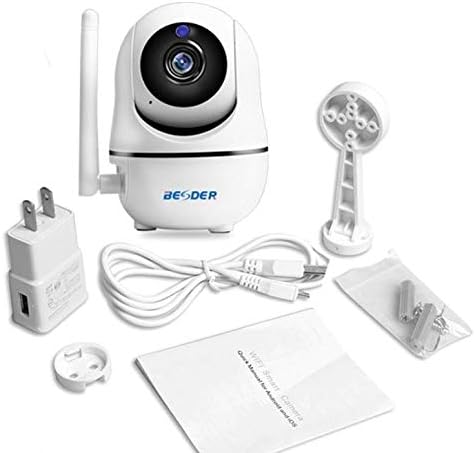
ചിത്രം 1: Package contents of the BESDER Smart Home Security Camera, showing the camera unit, power adapter, USB cable, mounting bracket, screws, and the user manual.
ഉൽപ്പന്നം കഴിഞ്ഞുview
Familiarize yourself with the various components of your BESDER Smart Home Security Camera.
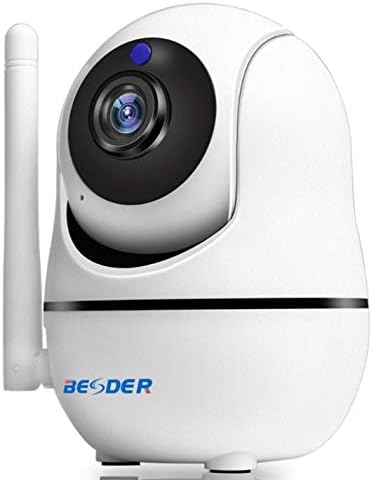
ചിത്രം 2: ഫ്രണ്ട് view of the BESDER Smart Home Security Camera, highlighting the camera lens, infrared LEDs for night vision, and the status indicator light.

ചിത്രം 3: പിൻഭാഗം view of the BESDER Smart Home Security Camera, detailing the memory card slot (for microSD up to 128GB), reset button, built-in speaker, DC 5V power input, and the Ethernet network port for wired connection.
പ്രധാന ഘടകങ്ങൾ:
- ക്യാമറ ലെൻസ്: വീഡിയോ foo ക്യാപ്ചർ ചെയ്യുന്നുtage.
- IR LED- കൾ: രാത്രി കാഴ്ചയ്ക്ക് ഇൻഫ്രാറെഡ് പ്രകാശം നൽകുക.
- സ്റ്റാറ്റസ് ഇൻഡിക്കേറ്റർ ലൈറ്റ്: Indicates camera status (e.g., power on, network connection).
- മൈക്രോഫോൺ: For audio input and two-way audio communication.
- സ്പീക്കർ: For audio output and two-way audio communication.
- മെമ്മറി കാർഡ് സ്ലോട്ട്: Supports microSD cards up to 128GB for local storage.
- റീസെറ്റ് ബട്ടൺ: ഫാക്ടറി ക്രമീകരണങ്ങൾ പുനഃസ്ഥാപിക്കാൻ ഉപയോഗിക്കുന്നു.
- DC 5V പവർ ഇൻപുട്ട്: നൽകിയിരിക്കുന്ന പവർ അഡാപ്റ്ററിലേക്ക് ബന്ധിപ്പിക്കുന്നു.
- Network Port (RJ45): വയർഡ് ഇതർനെറ്റ് കണക്ഷന്.
സജ്ജമാക്കുക
1. പവർ ചെയ്യുന്നു
- Connect the DC 5V power adapter to the camera's power input port.
- ഒരു മതിൽ ഔട്ട്ലെറ്റിലേക്ക് പവർ അഡാപ്റ്റർ പ്ലഗ് ചെയ്യുക.
- The camera will power on, and the status indicator light will illuminate. Wait for the camera to complete its self-test (it may pan and tilt).
2. Network Connection (Wired or Wireless)
The camera supports both wired (Ethernet) and wireless (Wi-Fi) connections.
വയർഡ് കണക്ഷൻ:
- Connect one end of an Ethernet cable (not included) to the camera's network port.
- നിങ്ങളുടെ റൂട്ടറിലേക്കോ നെറ്റ്വർക്ക് സ്വിച്ചിലേക്കോ ഇതർനെറ്റ് കേബിളിന്റെ മറ്റേ അറ്റം ബന്ധിപ്പിക്കുക.
- ക്യാമറ സ്വയമേവ നെറ്റ്വർക്കിലേക്ക് കണക്റ്റുചെയ്യും.
Wireless (Wi-Fi) Connection:
- Download the recommended mobile application (e.g., XMEYE or iCsee) from your device's app store (iOS or Android).
- ഒരു അക്കൗണ്ട് രജിസ്റ്റർ ചെയ്ത് ലോഗിൻ ചെയ്യുക.
- Follow the in-app instructions to add your camera. This typically involves scanning a QR code on the camera or using a Wi-Fi configuration method (e.g., AP mode, SmartLink).
- Ensure your mobile device is connected to the 2.4GHz Wi-Fi network you intend to connect the camera to.
- Enter your Wi-Fi password when prompted by the app.
- The camera will attempt to connect to your Wi-Fi network. Once connected, the status indicator light will change (refer to app or camera manual for specific light indications).
3. മൈക്രോ എസ്ഡി കാർഡ് ഇൻസ്റ്റാളേഷൻ (ഓപ്ഷണൽ)
- Ensure the camera is powered off before inserting or removing the microSD card.
- Locate the microSD card slot (refer to Figure 3).
- സ്വർണ്ണ കോൺടാക്റ്റുകൾ താഴേക്ക് അഭിമുഖമായി വരുന്ന തരത്തിൽ, അത് സ്ഥലത്ത് ക്ലിക്കായി വരുന്ന വരെ മൈക്രോ എസ്ഡി കാർഡ് സ്ലോട്ടിലേക്ക് സൌമ്യമായി തിരുകുക.
- Power on the camera. You may need to format the SD card via the mobile app settings for optimal performance.
പ്രവർത്തന നിർദ്ദേശങ്ങൾ
1. Mobile Monitoring (iOS/Android)
- Open the XMEYE or iCsee app on your smartphone.
- ഉപകരണ ലിസ്റ്റിൽ നിന്ന് നിങ്ങളുടെ ക്യാമറ തിരഞ്ഞെടുക്കുക view ലൈവ് ഫീഡ്.
- Use the on-screen controls to pan (horizontal rotation) and tilt (vertical rotation) the camera lens.
- റെക്കോർഡ് ചെയ്ത foo-യുടെ പ്ലേബാക്ക് ആക്സസ് ചെയ്യുകtage stored on the microSD card or cloud service.
2. ടു-വേ ഓഡിയോ
- അതേസമയം viewing the live feed in the app, tap the microphone icon to speak through the camera's speaker.
- ക്യാമറയുടെ മൈക്രോഫോണിൽ നിന്ന് ഓഡിയോ കേൾക്കാൻ സ്പീക്കർ ഐക്കണിൽ ടാപ്പ് ചെയ്യുക.
3. ഐആർ നൈറ്റ് വിഷൻ
- The camera automatically switches to IR night vision mode in low-light conditions.
- The IR LEDs will illuminate, providing clear black and white video up to 15 meters.
4. മോഷൻ ഡിറ്റക്ഷനും അലാറങ്ങളും
- ആപ്പ് ക്രമീകരണങ്ങളിൽ ചലനം കണ്ടെത്തൽ പ്രവർത്തനക്ഷമമാക്കുക.
- Configure sensitivity levels and detection zones as needed.
- When motion is detected, the camera can send push notifications to your phone and/or record footage.
5. ക്ലൗഡ് സേവനം
- The camera supports cloud storage services (subscription may be required).
- Refer to the mobile app for details on activating and managing cloud storage.
മെയിൻ്റനൻസ്
- വൃത്തിയാക്കൽ: ക്യാമറ ലെൻസും ബോഡിയും വൃത്തിയാക്കാൻ മൃദുവായതും ഉണങ്ങിയതുമായ തുണി ഉപയോഗിക്കുക. ലിക്വിഡ് ക്ലീനറുകളോ എയറോസോളുകളോ ഉപയോഗിക്കരുത്.
- ഫേംവെയർ അപ്ഡേറ്റുകൾ: Regularly check for firmware updates via the mobile app to ensure optimal performance and security.
- പ്ലേസ്മെൻ്റ്: Ensure the camera is placed in a location where it is protected from direct water exposure and extreme temperatures.
- SD കാർഡ് മാനേജുമെന്റ്: Periodically check the status of your microSD card. If it becomes full, older recordings may be overwritten, or recording may stop.
ട്രബിൾഷൂട്ടിംഗ്
| പ്രശ്നം | സാധ്യമായ കാരണം | പരിഹാരം |
|---|---|---|
| ക്യാമറ ഓഫ്ലൈനാണ്/വൈഫൈയിലേക്ക് കണക്റ്റുചെയ്യാൻ കഴിയില്ല. | Incorrect Wi-Fi password; Camera too far from router; Router issues; 5GHz Wi-Fi network. |
|
| No image/Black screen | Power issue; Network issue; Lens obstruction. |
|
| ടു-വേ ഓഡിയോ പ്രവർത്തിക്കുന്നില്ല | Microphone/speaker disabled in app; Volume too low; Network latency. |
|
| Motion detection not triggering | Motion detection disabled; Sensitivity too low; Incorrect detection zone. |
|
| SD കാർഡ് റെക്കോർഡ് ചെയ്യുന്നില്ല | SD card full/corrupted; Incorrect format; SD card not inserted properly. |
|
സ്പെസിഫിക്കേഷനുകൾ
| ഫീച്ചർ | വിശദാംശങ്ങൾ |
|---|---|
| മോഡലിൻ്റെ പേര് | BESDER Smart Home Security |
| നിർമ്മാതാവിൻ്റെ റഫറൻസ് | ZX-X2-W/200W |
| വീഡിയോ റെസല്യൂഷൻ | Full HD 1080P (1920x1080) |
| സെൻസർ | 1/2.8'' F22 CMOS sensor (for 1080P) |
| വീഡിയോ കംപ്രഷൻ | H.264, supports dual stream, 0.1 – 6 Mpbs |
| ലെൻസ് | 3.6 mm G7 (default) |
| IR നൈറ്റ് വിഷൻ ദൂരം | Max 15 meters (6 IR LEDs) |
| കണക്റ്റിവിറ്റി | Wi-Fi (2.4GHz), Wired Ethernet |
| സംഭരണം | MicroSD card up to 128GB (not included), Cloud Service |
| ഓഡിയോ | ടു-വേ ഓഡിയോ (ബിൽറ്റ്-ഇൻ മൈക്രോഫോണും സ്പീക്കറും) |
| മൊബൈൽ മോണിറ്ററിംഗ് | iOS, Android (APP: XMEYE or iCsee) |
| വൈദ്യുതി വിതരണം | DC 5V 2A |
| പ്രവർത്തന താപനില | -5 മുതൽ 60°C വരെ (23 - 140°F) |
| അളവുകൾ | 6.39 x 4.33 x 3.11 സെ.മീ (ഏകദേശ പാക്കേജ് അളവുകൾ) |
വാറൻ്റിയും പിന്തുണയും
For warranty information and technical support, please refer to the contact details provided with your purchase or visit the official BESDER webസൈറ്റ്. വാങ്ങിയതിന്റെ തെളിവായി നിങ്ങളുടെ വാങ്ങൽ രസീത് സൂക്ഷിക്കുക.
നിർമ്മാതാവ്: മികച്ചത്


