ആമുഖം
Welcome to the world of robotics with your new Silverlit YCOO Program A Bot X! This gigantic programmable robot stands at an impressive 40cm tall and offers a dynamic play experience with multiple control methods and interactive features. Please read this manual carefully to ensure proper setup, operation, and maintenance of your robot.

Figure 1: The Program A Bot X robot alongside its retail packaging.
ബോക്സിൽ എന്താണുള്ളത്
Your Program A Bot X package should contain the following items:
- 1 x Program A Bot X Robot
- 1 x Full-Function Remote Control
- നിർദ്ദേശ മാനുവൽ (ഈ പ്രമാണം)
സജ്ജമാക്കുക
ബാറ്ററി ഇൻസ്റ്റാളേഷൻ
The Program A Bot X requires batteries for both the robot and the remote control. Batteries are not included.
- റോബോട്ട്: Locate the battery compartment on the back of the robot. Use a screwdriver to open the compartment. Insert 4 x AA batteries, ensuring correct polarity (+/-). Close the compartment and secure with the screw.
- റിമോട്ട് കൺട്രോൾ: Locate the battery compartment on the back of the remote control. Use a screwdriver to open the compartment. Insert 2 x AAA batteries, ensuring correct polarity (+/-). Close the compartment and secure with the screw.
Note: Always use new batteries of the same type. Do not mix old and new batteries, or different types of batteries.
പ്രാരംഭ പവർ ഓൺ
Once batteries are installed:
- Turn on the robot using the power switch, usually located on its back or chest.
- റിമോട്ട് കൺട്രോളിന്റെ പവർ സ്വിച്ച് ഉപയോഗിച്ച് അത് ഓണാക്കുക.
- The robot and remote should automatically pair. If not, refer to the troubleshooting section.
റോബോട്ടിൻ്റെ പ്രവർത്തനം
The Program A Bot X offers three primary modes of interaction: direct remote control, motion control, and programmable actions.
റിമോട്ട് കൺട്രോൾ ഓപ്പറേഷൻ
Use the included remote control for full-function direct command over the robot's movements and actions.
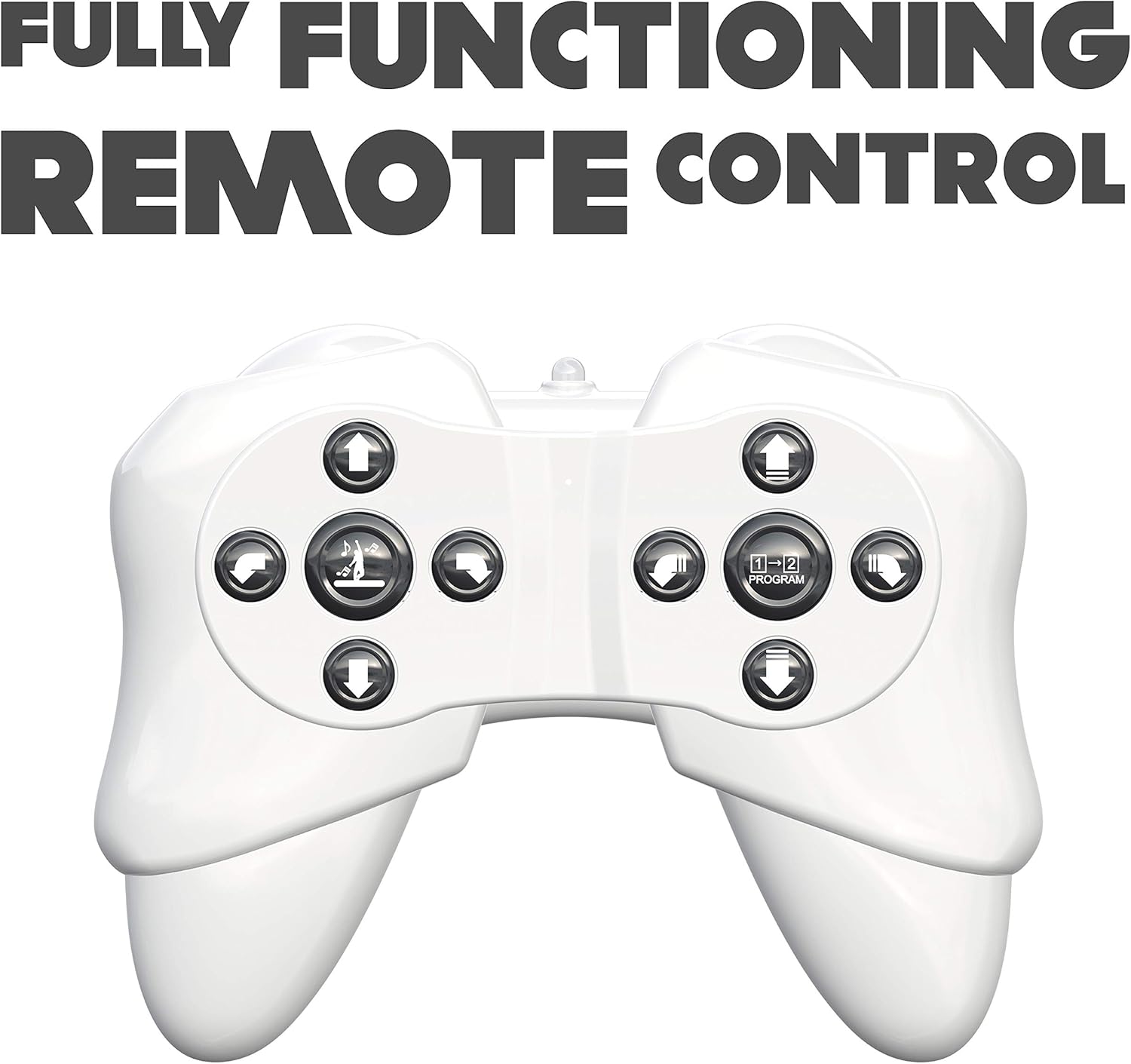
Figure 2: The robot's remote control, featuring various directional and action buttons.
- ദിശാസൂചന ബട്ടണുകൾ: Control forward, backward, left, and right movements.
- Walk/Glide Button: Toggle between walking and gliding modes.
- Dance Button: Activate pre-programmed dance routines. The robot features swinging arms during dance.
- പ്രോഗ്രാം ബട്ടൺ: Enter programming mode (see below).
ചലന നിയന്ത്രണം
Interact with the robot using simple hand gestures. The robot is equipped with sensors to detect specific hand movements.

Figure 3: Demonstrating the gesture control feature of the robot.
- Refer to the quick start guide for specific gesture commands.
- Ensure adequate lighting and clear space for optimal gesture recognition.
പ്രോഗ്രാം ചെയ്യാവുന്ന പ്രവർത്തനങ്ങൾ
The Program A Bot X can store and execute a sequence of up to 48 commands.

Figure 4: The robot is programmable, allowing for sequences of up to 48 actions.
- അമർത്തുക പ്രോഗ്രാം button on the remote control to enter programming mode.
- Input your desired sequence of movements and actions using the remote control buttons. Each button press will be recorded as one command.
- അമർത്തുക പ്രോഗ്രാം button again to exit programming mode and save the sequence.
- അമർത്തുക കളിക്കുക button (or equivalent, refer to remote diagram) to execute the programmed sequence.
സംവേദനാത്മക സവിശേഷതകൾ
- Robotic Sound Effects: The robot produces various sound effects to enhance interaction.
- LED കണ്ണുകൾ: The robot's eyes display different LED expressions, adding to its personality.

Figure 5: The robot features integrated robotic sound effects.

Figure 6: The robot's eyes illuminate with various LED patterns.
മെയിൻ്റനൻസ്
- വൃത്തിയാക്കൽ: മൃദുവായതും ഉണങ്ങിയതുമായ തുണി ഉപയോഗിച്ച് റോബോട്ടും റിമോട്ട് കൺട്രോളും തുടയ്ക്കുക. കഠിനമായ രാസവസ്തുക്കളോ അബ്രാസീവ് ക്ലീനറുകളോ ഉപയോഗിക്കരുത്.
- ബാറ്ററി മാറ്റിസ്ഥാപിക്കൽ: Replace batteries when the robot's performance diminishes or it stops responding. Always replace all batteries at once.
- സംഭരണം: When not in use for extended periods, remove all batteries from both the robot and the remote control to prevent leakage. Store in a cool, dry place away from direct sunlight.
ട്രബിൾഷൂട്ടിംഗ്
| പ്രശ്നം | സാധ്യമായ കാരണം | പരിഹാരം |
|---|---|---|
| റോബോട്ട് ഓണാക്കുന്നില്ല. | ബാറ്ററികൾ ഡെഡ് അല്ലെങ്കിൽ തെറ്റായി ഇൻസ്റ്റാൾ ചെയ്തു. | ബാറ്ററി പോളാരിറ്റി പരിശോധിക്കുക. പുതിയ ബാറ്ററികൾ ഉപയോഗിച്ച് മാറ്റിസ്ഥാപിക്കുക. |
| Robot does not respond to remote control. | Remote control batteries are low/dead; robot and remote are not paired; out of range. | Replace remote control batteries. Ensure robot and remote are turned on and within operating range. Re-pair if necessary (refer to initial power on steps). |
| Robot falls over frequently. | Uneven surface; complex programmed movements. | Operate on a flat, smooth surface. Simplify programmed sequences if they cause instability. |
| ആംഗ്യ നിയന്ത്രണം പ്രവർത്തിക്കുന്നില്ല. | Insufficient lighting; incorrect gesture; obstruction of sensors. | Ensure adequate lighting. Perform gestures clearly as instructed. Check for any obstructions blocking the robot's sensors. |
സ്പെസിഫിക്കേഷനുകൾ
| മോഡൽ നമ്പർ | 88071 |
| ഉൽപ്പന്ന അളവുകൾ | 15.24 x 45.72 x 25.4 സെ.മീ; 1.22 കി.ഗ്രാം |
| മെറ്റീരിയൽ തരം | പ്ലാസ്റ്റിക് |
| ബാറ്ററികൾ ആവശ്യമാണ് | Yes (4 x AA for robot, 2 x AAA for remote) |
| റിമോട്ട് കൺട്രോൾ ഉൾപ്പെടുത്തിയിട്ടുണ്ട് | അതെ |
| നിർമ്മാതാവ് ശുപാർശ ചെയ്യുന്ന പ്രായം | 15 വർഷവും അതിൽ കൂടുതലും |
| ഭാഷ | English, Italian, French, German, Spanish |
| നിറം | വെള്ള |
വാറൻ്റിയും പിന്തുണയും
വാറന്റി വിവരങ്ങൾക്കും ഉപഭോക്തൃ പിന്തുണയ്ക്കും, ഉൽപ്പന്ന പാക്കേജിംഗിൽ നൽകിയിരിക്കുന്ന കോൺടാക്റ്റ് വിശദാംശങ്ങൾ പരിശോധിക്കുകയോ ഔദ്യോഗിക സിൽവർലിറ്റ് സന്ദർശിക്കുകയോ ചെയ്യുക. webസൈറ്റ്. ഏതെങ്കിലും വാറന്റി ക്ലെയിമുകൾക്ക് വാങ്ങിയതിന്റെ തെളിവായി നിങ്ങളുടെ വാങ്ങൽ രസീത് സൂക്ഷിക്കുക.


