ആമുഖം
Thank you for choosing the Heegomn Video Camera Camcorder. This Full HD 1080P 24MP digital camcorder is designed for ease of use, making it ideal for kids, teens, beginners, and adults to capture precious moments. This manual provides detailed instructions on setting up, operating, and maintaining your camcorder to ensure optimal performance and longevity.

Image: Heegomn Video Camera Camcorder, showcasing its compact design and a vibrant display. The screen shows a child snowboarding, highlighting its use for capturing dynamic activities.
ബോക്സിൽ എന്താണുള്ളത്
എല്ലാ ഇനങ്ങളും ഉണ്ടെന്ന് ഉറപ്പാക്കാൻ പാക്കേജ് ഉള്ളടക്കങ്ങൾ പരിശോധിക്കുക:
- Heegomn Video Camera Camcorder (Model: FB-8162)
- ഉപയോക്തൃ മാനുവൽ
- Lithium-ion Battery (800mAh)
- USB കേബിൾ
- സ്റ്റോറേജ് ബാഗ്

Image: A visual representation of the camcorder and its included accessories: the camcorder itself, a USB cable for charging and data transfer, a rechargeable battery, the user manual, and a protective storage bag.
ഉൽപ്പന്നം കഴിഞ്ഞുview
Familiarize yourself with the main components of your camcorder:
- ലെൻസ്: വീഡിയോയും നിശ്ചല ചിത്രങ്ങളും പകർത്തുന്നു.
- 2.8" TFT LCD Screen: Rotates 270 degrees for versatile viewing and self-recording.
- പവർ ബട്ടൺ: Turns the camcorder on/off.
- മോഡ് ബട്ടൺ: വീഡിയോ, ഫോട്ടോ, പ്ലേബാക്ക് മോഡുകൾക്കിടയിൽ മാറുന്നു.
- OK/Navigation Buttons: For menu selection and navigation.
- സൂം ലിവർ: Controls the 8X digital zoom.
- ബിൽറ്റ്-ഇൻ ഫിൽ ലൈറ്റ്: കുറഞ്ഞ വെളിച്ചത്തിൽ പ്രകാശം നൽകുന്നു.
- Tripod Interface: Standard screw mount for attaching to a tripod (not included).
- USB പോർട്ട്: For charging and connecting to a PC.
- SD കാർഡ് സ്ലോട്ട്: Supports SD cards up to 256GB (sold separately).
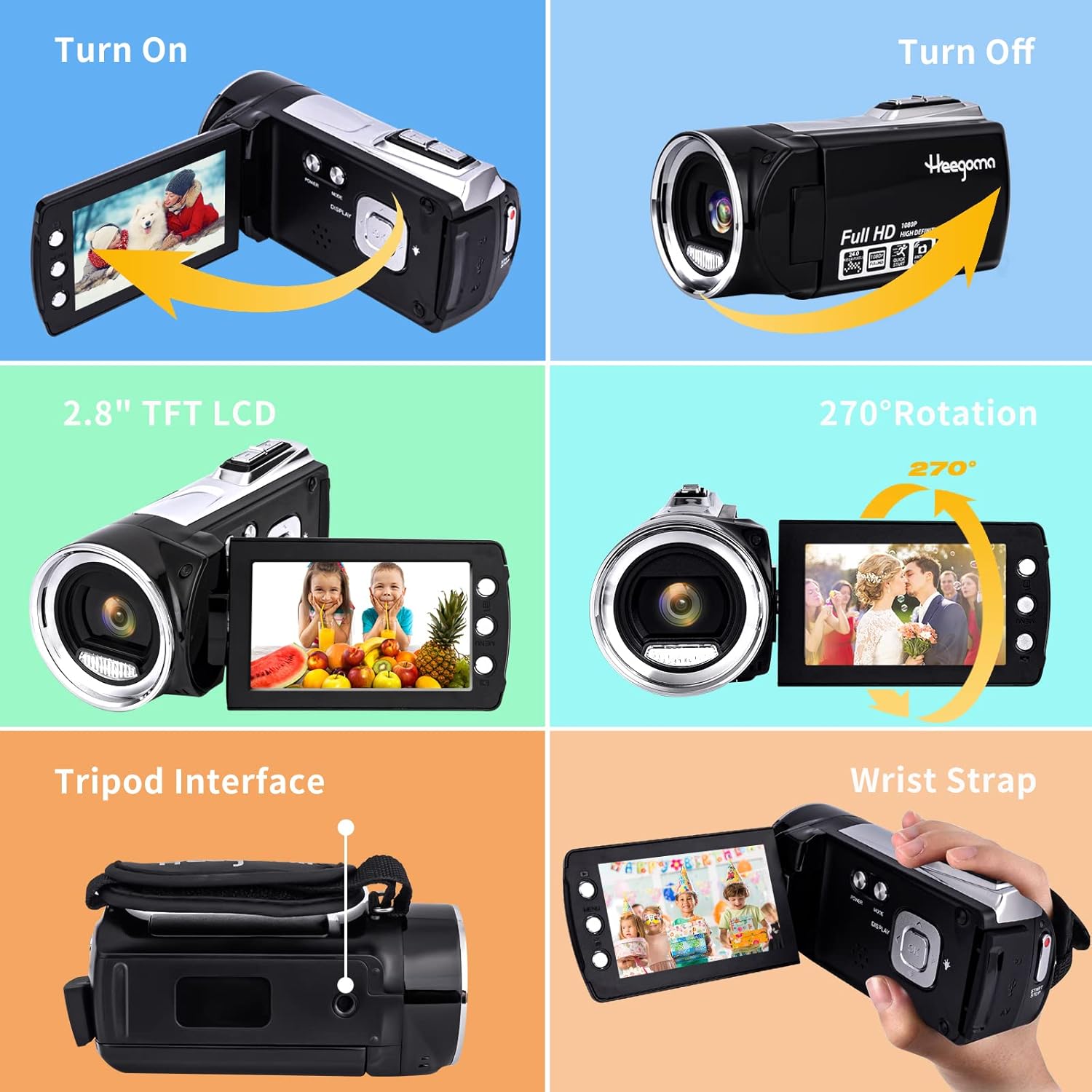
Image: A composite image illustrating key features of the camcorder, including how to turn it on and off, the 2.8-inch TFT LCD screen, its 270-degree rotation capability, the tripod interface, and the wrist strap attachment point.
സജ്ജമാക്കുക
1. ബാറ്ററി ഇൻസ്റ്റാളേഷനും ചാർജിംഗും
The camcorder comes with an 800mAh Li-ion battery. Ensure the battery is fully charged before first use.
- ബാറ്ററി കമ്പാർട്ട്മെൻ്റ് കവർ തുറക്കുക.
- പോളാരിറ്റി സൂചകങ്ങൾക്കനുസരിച്ച് ബാറ്ററി ഇടുക.
- ബാറ്ററി കമ്പാർട്ട്മെൻ്റ് കവർ സുരക്ഷിതമായി അടയ്ക്കുക.
- Connect the camcorder to a power source using the provided USB cable. The charging indicator will illuminate.
- A full charge typically provides 90-120 minutes of continuous use.

Image: This image demonstrates the camcorder's dual charging capability, either directly via a charging adapter or a power bank. It also shows how to connect the camcorder to a TV using an AV cable (not included) and its function as a PC camera for video calls.
2. എസ്ഡി കാർഡ് ഇൻസ്റ്റാളേഷൻ
An SD card (up to 256GB) is required for storing videos and photos and is sold separately. Please format the SD card before initial use.
- Locate the SD card slot on the camcorder.
- മെറ്റൽ കോൺടാക്റ്റുകൾ താഴേക്ക് അഭിമുഖമായി വരുന്ന വിധത്തിൽ SD കാർഡ് ഇടുക, അങ്ങനെ അത് സ്ഥലത്ത് ക്ലിക്ക് ആകും വരെ.
- To remove, gently push the card until it pops out.
3. പ്രാരംഭ പവർ ഓൺ
Once the battery is charged and the SD card is inserted, open the LCD screen to power on the camcorder. The screen will display "Welcome" and then switch to recording mode.
പ്രവർത്തന നിർദ്ദേശങ്ങൾ
1. Basic Recording and Photo Capture
- വീഡിയോ റെക്കോർഡിംഗ്: In video mode, press the Record button to start recording. Press again to stop.
- ഫോട്ടോ ക്യാപ്ചർ: Switch to photo mode using the Mode button. Press the Shutter button to take a picture.
- പ്ലേബാക്ക്: Use the Mode button to enter playback mode to review നിങ്ങൾ പിടിച്ചെടുത്ത വീഡിയോകളും ഫോട്ടോകളും.
2. സൂം ഫംഗ്ഷൻ
The camcorder features 8X digital zoom. Use the zoom lever to zoom in or out while recording or in standby mode.
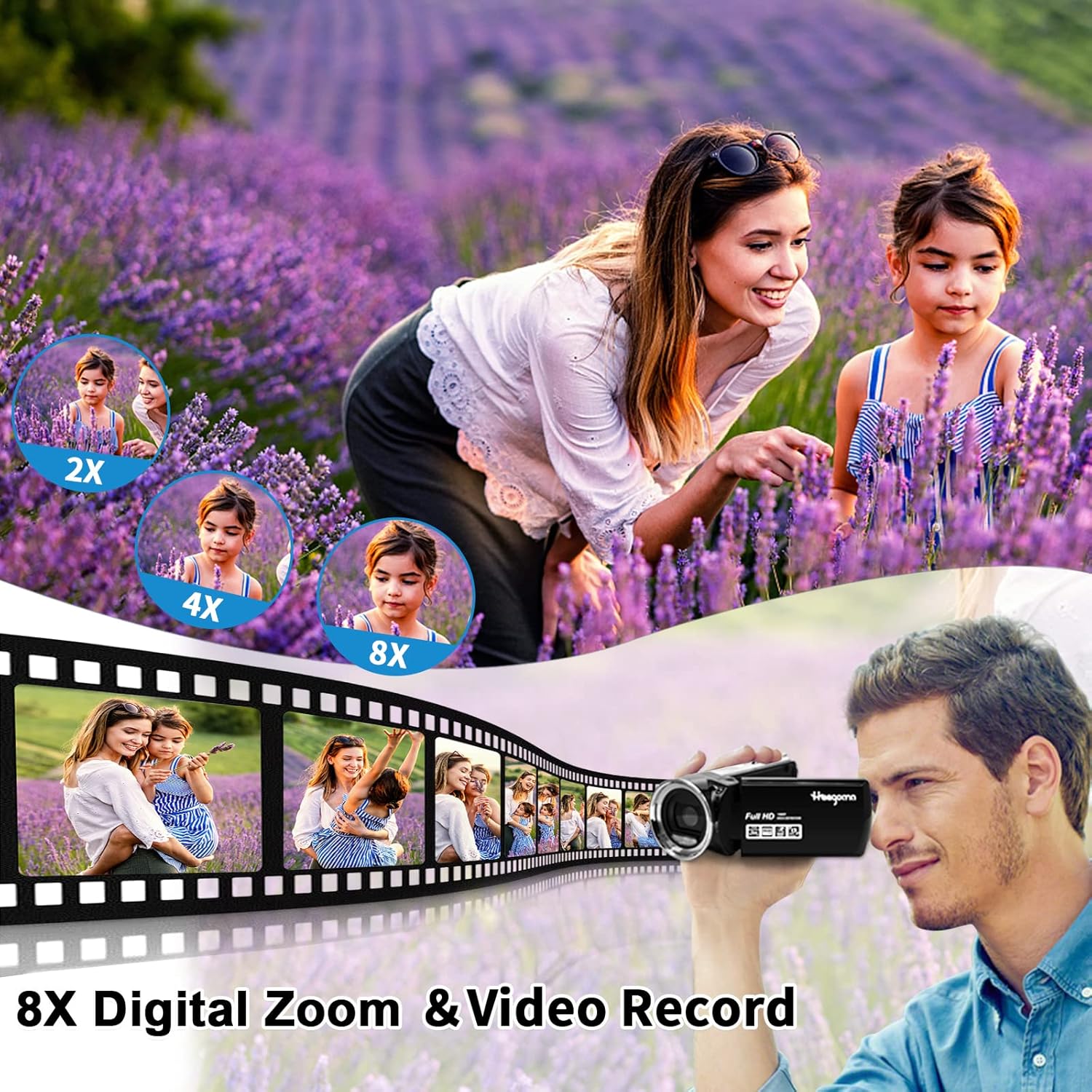
Image: This image illustrates the 8X digital zoom feature, showing a scene with a woman and child in a lavender field, captured at various zoom levels (2X, 4X, 8X) to demonstrate the magnification.
3. ബിൽറ്റ്-ഇൻ ഫിൽ ലൈറ്റ്
Activate the built-in fill light for improved visibility in low-light conditions or complete darkness. Refer to the camcorder's controls for the specific light activation button.
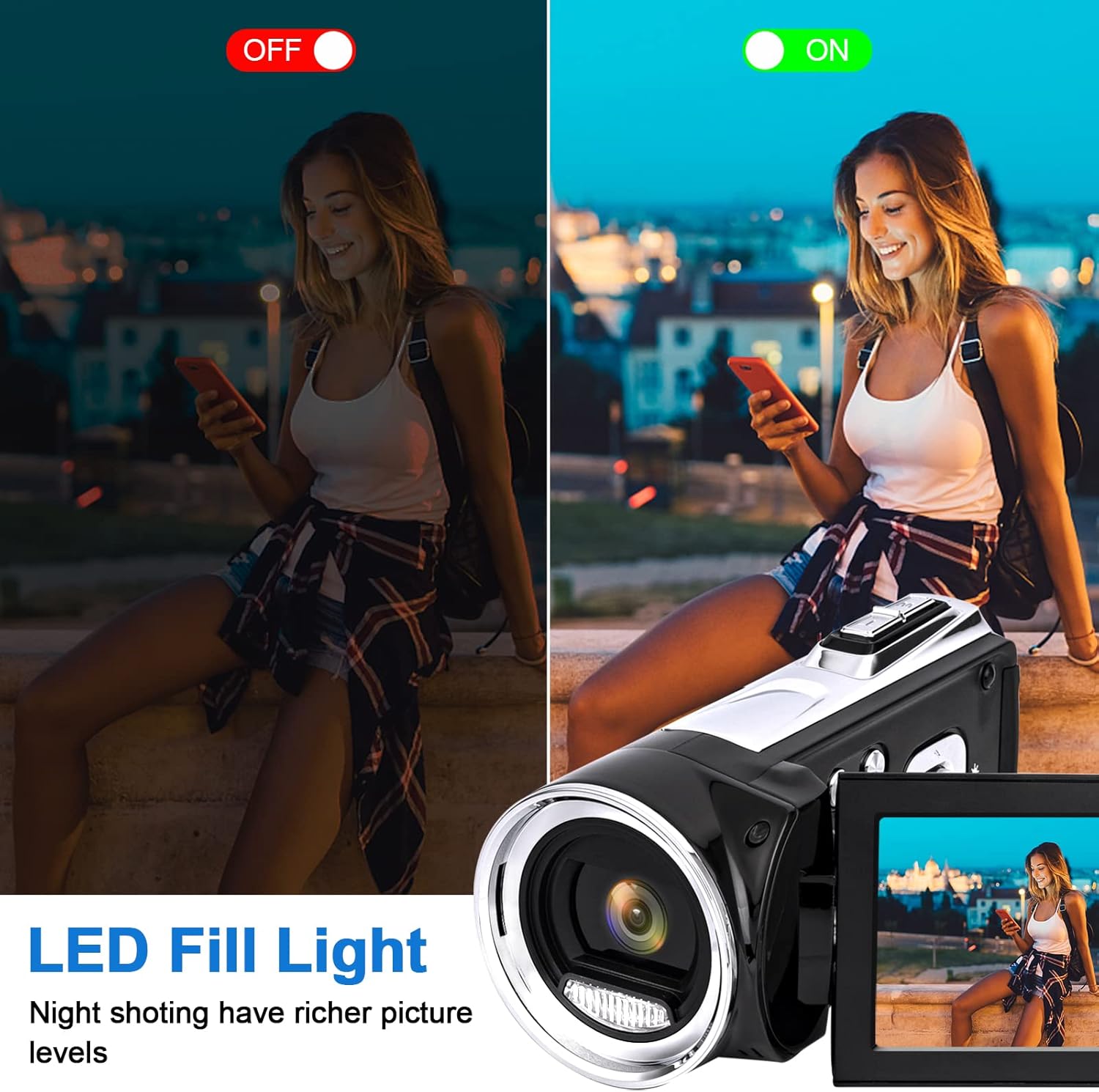
Image: A comparison showing the effect of the LED fill light. One side depicts a low-light scene without the light, while the other shows the same scene with the light activated, demonstrating enhanced picture levels in darkness.
4. PC Camera Function (Webക്യാം)
Connect the camcorder to your PC via the USB cable to use it as a webcam for video calls or live streaming on platforms like YouTube, Facebook, and InstagRAM.
- യുഎസ്ബി കേബിൾ ഉപയോഗിച്ച് നിങ്ങളുടെ കമ്പ്യൂട്ടറിലേക്ക് കാംകോർഡർ ബന്ധിപ്പിക്കുക.
- Select "PC Camera" mode on the camcorder's screen (if prompted).
- നിങ്ങളുടെ കമ്പ്യൂട്ടർ കാംകോർഡറിനെ ഒരു ആയി തിരിച്ചറിയണം webക്യാം

Image: This image highlights the camcorder's versatile functions, including its use for video conferencing when connected to a laptop, connecting to a TV for playback, and capturing joyful family moments.
5. TV Output
View your recordings directly on a television screen using an AV cable (not included).
- Connect the camcorder to your TV's AV input using a compatible AV cable.
- Switch your TV's input source to AV.
- The camcorder's display will mirror on the TV screen.
6. പ്രത്യേക സവിശേഷതകൾ
- Low-speed Video: Capture slow-motion effects.
- സ്മൈൽ ക്യാപ്ചർ: ഒരു പുഞ്ചിരി കണ്ടെത്തുമ്പോൾ യാന്ത്രികമായി ഒരു ഫോട്ടോ എടുക്കുന്നു.
- സ്വയം ടൈമർ: Set a delay before taking a photo (e.g., 2s, 5s, 10s).
- ആന്റി-ഷെയ്ക്കിംഗ്: Helps stabilize footage for clearer videos.
- മുഖം തിരിച്ചറിയൽ: Optimizes focus and exposure for faces.
- സമയദൈർഘ്യം: Record a series of images over time to create a time-lapse video.
- പ്രവർത്തനം താൽക്കാലികമായി നിർത്തുക: Pause and resume recording within the same video file.

Image: This image illustrates the anti-shaking feature, showing a blurred image of a skier (without stabilization) next to a clear, stabilized image of the same skier, demonstrating the effectiveness of the feature.

Image: This image demonstrates the pause function during video recording, showing a child playing with water. It highlights the ability to pause and resume recording within a single video file, indicated by pause and play icons.
മെയിൻ്റനൻസ്
- Keep the camcorder clean by wiping it with a soft, dry cloth.
- Avoid exposing the camcorder to extreme temperatures, dust, or moisture.
- Do not attempt to disassemble the camcorder, as this will void the warranty.
- Store the camcorder in its protective bag when not in use.
- Regularly back up your photos and videos to a computer or external storage device.
ട്രബിൾഷൂട്ടിംഗ്
| പ്രശ്നം | സാധ്യമായ പരിഹാരം |
|---|---|
| കാംകോർഡർ പവർ ഓൺ ചെയ്യുന്നില്ല. | Ensure the battery is fully charged and correctly inserted. Try charging the battery for at least 30 minutes. |
| Cannot record videos/take photos. | Check if an SD card is inserted and properly formatted. Ensure there is sufficient storage space on the SD card. |
| മോശം ഇമേജ്/വീഡിയോ നിലവാരം. | Ensure the lens is clean. Check lighting conditions and use the built-in fill light if necessary. |
| Camcorder freezes or becomes unresponsive. | Remove the battery, wait a few seconds, and then reinsert it to reset the device. |
സ്പെസിഫിക്കേഷനുകൾ
| ഫീച്ചർ | വിശദാംശങ്ങൾ |
|---|---|
| വീഡിയോ ക്യാപ്ചർ റെസല്യൂഷൻ | 1080p |
| ഫോട്ടോ സെൻസർ ടെക്നോളജി | CMOS |
| പരമാവധി അപ്പേർച്ചർ | 2 എഫ് |
| ഫ്ലാഷ് മെമ്മറി തരം | SD (256GB വരെ) |
| വീഡിയോ ക്യാപ്ചർ ഫോർമാറ്റ് | എ.വി.ഐ |
| പിന്തുണയ്ക്കുന്ന ഓഡിയോ ഫോർമാറ്റ് | AAC, MP3 |
| സ്ക്രീൻ വലിപ്പം | 2.7 Inches (2.8" / 270° Rotation Screen) |
| കണക്റ്റിവിറ്റി ടെക്നോളജി | USB |
| ഇനത്തിൻ്റെ ഭാരം | 10.8 ഔൺസ് |
| ഉൽപ്പന്ന അളവുകൾ | 4.73 x 2.3 x 2.2 ഇഞ്ച് |
| പ്രത്യേക സവിശേഷതകൾ | Lightweight, Anti-Shake, Low Light, Low-speed video, Smile capture, Self-timer, Face detect, Time-lapse, PC camera, Pause function |
വാറൻ്റിയും പിന്തുണയും
HEEGOMN provides a 3-month free replacement or refund service for this product. If you encounter any problems or have concerns, please do not hesitate to contact us. We are committed to providing a satisfactory solution within 24 hours.
For support, please refer to the contact information provided in your purchase documentation or visit the official Heegomn store page on Amazon: Heegomn Store


