1. ആമുഖം
This manual provides detailed instructions for the HXSJ J600 Mechanical Gaming Mouse. Please read this guide thoroughly to ensure proper setup, operation, and maintenance of your device. The HXSJ J600 is designed for gaming enthusiasts, featuring customizable macro programming, adjustable DPI, and dynamic LED lighting.
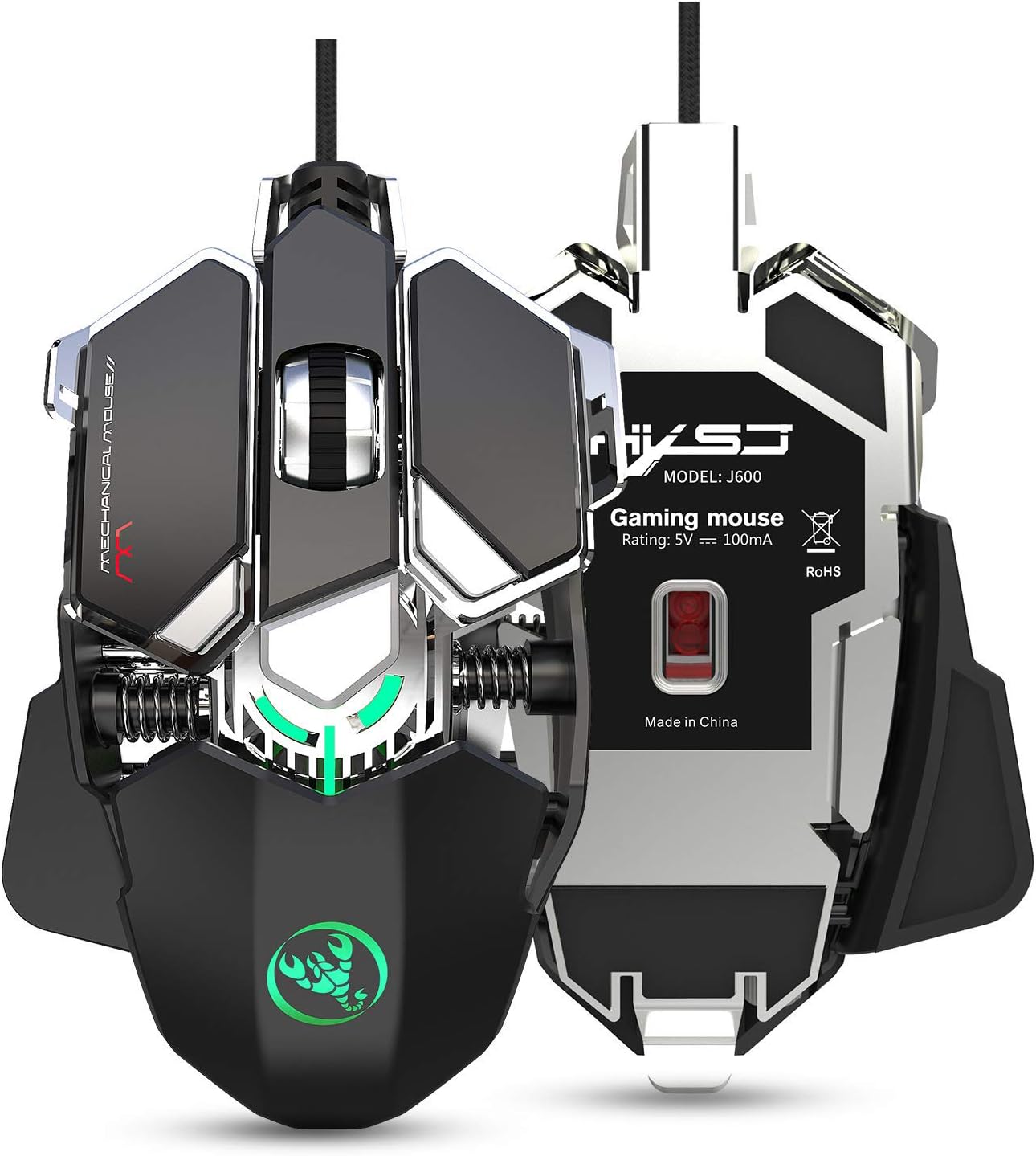
ചിത്രം 1.1: The HXSJ J600 Mechanical Gaming Mouse, showcasing its ergonomic design and illuminated features. This image provides a general view ഉൽപ്പന്നത്തിൻ്റെ.
2. ഉൽപ്പന്നം കഴിഞ്ഞുview
2.1 പ്രധാന സവിശേഷതകൾ
- 9 പ്രോഗ്രാം ചെയ്യാവുന്ന കീകൾ: Full-key customization for macros and functions.
- ക്രമീകരിക്കാവുന്ന DPI: Six-level DPI settings (800-1600-2400-3200-4800-6400) for precise control.
- Advanced Gaming Chip: Utilizes a professional A6653 game chip for stable transmission and accurate analysis.
- ഡൈനാമിക് LED ലൈറ്റിംഗ്: Cool LED variable light effects with 16 million RGB full-color breathing lights and multiple mode changes.
- എർഗണോമിക് ഡിസൈൻ: Human body engineering design for comfortable use during extended gaming sessions.
- നീണ്ടുനിൽക്കുന്ന നിർമ്മാണം: Integrated aluminum alloy sandblasted metal floor design and electroplated skeleton structure.
2.2 മൗസ് ഘടകങ്ങൾ

ചിത്രം 2.1: കഴിഞ്ഞുview of the HXSJ J600 mouse buttons in Office Mode. Key components include Left Button (1), Right Button (2), Middle Button/Scroll Wheel (3), Forward (4), Back button (5), Display Desktop (6), DPI- (7), DPI+ (8), and Fire Key3 (9).

ചിത്രം 2.2: പൊട്ടിത്തെറിച്ചു view illustrating the modular structure design of the HXSJ J600. Key internal components shown are the braided wire, spraying process, right button (dumb UV process), spray sanding border, million click life micro switch, fixed decorative spring, PCP board, electroplated skeleton structure, sandblasting base, metal screw decoration, and UPE foot stickers.
3. സജ്ജീകരണം
- മൗസ് ബന്ധിപ്പിക്കുക: Plug the USB connector of the HXSJ J600 mouse into an available USB port on your computer. The mouse is plug-and-play.
- ഡ്രൈവർ ഇൻസ്റ്റാളേഷൻ:
- Download the macro programming software from the official HXSJ webസൈറ്റ്.
- Run the "setup.exe" file to install the driver software.
- Once the installation is complete, a "J600" drive icon will appear on your desktop.
- പ്രാരംഭ ഉപയോഗം: Ensure the mouse is successfully connected and functioning normally before proceeding with customization.
4. പ്രവർത്തന നിർദ്ദേശങ്ങൾ
4.1 Button Settings and Macro Programming
The HXSJ J600 features 9 programmable buttons. The installed driver software allows for custom settings and macro editing to enhance your gaming experience.
- Open the "J600" driver software from your desktop.
- Navigate to the "Button settings" section. Here, you can assign custom functions to buttons 1-9.
- For advanced customization, go to "Custom Settings" to access the macro editing interface. You can create and edit macros to support various game effects.
4.2 ഡിപിഐ അഡ്ജസ്റ്റ്മെന്റ്
The mouse supports 6-level adjustable DPI settings. You can cycle through these settings using the dedicated DPI+ and DPI- buttons on the mouse.
- Default DPI values: 800, 1600, 2400, 3200, 4800, 6400.
- Each DPI level is indicated by a specific LED color, providing visual feedback when switching.

ചിത്രം 4.1: Visual representation of DPI switching and corresponding LED colors. DPI levels are 800 (Green), 1600 (Purple), 2400 (Blue), 3200 (Red), 4800 (Yellow), and 6400 (Cyan-blue).

ചിത്രം 4.2: The HXSJ J600 mouse demonstrating its 6400 DPI high precision capability, ensuring stable transmission and accurate analysis for various applications including gaming.
4.3 LED ക്രമീകരണങ്ങൾ
The HXSJ J600 features customizable LED lighting effects.

ചിത്രം 4.3: The HXSJ J600 mouse displaying its 16 million RGB full-color breathing lights, offering various lighting modes and adjustable switching speeds.
Within the driver software, you can configure LED settings:
- എപ്പോഴും ഓണാണ്: LED lights remain constantly illuminated.
- Custom Breath: LED lights pulse with a customizable breathing effect.
- Spectral Cycle: LED lights cycle through a spectrum of colors.
- ഓഫ്: എൽഇഡി ലൈറ്റുകൾ ഓഫ് ചെയ്തിരിക്കുന്നു.
4.4 Mouse Parameters
The driver software allows you to fine-tune various mouse parameters:
- Pointer Precision: Adjust the accuracy of the mouse pointer.
- ചക്ര വേഗത: Control the scrolling speed of the mouse wheel.
- ഇരട്ട ക്ലിക്ക് വേഗത: Set the required speed for a double-click to register.
4.5 സേവിംഗ് സെറ്റിംഗ്സ്
After making any adjustments in the driver software, click "Applications" and then "Save Configuration." To ensure all customizations are active, you should restart the driver software the next time you use the mouse.
5. പരിപാലനം
To ensure the longevity and optimal performance of your HXSJ J600 Mechanical Gaming Mouse, follow these simple maintenance guidelines:
- വൃത്തിയാക്കൽ: Regularly wipe the mouse surface with a soft, dry cloth. For stubborn dirt, slightly dampതുണിയിൽ വെള്ളം ഒഴിക്കുക. കഠിനമായ രാസവസ്തുക്കളോ ഉരച്ചിലുകളോ ഉള്ള വസ്തുക്കൾ ഉപയോഗിക്കുന്നത് ഒഴിവാക്കുക.
- കേബിൾ കെയർ: കേടുപാടുകൾ ഒഴിവാക്കാൻ മൂർച്ചയുള്ള വളവുകളോ യുഎസ്ബി കേബിളിൽ അമിതമായി വലിക്കുന്നതോ ഒഴിവാക്കുക.
- സംഭരണം: Store the mouse in a clean, dry environment away from extreme temperatures and direct sunlight when not in use.
6. പ്രശ്നപരിഹാരം
If you encounter any issues with your HXSJ J600 Mechanical Gaming Mouse, please refer to the following common solutions:
- മൗസ് പ്രതികരിക്കുന്നില്ല: Ensure the USB cable is securely plugged into a functional USB port on your computer. Try a different USB port.
- ഡ്രൈവർ പ്രശ്നങ്ങൾ: If customization settings are not applying, ensure the driver software is correctly installed and running. Try reinstalling the driver if problems persist.
- DPI or LED Not Changing: Verify that you are using the correct buttons for DPI adjustment and that the driver software settings are saved.
- പ്രതികരിക്കാത്ത ബട്ടണുകൾ: Check the button assignments in the driver software. If a button is physically stuck, gently clean around it.
For further assistance, please contact HXSJ customer support.
7 സ്പെസിഫിക്കേഷനുകൾ
| ഫീച്ചർ | സ്പെസിഫിക്കേഷൻ |
|---|---|
| ഉൽപ്പന്ന മോഡൽ | J600 Mechanical Macros Define the game mouse |
| കീകൾ | 9 പ്രോഗ്രാം ചെയ്യാവുന്ന കീകൾ |
| ഡിപിഐ ലെവലുകൾ | 800-1600-2400-3200-4800-6400 (adjustable) |
| LED പ്രഭാവം | Cool LED variable light effect, 16 million RGB full-color breathing lights |
| വാല്യംtagഇ / കറന്റ് | DC 5V / 100mA |
| ഇൻ്റർഫേസ് | യുഎസ്ബി (പ്ലഗ് ആൻഡ് പ്ലേ) |
| ജീവിതം മാറുക | 20 ദശലക്ഷം സൈക്കിളുകൾ |
| കേബിൾ നീളം | 150 സെ.മീ |
| ഇനത്തിൻ്റെ ഭാരം | 137.5 ഗ്രാം |
| ഇനത്തിന്റെ വലുപ്പം (L*W*H) | 130*80*35എംഎം |
| പിന്തുണയ്ക്കുന്ന OS | Windows 2000 / XP / win7 / win8 / win10 / Vista 32bit / IOS or latest |
| ഹാർഡ്വെയർ പ്ലാറ്റ്ഫോം | PC |
| മെറ്റീരിയൽ തരം | ലോഹം |
| കൈ ഓറിയൻ്റേഷൻ | ശരിയാണ് |
8. വാറൻ്റിയും പിന്തുണയും
For information regarding warranty coverage and technical support for your HXSJ J600 Mechanical Gaming Mouse, please refer to the warranty card included with your product or visit the official HXSJ website. You can also contact HXSJ customer service for assistance with any product-related inquiries or issues.


