ആമുഖം
This manual provides detailed instructions for the Razer BlackShark V2 gaming headset. Designed for esports, this headset offers high-quality audio, clear microphone communication, and effective sound isolation. Please read this manual thoroughly to ensure proper setup and optimal performance of your device.
വീഡിയോ വിവരണം: ഒരു ഉദ്യോഗസ്ഥൻ കടന്നുview വീഡിയോ ഷോasing the Razer BlackShark V2 headset, highlighting its design and key features. This video provides a visual introduction to the product and its various models.
ബോക്സിൽ എന്താണുള്ളത്
നിങ്ങളുടെ പാക്കേജിൽ എല്ലാ ഘടകങ്ങളും ഉണ്ടെന്ന് ഉറപ്പാക്കുക:
- Razer BlackShark V2 Headset
- യുഎസ്ബി സൗണ്ട് കാർഡ്
- വേർപെടുത്താവുന്ന റേസർ ഹൈപ്പർക്ലിയർ കാർഡിയോയിഡ് മൈക്രോഫോൺ
- ഉപയോക്തൃ മാനുവൽ
സജ്ജീകരണ നിർദ്ദേശങ്ങൾ
Follow these steps to set up your Razer BlackShark V2 headset:
- മൈക്രോഫോൺ ബന്ധിപ്പിക്കുക: Insert the detachable Razer HyperClear Cardioid Microphone into the port on the left earcup until it clicks into place.
- ഉപകരണത്തിലേക്ക് കണക്റ്റുചെയ്യുക:
- Via USB Sound Card (Recommended for PC/Mac): Connect the headset's 3.5mm jack to the USB Sound Card, then plug the USB Sound Card into an available USB port on your computer. This enables advanced audio features via Razer Synapse.
- Via 3.5mm Jack (for Consoles/Mobile): Connect the headset's 3.5mm jack directly to the 3.5mm audio port on your PlayStation, Xbox, Nintendo Switch, or mobile device.
- Install Razer Synapse (PC/Mac): For full customization and access to features like THX Spatial Audio and advanced microphone controls, download and install Razer Synapse from the official Razer webസൈറ്റ്.
- ഓഡിയോ ക്രമീകരണങ്ങൾ കോൺഫിഗർ ചെയ്യുക: After connecting, ensure your operating system's audio output and input devices are set to the Razer BlackShark V2 or the Razer USB Sound Card.
പ്രവർത്തന നിർദ്ദേശങ്ങൾ
Audio Performance with Razer TriForce Titanium 50mm Drivers

ചിത്ര വിവരണം: This image illustrates the unique design of the Razer TriForce Titanium 50mm Drivers. It shows the driver divided into three parts, each dedicated to tuning highs, mids, and lows, resulting in clearer and more powerful audio. The titanium-coated diaphragms are also visible.
The Razer BlackShark V2 features TriForce Titanium 50mm Drivers. These drivers are designed with titanium-coated diaphragms and are divided into three parts for individual tuning of high, mid, and low audio frequencies. This design ensures brighter, clearer audio with richer highs and more powerful lows, enhancing your listening experience for both gaming and multimedia.
റേസർ ഹൈപ്പർക്ലിയർ കാർഡിയോയിഡ് മൈക്രോഫോൺ
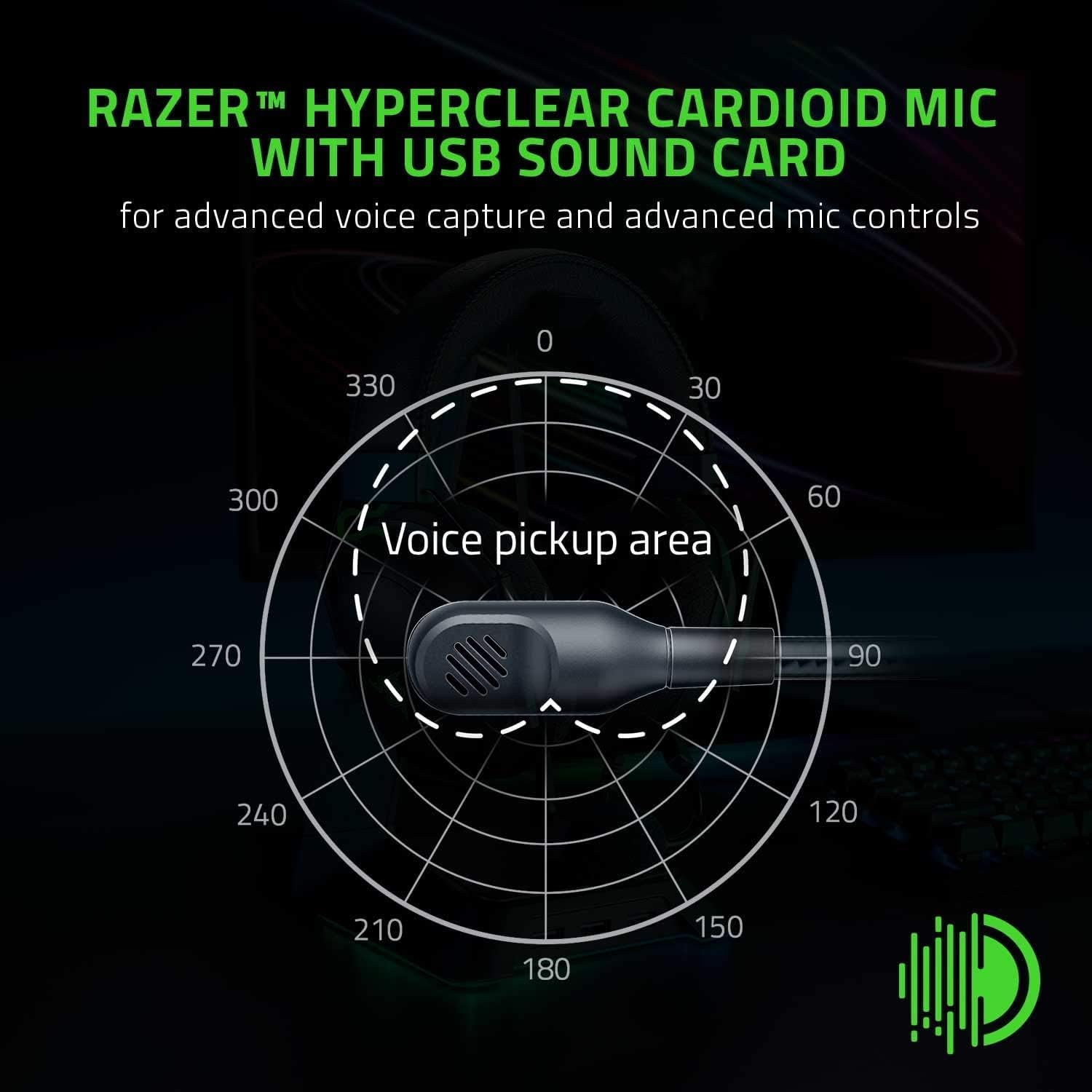
ചിത്ര വിവരണം: This image displays a polar pattern diagram illustrating the focused voice pickup area of the Razer HyperClear Cardioid Microphone. The diagram highlights how the microphone is tuned to capture sound primarily from the front, minimizing background noise.
The detachable Razer HyperClear Cardioid Mic is engineered for enhanced voice capture. Its cardioid pickup pattern focuses on your voice while suppressing background noise. When connected via the USB Sound Card, you can further refine your voice output using Razer Synapse software, adjusting settings for clarity and noise reduction.
- നിശബ്ദ ബട്ടൺ: A dedicated mute button is located on the left earcup for quick microphone control.
- വോളിയം നിയന്ത്രണം: A volume wheel on the left earcup allows for easy adjustment of audio levels.
Advanced Passive Noise Cancellation

ചിത്ര വിവരണം: The image shows the Razer BlackShark V2 headset positioned on a desk, emphasizing its closed-earcup design. This design, combined with plush ear cushions, creates a tight seal around the ears to provide advanced passive noise cancellation, blocking out external distractions.
The headset features advanced passive noise cancellation. Its special closed earcups fully cover your ears, and the plush cushions form a perfect seal. This design effectively blocks out external noise, allowing for uninterrupted focus during gaming or other activities.
Ultra-Soft Breathable Memory Foam Cushions

ചിത്ര വിവരണം: A detailed close-up of the headset's ear cushions, highlighting the ultra-soft breathable memory foam wrapped in plush leatherette. This design is intended to reduce clamping force and minimize heat buildup for extended comfort.
For premium comfort during long sessions, the ear cushions are made from ultra-soft breathable memory foam, wrapped in plush leatherette. The improved density of the foam reduces clamping force, while the breathable fabric minimizes sweat and heat buildup, ensuring comfort over extended periods of use.
THX സ്പേഷ്യൽ ഓഡിയോ

ചിത്ര വിവരണം: The Razer BlackShark V2 headset is shown with the THX logo prominently displayed, signifying its THX Spatial Audio feature. This technology provides pinpoint positional accuracy in audio, enhancing immersion and competitive advantagഇ ഗെയിമിംഗിൽ.
When used with the USB Sound Card and Razer Synapse, the Razer BlackShark V2 supports THX Spatial Audio. This feature provides pinpoint positional accuracy, optimizing game sound design for true-to-life acoustics. This allows you to better identify the direction of sounds, gaining a competitive edge in games.
മെയിൻ്റനൻസ്
നിങ്ങളുടെ ഹെഡ്സെറ്റിന്റെ ദീർഘായുസ്സും ഒപ്റ്റിമൽ പ്രകടനവും ഉറപ്പാക്കാൻ, ഈ പരിപാലന മാർഗ്ഗനിർദ്ദേശങ്ങൾ പാലിക്കുക:
- വൃത്തിയാക്കൽ: ഇയർകപ്പുകളും ഹെഡ്ബാൻഡും തുടയ്ക്കാൻ മൃദുവായതും ഉണങ്ങിയതുമായ തുണി ഉപയോഗിക്കുക. കൂടുതൽ ആഴത്തിലുള്ള വൃത്തിയാക്കലിന്, അൽപ്പം ഡി.amp cloth with mild soap can be used, but ensure no moisture enters the speaker grilles or microphone.
- മൈക്രോഫോൺ കെയർ: When not in use, you can detach the microphone to prevent damage. Store it in a safe place.
- സംഭരണം: ഹെഡ്സെറ്റ് തണുത്തതും വരണ്ടതുമായ സ്ഥലത്ത് സൂക്ഷിക്കുക, നേരിട്ടുള്ള സൂര്യപ്രകാശത്തിൽ നിന്നും ഉയർന്ന താപനിലയിൽ നിന്നും അകറ്റി നിർത്തുക. ഭാരമുള്ള വസ്തുക്കൾ ഹെഡ്സെറ്റിന് മുകളിൽ വയ്ക്കുന്നത് ഒഴിവാക്കുക.
- കേബിൾ മാനേജുമെന്റ്: ആന്തരിക കേടുപാടുകൾ തടയാൻ കേബിളുകളിൽ മൂർച്ചയുള്ള വളവുകളോ അമിതമായി വലിക്കുന്നതോ ഒഴിവാക്കുക.
ട്രബിൾഷൂട്ടിംഗ്
If you encounter issues with your Razer BlackShark V2 headset, refer to the following common solutions:
- ഓഡിയോ ഇല്ല/കുറഞ്ഞ വോളിയം:
- Check the volume wheel on the left earcup and ensure it is turned up.
- Verify that the headset is correctly plugged into your device or USB Sound Card.
- Confirm that the correct audio output device is selected in your operating system's sound settings.
- If using the USB Sound Card, ensure Razer Synapse is installed and updated, and check its audio settings.
- മൈക്രോഫോൺ പ്രവർത്തിക്കുന്നില്ല:
- Ensure the microphone is securely inserted into the headset's port.
- Check if the microphone mute button on the left earcup is disengaged (not muted).
- Verify that the correct microphone input device is selected in your operating system's sound settings and any communication software (e.g., Discord, Zoom).
- If using the USB Sound Card, check microphone settings within Razer Synapse.
- Ensure the microphone is oriented correctly towards your mouth, as it has a focused pickup area.
- Audio Glitches/Distortion:
- Try connecting the headset to a different USB port or 3.5mm jack.
- Update your audio drivers and Razer Synapse software.
- Test the headset on another device to determine if the issue is with the headset or the source device.
- ഉപയോഗ സമയത്ത് അസ്വസ്ഥത:
- Adjust the headband for a comfortable fit. The earcups are designed to slide to accommodate different head sizes.
- Ensure the ear cushions are properly seated around your ears.
സ്പെസിഫിക്കേഷനുകൾ
| ഫീച്ചർ | വിശദാംശങ്ങൾ |
|---|---|
| ബ്രാൻഡ് | റേസർ |
| മോഡലിൻ്റെ പേര് | ബ്ലാക്ക്ഷാർക്ക് വി 2 |
| മോഡൽ നമ്പർ | RZ04-03230100-R3M1 |
| നിറം | കറുപ്പ് |
| ചെവി പ്ലേസ്മെൻ്റ് | ചെവിക്ക് മുകളിൽ |
| കണക്റ്റിവിറ്റി ടെക്നോളജി | Wired (3.5 mm Jack, USB via Sound Card) |
| ഓഡിയോ ഡ്രൈവർ തരം | Dynamic Driver (Razer TriForce Titanium) |
| ഓഡിയോ ഡ്രൈവർ വലിപ്പം | 50 മില്ലിമീറ്റർ |
| ഫ്രീക്വൻസി പ്രതികരണം | 12Hz - 28KHz |
| പ്രതിരോധം | 32 ഓം |
| സംവേദനക്ഷമത | 98 ഡി.ബി |
| ശബ്ദ നിയന്ത്രണം | ശബ്ദ ഒറ്റപ്പെടൽ (നിഷ്ക്രിയ ശബ്ദ റദ്ദാക്കൽ) |
| മൈക്രോഫോൺ തരം | Razer HyperClear Cardioid (Detachable) |
| അനുയോജ്യമായ ഉപകരണങ്ങൾ | PC, Mac, PS4, Xbox One, Nintendo Switch, Mobile Devices |
| ഇനത്തിൻ്റെ ഭാരം | 1.32 പൗണ്ട് (ഏകദേശം 599 ഗ്രാം) |
| മെറ്റീരിയൽ | കൃത്രിമ തുകൽ (ചെവി തലയണകൾ) |
വാറൻ്റിയും പിന്തുണയും
Razer products come with a limited manufacturer's warranty. For detailed warranty information, product registration, and technical support, please visit the official Razer support webസൈറ്റ്:
വാറൻ്റി ക്ലെയിമുകൾക്കായി നിങ്ങളുടെ വാങ്ങിയതിൻ്റെ തെളിവ് സൂക്ഷിക്കുക.


