1. ആമുഖം
This manual provides detailed instructions for the installation, operation, and maintenance of your YESKAMO 5MP NVR WiFi Security Camera System. Please read this manual thoroughly before using the product to ensure proper setup and functionality.
2. പാക്കേജ് ഉള്ളടക്കം
താഴെ ലിസ്റ്റ് ചെയ്തിരിക്കുന്ന എല്ലാ ഇനങ്ങളും നിങ്ങളുടെ പാക്കേജിൽ ഉൾപ്പെടുത്തിയിട്ടുണ്ടെന്ന് ഉറപ്പാക്കുക. ഏതെങ്കിലും ഇനങ്ങൾ നഷ്ടപ്പെട്ടിട്ടുണ്ടെങ്കിലോ കേടായിട്ടുണ്ടെങ്കിലോ, ദയവായി ഉപഭോക്തൃ പിന്തുണയുമായി ബന്ധപ്പെടുക.

ചിത്രം 2.1: Illustration of the YESKAMO 5MP NVR WiFi Security Camera System package contents, including the 8-channel NVR, four 3MP floodlight cameras, power adapters, mouse, Ethernet cable, 1TB hard drive, user manual, screws, and warning card.
- 8 ചാനൽ NVR റെക്കോർഡർ
- 3MP Floodlight Cameras (x4)
- DC 12V 2A Power Adapter (for NVR)
- DC 12V 1A Power Adapters (x4, for cameras)
- മൗസ്
- ഇഥർനെറ്റ് കേബിൾ
- 1TB ഹാർഡ് ഡ്രൈവ് (പ്രീ-ഇൻസ്റ്റാൾ ചെയ്തത്)
- ഉപയോക്തൃ മാനുവൽ
- Screws / Warning Card
3. ഉൽപ്പന്നം കഴിഞ്ഞുview
Familiarize yourself with the components of your security camera system.

ചിത്രം 3.1: കഴിഞ്ഞുview of the YESKAMO 5MP NVR WiFi Security Camera System, showing the NVR unit, four wireless cameras, a 1TB hard drive, and a smartphone displaying live camera feed.
3.1 ക്യാമറ ഘടകങ്ങൾ

ചിത്രം 3.2: Detailed diagram of a YESKAMO camera, highlighting key features such as the 5dBi antenna, IR cut filter, floodlights, IR LEDs, microphone, speaker, 2-axis mounting bracket, RJ45 Ethernet port, and power-in port. The camera features IP66 weatherproof metal housing.
- 5dBi ആന്റിന: വയർലെസ് സിഗ്നൽ പ്രക്ഷേപണത്തിനായി.
- IR കട്ട് ഫിൽട്ടർ: Automatically switches between day and night vision.
- 2pcs ഫ്ലഡ്ലൈറ്റ്: വർണ്ണ രാത്രി കാഴ്ച നൽകുകയും ഒരു പ്രതിരോധമായി പ്രവർത്തിക്കുകയും ചെയ്യുന്നു.
- 2pcs IR LED: Enables infrared night vision up to 100ft.
- മൈക്രോഫോൺ: For audio input (pick up audio).
- സ്പീക്കർ: For audio output (transmit sound, two-way audio).
- 2-ആക്സിസ് മൗണ്ടിംഗ് ബ്രാക്കറ്റ്: Allows flexible camera positioning.
- RJ45 ഇഥർനെറ്റ് പോർട്ട്: വയർഡ് നെറ്റ്വർക്ക് കണക്ഷന് (ഓപ്ഷണൽ).
- പവർ-ഇൻ പോർട്ട്: For DC 12V power supply.
- IP66 Weatherproof Metal Housing: Ensures durability for outdoor use.
3.2 എൻവിആർ (നെറ്റ്വർക്ക് വീഡിയോ റെക്കോർഡർ)
The NVR is the central recording and management unit for your security system. It features an 8-channel capacity and comes with a pre-installed 1TB hard drive for storage.
4. സജ്ജീകരണ ഗൈഡ്
4.1 പ്രാരംഭ പവർ-അപ്പും കണക്ഷനും
- Connect the NVR to a monitor using an HDMI or VGA cable.
- Connect the NVR to a power outlet using its DC 12V 2A power adapter.
- Connect the included mouse to the NVR's USB port.
- Connect each camera to a power outlet using its DC 12V 1A power adapter.
- The cameras will automatically pair with the NVR.

ചിത്രം 4.1: Diagram illustrating the auto-pair system setup, showing a camera wirelessly connecting to the NVR, which is connected to a monitor for local surveillance. It also depicts the NVR connected to a router for remote access via various devices.
4.2 Network Connection for Remote View
To access your system remotely via a smartphone, tablet, or computer, connect the NVR to your internet router using the provided Ethernet cable.
- Connect one end of the Ethernet cable to the NVR's RJ45 port.
- Connect the other end to an available LAN port on your internet router.
- Follow the on-screen instructions on the NVR monitor to configure network settings if necessary.
- Download the official YESKAMO app on your mobile device or client software on your computer.
- Register an account and add your NVR by scanning the QR code or entering the device ID.
5. പ്രവർത്തന നിർദ്ദേശങ്ങൾ
5.1 തത്സമയം View ഒപ്പം റെക്കോർഡിംഗ്
സിസ്റ്റം സജ്ജീകരിച്ചുകഴിഞ്ഞാൽ, നിങ്ങൾക്ക് കഴിയും view live feeds from all connected cameras on your monitor or through the remote viewing application.
5.2 Human Detection and Siren Alarm
The system features smart AI human detection to minimize false alerts. When human motion is detected, the system can trigger a siren alarm and floodlights, and send instant app notifications with intruder snapshots.

ചിത്രം 5.1: Diagram illustrating the smart AI human detection feature. The camera detects unusual human activity, avoiding false alerts from animals or environmental factors. An app notification with a snapshot is sent upon detection.
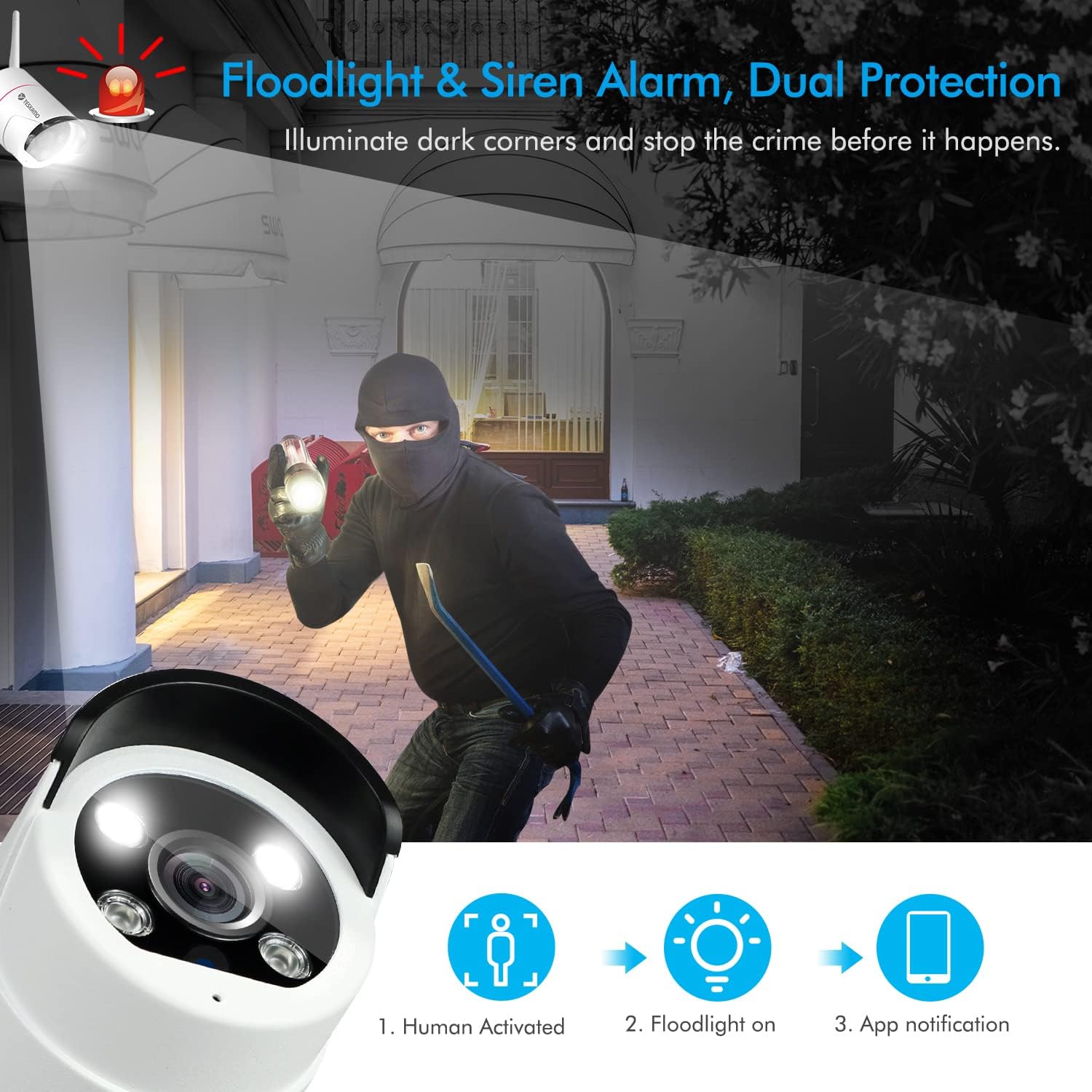
ചിത്രം 5.2: Illustration of the floodlight and siren alarm in action. Upon human activation, the floodlight turns on, and an app notification is sent, providing dual protection by illuminating dark areas and deterring intruders.
5.3 ടു-വേ ഓഡിയോ
Each camera is equipped with a microphone and speaker, enabling two-way audio communication. You can listen to audio from the camera's location and speak through the camera using the remote viewing application.

ചിത്രം 5.3: Depiction of the two-way audio feature, showing a user interacting with a delivery person at their door via the camera and a smartphone app.
5.4 രാത്രി കാഴ്ച ശേഷികൾ
The cameras offer advanced night vision options:
- ഇൻഫ്രാറെഡ് നൈറ്റ് വിഷൻ: Provides clear black and white video in complete darkness up to 100ft using IR LEDs.
- കളർ നൈറ്റ് വിഷൻ: When floodlights are activated (either manually or by human detection), the cameras can capture full-color video even in low-light conditions.
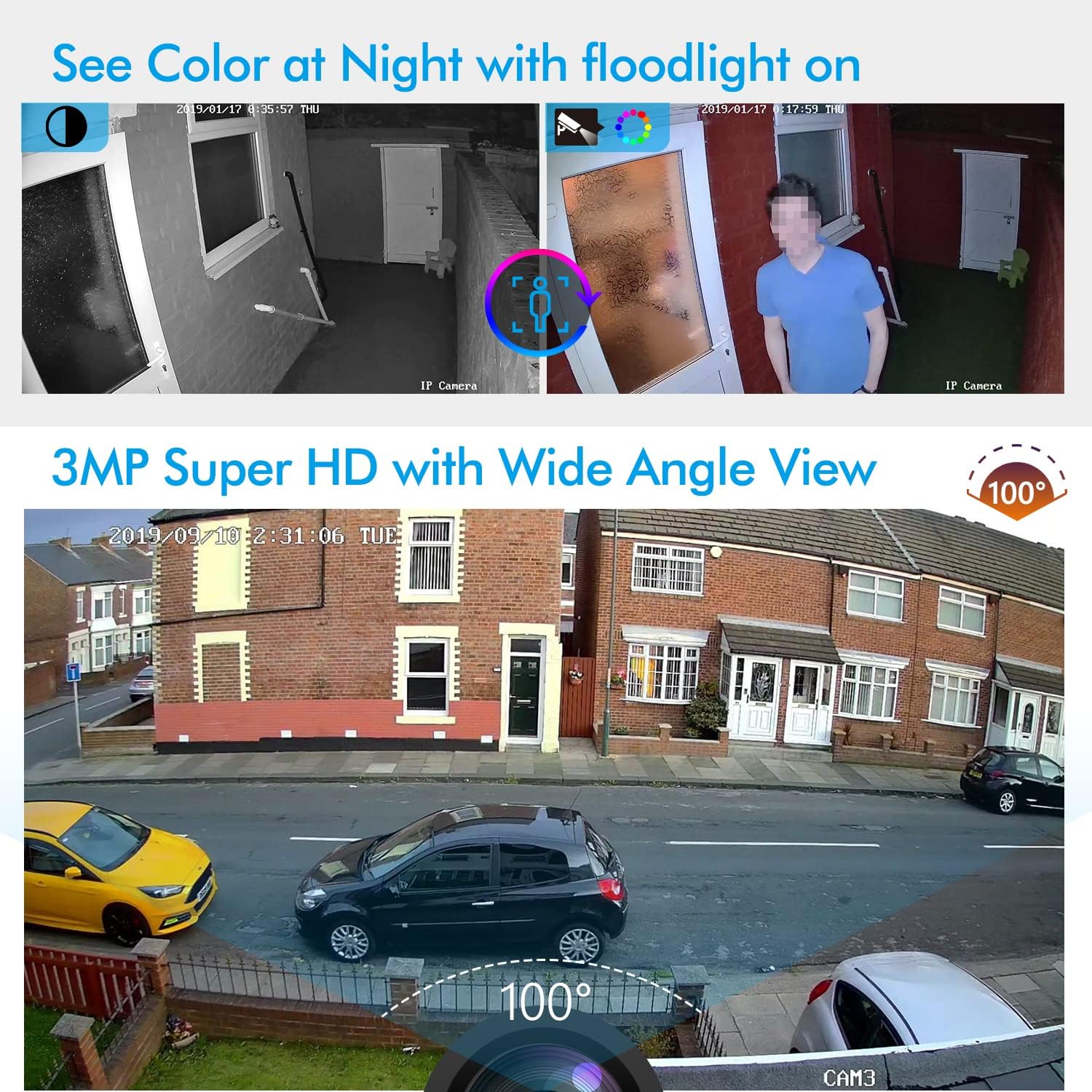
ചിത്രം 5.4: Comparison of night vision modes, showing a black and white IR night vision view versus a color night vision view with floodlight on. Also illustrates the 3MP Super HD resolution with a 100-degree wide-angle view during daytime.
5.5 നിങ്ങളുടെ സിസ്റ്റം വികസിപ്പിക്കൽ
The 8-channel NVR supports up to 8 cameras. You can add up to 4 additional YESKAMO wireless cameras to expand your surveillance coverage. These cameras will also auto-pair and transfer audio and video wirelessly to the NVR.

ചിത്രം 5.5: Illustration demonstrating the efficiency of H.265 compression, saving over 50% capacity compared to H.264. Also shows the capability to add up to four more YESKAMO wireless cameras to the system.
6. പരിപാലനം
6.1 ഹാർഡ് ഡ്രൈവ് മാനേജ്മെന്റ്
The system utilizes advanced H.265 video compression, which significantly reduces storage space requirements (over 50% compared to H.264) and allows for faster uploading. The pre-installed 1TB hard drive provides ample storage. Regularly check the NVR settings for hard drive status and consider backing up important footage.
6.2 വൃത്തിയാക്കൽ
- Wipe camera lenses with a soft, damp വ്യക്തമായ ഇമേജ് ഗുണനിലവാരം ഉറപ്പാക്കാൻ തുണി.
- Keep the NVR unit free from dust and ensure proper ventilation.
6.3 ഫേംവെയർ അപ്ഡേറ്റുകൾ
Periodically check the YESKAMO official website or app for available firmware updates to ensure optimal performance and access to new features. Follow the provided instructions carefully when performing updates.
7. പ്രശ്നപരിഹാരം
നിങ്ങളുടെ സിസ്റ്റത്തിൽ പ്രശ്നങ്ങൾ നേരിടുകയാണെങ്കിൽ, ഇനിപ്പറയുന്ന പൊതുവായ പ്രശ്നങ്ങളും പരിഹാരങ്ങളും പരിശോധിക്കുക:
| പ്രശ്നം | സാധ്യമായ കാരണം | പരിഹാരം |
|---|---|---|
| മോണിറ്ററിൽ വീഡിയോ ഡിസ്പ്ലേ ഇല്ല. | Loose cable connection, NVR not powered on, monitor input incorrect. | Check HDMI/VGA cable, ensure NVR power adapter is connected, select correct input on monitor. |
| Cameras not showing video | Camera not powered, out of range, interference, not paired. | Ensure camera power adapters are connected, move camera closer to NVR, check for obstructions, re-pair camera if necessary. |
| റിമോട്ട് ആക്സസ് ഇല്ല | NVR not connected to internet, incorrect network settings, app issues. | Verify NVR is connected to router via Ethernet, check NVR network settings, ensure router has internet access, restart app/NVR. |
| False alarms from human detection | Sensitivity too high, environmental factors (e.g., strong light changes, moving branches). | Adjust detection sensitivity in NVR/app settings, reposition camera to avoid common false alarm triggers. |
| ക്യാമറയിൽ നിന്ന് ഓഡിയോ ഇല്ല. | Microphone disabled, volume too low, camera malfunction. | Check audio settings in NVR/app, increase volume, test two-way audio. |
8 സ്പെസിഫിക്കേഷനുകൾ
| ഫീച്ചർ | വിശദാംശങ്ങൾ |
|---|---|
| മോഡൽ നമ്പർ | W05-US3004-1TB |
| ബ്രാൻഡ് | യെസ്കാമോ |
| ചാനലുകളുടെ എണ്ണം | 8 |
| ക്യാമറ റെസല്യൂഷൻ | 5MP (2K UltraHD) |
| ഹാർഡ് ഡ്രൈവ് ശേഷി | 1 TB (pre-installed) |
| റെക്കോർഡിംഗ് മോഡ് | മോഷൻ ഡിറ്റക്ഷൻ |
| വീഡിയോ കംപ്രഷൻ | H.265 |
| നൈറ്റ് വിഷൻ | IR Night Vision (100ft), Color Night Vision (with floodlight) |
| ഓഡിയോ | ടു-വേ ഓഡിയോ |
| കാലാവസ്ഥാ പ്രൂഫ് റേറ്റിംഗ് | IP66 |
| Product Dimensions (NVR) | 30.5 x 15.2 x 27.9 സെ.മീ (ഏകദേശം) |
| യു.പി.സി | 631851240736 |
9. വാറൻ്റിയും പിന്തുണയും
For warranty information, technical support, or any inquiries regarding your YESKAMO security system, please refer to the warranty card included in your package or visit the official YESKAMO website. Contact details for customer service are typically provided on the product packaging or within the user manual.


