ആമുഖം
വാങ്ങിയതിന് നന്ദി.asing the Trevi TT 1072 DAB Turntable System. This versatile audio system combines a classic vinyl turntable with modern features like Bluetooth connectivity, DAB/DAB+ digital radio, CD player, USB/SD playback, and recording capabilities. This manual provides detailed instructions for setup, operation, maintenance, and troubleshooting to ensure optimal performance and longevity of your device.
പ്രധാനപ്പെട്ട സുരക്ഷാ വിവരങ്ങൾ
Please read these safety instructions carefully before using the appliance and keep them for future reference. Incorrect use may result in electric shock or fire.
- മഴയോ ഈർപ്പമോ യൂണിറ്റ് തുറന്നുകാട്ടരുത്.
- വെൻ്റിലേഷൻ ഓപ്പണിംഗുകളൊന്നും തടയരുത്.
- ശരിയായ വൈദ്യുതി വിതരണം വോളിയം ഉറപ്പാക്കുകtagയൂണിറ്റിൽ സൂചിപ്പിച്ചിരിക്കുന്നതുപോലെ.
- സി തുറക്കരുത്.asing; എല്ലാ സേവനങ്ങളും യോഗ്യതയുള്ള ഉദ്യോഗസ്ഥർക്ക് റഫർ ചെയ്യുക.
- നേരിട്ടുള്ള സൂര്യപ്രകാശം, താപ സ്രോതസ്സുകൾ, ശക്തമായ കാന്തികക്ഷേത്രങ്ങൾ എന്നിവയിൽ നിന്ന് യൂണിറ്റിനെ അകറ്റി നിർത്തുക.
- ഉണങ്ങിയ തുണി ഉപയോഗിച്ച് മാത്രം വൃത്തിയാക്കുക.
പാക്കേജ് ഉള്ളടക്കം
അൺപാക്ക് ചെയ്യുമ്പോൾ എല്ലാ ഇനങ്ങളും നിലവിലുണ്ടെന്നും നല്ല നിലയിലാണെന്നും ഉറപ്പാക്കുക:
- Trevi TT 1072 DAB Turntable System
- പിക്കപ്പ് സിസ്റ്റം
- Stylus (Needle)
- പൊടി കവർ
- പവർ കേബിൾ
- ഉപയോക്തൃ മാനുവൽ (ഈ പ്രമാണം)
ഉൽപ്പന്നം കഴിഞ്ഞുview
Familiarize yourself with the main components of your Trevi TT 1072 DAB system.

ചിത്രം 1: ഫ്രണ്ട് view of the Trevi TT 1072 DAB Turntable System with the dust cover open, showing the turntable platter, control panel, and two external speakers.
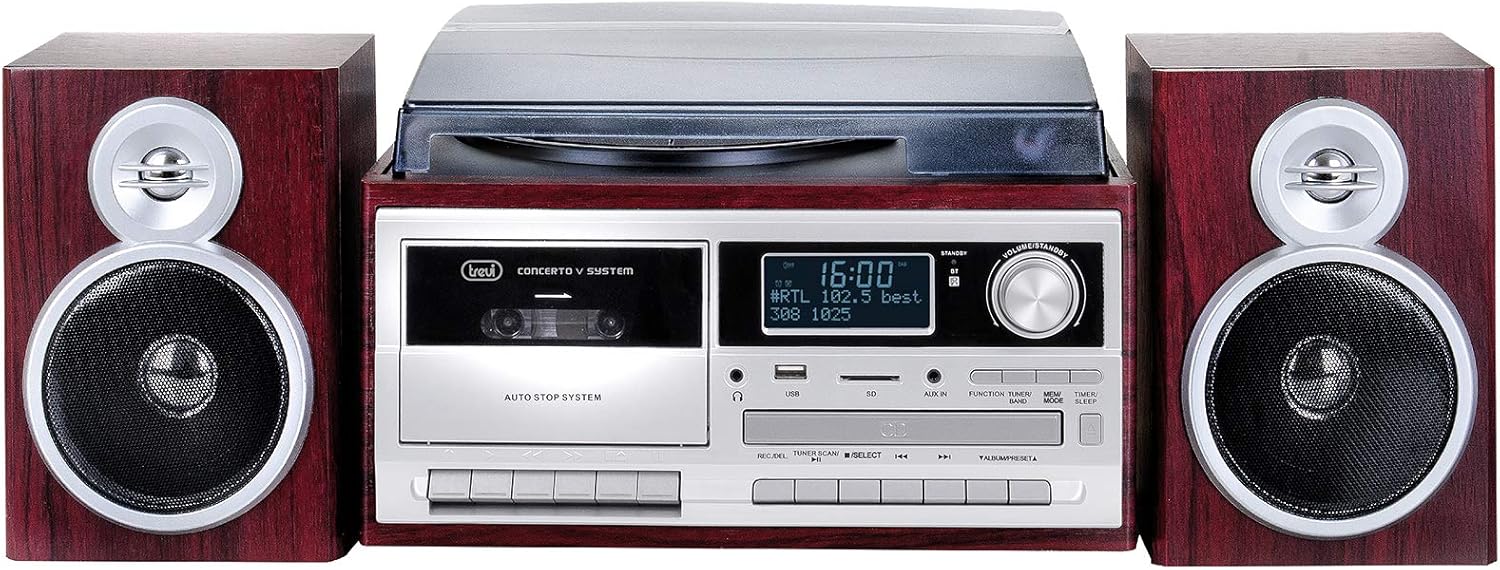
ചിത്രം 2: ഫ്രണ്ട് view of the Trevi TT 1072 DAB Turntable System with the dust cover closed, showcasing its compact design with the central unit and two detached speakers.
പ്രധാന സവിശേഷതകൾ:
- Vinyl Turntable: Supports 33, 45, and 78 RPM records.
- ബ്ലൂടൂത്ത് കണക്റ്റിവിറ്റി: Wireless connection to external devices.
- DAB/DAB+ ഡിജിറ്റൽ റേഡിയോ: For clear digital radio reception.
- Multi-format Player: MP3 പ്ലേ ചെയ്യുന്നു files from CD, USB, and SD cards.
- Recording Function (Full Encoding): Record vinyl, CD, or radio to USB/SD.
- Cassette Player/Recorder (Full Recorder): ഓഡിയോ കാസറ്റുകൾ പ്ലേ ചെയ്ത് റെക്കോർഡ് ചെയ്യുക.
- LCD ഡിസ്പ്ലേ: Shows track information, radio stations, and settings.
സജ്ജീകരണ ഗൈഡ്
1. അൺപാക്കിംഗും പ്ലേസ്മെൻ്റും:
- പാക്കേജിംഗിൽ നിന്ന് എല്ലാ ഘടകങ്ങളും ശ്രദ്ധാപൂർവ്വം നീക്കം ചെയ്യുക.
- Place the main unit on a stable, flat surface, away from direct sunlight, heat, and moisture.
- Position the speakers on either side of the main unit for optimal stereo sound.
2. Connecting the Speakers:
Connect the speaker wires from the back of each speaker to the corresponding speaker output terminals on the main unit. Ensure correct polarity (red to red, black to black).
3. പവർ കണക്ഷൻ:
Plug the power cable into the AC IN socket on the back of the unit, then plug the other end into a standard wall outlet.
4. Installing the Dust Cover:
Carefully attach the dust cover to the hinges on the back of the turntable unit. This protects the turntable from dust when not in use.
പ്രവർത്തന നിർദ്ദേശങ്ങൾ
1. പവർ ഓൺ/ഓഫ്:
അമർത്തുക പവർ യൂണിറ്റ് ഓണാക്കാനോ ഓഫാക്കാനോ മുൻ പാനലിലെ ബട്ടൺ.
2. Turntable Operation:
- പൊടി കവർ തുറക്കുക.
- ഒരു വിനൈൽ റെക്കോർഡ് പ്ലേറ്ററിൽ വയ്ക്കുക.
- Select the appropriate speed (33, 45, or 78 RPM) using the speed selector switch. For 45 RPM records, place the included adapter on the spindle.
- Gently lift the tone arm using the cueing lever and position the stylus over the desired track.
- Lower the tone arm slowly onto the record using the cueing lever.
- ഉപയോഗിച്ച് വോളിയം ക്രമീകരിക്കുക വോളിയം മുട്ട്.
- At the end of the record, the turntable may stop automatically (depending on the auto-stop feature). Lift the tone arm and return it to its rest.
3. ബ്ലൂടൂത്ത് കണക്റ്റിവിറ്റി:
- അമർത്തുക മോഡ് button until "Bluetooth" or "BT" appears on the display.
- നിങ്ങളുടെ സ്മാർട്ട്ഫോണിലോ ടാബ്ലെറ്റിലോ മറ്റ് ഉപകരണത്തിലോ ബ്ലൂടൂത്ത് പ്രവർത്തനക്ഷമമാക്കുക.
- ഇതിനായി തിരയുക "Trevi TT 1072 DAB" (or similar) in your device's Bluetooth settings and select it to pair.
- Once paired, you can stream audio wirelessly from your device to the turntable system.
4. DAB/DAB+ Digital Radio:
- അമർത്തുക മോഡ് ഡിസ്പ്ലേയിൽ "DAB" ദൃശ്യമാകുന്നതുവരെ ബട്ടൺ അമർത്തുക.
- The system will automatically scan for available DAB/DAB+ stations.
- ഉപയോഗിക്കുക ട്യൂൺ +/- buttons to navigate through the available stations.
- ഒരു സ്റ്റേഷൻ സംരക്ഷിക്കാൻ, അമർത്തിപ്പിടിക്കുക പ്രീസെറ്റ് ബട്ടൺ, തുടർന്ന് ഉപയോഗിക്കുക ട്യൂൺ +/- to select a preset number and press പ്രീസെറ്റ് സ്ഥിരീകരിക്കാൻ വീണ്ടും.
5. CD/USB/SD Playback:
- Insert a CD into the CD slot, a USB drive into the USB port, or an SD card into the SD card slot.
- അമർത്തുക മോഡ് button to select the desired source (CD, USB, or SD).
- ഉപയോഗിക്കുക പ്ലേ/താൽക്കാലികമായി നിർത്തുക, നിർത്തുക, SKIP +/- പ്ലേബാക്ക് നിയന്ത്രിക്കുന്നതിനുള്ള ബട്ടണുകൾ.
6. Recording (Full Encoding/Full Recorder):
The system allows recording from vinyl, CD, radio, or cassette to USB or SD card.
- Insert a USB drive or SD card into the respective slot.
- Select the desired source (e.g., Turntable, CD, Radio, Cassette).
- അമർത്തുക രേഖപ്പെടുത്തുക button. The display will indicate recording is active.
- Start playback on the source (e.g., play a vinyl record, start a CD track).
- അമർത്തുക രേഖപ്പെടുത്തുക button again or നിർത്തുക റെക്കോർഡിംഗ് അവസാനിപ്പിക്കാൻ.
For cassette recording, ensure a blank cassette is inserted and follow similar steps, using the cassette deck's record function.
പരിപാലനവും പരിചരണവും
- യൂണിറ്റ് വൃത്തിയാക്കൽ: യൂണിറ്റിന്റെ പുറംഭാഗം തുടയ്ക്കാൻ മൃദുവായതും ഉണങ്ങിയതുമായ തുണി ഉപയോഗിക്കുക. അബ്രസീവ് ക്ലീനറുകളോ ലായകങ്ങളോ ഉപയോഗിക്കരുത്.
- സ്റ്റൈലസ് വൃത്തിയാക്കൽ: Gently brush the stylus from back to front with a soft brush designed for stylus cleaning. Avoid touching the stylus with your fingers.
- പൊടി കവർ: Keep the dust cover closed when the turntable is not in use to prevent dust accumulation on the platter and stylus.
- റെക്കോർഡ് കെയർ: Keep your vinyl records clean and store them vertically in their sleeves to prevent warping and dust buildup.
- സ്റ്റൈലസ് മാറ്റിസ്ഥാപിക്കൽ: The stylus is a consumable part and will wear out over time. Replace it when you notice a degradation in sound quality or visible wear. Refer to the manufacturer's recommendations for replacement stylus models.
ട്രബിൾഷൂട്ടിംഗ്
| പ്രശ്നം | സാധ്യമായ കാരണം | പരിഹാരം |
|---|---|---|
| ശക്തിയില്ല | പവർ കേബിൾ ബന്ധിപ്പിച്ചിട്ടില്ല; പവർ ഔട്ട്ലെറ്റ് പ്രവർത്തിക്കുന്നില്ല. | Ensure power cable is securely plugged in; try a different outlet. |
| സ്പീക്കറുകളിൽ നിന്ന് ശബ്ദമില്ല | Volume too low; speakers not connected correctly; wrong input mode selected. | Increase volume; check speaker connections; select correct source mode (e.g., PHONO, BT, CD). |
| ടേൺടേബിൾ വേഗത തെറ്റാണ് | തെറ്റായ വേഗത തിരഞ്ഞെടുത്തു. | Adjust the speed selector switch to 33, 45, or 78 RPM. |
| ബ്ലൂടൂത്ത് ജോടിയാക്കൽ പരാജയപ്പെട്ടു | Device too far; Bluetooth not enabled on device; unit not in Bluetooth mode. | Move device closer; enable Bluetooth; ensure unit is in Bluetooth mode. |
| മോശം റേഡിയോ സ്വീകരണം | ആന്റിന നീട്ടിയിട്ടില്ല; ദുർബലമായ സിഗ്നൽ. | Fully extend the antenna; reposition the unit for better reception. |
സ്പെസിഫിക്കേഷനുകൾ
| ഫീച്ചർ | വിശദാംശങ്ങൾ |
|---|---|
| മോഡൽ നമ്പർ | 0T107230 |
| അളവുകൾ (L x W x H) | 32 x 21 x 29 സെ.മീ |
| ഭാരം | 5.85 കി.ഗ്രാം |
| ടേൺ ചെയ്യാവുന്ന വേഗത | 33, 45, 78 ആർപിഎം |
| കണക്റ്റിവിറ്റി | Bluetooth, USB, SD, Aux-in |
| റേഡിയോ ട്യൂണർ | DAB/DAB+ ഡിജിറ്റൽ റേഡിയോ |
| അനുയോജ്യമായ ഉപകരണങ്ങൾ | Smartphone, MP3 player, PC, tablet, speaker, headphones |
| പവർ ഉറവിടം | എസി അഡാപ്റ്റർ |
| നിറം | ബ്രൗൺ |
| മെറ്റീരിയൽ | Vinyl (exterior finish) |
വാറൻ്റിയും പിന്തുണയും
Trevi products are designed for reliability and performance. For warranty information, please refer to the warranty card included with your purchase or visit the official Trevi website. For technical support, troubleshooting assistance, or spare parts, please contact Trevi customer service through their official channels.
You can find more information and contact details on the official Trevi webസൈറ്റ്: www.trevi.it


