ആമുഖം
This manual provides detailed instructions for the safe and efficient use of your ROIDMI S2 Cordless Vacuum Cleaner. Please read this manual thoroughly before operating the appliance and retain it for future reference.
സുരക്ഷാ നിർദ്ദേശങ്ങൾ
- പവർ അഡാപ്റ്റർ നിങ്ങളുടെ ലോക്കൽ വോള്യവുമായി പൊരുത്തപ്പെടുന്നുണ്ടെന്ന് ഉറപ്പാക്കുക.tage.
- Do not use the vacuum cleaner to pick up liquids, burning objects, or sharp objects.
- മുടി, അയഞ്ഞ വസ്ത്രങ്ങൾ, വിരലുകൾ, ശരീരത്തിൻ്റെ എല്ലാ ഭാഗങ്ങളും തുറസ്സുകളിൽ നിന്നും ചലിക്കുന്ന ഭാഗങ്ങളിൽ നിന്നും അകറ്റി നിർത്തുക.
- വാക്വം ക്ലീനർ കേടായാലോ തകരാറിലായാലും അത് പ്രവർത്തിപ്പിക്കരുത്.
- ശാരീരികമോ ഇന്ദ്രിയപരമോ മാനസികമോ ആയ കഴിവുകൾ കുറയുകയോ അനുഭവപരിചയവും അറിവില്ലായ്മയും ഉള്ള വ്യക്തികൾക്ക് അവരുടെ സുരക്ഷയ്ക്ക് ഉത്തരവാദിത്തമുള്ള ഒരു വ്യക്തി ഉപകരണത്തിൻ്റെ ഉപയോഗത്തെ സംബന്ധിച്ച മേൽനോട്ടമോ നിർദ്ദേശമോ നൽകിയിട്ടില്ലെങ്കിൽ, ഈ ഉപകരണം ഉപയോഗിക്കാൻ ഉദ്ദേശിച്ചുള്ളതല്ല.
- കുട്ടികൾ ഉപകരണം ഉപയോഗിച്ച് കളിക്കുന്നില്ലെന്ന് ഉറപ്പാക്കാൻ മേൽനോട്ടം വഹിക്കണം.
പാക്കേജ് ഉള്ളടക്കം
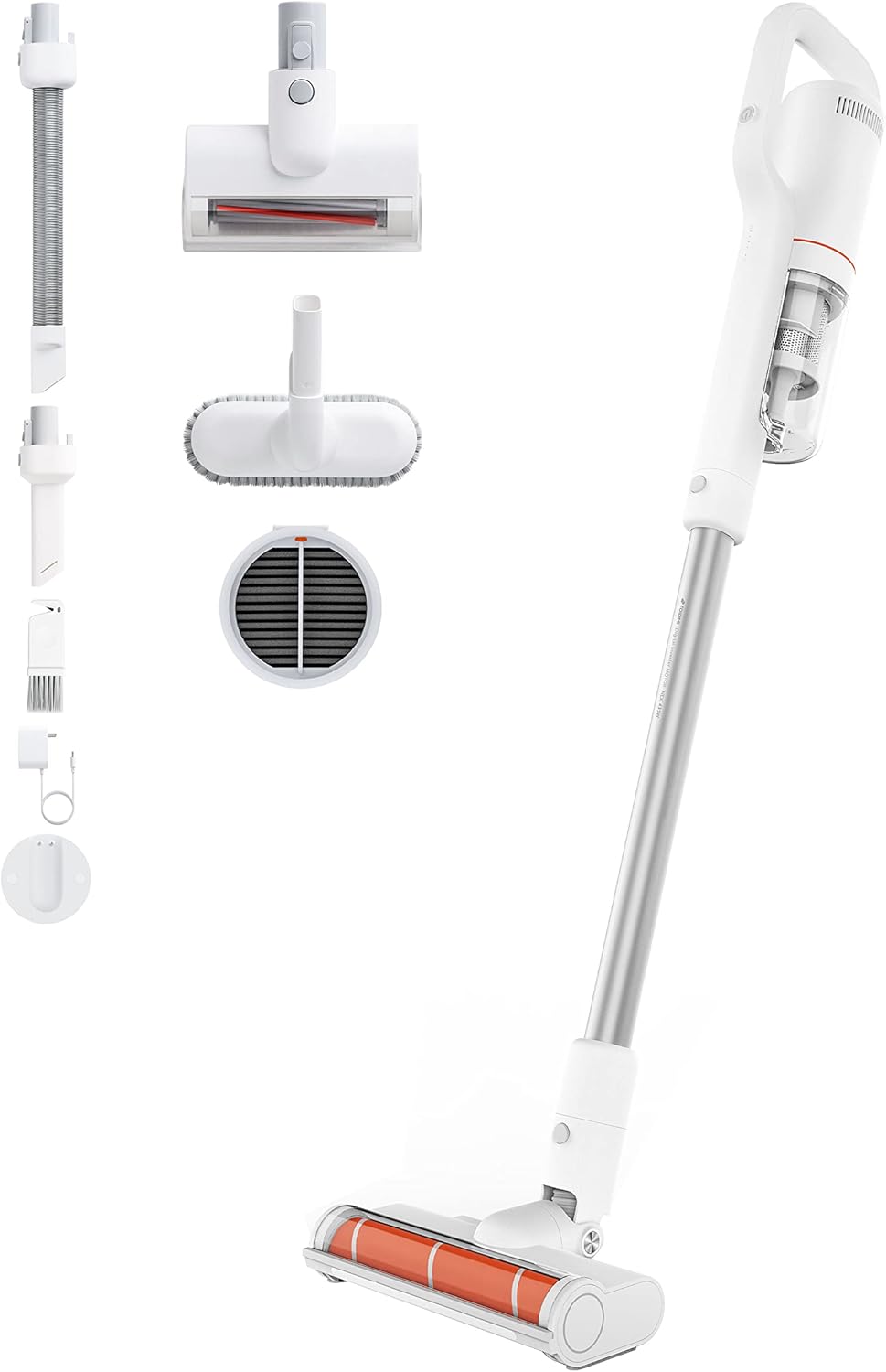
Image: All components included with the ROIDMI S2 Cordless Vacuum Cleaner, laid out on a white background. This includes the main vacuum unit, extension wand, floor brush, various nozzles, and the magnetic wall mount.
എല്ലാ ഇനങ്ങളും നിലവിലുണ്ടെന്നും നല്ല നിലയിലാണെന്നും ഉറപ്പാക്കുക:
- ROIDMI S2 Cordless Vacuum Cleaner (Main Unit)
- ഇലക്ട്രിക് ഫ്ലോർ ബ്രഷ്
- Metal Connecting Tube (Extension Wand)
- മെത്ത ബ്രഷ്
- മൾട്ടി-ഫംഗ്ഷൻ ബ്രഷ്
- ഫ്ലാറ്റ് നോസൽ
- Dust Filter (pre-installed or spare)
- പവർ അഡാപ്റ്റർ
- Magnetic Wall Charging Station
- മൗണ്ടിംഗ് സ്ക്രൂകൾ
- ഉപയോക്തൃ മാനുവൽ
സജ്ജമാക്കുക
1. അസംബ്ലി
- എക്സ്റ്റൻഷൻ വാൻഡ് ഘടിപ്പിക്കുക: Insert the metal connecting tube into the main vacuum unit until it clicks securely.
- ഫ്ലോർ ബ്രഷ് ഘടിപ്പിക്കുക: Connect the electric floor brush to the other end of the extension wand. Ensure it clicks into place.
- ഇതര അറ്റാച്ചുമെന്റുകൾ: For handheld use, attach the mattress brush, multi-function brush, or flat nozzle directly to the main unit.
2 ബാറ്ററി ചാർജ് ചെയ്യുന്നു
ആദ്യമായി ഉപയോഗിക്കുന്നതിന് മുമ്പ്, വാക്വം ക്ലീനർ പൂർണ്ണമായും ചാർജ് ചെയ്യുക. ബാറ്ററി പൂർണ്ണമായും ചാർജ് ചെയ്യാൻ ഏകദേശം 2.5 മണിക്കൂർ എടുക്കും.

Image: Close-up of the ROIDMI S2 main unit magnetically attaching to its wall-mounted charging station. Blue indicator lights are visible, signifying charging status.
- Install Wall Charging Station: Choose a suitable location on a wall near a power outlet. Use the provided screws to securely mount the magnetic charging station.
- പവർ ബന്ധിപ്പിക്കുക: Plug the power adapter into the charging station and then into a wall outlet.
- Charge Vacuum: Place the vacuum cleaner onto the magnetic charging station. The indicator lights on the vacuum will show the charging status.
പ്രവർത്തന നിർദ്ദേശങ്ങൾ
1. പവർ ഓൺ/ഓഫ്, മോഡ് തിരഞ്ഞെടുക്കൽ
Press the power button to turn the vacuum cleaner on. Press it again to cycle through different suction modes (Standard, Max). Press and hold to turn off.
2. Using the Floor Brush

Image: The ROIDMI S2 cordless vacuum in use, showing the motorized floor brush with its automatic LED sensor light illuminating the area in front of it. The brush is designed for various floor types.
- The electric floor brush is suitable for hard floors, laminate, parquet, and carpets.
- The automatic LED sensor light illuminates dark areas, improving visibility during cleaning.
- The 270° flexible design allows for easy maneuverability around furniture and into tight spaces.
3. അറ്റാച്ചുമെന്റുകൾ ഉപയോഗിക്കുന്നു

Image: A collage of four images demonstrating the versatility of the ROIDMI S2. Top left shows the vacuum standing upright against a wall. Top right shows the flat nozzle cleaning between sofa cushions. Bottom left shows the multi-function brush cleaning a laptop keyboard. Bottom right shows the main unit with the mattress brush cleaning a bed.
- മെത്ത ബ്രഷ്: Ideal for cleaning upholstery, mattresses, and pet hair.
- Multi-function Brush: Use for delicate surfaces, keyboards, and car interiors.
- പരന്ന നോസൽ: ഇടുങ്ങിയ വിടവുകൾ, കോണുകൾ, എത്തിപ്പെടാൻ പ്രയാസമുള്ള സ്ഥലങ്ങൾ എന്നിവയ്ക്ക് അനുയോജ്യം.
4. ബാറ്ററി റൺടൈം
- Standard Mode: Up to 60 minutes.
- Max Mode: Up to 10 minutes.
5. ROIDMI Cleaner App

Image: A smartphone screen displaying the ROIDMI Cleaner App interface. The app shows information such as current electricity percentage, battery starting time, and filter remaining life, providing smart control and monitoring of the vacuum cleaner.
The ROIDMI Cleaner App provides additional features such as battery status, filter condition, and cleaning statistics. Download the app from your device's app store and follow the in-app instructions to connect your S2 vacuum cleaner.
മെയിൻ്റനൻസ്
1. ഡസ്റ്റ് ബിൻ കാലിയാക്കൽ
Empty the dust bin regularly to maintain optimal suction performance. Press the release button to detach the dust bin from the main unit, then open the lid and empty the contents.
2. ഫിൽട്ടറുകൾ വൃത്തിയാക്കുന്നു

ചിത്രം: പൊട്ടിത്തെറിച്ച ഒരു view of the ROIDMI S2's multi-stage filtration system, showing individual components like the HEPA filter, dust filter, and isolation filter. This illustrates the layers of filtration for effective dust capture.
- The multi-filter system (HEPA, dust filter, isolation) should be cleaned periodically.
- Remove the filters from the dust bin. Tap them gently to remove loose dust.
- Rinse washable filters under cold running water. Ensure they are completely dry before reassembling.
- Replace filters if they are heavily soiled or damaged.
3. ബ്രഷ് റോൾ വൃത്തിയാക്കൽ
Regularly check the brush roll for tangled hair or debris. Remove the brush roll from the floor head (refer to the diagram in the full manual for specific instructions) and use scissors or a cleaning tool to remove any obstructions. Reinsert the brush roll securely.
4 ജനറൽ ക്ലീനിംഗ്
വാക്വം ക്ലീനറിന്റെ പുറംഭാഗം മൃദുവായ, ഡി ക്ലീനർ ഉപയോഗിച്ച് തുടയ്ക്കുക.amp തുണി. കഠിനമായ ഡിറ്റർജന്റുകളോ ലായകങ്ങളോ ഉപയോഗിക്കരുത്.
ട്രബിൾഷൂട്ടിംഗ്
| പ്രശ്നം | സാധ്യമായ കാരണം | പരിഹാരം |
|---|---|---|
| വാക്വം ഓണാകുന്നില്ല. | ബാറ്ററി തീർന്നു. | ബാറ്ററി പൂർണ്ണമായും ചാർജ് ചെയ്യുക. |
| സക്ഷൻ പവർ കുറച്ചു. | Dust bin is full; Filters are clogged; Brush roll is obstructed. | Empty dust bin; Clean or replace filters; Remove obstructions from brush roll. |
| ബ്രഷ് റോൾ കറങ്ങുന്നില്ല. | Obstruction in brush roll; Brush roll not properly installed. | Remove obstructions; Ensure brush roll is securely installed. |
| വാക്വം അപ്രതീക്ഷിതമായി നിലയ്ക്കുന്നു. | Battery is low; Overheating protection activated. | Charge the battery; Allow the vacuum to cool down for at least 30 minutes. |
സ്പെസിഫിക്കേഷനുകൾ
| ബ്രാൻഡ് | ROIDMI |
| മോഡൽ നമ്പർ | S2 (XCQ12RM) |
| ശക്തി | 425 വാട്ട്സ് |
| സക്ഷൻ പവർ | 23,500 Pa (135 AW) |
| വാല്യംtage | 100 വോൾട്ട് |
| ബാറ്ററി തരം | ലിഥിയം-അയോൺ (2500 mAh) |
| പ്രവർത്തനസമയം | 60 മിനിറ്റ് വരെ (സ്റ്റാൻഡേർഡ് മോഡ്) |
| ചാർജിംഗ് സമയം | ഏകദേശം 2.5 മണിക്കൂർ |
| ശബ്ദ നില | 72 ഡെസിബെൽ |
| ഭാരം (പ്രധാന യൂണിറ്റ്) | 1.5 കിലോഗ്രാം |
| അളവുകൾ (L x W x H) | 119.1 x 25.9 x 15.8 സെ.മീ |
| ഫിൽട്ടർ തരം | Multi-filter (HEPA, Dust, Isolation) |
| പ്രത്യേക സവിശേഷതകൾ | Automatic LED Sensor Light, Magnetic Wireless Charging, ROIDMI Cleaner App Connectivity |
വാറൻ്റിയും പിന്തുണയും
For warranty information and customer support, please refer to the warranty card included in your product packaging or visit the official ROIDMI webസൈറ്റ്. വാങ്ങിയതിന്റെ തെളിവായി നിങ്ങളുടെ വാങ്ങൽ രസീത് സൂക്ഷിക്കുക.
ഓൺലൈൻ ഉറവിടങ്ങൾ: For further assistance, FAQs, and product registration, please visit: www.roidmi.com


