1. ആമുഖം
This manual provides detailed instructions for the installation, setup, operation, and maintenance of your KICKER KEY2004 4-Channel Smart Amplifier. The KEY2004 integrates an amplifier with an AI-driven Digital Signal Processor (DSP) to optimize your vehicle's audio system. This product is designed to enhance your listening experience by automatically correcting sound characteristics specific to your vehicle's interior.
2 സുരക്ഷാ വിവരങ്ങൾ
ഉൽപ്പന്നത്തിനും വാഹനത്തിനും പരിക്കുകളോ കേടുപാടുകളോ ഉണ്ടാകാതിരിക്കാൻ ഇനിപ്പറയുന്ന സുരക്ഷാ മുൻകരുതലുകൾ എപ്പോഴും പാലിക്കുക:
- ഏതെങ്കിലും ഇൻസ്റ്റാളേഷൻ ആരംഭിക്കുന്നതിന് മുമ്പ് വാഹനത്തിന്റെ ബാറ്ററി നെഗറ്റീവ് ടെർമിനൽ വിച്ഛേദിക്കുക.
- പിഞ്ചിംഗ് അല്ലെങ്കിൽ കേടുപാടുകൾ തടയുന്നതിന് എല്ലാ വയറിംഗും ശരിയായി റൂട്ട് ചെയ്തിട്ടുണ്ടെന്നും സുരക്ഷിതമാണെന്നും ഉറപ്പാക്കുക.
- Use appropriate gauge wiring and fuses as specified. Incorrect fusing can lead to fire or equipment damage.
- ഇൻസ്റ്റലേഷൻ പ്രക്രിയയുടെ ഏതെങ്കിലും ഭാഗത്തെക്കുറിച്ച് നിങ്ങൾക്ക് ഉറപ്പില്ലെങ്കിൽ ഒരു പ്രൊഫഷണൽ ഇൻസ്റ്റാളറെ സമീപിക്കുക.
- പ്രവർത്തിപ്പിക്കരുത് ampവെറ്റ് അല്ലെങ്കിൽ ഡിamp വ്യവസ്ഥകൾ.
- മൌണ്ട് ചെയ്യുന്നത് ഒഴിവാക്കുക ampനേരിട്ടുള്ള സൂര്യപ്രകാശമോ അമിതമായ ചൂടോ ഏൽക്കുന്ന സ്ഥലങ്ങളിൽ ലിഫയർ.
Important Fuse Note: The KICKER KEY2004 amplifier requires a 20A fuse for proper protection. If using an aftermarket wiring kit, verify the included fuse matches this requirement. A 60A fuse, for example, is oversized and will not adequately protect the ampജീവൻ.
3. പാക്കേജ് ഉള്ളടക്കം
Your KICKER KEY2004 package includes the following items:
- KICKER KEY2004 4-Channel Smart Ampജീവപര്യന്തം
- Auto-EQ Microphone with Selector Switch
- Wiring Harnesses (Power, Speaker, RCA inputs)
- മൌണ്ടിംഗ് ഹാർഡ്വെയർ
If purchased as a bundle, the Rockville RWK82 8 Gauge 4 Channel Car Amplifier Wiring Installation Kit includes:
- (2) 17 ft High Grade Twisted Pair 100% Copper RCA Cables
- 17 ft 8 Gauge Translucent Blue SuperFlex Power Cable
- 17 ft 18 Gauge Blue Remote Cable
- 17 ft 16 Gauge Clear Speaker Wire
- 3 ft 8 Gauge SuperFlex Ground Wire
- Gold Plated AGU Heat Resistant Fuse Holder
- 60 Amp AGU Gold Plated Fuse (Note: Replace with 20A fuse for KEY2004)
- 7 ft Split Tube Loom
- Accessories: Wire Ties, Ring Terminals, Butt Connectors, Spades, Grommets
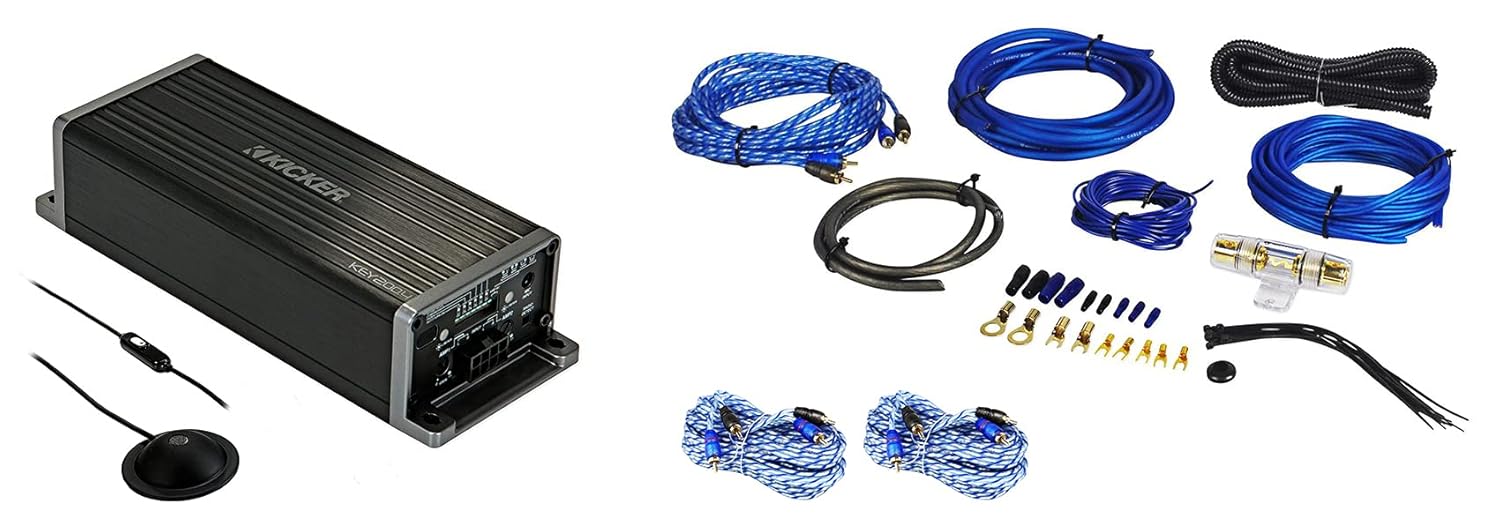
Image: Kicker KEY2004 Smart Amplifier shown alongside the components of the Rockville RWK82 wiring installation kit.

Image: The Kicker KEY2004 amplifier unit with its included Auto-EQ microphone and remote switch.

Image: Various components of the Rockville RWK82 wiring kit, including power cables, RCA cables, fuse holder, and terminals.
4. ഉൽപ്പന്നം കഴിഞ്ഞുview: KICKER KEY2004 Smart Ampജീവപര്യന്തം
The KICKER KEY2004 is a compact 4-channel amplifier designed to deliver 50 watts RMS per channel. Its primary innovation is the integrated AI-driven Digital Signal Processor (DSP) with Auto-EQ functionality, which automatically analyzes and corrects your vehicle's acoustic environment for optimal sound quality.
പ്രധാന സവിശേഷതകൾ:
- Auto-EQ: Utilizes a microphone to analyze and automatically correct the vehicle's acoustic response.
- AI-driven DSP: Advanced digital signal processing for sound optimization.
- FIT2 Technology: Kicker's Fail-Safe Integration Technology for superior input signal compatibility.
- Start/Stop Vehicle Technology Compatible: Designed to work seamlessly with modern vehicle start/stop systems.
- Auto 40-Band Equalizer: Automatically adjusts 40 frequency bands for precise sound tuning.
- ബൈ-Amp കഴിവ്: Allows for bi-amplification setups (defeasible).
- Auto Compressor: Dynamic range compression (defeasible).
- Kicker EQ Preset: Pre-programmed Kicker sound signature (defeasible).
- Auto Time Alignment: Automatically corrects speaker timing for improved sound staging (defeasible).
- Auto Level Adjustment: Adjusts levels in Bi-Amp മോഡ് മാത്രം.
- Auto Speaker Size Detection: Automatically identifies connected speaker sizes.
- 24dB Crossovers: Selectable high-pass filters at 60, 80, or 120Hz (defeasible).
നിയന്ത്രണങ്ങളും കണക്ഷനുകളും:
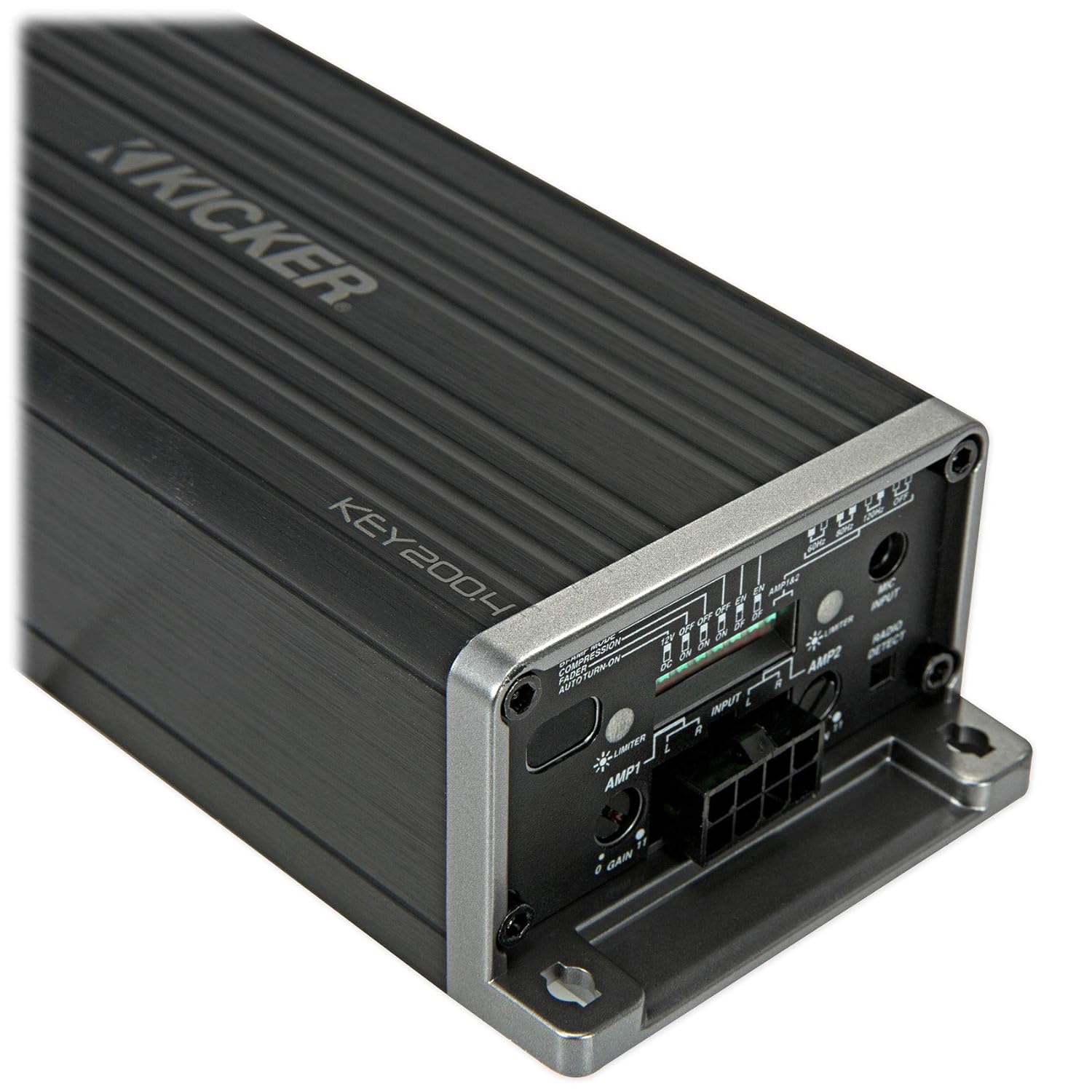
ചിത്രം: ക്ലോസ്-അപ്പ് view of the Kicker KEY2004 amplifier's input and control panel, showing gain adjustments, input selectors, and various switches.
ദി amplifier features input terminals for both high-level (speaker level) and low-level (RCA) signals, gain controls for each channel pair, and switches for crossover settings and other DSP functions. The included microphone connects to a dedicated port for the Auto-EQ process.

Image: The various wiring harnesses provided with the Kicker KEY2004, including the main power/speaker harness and the microphone cable.
5. ഇൻസ്റ്റലേഷൻ
Proper installation is crucial for optimal performance and safety. If you are not comfortable with electrical wiring, seek professional assistance.
5.1 മൌണ്ട് ചെയ്യുന്നു Ampജീവപര്യന്തം
- Choose a dry, stable location away from heat sources and direct sunlight.
- ചുറ്റും മതിയായ വായുസഞ്ചാരം ഉറപ്പാക്കുക ampജീവൻ.
- സുരക്ഷിതമായി മൌണ്ട് ചെയ്യുക amplifier using the provided hardware to prevent movement during vehicle operation.
5.2 വയറിംഗ് കണക്ഷനുകൾ
ഏതെങ്കിലും കണക്ഷനുകൾ ഉണ്ടാക്കുന്നതിന് മുമ്പ്, വാഹനത്തിന്റെ നെഗറ്റീവ് ബാറ്ററി ടെർമിനൽ വിച്ഛേദിക്കുക.
- പവർ വയർ: Connect the 8-gauge power cable (from RWK82 kit) directly to the positive terminal of the vehicle's battery. Install the fuse holder within 18 inches (45 cm) of the battery.
- ഫ്യൂസ് ഇൻസ്റ്റാളേഷൻ: എ തിരുകുക 20എ ഫ്യൂസ് into the fuse holder. The 60A fuse included in the RWK82 kit is too large for the KEY2004 and must be replaced.
- ഗ്രൗണ്ട് വയർ: Connect the 8-gauge ground wire (from RWK82 kit) from the amplifier to a clean, solid metal point on the vehicle chassis. The ground point should be free of paint and corrosion.
- റിമോട്ട് ടേൺ-ഓൺ വയർ: Connect the 18-gauge blue remote wire (from RWK82 kit) from the amplifier to the remote turn-on output of your head unit. If your head unit lacks a remote output, the KEY2004 can use DC offset sensing or audio signal sensing for turn-on.
- ഇൻപുട്ട് സിഗ്നൽ:
- RCA (Low-Level) Input: Use the twisted pair RCA cables (from RWK82 kit) to connect the amplifier's RCA inputs to the RCA outputs of your head unit.
- Speaker Level (High-Level) Input: If your head unit does not have RCA outputs, connect the speaker wires from your head unit directly to the amplifier's high-level input harness.
- സ്പീക്കർ വയറുകൾ: Connect the 16-gauge clear speaker wires (from RWK82 kit) from the amplifier's speaker outputs to your vehicle's speakers. Ensure correct polarity (+ to + and – to –).

ചിത്രം: മുകളിൽ view of the Kicker KEY2004 amplifier, showing its compact design and heat sink fins.
6. Setup: Auto-EQ and Initial Configuration
The KEY2004's primary feature is its Auto-EQ capability, which automatically tunes your system. Follow these steps for initial setup:
- മൈക്രോഫോൺ ബന്ധിപ്പിക്കുക: Plug the Auto-EQ microphone into the dedicated port on the ampജീവൻ.
- മൈക്രോഫോൺ പ്ലേസ്മെൻ്റ്: Place the microphone at the primary listening position (e.g., driver's headrest).
- Set Head Unit Volume: Turn your head unit volume to approximately 75% of its maximum.
- Start Auto-EQ: Press and hold the Auto-EQ button on the amplifier (or the remote switch if applicable) until the LED indicator changes. The amplifier will play a series of test tones.
- പൂർത്തീകരണത്തിനായി കാത്തിരിക്കുക: Allow the process to complete. This may take several minutes. The amplifier will indicate completion (refer to the specific LED patterns in the full manual).
- നേട്ടം ക്രമീകരിക്കുക: After Auto-EQ, adjust the amplifier's gain controls to match the output of your head unit. Start with the gain at minimum and slowly increase until you hear distortion, then back off slightly.
- ക്രോസ്ഓവർ ക്രമീകരണങ്ങൾ: Select the desired high-pass filter frequency (60Hz, 80Hz, or 120Hz) using the switches on the amplifier, depending on your speaker size and type.
- ഓപ്ഷണൽ സവിശേഷതകൾ: Enable or disable Bi-Amp Capability, Auto Compressor, Kicker EQ Preset, Auto Time Alignment, and Auto Speaker Size Detection as desired. These are defeasible.
The Auto-EQ process should be performed in a quiet environment with the vehicle's engine off.
7. പ്രവർത്തിപ്പിക്കുന്നത് Ampജീവപര്യന്തം
Once installed and set up, the KICKER KEY2004 operates automatically with your vehicle's audio system. The AI-driven DSP continuously works to maintain optimal sound quality based on the initial Auto-EQ calibration.
- പവർ ഓൺ/ഓഫ്: ദി amplifier will turn on and off with your head unit (via remote wire or signal sensing).
- വോളിയം നിയന്ത്രണം: Use your head unit's volume control for overall system volume.
- ശബ്ദ ക്രമീകരണങ്ങൾ: While the KEY2004 provides automatic optimization, minor adjustments can still be made via your head unit's tone controls if desired. However, significant changes may negate some benefits of the Auto-EQ.
8. പരിപാലനം
The KICKER KEY2004 ampദീർഘകാല പ്രകടനം ഉറപ്പാക്കാൻ ലിഫയറിന് കുറഞ്ഞ അറ്റകുറ്റപ്പണികൾ ആവശ്യമാണ്.
- വൃത്തിയാക്കൽ: ഇടയ്ക്കിടെ തുടയ്ക്കുക ampമൃദുവായതും ഉണങ്ങിയതുമായ തുണി ഉപയോഗിച്ച് ലിഫയറിന്റെ പുറംഭാഗം തടവുക. കഠിനമായ രാസവസ്തുക്കളോ അബ്രാസീവ് ക്ലീനറുകളോ ഉപയോഗിക്കരുത്.
- കണക്ഷനുകൾ: ഇടയ്ക്കിടെ എല്ലാ വയറിംഗ് കണക്ഷനുകളും സുരക്ഷിതമാണെന്നും തുരുമ്പെടുക്കലിൽ നിന്ന് മുക്തമാണെന്നും ഉറപ്പാക്കാൻ പരിശോധിക്കുക.
- വെൻ്റിലേഷൻ: എന്ന് ഉറപ്പാക്കുക amplifier's cooling fins are not obstructed to prevent overheating.
- ഫ്യൂസ് പരിശോധന: എങ്കിൽ amplifier stops working, check the fuse in the power line. Replace it only with a fuse of the correct rating (20A).
9. പ്രശ്നപരിഹാരം
If you experience issues with your KICKER KEY2004 ampലിഫയർ, ഇനിപ്പറയുന്ന പൊതുവായ പ്രശ്നങ്ങളും പരിഹാരങ്ങളും കാണുക:
| പ്രശ്നം | സാധ്യമായ കാരണം | പരിഹാരം |
|---|---|---|
| പവർ ഇല്ല | Blown fuse; loose power/ground wire; no remote turn-on signal. | Check and replace fuse (20A); verify all power and ground connections; check remote wire connection or ensure DC offset/audio sensing is active. |
| ശബ്ദമില്ല | No input signal; loose speaker wires; ampസംരക്ഷണ മോഡിൽ ലിഫയർ. | Verify RCA/high-level input connections; check speaker wire connections; check amplifier status LED for protect mode indication. |
| വികലമായ ശബ്ദം | Gain set too high; poor input signal; incorrect Auto-EQ. | കുറയ്ക്കുക amplifier gain; ensure head unit output is clean; re-run Auto-EQ process. |
| Ampലിഫയർ അമിത ചൂടാക്കൽ | Insufficient ventilation; impedance mismatch. | ഉറപ്പാക്കുക amplifier is in a well-ventilated area; verify speaker impedance matches ampലൈഫയർ സവിശേഷതകൾ. |
10 സ്പെസിഫിക്കേഷനുകൾ
| ഫീച്ചർ | സ്പെസിഫിക്കേഷൻ |
|---|---|
| പവർ put ട്ട്പുട്ട് (ആർഎംഎസ്) | 50 watts x 4 channels @ 4 Ohm stereo |
| ഫ്രീക്വൻസി പ്രതികരണം | 20Hz - 20kHz, + 0 / -1dB |
| Input Sensitivity (High Level) | 250mV - 10V |
| സിഗ്നൽ-ടു-നോയിസ് അനുപാതം | >90dB, a-weighted, re: റേറ്റുചെയ്ത പവർ |
| സജീവ ക്രോസ്ഓവർ | 24dB/octave, selectable high pass or all pass @ 60, 80, or 120Hz |
| അളവുകൾ (H x W x L) | 1-11/16" x 2-3/4" x 7-3/8" (4.3 x 7 x 18.7 cm) |
| പരമാവധി സപ്ലൈ വോളിയംtage | 10 Volts (Operating range typically 10-16V) |
| മൗണ്ടിംഗ് തരം | ഫ്രീസ്റ്റാൻഡിംഗ് |
| ചാനലുകളുടെ എണ്ണം | 4 |
11. വാറൻ്റിയും പിന്തുണയും
KICKER products are designed for reliable performance. For specific warranty information, please refer to the warranty card included with your product or visit the official KICKER website. For technical support, contact KICKER customer service.
For the most comprehensive and up-to-date information, including detailed wiring diagrams and advanced setup options, please refer to the official KICKER KEY2004 product manual:
Download Official KICKER KEY2004 Manual (PDF)

Image: Product packaging for the Kicker KEY2004, highlighting key features and a QR code linking to the official product manual.


