1. ആമുഖം
The Perixx PERIBOARD-326 is a compact, wired USB keyboard featuring low-profile keys and adjustable white backlighting. Designed for efficiency and comfort, this keyboard is suitable for various computing environments, offering a reliable and quiet typing experience. This manual provides detailed instructions for setting up, operating, maintaining, and troubleshooting your PERIBOARD-326 keyboard.

കഴിഞ്ഞുview of the Perixx PERIBOARD-326 mini backlit USB keyboard, highlighting its compact design and wired USB connection.
2. പാക്കേജ് ഉള്ളടക്കം
നിങ്ങളുടെ പാക്കേജിൽ എല്ലാ ഇനങ്ങളും ഉണ്ടെന്ന് ദയവായി പരിശോധിക്കുക:
- Perixx PERIBOARD-326 Wired Mini Backlit USB Keyboard
- ഉപയോക്തൃ മാനുവൽ

Contents of the PERIBOARD-326 package, including the keyboard, user manual, and product box.
3. സിസ്റ്റം ആവശ്യകതകൾ
The Perixx PERIBOARD-326 keyboard is compatible with the following operating systems:
- വിൻഡോസ് 7
- വിൻഡോസ് 8
- Windows 10-ഉം അതിനുമുകളിലും
- ലഭ്യമായ യുഎസ്ബി പോർട്ട് ഉള്ള പിസി
4. സജ്ജീകരണ നിർദ്ദേശങ്ങൾ
The PERIBOARD-326 is designed for simple plug-and-play functionality.
- USB കേബിൾ ബന്ധിപ്പിക്കുക: Locate an available USB port on your computer. Insert the USB-A connector of the keyboard's cable into the USB port. The keyboard features a 1.5-meter (4'9 ft) long USB cable for convenient connection.
- ഓട്ടോമാറ്റിക് ഡ്രൈവർ ഇൻസ്റ്റാളേഷൻ: Your operating system will automatically detect the keyboard and install the necessary drivers. This process typically takes a few seconds.
- ടൈപ്പിംഗ് ആരംഭിക്കുക: ഡ്രൈവറുകൾ ഇൻസ്റ്റാൾ ചെയ്തുകഴിഞ്ഞാൽ, കീബോർഡ് ഉടനടി ഉപയോഗിക്കുന്നതിന് തയ്യാറാകും.

The PERIBOARD-326 keyboard positioned on a desk, illustrating its slim and elegant design. The image also highlights the 1.5-meter USB cable for connectivity.
5. കീബോർഡ് പ്രവർത്തിപ്പിക്കൽ
The PERIBOARD-326 offers a comfortable and efficient typing experience with its low-profile keys and compact design.
5.1 ടൈപ്പിംഗ് അനുഭവം
- ലോ-പ്രോfile കീകൾ: The keys are designed for comfortable and quiet typing, suitable for extended use.
- കോംപാക്റ്റ് ഡിസൈൻ: The mini layout without a dedicated number pad saves desk space and reduces the distance to your mouse.

A user's hands are shown typing on the PERIBOARD-326, emphasizing the comfortable typing experience and the quiet operation of the keys.
ക്രമീകരിക്കാവുന്ന അടി
The keyboard is equipped with adjustable feet on the underside. These can be extended to tilt the keyboard to a more ergonomic angle, enhancing typing comfort.

സൈഡ് പ്രോfile of the PERIBOARD-326 keyboard, illustrating the adjustable feet that allow for ergonomic positioning.
6. Function Keys and Backlight Control
The PERIBOARD-326 features integrated FN hotkeys for quick access to multimedia functions and backlight control.
6.1 ബാക്ക്ലൈറ്റ് നിയന്ത്രണം
The keyboard's white backlighting can be adjusted to suit your preference and environment. Use the following key combination:
- അമർത്തുക Fn + F8 to cycle through 4 levels of brightness (100%, 75%, 50%, 25%) and turn the backlight off (0%).

The PERIBOARD-326 keyboard illuminated with white backlighting, demonstrating its visibility in low-light conditions and the availability of 4 adjustable brightness levels.
6.2 Integrated FN Hotkeys
സംയോജിപ്പിക്കുക Fn key with the designated F-keys for additional functionality:
- Fn+F9: മീഡിയ പ്ലേ ചെയ്യുക/താൽക്കാലികമായി നിർത്തുക
- Fn+F10: മാധ്യമങ്ങൾ നിർത്തുക
- Fn+F11: മുമ്പത്തെ ട്രാക്ക്
- Fn+F12: അടുത്ത ട്രാക്ക്
- എഫ്എൻ + പ്രിന്റ്സ്ക്രിപ്ഷൻ: പ്രിൻ്റ് സ്ക്രീൻ
- Fn + സ്ക്രോൾ ലോക്ക്: സ്ക്രോൾ ലോക്ക്
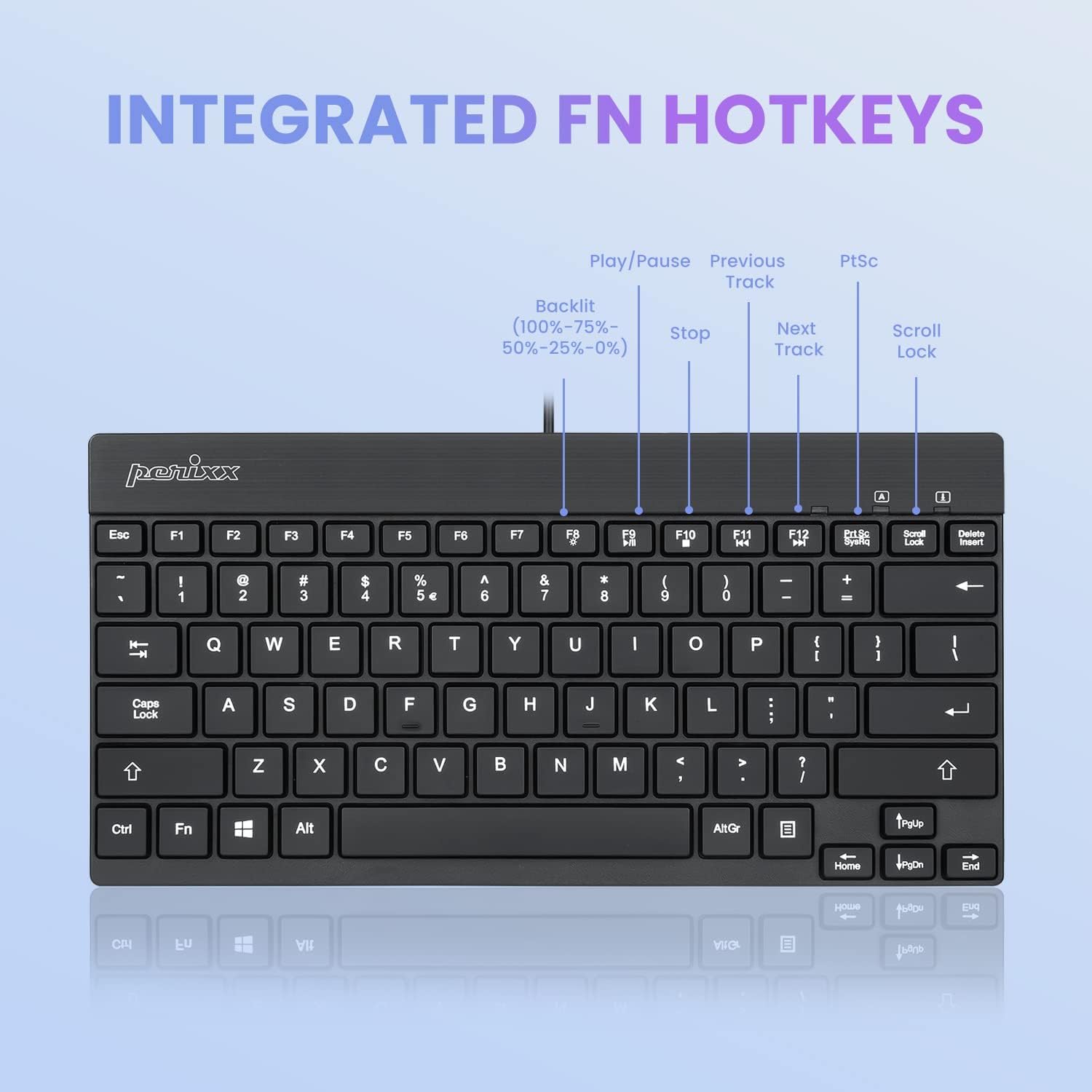
വിശദമായി view of the PERIBOARD-326 keyboard layout, specifically highlighting the integrated FN hotkeys for multimedia control and backlight brightness adjustment (100%-75%-50%-25%-0%).
7. പരിപാലനം
To ensure the longevity and optimal performance of your PERIBOARD-326 keyboard, follow these maintenance guidelines:
- വൃത്തിയാക്കൽ: മൃദുവായ, ലിൻ്റ് രഹിത തുണി ഉപയോഗിക്കുകampened with water or a mild cleaning solution to wipe the surface of the keyboard. Avoid harsh chemicals, abrasive cleaners, or excessive moisture.
- പൊടി നീക്കം: താക്കോലുകൾക്കിടയിൽ നിന്ന് പൊടിയും അവശിഷ്ടങ്ങളും നീക്കം ചെയ്യാൻ കംപ്രസ് ചെയ്ത വായു ഉപയോഗിക്കുക.
- സംഭരണം: ദീർഘനേരം ഉപയോഗിക്കാത്തപ്പോൾ, നേരിട്ടുള്ള സൂര്യപ്രകാശവും കടുത്ത താപനിലയും ഏൽക്കാത്ത വൃത്തിയുള്ളതും വരണ്ടതുമായ അന്തരീക്ഷത്തിൽ കീബോർഡ് സൂക്ഷിക്കുക.
- ചോർച്ച ഒഴിവാക്കുക: ആന്തരിക ഘടകങ്ങൾക്ക് കേടുപാടുകൾ സംഭവിക്കാതിരിക്കാൻ കീബോർഡിൽ നിന്ന് ദ്രാവകങ്ങൾ അകറ്റി നിർത്തുക. ചോർച്ചയുണ്ടായാൽ, ഉടൻ തന്നെ കമ്പ്യൂട്ടറിൽ നിന്ന് കീബോർഡ് വിച്ഛേദിച്ച് പൂർണ്ണമായും ഉണങ്ങാൻ അനുവദിക്കുക, തുടർന്ന് വീണ്ടും ബന്ധിപ്പിക്കുക.
8. പ്രശ്നപരിഹാരം
If you encounter issues with your PERIBOARD-326 keyboard, please refer to the following common solutions:
- കീബോർഡ് പ്രതികരിക്കുന്നില്ല:
- നിങ്ങളുടെ കമ്പ്യൂട്ടറിലെ പ്രവർത്തിക്കുന്ന ഒരു USB പോർട്ടിലേക്ക് USB കേബിൾ സുരക്ഷിതമായി പ്ലഗ് ചെയ്തിട്ടുണ്ടെന്ന് ഉറപ്പാക്കുക.
- കീബോർഡ് മറ്റൊരു യുഎസ്ബി പോർട്ടിലേക്ക് ബന്ധിപ്പിക്കാൻ ശ്രമിക്കുക.
- നിങ്ങളുടെ കമ്പ്യൂട്ടർ പുനരാരംഭിക്കുക.
- പ്രശ്നം കീബോർഡിലാണോ അതോ കമ്പ്യൂട്ടറിലാണോ എന്ന് നിർണ്ണയിക്കാൻ മറ്റൊരു കമ്പ്യൂട്ടറിൽ കീബോർഡ് പരിശോധിക്കുക.
- ബാക്ക്ലൈറ്റ് പ്രവർത്തിക്കുന്നില്ല:
- അമർത്തുക Fn + F8 repeatedly to cycle through brightness levels and ensure the backlight is not turned off.
- കീബോർഡ് നിങ്ങളുടെ കമ്പ്യൂട്ടറുമായി ശരിയായി ബന്ധിപ്പിച്ചിട്ടുണ്ടെന്ന് ഉറപ്പാക്കുക.
- കീകൾ ശരിയായി പ്രവർത്തിക്കുന്നില്ല:
- ബാധിച്ച താക്കോലുകൾക്ക് കീഴിൽ എന്തെങ്കിലും ഭൗതിക തടസ്സങ്ങളോ അവശിഷ്ടങ്ങളോ ഉണ്ടോയെന്ന് പരിശോധിക്കുക.
- Ensure your operating system drivers are up to date.
9 സ്പെസിഫിക്കേഷനുകൾ
| ഉൽപ്പന്ന അളവുകൾ | 10.87 x 5.43 x 0.55 ഇഞ്ച് (27.61 x 13.79 x 1.4 സെ.മീ) |
| ഇനത്തിൻ്റെ ഭാരം | 13.4 ഔൺസ് (0.38 കി.ഗ്രാം) |
| കണക്റ്റിവിറ്റി ടെക്നോളജി | യുഎസ്ബി വയർഡ് |
| കീബോർഡ് വിവരണം | ഒതുക്കമുള്ളത് |
| പ്രത്യേക ഫീച്ചർ | Backlit (White) |
| കീബോർഡ് ബാക്ക്ലൈറ്റിംഗ് വർണ്ണ പിന്തുണ | Single Color (White) |
| അനുയോജ്യമായ ഉപകരണങ്ങൾ | PC |
| നിർമ്മാതാവ് | പെരിക്സക്സ് |
| മോഡൽ നമ്പർ | 11607 |
10. വാറൻ്റിയും പിന്തുണയും
Perixx products are designed and manufactured with quality in mind. For information regarding warranty coverage and customer support, please refer to the official Perixx website or contact their customer service directly. Perixx is committed to providing friendly customer support for their products.
കൂടുതൽ സഹായത്തിന്, നിങ്ങൾക്ക് സന്ദർശിക്കാവുന്നതാണ് Perixx Store on Amazon അല്ലെങ്കിൽ അവരുടെ ഉദ്യോഗസ്ഥൻ webസൈറ്റ്.


