1. സജ്ജീകരണവും ഇൻസ്റ്റാളേഷനും
1.1 Unboxing Your TV
Carefully remove the television from its packaging. Due to its size and weight (approximately 75.3 pounds), it is recommended that two or more people assist with unboxing and handling to prevent damage or injury.
1.2 സ്റ്റാൻഡ് അറ്റാച്ചുചെയ്യുന്നു
If you are not wall-mounting your TV, attach the included stand legs. Place the TV face down on a soft, clean surface to avoid scratching the screen. Ensure the correct leg is inserted into the corresponding slot (left leg into left slot, right leg into right slot) and secure with the provided screws. Refer to the diagram below for proper stand attachment.

Image: VIZIO P75Q9-H61 TV dimensions and included components. This image illustrates the TV's measurements with and without the stand, and lists the included accessories: User Manual, Power Cable, and XRT140 Remote.
1.3 വാൾ മൗണ്ടിംഗ് (ഓപ്ഷണൽ)
If wall-mounting, ensure you use a VESA-compatible wall mount (not included) that supports the TV's weight and size. Follow the wall mount manufacturer's instructions carefully. Remove the stand legs before mounting.
1.4 പെരിഫറലുകൾ ബന്ധിപ്പിക്കുന്നു
Connect your external devices such as cable boxes, gaming consoles, Blu-ray players, and sound systems to the TV's input ports. The VIZIO P75Q9-H61 features multiple HDMI 2.1 ports, USB ports, and an Ethernet port for network connectivity.
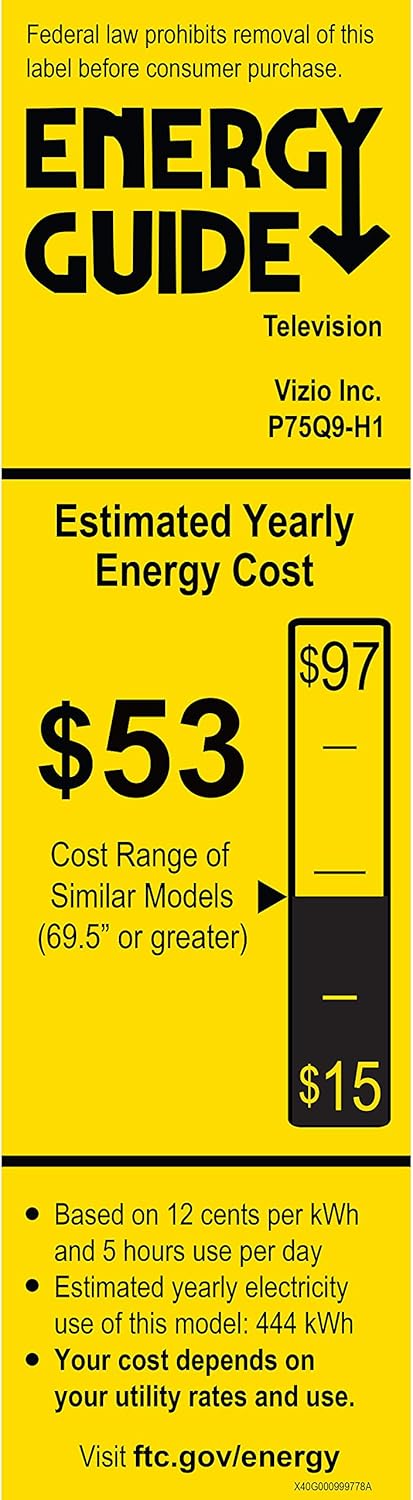
Image: Close-up of the VIZIO P75Q9-H61 TV's rear input ports. This image details the various connection options available on the back of the television, including HDMI, USB, audio outputs, antenna input, and an Ethernet port.
1.5 പ്രാരംഭ പവർ ഓണും നെറ്റ്വർക്ക് കണക്ഷനും
After connecting all necessary cables, plug the power cable into an electrical outlet. Press the power button on the remote control or on the TV. Follow the on-screen instructions for the initial setup wizard, which will guide you through language selection, channel scanning, and connecting to your home Wi-Fi network. A stable internet connection is required to access Smart TV features.
2. Operating Your VIZIO Smart TV
2.1 വിദൂര നിയന്ത്രണ പ്രവർത്തനങ്ങൾ
The included VIZIO XRT140 remote control provides access to all TV functions. Familiarize yourself with the buttons for power, input selection, volume, channel, SmartCast home, and navigation.
2.2 SmartCast Interface
Your VIZIO P75Q9-H61 features the SmartCast platform, offering quick access to a wide range of streaming applications and free channels. Press the 'Home' button on your remote to access the SmartCast interface.

Image: VIZIO P75Q9-H61 TV displaying the SmartCast home screen. This image shows the user interface with popular streaming applications and content recommendations.
2.3 ചിത്ര ക്രമീകരണങ്ങൾ
നിങ്ങളുടെ ഒപ്റ്റിമൈസ് ചെയ്യുക viewing experience by adjusting picture settings. Navigate to the Picture menu to customize options such as brightness, contrast, color, and sharpness. The P75Q9-H61 features:
- Quantum Color: Delivers a wider spectrum of colors for a more vibrant image.
- Ultrabright 1200: Provides up to 1200 nits of peak brightness for enhanced detail in highlights.
- Active Full Array with 240 Local Dimming Zones: Precisely controls backlighting for deep blacks and improved contrast.
- ഡോൾബി വിഷൻ HDR: Supports advanced HDR formats for superior color, brightness, and detail.

Image: Quantum Color comparison chart. This graphic demonstrates the expanded color volume provided by VIZIO's Quantum Color technology, indicating 120% more color compared to standard 4K UHD TVs.
2.4 ഗെയിമിംഗ് സവിശേഷതകൾ
The P75Q9-H61 is equipped with the ProGaming Engine for an optimized gaming experience:
- എഎംഡി ഫ്രീസിങ്ക് പ്രീമിയം: Reduces screen tearing and stuttering.
- 4K 120Hz Gaming: Supports high refresh rates for smooth gameplay on compatible consoles.
- കുറഞ്ഞ ഇൻപുട്ട് ലാഗ്: Ensures responsive control during gaming sessions.

Image: VIZIO ProGaming Engine in action. This image shows the TV displaying a fast-paced video game, emphasizing the benefits of the ProGaming Engine for next-generation gaming.
2.5 സ്മാർട്ട് ഹോം ഇന്റഗ്രേഷൻ
The TV supports Apple AirPlay 2 and Chromecast Built-in, allowing you to stream content directly from your compatible mobile devices. It also integrates with voice assistants like Siri, Google Assistant, and Alexa-enabled devices for convenient voice control.

Image: VIZIO TV with Apple AirPlay and Chromecast. This image illustrates the TV's compatibility with Apple AirPlay and Chromecast, enabling seamless content streaming from mobile devices.
3. പരിപാലനം
3.1 നിങ്ങളുടെ ടിവി വൃത്തിയാക്കൽ
സ്ക്രീൻ വൃത്തിയാക്കാൻ, മൃദുവായതും ഉണങ്ങിയതുമായ ഒരു മൈക്രോഫൈബർ തുണി ഉപയോഗിച്ച് സൌമ്യമായി തുടയ്ക്കുക. കഠിനമായ കറകൾക്ക്, ചെറുതായി dampen the cloth with water or a screen-specific cleaning solution. Avoid using harsh chemicals, abrasive cleaners, or direct spraying onto the screen. Clean the TV's body with a soft, dry cloth.
3.2 സോഫ്റ്റ്വെയർ അപ്ഡേറ്റുകൾ
Your VIZIO Smart TV periodically receives software updates to improve performance and add new features. Ensure your TV is connected to the internet to receive these updates automatically. You can also manually check for updates in the TV's settings menu.
4. പ്രശ്നപരിഹാരം
4.1 പൊതുവായ പ്രശ്നങ്ങളും പരിഹാരങ്ങളും
- ശക്തിയില്ല: ടിവിയിലേക്കും പ്രവർത്തിക്കുന്ന ഒരു ഇലക്ട്രിക്കൽ ഔട്ട്ലെറ്റിലേക്കും പവർ കേബിൾ സുരക്ഷിതമായി ബന്ധിപ്പിച്ചിട്ടുണ്ടെന്ന് ഉറപ്പാക്കുക. മറ്റൊരു ഔട്ട്ലെറ്റ് പരീക്ഷിക്കുക.
- ചിത്രം/ശബ്ദം ഇല്ല: ശരിയായ ഇൻപുട്ട് ഉറവിടം തിരഞ്ഞെടുത്തിട്ടുണ്ടെന്ന് ഉറപ്പാക്കുക. ബാഹ്യ ഉപകരണങ്ങളിലേക്കുള്ള എല്ലാ കേബിൾ കണക്ഷനുകളും പരിശോധിക്കുക.
- TV Turns Off Randomly: This can sometimes be resolved by performing a soft reset. Unplug the TV from the power outlet for 60 seconds, then plug it back in. If the issue persists, check for available software updates.
- SmartCast Not Working/Slow: Ensure your TV has a stable internet connection. Try restarting your router and modem. A soft reset of the TV may also resolve the issue. If problems persist, check for software updates.
- റിമോട്ട് കൺട്രോൾ പ്രതികരിക്കുന്നില്ല: റിമോട്ടിലെ ബാറ്ററികൾ മാറ്റിസ്ഥാപിക്കുക. റിമോട്ടിനും ടിവിയുടെ ഐആർ സെൻസറിനും ഇടയിൽ തടസ്സങ്ങളൊന്നുമില്ലെന്ന് ഉറപ്പാക്കുക.
4.2 ഒരു ഫാക്ടറി റീസെറ്റ് നടത്തുന്നു
If issues persist, a factory reset can often resolve software-related problems. Be aware that a factory reset will erase all personalized settings and data, returning the TV to its original factory state. Consult the TV's on-screen menu for the exact steps to perform a factory reset.
5 സ്പെസിഫിക്കേഷനുകൾ
| ഫീച്ചർ | സ്പെസിഫിക്കേഷൻ |
|---|---|
| മോഡൽ നമ്പർ | P75Q9-H61 |
| സ്ക്രീൻ വലിപ്പം | 75 ഇഞ്ച് |
| റെസലൂഷൻ | 4K അൾട്രാ HD (3840 x 2160) |
| ഡിസ്പ്ലേ ടെക്നോളജി | LED, Quantum Color |
| ബാക്ക്ലൈറ്റ് തരം | Active Full Array with 240 Local Dimming Zones |
| HDR പിന്തുണ | Dolby Vision HDR, HDR10, HLG |
| പുതുക്കിയ നിരക്ക് | 120 Hz |
| പീക്ക് തെളിച്ചം | Ultrabright 1200 nits |
| പ്രോസസ്സർ | IQ Ultra Processor |
| ഗെയിമിംഗ് സവിശേഷതകൾ | ProGaming Engine, AMD FreeSync Premium, 4K 120Hz Gaming |
| സ്മാർട്ട് ടിവി പ്ലാറ്റ്ഫോം | VIZIO SmartCast, Apple AirPlay 2, Chromecast Built-in |
| കണക്റ്റിവിറ്റി | HDMI 2.1, USB, Ethernet |
| അളവുകൾ (സ്റ്റാൻഡിനൊപ്പം) | 65.76 x 13.39 x 40.26 ഇഞ്ച് |
| അളവുകൾ (സ്റ്റാൻഡ് ഇല്ലാതെ) | 65.8"ആംശം x 34.9"ആംശം x 2.7"ആംശം |
| ഭാരം | 75.34 പൗണ്ട് |
| ഉൾപ്പെടുത്തിയ ഘടകങ്ങൾ | പവർ കേബിൾ, റിമോട്ട് കൺട്രോൾ, സ്റ്റാൻഡ് |
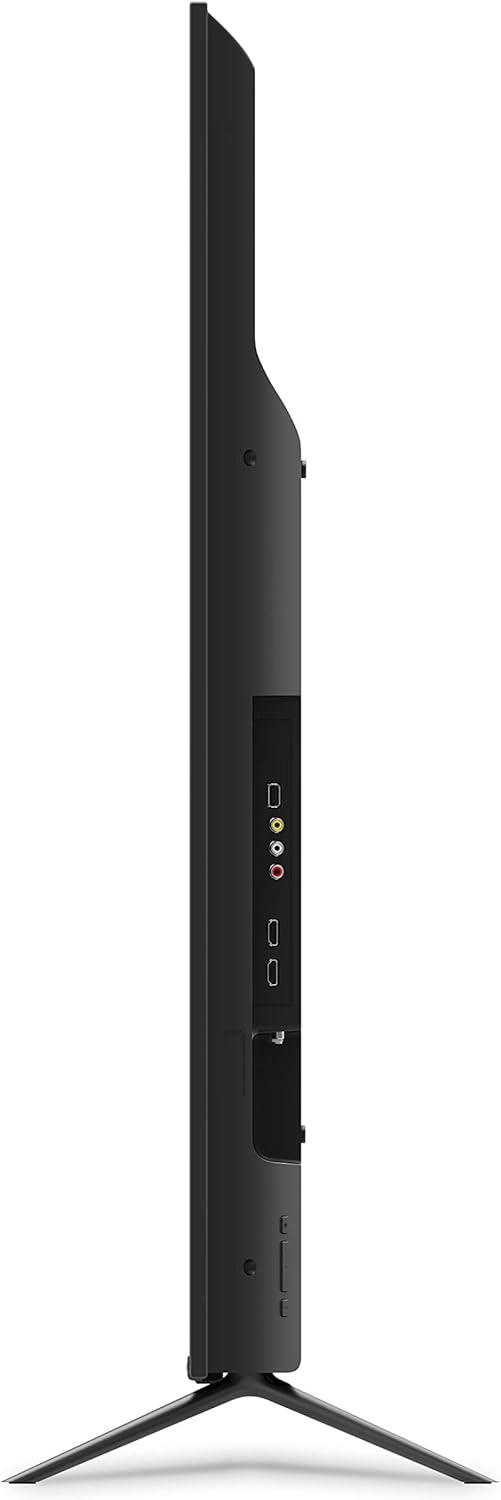
Image: Energy Guide label for VIZIO P75Q9-H1. This label provides information on the estimated yearly energy cost and consumption of the television.
6. വാറൻ്റി വിവരങ്ങൾ
For detailed warranty information, please refer to the warranty card included with your product or visit the official VIZIO support webസൈറ്റ്. വാറന്റി നിബന്ധനകളും വ്യവസ്ഥകളും പ്രദേശത്തിനും വാങ്ങൽ തീയതിക്കും അനുസരിച്ച് വ്യത്യാസപ്പെടാം.
7. ഉപഭോക്തൃ പിന്തുണ
If you encounter any issues not covered in this manual or require further assistance, please contact VIZIO Customer Support. You can find contact information, FAQs, and additional resources on the official VIZIO webസൈറ്റ്:
7.1 നിർദ്ദേശ വീഡിയോകൾ
Watch official VIZIO instructional videos for visual guidance on setup and features.
Video: VIZIO Product Overview (2:36). This video provides a general overview of the VIZIO P-Series Quantum TV's features and capabilities.
Video: VIZIO SmartCast Tutorial (1:17). This video guides users through the VIZIO SmartCast interface and its functionalities.


