ആമുഖം
This manual provides comprehensive instructions for the installation, operation, and maintenance of your Lepro LE 50ft RGB 5050 LED Strip Lights. Please read this manual thoroughly before installation and use to ensure proper function and safety. Keep this manual for future reference.
സുരക്ഷാ നിർദ്ദേശങ്ങൾ
- ഇൻസ്റ്റാളേഷൻ അല്ലെങ്കിൽ അറ്റകുറ്റപ്പണിക്ക് മുമ്പ് വൈദ്യുതി വിതരണം വിച്ഛേദിച്ചിട്ടുണ്ടെന്ന് ഉറപ്പാക്കുക.
- ഈ ഉൽപ്പന്നം ഇൻഡോർ ഉപയോഗത്തിന് മാത്രമായി രൂപകൽപ്പന ചെയ്തിരിക്കുന്നു. വെള്ളത്തിലോ ഉയർന്ന ആർദ്രതയിലോ ഉള്ള സമ്പർക്കം ഒഴിവാക്കുക.
- Do not connect the LED strip to the power supply while it is still coiled on the reel. Unroll the strip completely before powering on to prevent overheating.
- Use only the provided 12V ETL-listed power adapter. Using an incompatible power supply may damage the product and void the warranty.
- Do not bend the LED strip at sharp angles (less than 90 degrees) to avoid damaging the circuit board or LEDs.
- കുട്ടികൾക്ക് ലഭ്യമാകാതെ സൂക്ഷിക്കുക.
- If any damage is observed on the strip or power adapter, discontinue use immediately and contact customer support.
പാക്കേജ് ഉള്ളടക്കം

Image: The complete package contents including two rolls of LED strip lights, a remote control, a power adapter, and fixing clips with screws.
താഴെ ലിസ്റ്റ് ചെയ്തിരിക്കുന്ന എല്ലാ ഇനങ്ങളും നിങ്ങളുടെ പാക്കേജിൽ ഉൾപ്പെടുത്തിയിട്ടുണ്ടെന്ന് ദയവായി പരിശോധിക്കുക:
- 2 x 24.6ft (total 50ft) RGB 5050 LED Strip Lights
- 1 x IR Remote Controller (44-key)
- 1 x 12V ETL-listed Power Adapter
- 1 x കൺട്രോൾ ബോക്സ്
- ക്ലിപ്പുകളും സ്ക്രൂകളും ശരിയാക്കുന്നു
- ഉപയോക്തൃ മാനുവൽ (ഈ പ്രമാണം)
സ്പെസിഫിക്കേഷനുകൾ
| മോഡൽ നമ്പർ | 410105-RGB-US |
| ഇളം നിറം | RGB (ചുവപ്പ്, പച്ച, നീല) |
| പ്രകാശ സ്രോതസ്സ് തരം | 5050 എൽ.ഇ.ഡി |
| ആകെ നീളം | 50 Feet (2 x 24.6ft rolls) |
| മീറ്ററിന് LED-കൾ | 30 എൽ.ഇ.ഡി |
| പവർ ഉറവിടം | Corded Electric, 12V Adapter |
| വാട്ട്tage | 36 വാട്ട്സ് |
| കൺട്രോളർ തരം | IR Remote Control (44-key) |
| ഇൻഡോർ/ഔട്ട്ഡോർ ഉപയോഗം | ഇൻഡോർ മാത്രം |
| മെറ്റീരിയൽ | പ്ലാസ്റ്റിക് |
| ഉൽപ്പന്ന അളവുകൾ | 5.31 x 3.15 x 5.35 ഇഞ്ച് (പാക്കേജ്) |
| ഇനത്തിൻ്റെ ഭാരം | 14.72 ഔൺസ് |
സജ്ജീകരണവും ഇൻസ്റ്റാളേഷനും
Follow these steps for proper installation of your LED strip lights:
- ഉപരിതലം തയ്യാറാക്കുക:
Before attaching the LED strip, ensure the installation surface is clean, dry, and smooth. Wipe the surface with a clean cloth to remove dust or debris. This ensures optimal adhesion of the 3M adhesive backing.

Image: A hand wiping a wooden surface with a cloth, illustrating the first step of surface preparation.
- ഘടകങ്ങൾ ബന്ധിപ്പിക്കുക:
Connect the 4-pin connector from the LED strip to the control box. Ensure the arrow mark on the strip's connector aligns with the arrow mark on the control box. Then, connect the DC wire from the power adapter to the control box. Finally, plug the power adapter into a standard electrical outlet.
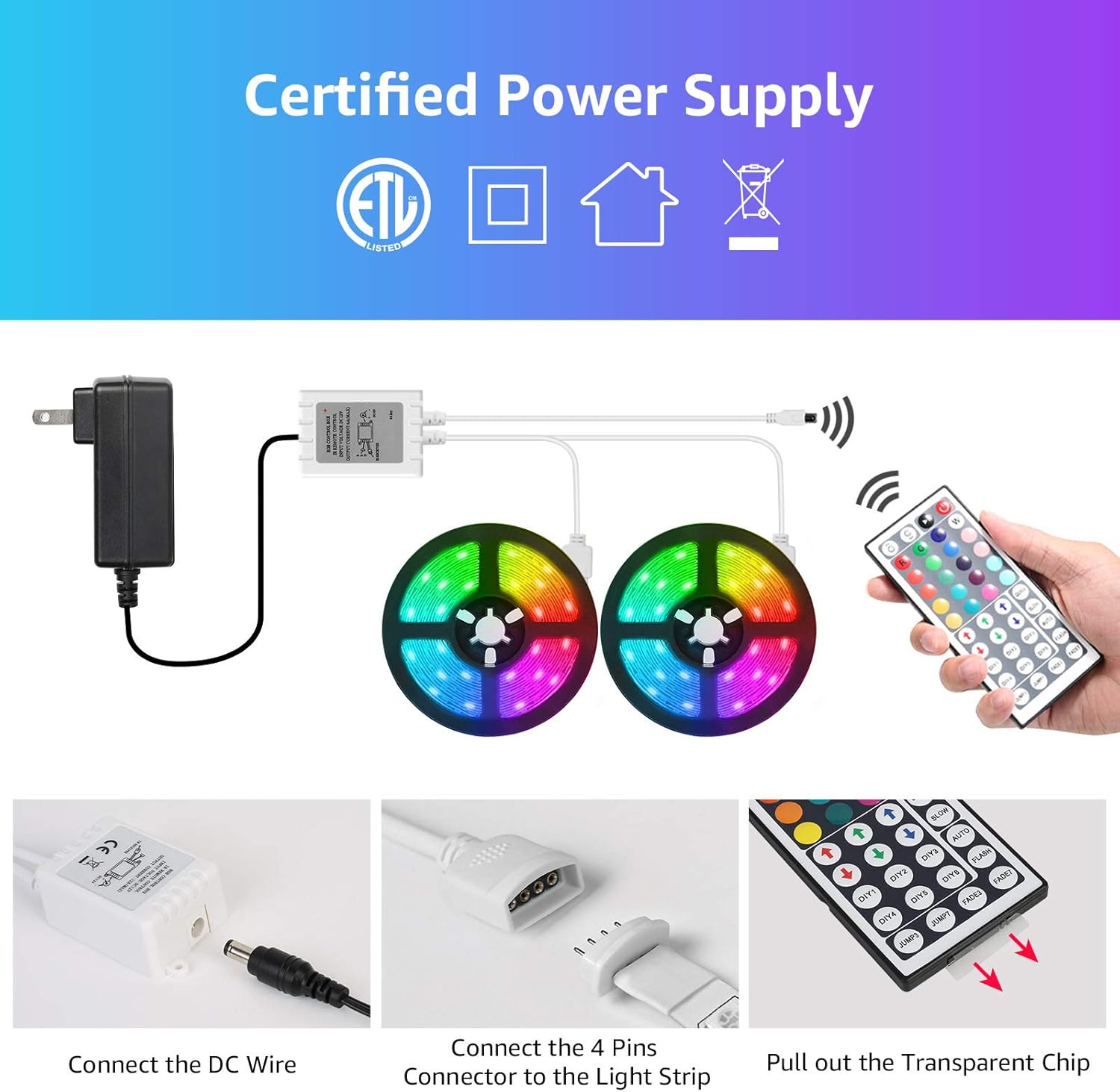
Image: A visual guide demonstrating how to connect the DC wire to the control box and the 4-pin connector to the LED strip, emphasizing arrow alignment.
പ്രധാനപ്പെട്ടത്: Ensure the "arrow" mark on the LED strip connector and the "12V" mark on the control box are on the same side for correct polarity.

Image: Detail of the RGB light strip, highlighting the 10mm 4-pin connector and the strong 3M self-adhesive backing for installation.
- LED സ്ട്രിപ്പ് ഘടിപ്പിക്കുക:
Peel off the protective backing from the 3M adhesive on the back of the LED strip. Carefully press the strip onto the prepared surface, applying firm and even pressure along its entire length. For added security, use the included fixing clips and screws at regular intervals, especially around corners or areas with less adhesion.
Image: A hand demonstrating how to peel and attach the LED strip to a surface, showing the adhesive backing.
- റിമോട്ട് കൺട്രോൾ തയ്യാറെടുപ്പ്:
Before using the remote control, pull out the transparent plastic chip from the battery compartment. This activates the battery.
Image: A close-up showing a hand pulling the transparent plastic chip from the remote control, indicating battery activation.
ഇൻസ്റ്റലേഷൻ പ്രദർശന വീഡിയോ
Video: A demonstration of the Lepro LED Strip Lights in various indoor settings, showcasing color changes and potential applications. This video provides visual examples of how the lights can be installed and used to enhance different environments.
ഓപ്പറേഷൻ
Your LED strip lights are controlled by the included 44-key IR remote control. Point the remote directly at the IR receiver on the control box for optimal response.
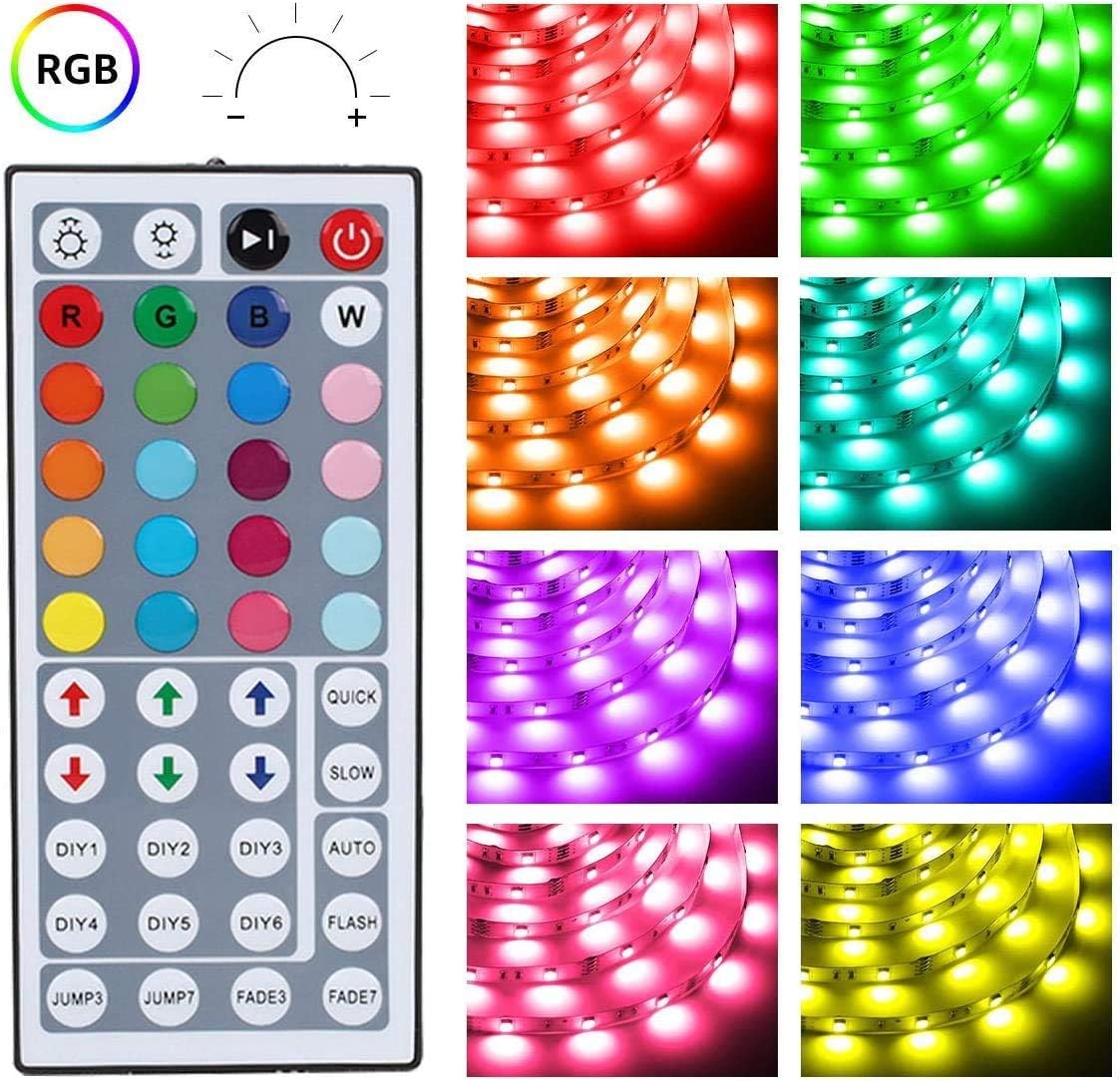
ചിത്രം: വിശദമായ ഒരു ചിത്രം view of the 44-key remote control, showing buttons for power, brightness adjustment, RGB color selection, 6 DIY color buttons, and various dynamic modes like Jump, Fade, Quick, Slow, and Auto.
- പവർ ഓൺ/ഓഫ്: അമർത്തുക ചുവന്ന പവർ ബട്ടൺ to turn the lights on or off.
- തെളിച്ച ക്രമീകരണം: ഉപയോഗിക്കുക മുകളിലേക്കും താഴേക്കുമുള്ള അമ്പടയാള ബട്ടണുകൾ (above the R, G, B, W buttons) to increase or decrease brightness.
- വർണ്ണ തിരഞ്ഞെടുപ്പ്: ഏതെങ്കിലും ഏതെങ്കിലും അമർത്തുക 20 color buttons to select a static color.
- DIY നിറങ്ങൾ:
- ഒരെണ്ണം അമർത്തുക DIY1-DIY6 buttons.
- ഉപയോഗിക്കുക RGB up/down arrows to adjust the intensity of Red, Green, and Blue to create your desired custom color.
- Press the same DIY button again to save the custom color.
- ഡൈനാമിക് മോഡുകൾ:
- JUMP3 / JUMP7: Cycles through 3 or 7 colors with a jump effect.
- FADE3 / FADE7: Fades between 3 or 7 colors.
- QUICK / SLOW: Adjusts the speed of dynamic modes.
- സ്വയമേവ: Cycles through all available dynamic modes.
- ഫ്ലാഷ്: Flashes through colors.
മെയിൻ്റനൻസ്
- വൃത്തിയാക്കൽ: Ensure the power is off and unplugged before cleaning. Gently wipe the LED strip with a dry, soft cloth. Do not use liquid cleaners or abrasive materials.
- സംഭരണം: If storing the lights for an extended period, ensure they are clean and dry. Store in a cool, dry place away from direct sunlight.
- അഡീഷൻ: If the adhesive begins to lose its stickiness, you can reinforce the strip with additional fixing clips or a suitable adhesive tape (not included).
ട്രബിൾഷൂട്ടിംഗ്
| പ്രശ്നം | സാധ്യമായ കാരണം | പരിഹാരം |
|---|---|---|
| വിളക്കുകൾ തെളിയുന്നില്ല. |
|
|
| റിമോട്ട് കൺട്രോൾ പ്രതികരിക്കുന്നില്ല. |
|
|
| നിറങ്ങൾ തെറ്റാണ് അല്ലെങ്കിൽ പൊരുത്തമില്ലാത്തതാണ്. |
|
|
| LED strip is falling off the surface. |
|
|
വാറൻ്റി & പിന്തുണ
Lepro products are designed for quality and reliability. For warranty information, technical support, or any questions regarding your LED strip lights, please contact Lepro customer service through the retailer where the product was purchased or visit the official Lepro webസൈറ്റ്.
Please have your model number (410105-RGB-US) and purchase details ready when contacting support.


