1. പ്രധാന സുരക്ഷാ നിർദ്ദേശങ്ങൾ
Please read these safety instructions carefully before using the appliance and keep them for future reference. Incorrect use may lead to injury or damage.
- ശരിയായ വോള്യം ഉള്ള ഒരു ഗ്രൗണ്ടഡ് പവർ ഔട്ട്ലെറ്റിലേക്ക് ഉപകരണം ബന്ധിപ്പിച്ചിട്ടുണ്ടെന്ന് ഉറപ്പാക്കുക.tagഇ (220V).
- ഉപകരണം, ചരട്, അല്ലെങ്കിൽ പ്ലഗ് എന്നിവ വെള്ളത്തിലോ മറ്റേതെങ്കിലും ദ്രാവകത്തിലോ മുക്കരുത്.
- Always unplug the appliance before cleaning, refilling water, or when not in use.
- കേടായ ചരടോ പ്ലഗോ ഉപയോഗിച്ച് ഉപകരണം പ്രവർത്തിപ്പിക്കരുത്, അല്ലെങ്കിൽ അത് താഴെ വീണിരിക്കുകയോ ഏതെങ്കിലും വിധത്തിൽ കേടുപാടുകൾ സംഭവിക്കുകയോ ചെയ്തിട്ടുണ്ടെങ്കിൽ.
- കുട്ടികൾക്കും വളർത്തുമൃഗങ്ങൾക്കും ലഭ്യമല്ലാത്തവിധം ഉപകരണം സൂക്ഷിക്കുക.
- Do not block the air inlets or outlets. Ensure adequate ventilation around the unit.
- ഈ മാനുവലിൽ വിവരിച്ചിരിക്കുന്നതുപോലെ ഉപകരണം അതിന്റെ ഉദ്ദേശിച്ച ഗാർഹിക ആവശ്യങ്ങൾക്ക് മാത്രം ഉപയോഗിക്കുക.
- Do not place the appliance near heat sources, direct sunlight, or in excessively humid environments.
- Always place the appliance on a stable, flat surface to prevent tipping.
2. ഉൽപ്പന്നം കഴിഞ്ഞുview
The ADLER AD 7913 is a versatile evaporative cooler designed to provide cooling, ventilation, humidification, and air purification. It features a portable design with wheels for easy movement.

ചിത്രം 2.1: മുൻഭാഗം view of the ADLER AD 7913 Evaporative Cooler, showing the air outlet, control panel, and water level indicator.
പ്രധാന ഘടകങ്ങൾ:
- നിയന്ത്രണ പാനൽ: Located on the top, with buttons for power, speed, mode, and oscillation.
- എയർ ഔട്ട്ലെറ്റ്: Front grille where cooled air is discharged.
- വാട്ടർ ടാങ്ക്: 12-litre capacity, located at the bottom, accessible for refilling.
- ജലനിരപ്പ് സൂചകം: Transparent window on the front to monitor water level.
- ചക്രങ്ങൾ: Four castor wheels for easy portability.
- Air Filter/Cooling Pad: Located at the rear, responsible for air filtration and evaporation.
3. സജ്ജീകരണം
3.1 അൺപാക്കിംഗ്
- Carefully remove the evaporative cooler from its packaging.
- സംരക്ഷണ ഫിലിമുകളോ ടേപ്പുകളോ ഉൾപ്പെടെ എല്ലാ പാക്കിംഗ് വസ്തുക്കളും നീക്കം ചെയ്യുക.
- ഉപകരണത്തിന് എന്തെങ്കിലും കേടുപാടുകൾ സംഭവിച്ചിട്ടുണ്ടോ എന്ന് പരിശോധിക്കുക. കേടുപാടുകൾ സംഭവിച്ചിട്ടുണ്ടെങ്കിൽ, അത് ഉപയോഗിക്കരുത്, ഉപഭോക്തൃ പിന്തുണയുമായി ബന്ധപ്പെടുക.
3.2 പ്ലേസ്മെൻ്റ്
Place the evaporative cooler on a firm, level surface. Ensure there is at least 20 cm of clear space around the back and sides of the unit for proper airflow. For optimal cooling, place the unit near an open window or door to allow fresh air intake.
3.3 വാട്ടർ ടാങ്ക് നിറയ്ക്കൽ
The ADLER AD 7913 has a 12-litre water tank. For cooling and humidification, the tank must be filled with water.
- പവർ ഔട്ട്ലെറ്റിൽ നിന്ന് ഉപകരണം അൺപ്ലഗ് ചെയ്തിട്ടുണ്ടെന്ന് ഉറപ്പാക്കുക.
- Locate the water filling port, typically at the top or rear of the unit.
- Slowly pour clean, cold water into the tank. Do not exceed the 'MAX' fill line indicated on the water level indicator.
- For enhanced cooling, you may add ice packs (if included or purchased separately) to the water tank.
- വാട്ടർ ടാങ്ക് തൊപ്പി സുരക്ഷിതമായി അടയ്ക്കുക.

Figure 3.1: The evaporative cooler positioned in a living space, demonstrating its portable nature.
4. പ്രവർത്തന നിർദ്ദേശങ്ങൾ
4.1 കൺട്രോൾ പാനൽ ഓവർview
The control panel on the top of the unit allows you to manage all functions.
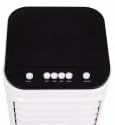
ചിത്രം 4.1: മുകളിൽ view of the control panel with various function buttons.
4.2 പവർ ഓൺ/ഓഫ്
- അനുയോജ്യമായ ഒരു ഇലക്ട്രിക്കൽ ഔട്ട്ലെറ്റിലേക്ക് പവർ കോർഡ് പ്ലഗ് ചെയ്യുക.
- അമർത്തുക പവർ button (usually marked with ⑉) to turn the unit on or off.
4.3 ഫാൻ വേഗത ക്രമീകരണം
The unit offers 3 fan speed levels.
- അമർത്തുക വേഗത കുറഞ്ഞ, ഇടത്തരം, ഉയർന്ന ഫാൻ വേഗതകളിലൂടെ സൈക്കിൾ ചെയ്യാൻ ബട്ടൺ ആവർത്തിച്ച് അമർത്തുക.
4.4 Cooling Function (Evaporative Cooling)
To activate the cooling function, ensure the water tank is filled.
- അമർത്തുക കൂൾ button. The water pump will activate, circulating water over the cooling pad, which then cools the air through evaporation.
- അമർത്തുക കൂൾ button again to deactivate the cooling function. The unit will then operate as a fan.
4.5 ഓസിലേഷൻ ഫംഗ്ഷൻ
The unit features 120° horizontal oscillation and 70° manual vertical oscillation to distribute air evenly.
- അമർത്തുക ഊഞ്ഞാലാടുക or OSC button to activate automatic horizontal oscillation.
- Press the button again to stop oscillation at the desired position.
- To adjust vertical airflow, manually tilt the front louvers up or down.
4.6 Humidification and Air Purification
When the cooling function is active, the unit also humidifies the air and helps purify it by trapping dust particles in the cooling pad.
5. പരിപാലനം
Regular maintenance ensures optimal performance and extends the lifespan of your evaporative cooler. Always unplug the unit before performing any maintenance.
5.1 പുറംഭാഗം വൃത്തിയാക്കൽ
- ഒരു മൃദുവായ, ഡി ഉപയോഗിച്ച് ബാഹ്യ പ്രതലങ്ങൾ തുടയ്ക്കുകamp തുണി.
- അബ്രാസീവ് ക്ലീനറുകൾ, മെഴുക് അല്ലെങ്കിൽ ലായകങ്ങൾ എന്നിവ ഉപയോഗിക്കരുത്, കാരണം അവ ഫിനിഷിന് കേടുവരുത്തും.
5.2 വാട്ടർ ടാങ്ക് വൃത്തിയാക്കൽ
To prevent mold and mildew growth, clean the water tank regularly, especially if the unit is used frequently.
- ടാങ്കിൽ നിന്ന് ശേഷിക്കുന്ന വെള്ളം ഒഴിക്കുക.
- Remove the water tank (if detachable) or access the tank interior.
- Clean the tank with a mild detergent and water. Rinse thoroughly to remove any soap residue.
- Allow the tank to air dry completely before reassembling or refilling.
5.3 Filter/Cooling Pad Maintenance
The cooling pad (also acts as a filter) should be cleaned periodically to maintain efficiency.
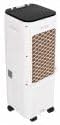
ചിത്രം 5.1: പിൻഭാഗം view of the unit, indicating the location of the air filter/cooling pad for maintenance.
- യൂണിറ്റ് അൺപ്ലഗ് ചെയ്യുക.
- Locate the filter access panel at the rear of the unit and remove it.
- Carefully slide out the cooling pad.
- Rinse the cooling pad under running water to remove dust and mineral deposits. For stubborn deposits, soak in a mild descaling solution (e.g., vinegar and water) for 30 minutes, then rinse thoroughly.
- Allow the cooling pad to air dry completely before reinserting it.
- Reinstall the cooling pad and secure the access panel.
5.4 സംഭരണം
യൂണിറ്റ് ദീർഘനേരം സൂക്ഷിക്കുകയാണെങ്കിൽ:
- Drain and clean the water tank and cooling pad thoroughly.
- Ensure all components are completely dry to prevent mold and mildew.
- നേരിട്ടുള്ള സൂര്യപ്രകാശത്തിൽ നിന്നും തീവ്രമായ താപനിലയിൽ നിന്നും അകന്ന്, തണുത്തതും വരണ്ടതുമായ സ്ഥലത്ത് യൂണിറ്റ് സൂക്ഷിക്കുക.
6. പ്രശ്നപരിഹാരം
ഉപഭോക്തൃ പിന്തുണയുമായി ബന്ധപ്പെടുന്നതിന് മുമ്പ്, പൊതുവായ പ്രശ്നങ്ങളും അവയുടെ പരിഹാരങ്ങളും അറിയാൻ ദയവായി ഇനിപ്പറയുന്ന പട്ടിക പരിശോധിക്കുക.
| പ്രശ്നം | സാധ്യമായ കാരണം | പരിഹാരം |
|---|---|---|
| യൂണിറ്റ് ഓണാക്കുന്നില്ല | വൈദ്യുതി വിതരണം ഇല്ല പവർ ബട്ടൺ അമർത്തിയില്ല | Check if the power cord is securely plugged in and the outlet is working. POWER ബട്ടൺ അമർത്തുക. |
| തണുത്ത വായു ഇല്ല / ദുർബലമായ തണുപ്പിക്കൽ | വാട്ടർ ടാങ്ക് കാലി Cooling function not activated Cooling pad dirty/clogged അപര്യാപ്തമായ വെൻ്റിലേഷൻ | വാട്ടർ ടാങ്ക് നിറയ്ക്കുക. Press the COOL button. Clean the cooling pad as per maintenance instructions. Ensure adequate space around the unit and an open window for fresh air. |
| അസുഖകരമായ മണം | Stagടാങ്കിലെ വെള്ളം Cooling pad needs cleaning | Drain and clean the water tank. Use fresh water. Clean the cooling pad. |
| വെള്ളം ചോർച്ച | Water tank overfilled യൂണിറ്റ് നിരപ്പായ പ്രതലത്തിലല്ല. | പരമാവധി ഫിൽ ലൈൻ കവിയരുത്. സുസ്ഥിരവും പരന്നതുമായ പ്രതലത്തിൽ യൂണിറ്റ് സ്ഥാപിക്കുക. |
7 സ്പെസിഫിക്കേഷനുകൾ
| ഫീച്ചർ | സ്പെസിഫിക്കേഷൻ |
|---|---|
| മോഡൽ നമ്പർ | എഡി 7913 |
| വൈദ്യുതി ഉപഭോഗം | 350 വാട്ട്സ് |
| വാല്യംtage | 220V |
| വാട്ടർ ടാങ്ക് കപ്പാസിറ്റി | 12 ലിറ്റർ |
| ഫാൻ വേഗത | 3 ലെവലുകൾ |
| എയർ ഫ്ലോ | 342 m³/h |
| തിരശ്ചീന ആന്ദോളനം | 120° |
| ലംബമായ ആന്ദോളനം | 70° (Manual) |
| ശബ്ദ നില | 44 ഡി.ബി |
| ഉൽപ്പന്ന അളവുകൾ (L x W x H) | 30 x 25 x 80 സെ.മീ |
| ഇനത്തിൻ്റെ ഭാരം | 2.1 കി.ഗ്രാം |
8. വാറൻ്റിയും പിന്തുണയും
ഈ ഉൽപ്പന്നം നിർമ്മാതാവിന്റെ വാറണ്ടിയിൽ ഉൾപ്പെടുന്നു. വാറന്റി കാലയളവ്, കവറേജ് വിശദാംശങ്ങൾ എന്നിവയുൾപ്പെടെയുള്ള നിർദ്ദിഷ്ട നിബന്ധനകൾക്കും വ്യവസ്ഥകൾക്കും നിങ്ങളുടെ വാങ്ങലിനൊപ്പം ഉൾപ്പെടുത്തിയിരിക്കുന്ന വാറന്റി കാർഡ് പരിശോധിക്കുക.
For technical assistance, troubleshooting beyond this manual, or to inquire about replacement parts, please contact Adler customer support. Contact information can typically be found on the product packaging, the official Adler webസൈറ്റ്, അല്ലെങ്കിൽ നിങ്ങളുടെ വാങ്ങൽ രസീത്.


