ആമുഖം
നിങ്ങളുടെ പുതിയ ഉപകരണത്തിനായുള്ള ഉപയോക്തൃ മാനുവലിലേക്ക് സ്വാഗതം KIDdesigns LOL SURPRISE Sing Along Karaoke BoomBox for Kids. This manual provides important information on how to set up, operate, and maintain your device. Please read it thoroughly before use to ensure proper functionality and safety.
ദി LOL SURPRISE Sing Along Karaoke BoomBox is designed to provide hours of musical fun for children. It features built-in music, LED flashing lights, and a working microphone, allowing kids to sing along to their favorite tunes or connect an external MP3 player for more song options. Its portable and durable design makes it suitable for both indoor and outdoor use.
സുരക്ഷാ വിവരങ്ങൾ
ഉപകരണത്തിന് പരിക്കേൽക്കുകയോ കേടുപാടുകൾ സംഭവിക്കുകയോ ചെയ്യാതിരിക്കാൻ ഇനിപ്പറയുന്ന സുരക്ഷാ മുൻകരുതലുകൾ പാലിക്കുക:
- മുന്നറിയിപ്പ്: Not suitable for children under 3 years due to small parts that may present a choking hazard.
- ഉപയോഗ സമയത്ത് എപ്പോഴും കൊച്ചുകുട്ടികളെ മേൽനോട്ടം വഹിക്കുക.
- ഉപകരണം വെള്ളത്തിലോ അമിതമായ ഈർപ്പത്തിലോ തുറന്നുകാട്ടരുത്.
- ഉപകരണം ഡിസ്അസംബ്ലിംഗ് ചെയ്യാനോ പരിഷ്ക്കരിക്കാനോ ശ്രമിക്കരുത്.
- Use only the specified battery type (3 "AA" batteries). Ensure correct polarity when inserting batteries.
- ഉപകരണം ദീർഘനേരം ഉപയോഗിക്കുന്നില്ലെങ്കിൽ ബാറ്ററികൾ നീക്കം ചെയ്യുക.
- താപ സ്രോതസ്സുകളിൽ നിന്നും നേരിട്ടുള്ള സൂര്യപ്രകാശത്തിൽ നിന്നും ഉപകരണം അകറ്റി നിർത്തുക.
പാക്കേജ് ഉള്ളടക്കം
എല്ലാ ഇനങ്ങളും ഉണ്ടെന്ന് ഉറപ്പാക്കാൻ പാക്കേജ് പരിശോധിക്കുക:
- LOL SURPRISE Sing Along Karaoke BoomBox Unit
- മൈക്രോഫോൺ
- ഉപയോക്തൃ മാനുവൽ (ഈ പ്രമാണം)
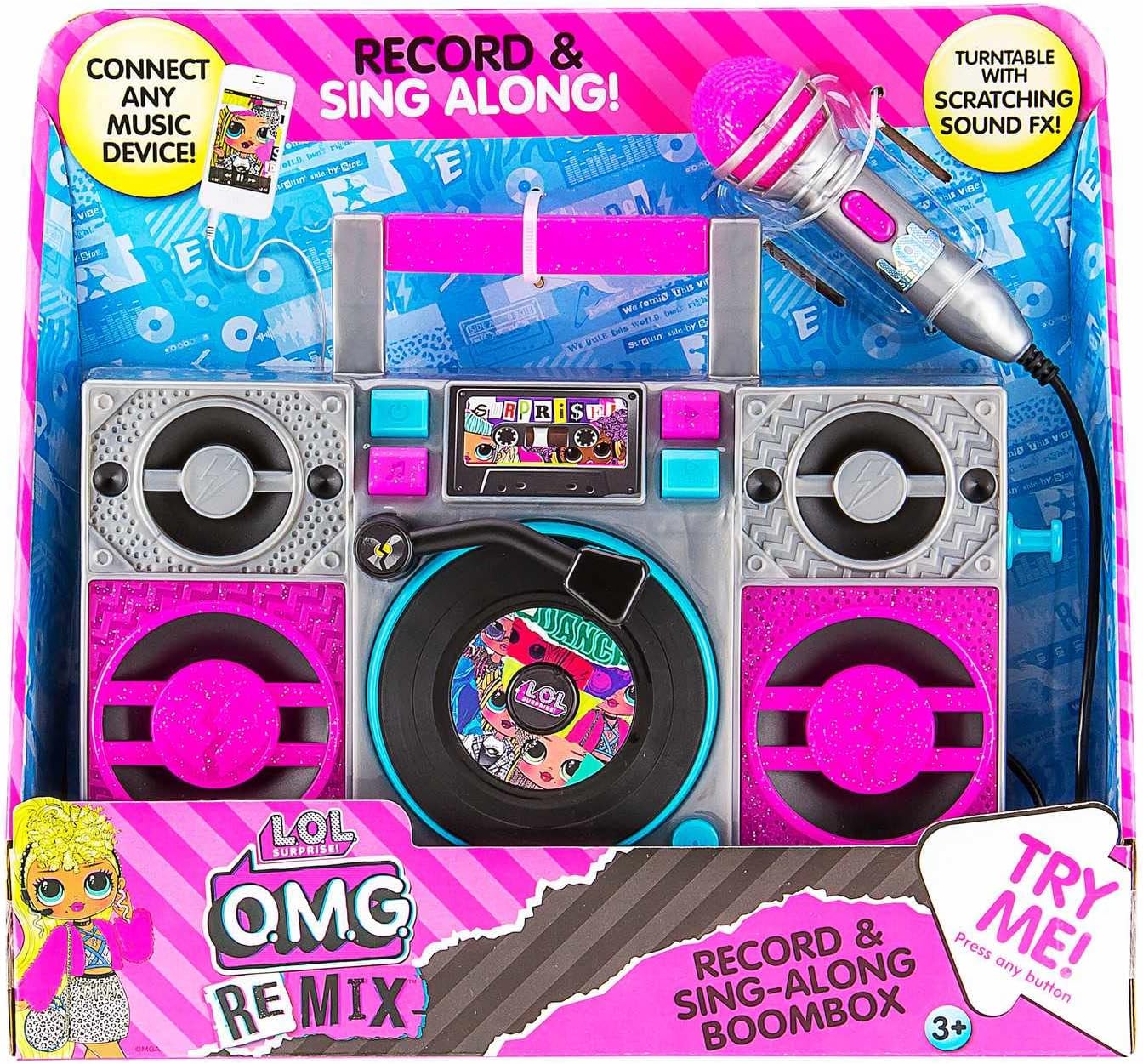
Image: The LOL SURPRISE Karaoke BoomBox as it appears in its retail packaging, highlighting its key features and included microphone.
ഉൽപ്പന്നം കഴിഞ്ഞുview
Familiarize yourself with the different parts of your Karaoke BoomBox.

ചിത്രം: മുൻഭാഗം view of the Karaoke BoomBox, illustrating its various components including speakers, central controls, and the attached microphone.
- കൈകാര്യം ചെയ്യുക: എളുപ്പമുള്ള പോർട്ടബിലിറ്റിക്ക്.
- സ്പീക്കറുകൾ: Output audio.
- Control Panel/Display: For selecting modes and viewing നില.
- Turntable (Decorative): Features scratching sound effects.
- മൈക്രോഫോൺ ഇൻപുട്ട്: Connect the included microphone here.
- മൈക്രോഫോൺ: For singing along.
- സഹായ ഇൻപുട്ട്: Connect external audio devices (e.g., MP3 player, smartphone).
- ബാറ്ററി കമ്പാർട്ട്മെൻ്റ്: Located on the back/bottom of the unit.
സജ്ജമാക്കുക
1. ബാറ്ററി ഇൻസ്റ്റാളേഷൻ
The Karaoke BoomBox requires 3 "AA" batteries (not included).
- യൂണിറ്റിന്റെ പിൻഭാഗത്തോ താഴെയോ ബാറ്ററി കമ്പാർട്ട്മെന്റ് കണ്ടെത്തുക.
- ഒരു ഫിലിപ്സ് ഹെഡ് സ്ക്രൂഡ്രൈവർ ഉപയോഗിച്ച്, ബാറ്ററി കമ്പാർട്ട്മെന്റ് കവർ അഴിക്കുക.
- Insert 3 "AA" batteries, ensuring the correct polarity (+/-) as indicated inside the compartment.
- ബാറ്ററി കമ്പാർട്ട്മെന്റ് കവർ മാറ്റി സ്ക്രൂ ഉപയോഗിച്ച് സുരക്ഷിതമാക്കുക.
2. മൈക്രോഫോൺ കണക്ഷൻ
Connect the included microphone to the microphone input jack on the unit.
പ്രവർത്തന നിർദ്ദേശങ്ങൾ
പവർ ചെയ്യുന്നത് ഓൺ/ഓഫ്
- To turn the unit ON, locate the Power button (usually on the front panel) and press it.
- To turn the unit OFF, press the Power button again.
Playing Built-in Music
- Once powered on, the unit may automatically start playing built-in music.
- Use the control buttons (e.g., Play/Pause, Next, Previous) on the front panel to navigate through the built-in songs.
Connecting an External Audio Device (MP3 Player/Smartphone)
You can connect your own music device to sing along to your favorite songs.

Image: The Karaoke BoomBox, showing the auxiliary input for connecting external audio devices like MP3 players or smartphones.
- Ensure the Karaoke BoomBox is powered on.
- Connect one end of a 3.5mm audio cable (not included) to the Auxiliary Input jack on the BoomBox.
- Connect the other end of the audio cable to the headphone jack or audio output of your MP3 player, smartphone, or other audio device.
- Start playing music on your connected device. The audio will now play through the BoomBox speakers.
- Adjust the volume on both your connected device and the BoomBox for optimal sound.
മൈക്രോഫോൺ ഉപയോഗിക്കുന്നു
- Once the microphone is connected, simply speak or sing into it. Your voice will be amplified through the BoomBox speakers.
- Adjust the microphone volume if available on the unit, or control the overall volume.
LED ഫ്ലാഷിംഗ് ലൈറ്റുകൾ
The unit features built-in LED flashing lights that activate during operation, adding to the karaoke experience.
Turntable Scratching Sound Effects
The decorative turntable on the front of the unit can be manually spun to produce fun scratching sound effects.
മെയിൻ്റനൻസ്
- വൃത്തിയാക്കൽ: മൃദുവായതും ഉണങ്ങിയതുമായ തുണി ഉപയോഗിച്ച് യൂണിറ്റ് തുടയ്ക്കുക. അബ്രാസീവ് ക്ലീനറുകളോ ലായകങ്ങളോ ഉപയോഗിക്കരുത്.
- സംഭരണം: ഉപയോഗത്തിലില്ലാത്തപ്പോൾ നേരിട്ട് സൂര്യപ്രകാശം ഏൽക്കാത്ത ഒരു തണുത്ത വരണ്ട സ്ഥലത്ത് യൂണിറ്റ് സൂക്ഷിക്കുക.
- ബാറ്ററി കെയർ: ബാറ്ററി ചോർച്ച തടയാൻ യൂണിറ്റ് ദീർഘനേരം ഉപയോഗിക്കുന്നില്ലെങ്കിൽ ബാറ്ററികൾ നീക്കം ചെയ്യുക.
ട്രബിൾഷൂട്ടിംഗ്
| പ്രശ്നം | സാധ്യമായ കാരണം | പരിഹാരം |
|---|---|---|
| യൂണിറ്റ് ഓണാക്കുന്നില്ല. | ബാറ്ററികൾ തീർന്നിരിക്കുന്നു അല്ലെങ്കിൽ തെറ്റായി ചേർത്തിരിക്കുന്നു. | Replace with new "AA" batteries, ensuring correct polarity. |
| സ്പീക്കറുകളിൽ നിന്ന് ശബ്ദമില്ല. | Volume is too low; external device not connected properly or volume too low. | Increase volume on the BoomBox and/or the connected external device. Ensure audio cable is fully inserted. |
| മൈക്രോഫോൺ പ്രവർത്തിക്കുന്നില്ല. | Microphone not fully plugged in. | Ensure the microphone cable is securely plugged into the microphone input jack. |
| വികലമായ ശബ്ദം. | വോളിയം വളരെ കൂടുതലാണ്; ബാറ്ററികൾ കുറവാണ്. | Lower the volume. Replace batteries if they are low. |
സ്പെസിഫിക്കേഷനുകൾ
- മോഡൽ: LOL SURPRISE Sing Along Karaoke BoomBox
- ബ്രാൻഡ്: EKIDS
- അളവുകൾ (L x W x H): 30.48 x 8.74 x 27.94 സെ.മീ (12 x 3.44 x 11 ഇഞ്ച്)
- ഭാരം: 750 ഗ്രാം (1.65 പൗണ്ട്)
- ശുപാർശ ചെയ്യുന്ന പ്രായം: 3 വർഷവും അതിൽ കൂടുതലും
- ഊർജ്ജ സ്രോതസ്സ്: ബാറ്ററി പവർ
- ആവശ്യമായ ബാറ്ററികൾ: 3 x "AA" (ഉൾപ്പെടുത്തിയിട്ടില്ല)
- കണക്റ്റിവിറ്റി: ഓക്സിലറി ഇൻപുട്ട് (3.5 മിമി)
- സ്പീക്കർമാരുടെ എണ്ണം: 1
- വാല്യംtage: 4.5 വോൾട്ട്
- UPC: 092298950778
- ഉൾപ്പെടുന്ന ഘടകങ്ങൾ: Karaoke BoomBox, Microphone
വാറൻ്റിയും പിന്തുണയും
This product is manufactured by eKids. For warranty information or technical support, please refer to the contact information provided on the product packaging or visit the official eKids webസൈറ്റ്. ഏതെങ്കിലും വാറന്റി ക്ലെയിമുകൾക്ക് വാങ്ങിയതിന്റെ തെളിവായി നിങ്ങളുടെ വാങ്ങൽ രസീത് സൂക്ഷിക്കുക.
കൂടുതൽ സഹായത്തിന്, നിങ്ങൾക്ക് സന്ദർശിക്കാവുന്നതാണ് EKIDS Brand Store on Amazon.


