1. ആമുഖം
This manual provides comprehensive instructions for the installation, setup, and operation of the Aubric 12V Wireless RF Remote Control Switch. This kit includes a 4-channel relay module and two 433Mhz remote controls, designed for versatile wireless control of various electrical devices such as lights, ceiling fans, garage door openers, and more.
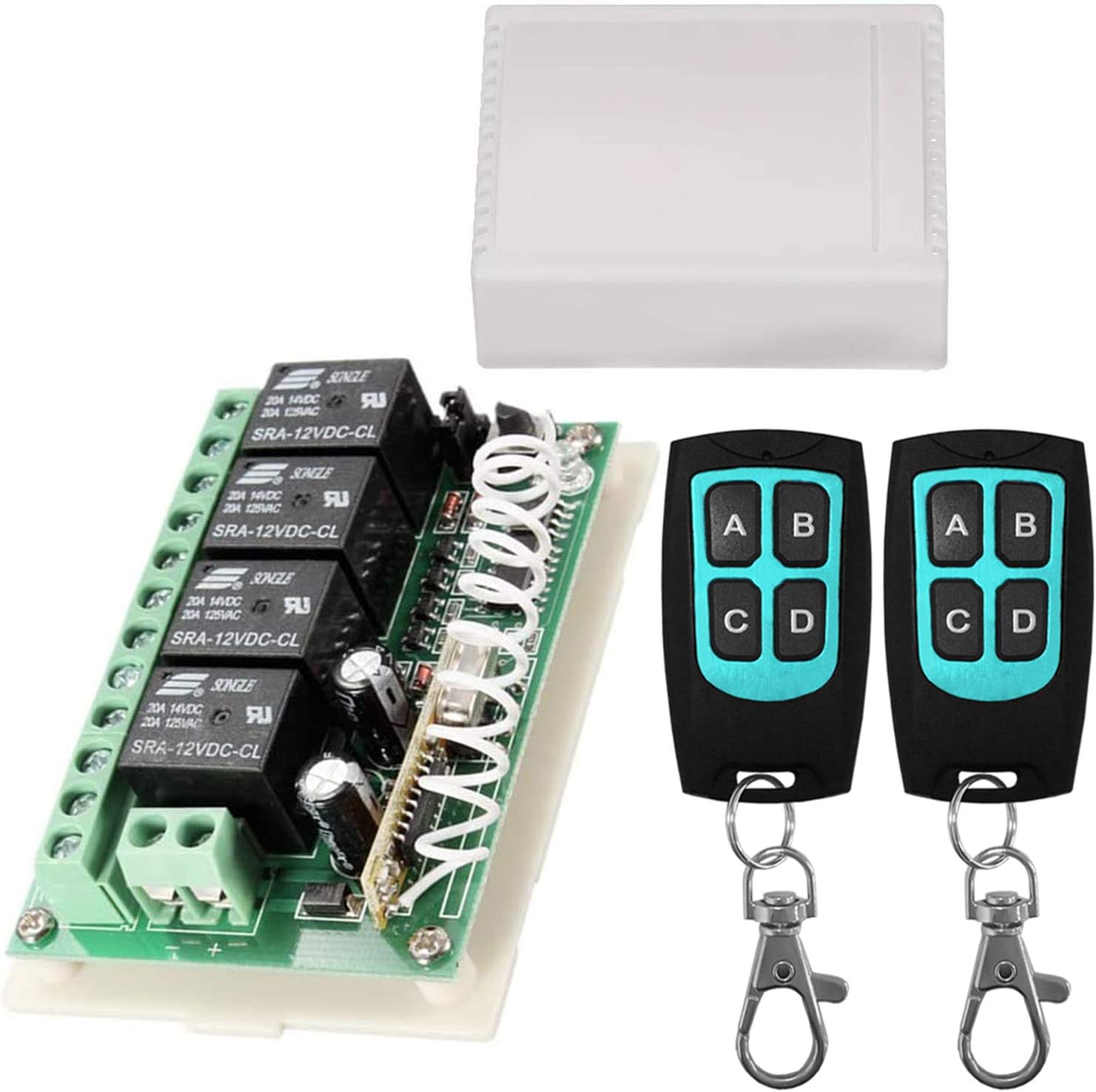
ചിത്രം 1.1: The Aubric 12V Wireless RF Remote Control Switch kit, including the 4-channel relay module, its protective casing, and two remote controls.
2 സുരക്ഷാ വിവരങ്ങൾ
Please read and understand all safety warnings and instructions before installing or operating this product. Failure to do so may result in electric shock, fire, or serious injury.
- ഏതെങ്കിലും വയറിംഗ് അല്ലെങ്കിൽ അറ്റകുറ്റപ്പണി നടത്തുന്നതിന് മുമ്പ് എല്ലായ്പ്പോഴും വൈദ്യുതി വിച്ഛേദിക്കുക.
- Ensure all wiring is done by a qualified electrician or in accordance with local electrical codes.
- പരമാവധി കറൻ്റും വോളിയവും കവിയരുത്tage ratings specified for the relay module.
- വെള്ളം, ഈർപ്പം, തീവ്രമായ താപനില എന്നിവയിൽ നിന്ന് ഉപകരണം അകറ്റി നിർത്തുക.
- ഈ ഉൽപ്പന്നം കുറഞ്ഞ വോള്യത്തിനായി രൂപകൽപ്പന ചെയ്തിരിക്കുന്നുtage DC applications (12V). Do not connect to AC mains voltagഇ നേരിട്ട്.
3. ഉൽപ്പന്ന ഘടകങ്ങൾ
The Aubric 12V Wireless RF Remote Control Switch kit typically includes the following components:
- 4-Channel Relay Module: The main receiver unit with screw terminals for wiring.
- സംരക്ഷണ സിasing: A plastic enclosure for the relay module.
- റിമോട്ട് കൺട്രോളുകൾ (x2): Handheld 4-button transmitters (A, B, C, D).

ചിത്രം 3.1: വിശദമായി view of the relay module, highlighting key components such as the learning button, indicator LED, antenna, 3-way jumper, power supply terminals, and relay output terminals (NC, C, NO).
4 സ്പെസിഫിക്കേഷനുകൾ
| ഫീച്ചർ | സ്പെസിഫിക്കേഷൻ |
|---|---|
| ബ്രാൻഡ് | Aubric |
| മോഡൽ നമ്പർ | BY06 |
| പവർ ഉറവിടം | DC 12V |
| കോയിൽ വോളിയംtage | 12 വോൾട്ട് |
| Current Rating (Each Relay) | 20 Amps (പരമാവധി) |
| വാട്ട്tage | 240 വാട്ട്സ് |
| RF ഫ്രീക്വൻസി | 433Mhz |
| റിമോട്ട് കൺട്രോൾ റേഞ്ച് | 164 അടി/50 മീറ്റർ വരെ (തുറന്ന പ്രദേശം) |
| ബന്ധപ്പെടാനുള്ള തരം | സാധാരണയായി തുറക്കുക (NO) |
| കോൺടാക്റ്റ് മെറ്റീരിയൽ | വെള്ളി |
| കണക്റ്റർ തരം | സ്ക്രൂ ടെർമിനലുകൾ |
| മൗണ്ടിംഗ് തരം | ഉപരിതല മൗണ്ട് |
| ഉൽപ്പന്ന അളവുകൾ | 2.05 x 0.98 x 2.95 ഇഞ്ച് |
| ഇനത്തിൻ്റെ ഭാരം | 3.99 ഔൺസ് |
| റിമോട്ട് ബാറ്ററി തരം | CR2016 ലിഥിയം മെറ്റൽ (ഉൾപ്പെടുത്തിയിരിക്കുന്നു) |
5. സജ്ജീകരണ ഗൈഡ്
5.1. അൺബോക്സിംഗും പ്രാരംഭ പരിശോധനയും
Carefully remove the relay module from its packaging. Open the protective casing to access the wiring terminals and the jumper cap for mode selection.

ചിത്രം 5.1: The relay module removed from its casing, showing the internal components and the open cover box.
5.2. വയറിംഗ് നിർദ്ദേശങ്ങൾ
Connect the 12V DC power supply to the '+' and '-' terminals on the relay module. Each of the four relays has three terminals: NC (Normally Closed), C (Common), and ഇല്ല (Normally Open). Connect your devices to the appropriate terminals based on your application. For most switching applications, you will connect your load to the ഇല്ല ഒപ്പം C ടെർമിനലുകൾ.

ചിത്രം 5.2: Example wiring diagram for controlling four lights using the relay module. The 12V DC power supply connects to the module, and each light is wired to the Common (C) and Normally Open (NO) terminals of a relay.

ചിത്രം 5.3: Example wiring diagram for controlling two DC motors using the relay module. Each motor is wired across two relays to allow for polarity reversal (forward/reverse control).
5.3. Setting Operating Modes
The relay module supports three different working modes, configured by adjusting the position of the 3-way jumper cap on the board. Ensure power is disconnected before changing jumper settings.

ചിത്രം 5.4: Jumper cap positions for different operating modes.
- Momentary Mode (Non Lock):
- ജമ്പർ ക്രമീകരണം: The jumper does not connect any two pins (removed or placed on only one pin).
- പ്രവർത്തനം: Press and hold a button on the remote to turn the relay ON. Release the button to turn the relay OFF.
- Toggle Mode (Self-lock):
- ജമ്പർ ക്രമീകരണം: The jumper connects pin 2 and pin 3.
- പ്രവർത്തനം: Press a button on the remote once to turn the relay ON. Press the same button again to turn the relay OFF.
- Latched Mode (Interlock):
- ജമ്പർ ക്രമീകരണം: The jumper connects pin 1 and pin 2.
- പ്രവർത്തനം: Press one button to turn its corresponding relay ON and simultaneously turn OFF any other previously ON relays. This mode is typically used for applications where only one output should be active at a time (e.g., forward/reverse motor control).
5.4. റിമോട്ട് കൺട്രോളുകൾ ജോടിയാക്കൽ
To pair a remote control with the receiver module:
- Ensure the relay module is powered on.
- അമർത്തുക പഠന ബട്ടൺ on the relay module once. The LED indicator will turn off, indicating it's in learning mode.
- Within a few seconds, press any button (A, B, C, or D) on the remote control you wish to pair.
- The LED indicator on the module will flash three times and then turn on again, confirming successful pairing.
- Repeat for additional remote controls if desired.
5.5. Removing Paired Remotes (Clearing Codes)
To clear all paired remote controls from the receiver module:
- അമർത്തിപ്പിടിക്കുക പഠന ബട്ടൺ on the relay module for approximately 6 seconds.
- The LED indicator will light up, then turn off, and then light up again, indicating that all previously learned codes have been successfully removed.
6. ഓപ്പറേഷൻ
Once the relay module is wired and the remote controls are paired, operation is straightforward:
- Depending on the selected operating mode (Momentary, Toggle, or Latched), press the corresponding button (A, B, C, or D) on the remote control to activate or deactivate the connected device.
- The remote controls transmit a strong 433Mhz signal, allowing control through walls, floors, and doors within the specified range.
7. Wide Applications
The Aubric 12V Wireless RF Remote Control Switch is highly versatile and can be used in a variety of applications, including but not limited to:
- ഗാരേജ് ഡോർ ഓപ്പണർമാർ
- ഔട്ട്ഡോർ ലൈറ്റിംഗ്
- Camper Modifications
- വാട്ടർ പമ്പുകൾ
- Electric Generators
- Motor-driven Curtains and Roller Blinds
- Car and Vehicle Modifications (e.g., auxiliary lights, winches)
- Anti-theft Alarm Control Panels
- Electric Door Release Locks

ചിത്രം 7.1: Visual representation of common applications for the wireless remote control switch, including garage door openers, camper modifications, outdoor lights, water pumps, and electric generators.
8. പരിപാലനം
The Aubric 12V Wireless RF Remote Control Switch requires minimal maintenance. Follow these guidelines to ensure longevity:
- Keep the module and remotes clean and free from dust and debris. Use a soft, dry cloth for cleaning.
- Avoid exposing the devices to extreme temperatures, direct sunlight, or high humidity.
- If the remote control range decreases significantly, consider replacing the CR2016 battery inside the remote.
- Periodically check wiring connections to ensure they are secure.
9. പ്രശ്നപരിഹാരം
| പ്രശ്നം | സാധ്യമായ കാരണം | പരിഹാരം |
|---|---|---|
| റിമോട്ട് കൺട്രോൾ പ്രവർത്തിക്കുന്നില്ല | Low battery in remote; Remote not paired; Out of range; Obstruction | Replace remote battery; Re-pair remote (Section 5.4); Move closer to receiver; Remove obstructions. |
| Relay not activating/deactivating | Incorrect wiring; Overload; Faulty relay module | Check wiring connections (Section 5.2); Ensure load does not exceed 20A; Contact support if module is faulty. |
| Unexpected activation/deactivation | Interference; Power fluctuation; Faulty remote/module | Ensure module is away from strong RF sources; Consider adding a power conditioner; Clear all paired remotes and re-pair only necessary ones (Section 5.5); Contact support. |
| Short remote range | Low battery; Environmental interference; Physical obstructions | Replace remote battery; Minimize interference from other wireless devices; Ensure clear line of sight if possible. |
10. വാറൻ്റിയും പിന്തുണയും
For technical support, troubleshooting assistance, or warranty inquiries, please contact Aubric customer service through the retailer where the product was purchased or visit the official Aubric webബന്ധപ്പെടാനുള്ള വിവരങ്ങൾക്കുള്ള സൈറ്റ്.
Please have your model number (BY06) and purchase details ready when contacting support.


