1. ആമുഖം
Thank you for choosing the NETVUE Indoor Camera NI-3421. This manual provides essential information for setting up, operating, and maintaining your camera. Please read it thoroughly before use and retain it for future reference.

Image 1: NETVUE Indoor Camera NI-3421, a compact white and black security camera.
2. ഉൽപ്പന്നം കഴിഞ്ഞുview
The NETVUE Indoor Camera NI-3421 is a versatile 1080P FHD security camera designed for indoor use, offering features such as 2.4GHz Wi-Fi connectivity, two-way audio, night vision, and AI human detection. It is suitable for monitoring pets, babies, or general home security.
പ്രധാന സവിശേഷതകൾ:
- 1080P Full HD Video: വ്യക്തവും മൂർച്ചയുള്ളതുമായ വീഡിയോ ഫൂ നൽകുന്നുtage.
- 2.4GHz Wi-Fi കണക്റ്റിവിറ്റി: Ensures stable wireless connection.
- പാൻ & ടിൽറ്റ് പ്രവർത്തനം: Offers 360° horizontal and 100° vertical rotation for comprehensive coverage.
- ടു-വേ ഓഡിയോ: ക്യാമറയിലൂടെ തത്സമയ ആശയവിനിമയം നടത്താൻ അനുവദിക്കുന്നു.
- വിപുലമായ രാത്രി കാഴ്ച: Provides clear monitoring in low-light conditions up to 32 feet.
- AI ഹ്യൂമൻ ഡിറ്റക്ഷൻ: Intelligently identifies human motion to reduce false alarms.
- ഒന്നിലധികം സംഭരണ ഓപ്ഷനുകൾ: Supports AWS Cloud storage (up to 30 days) and local MicroSD card storage (up to 128GB, not included).
- അലക്സാ ഇന്റഗ്രേഷൻ: Compatible with Amazon Alexa for voice control and live view അനുയോജ്യമായ ഉപകരണങ്ങളിൽ.

Image 2: The NETVUE Indoor Camera demonstrating its 360-degree pan and tilt capabilities, showing a wide view of a living room.
3. പാക്കേജ് ഉള്ളടക്കം
അൺബോക്സിംഗ് ചെയ്യുമ്പോൾ പാക്കേജ് ഉള്ളടക്കങ്ങൾ പരിശോധിക്കുക:
- NETVUE Indoor Camera NI-3421
- പവർ അഡാപ്റ്റർ
- USB കേബിൾ
- മൗണ്ടിംഗ് ബ്രാക്കറ്റും സ്ക്രൂകളും
- ഉപയോക്തൃ മാനുവൽ (ഈ പ്രമാണം)
4. സജ്ജീകരണം
4.1 ഭൗതിക സജ്ജീകരണം
- Unpack the camera and all accessories.
- Place the camera on a flat surface or mount it to a wall/ceiling using the provided mounting kit. Ensure it is within range of your 2.4GHz Wi-Fi network.
- നൽകിയിരിക്കുന്ന USB കേബിളും പവർ അഡാപ്റ്ററും ഉപയോഗിച്ച് ക്യാമറ ഒരു പവർ സ്രോതസ്സിലേക്ക് ബന്ധിപ്പിക്കുക. ക്യാമറ യാന്ത്രികമായി ഓണാകും.
4.2 ആപ്പ് ഇൻസ്റ്റാളേഷനും കണക്ഷനും
- Download the NETVUE app from the App Store (iOS) or Google Play Store (Android).
- ഒരു പുതിയ അക്കൗണ്ടിനായി രജിസ്റ്റർ ചെയ്യുക അല്ലെങ്കിൽ നിങ്ങൾക്ക് ഇതിനകം ഒന്ന് ഉണ്ടെങ്കിൽ ലോഗിൻ ചെയ്യുക.
- Follow the in-app instructions to add your new camera. This typically involves scanning a QR code on the camera or in the manual.
- Ensure your mobile device is connected to a 2.4GHz Wi-Fi network during the setup process.
4.3 വൈഫൈ കണക്ഷൻ
The camera supports 2.4GHz Wi-Fi networks only. During app setup, the app will generate a QR code. Present this QR code to the camera lens (10-30cm distance) for the camera to scan and connect to your Wi-Fi network. If connection fails, ensure your Wi-Fi password is entered correctly and try resetting the camera using the reset pin (usually located near the SD card slot).
5. പ്രവർത്തന നിർദ്ദേശങ്ങൾ
5.1 തത്സമയം View
Once connected, open the NETVUE app and select your camera to view the live video feed. You can switch between different cameras if you have multiple devices.
5.2 Pan & Tilt
Use the directional controls within the app to remotely pan (horizontal) and tilt (vertical) the camera lens, allowing you to monitor different areas of your room.
5.3 ടു-വേ ഓഡിയോ
Tap the microphone icon in the app to speak through the camera's built-in speaker. This feature is useful for communicating with pets, family members, or deterring intruders.

Image 3: A visual representation of the two-way audio feature, where a child is seen interacting with a dog via the camera's speaker and microphone.
5.4 അഡ്വാൻസ്ഡ് നൈറ്റ് വിഷൻ
The camera automatically switches between day and night vision modes. Infrared LEDs provide clear black-and-white video in complete darkness up to 32 feet.

Image 4: A split image illustrating the camera's automatic day/night vision switching, highlighting its 32ft infrared night vision capability.
5.5 Motion Detection & AI Human Detection
The camera features motion detection and advanced AI human detection. You will receive instant notifications on your mobile device when motion or a human figure is detected. Sensitivity levels can be adjusted in the app settings.

Image 5: A graphic demonstrating the camera's human and motion detection capabilities, with a smartphone displaying a motion alert notification.
5.6 സംഭരണ ഓപ്ഷനുകൾ
Choose between two storage methods for your video recordings:
- ക്ലൗഡ് സംഭരണം: AWS Cloud provides up to 30 days of storage. Subscription services are available for AI detection and continuous/event video recording.
- മൈക്രോ എസ്ഡി കാർഡ്: Supports local storage up to 128GB (card not included). Both options allow replaying 14 days of videos.
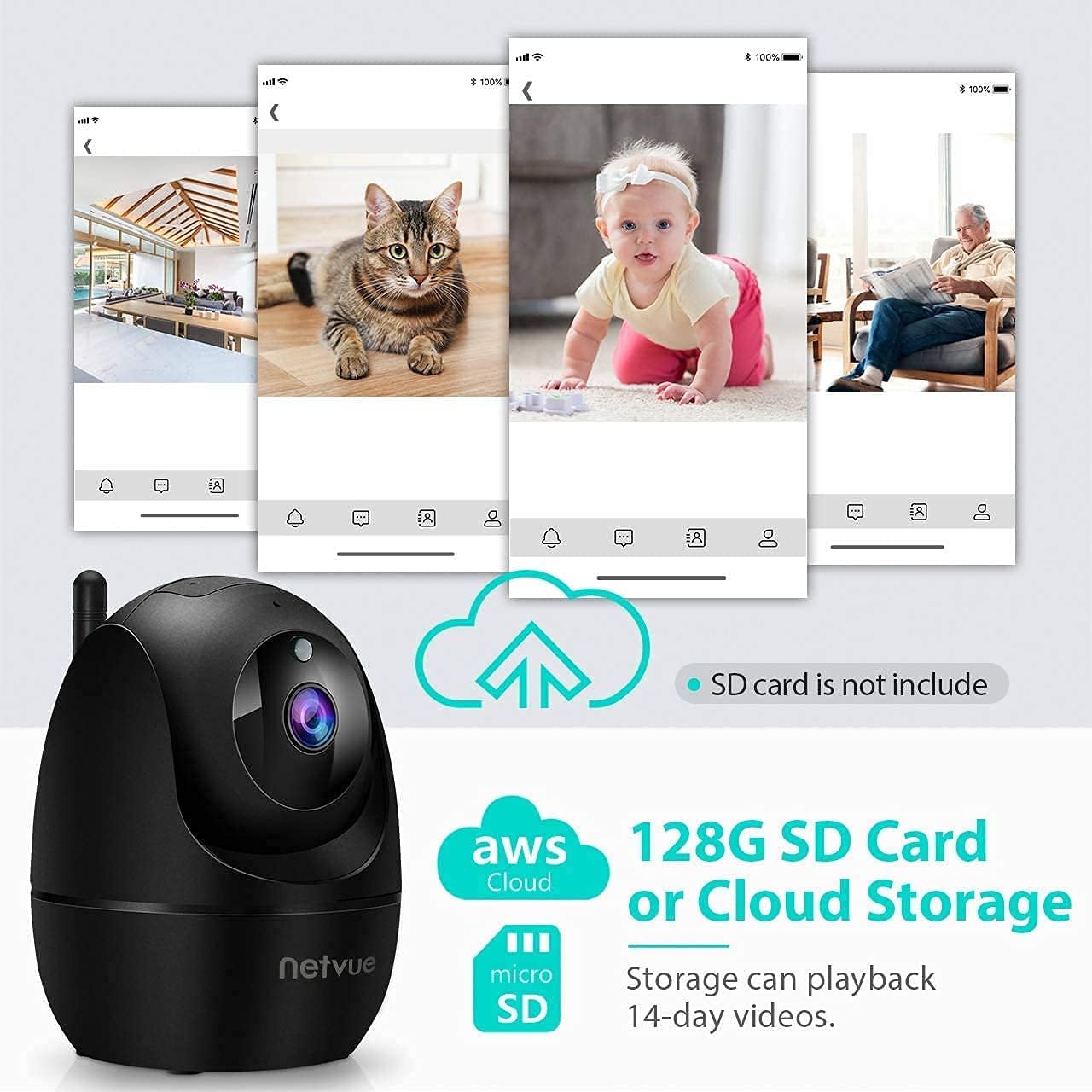
Image 6: The NETVUE Indoor Camera highlighting its compatibility with both AWS Cloud storage and MicroSD card storage for video recordings.
5.7 അലക്സാ ഇന്റഗ്രേഷൻ
The NETVUE camera can be integrated with Amazon Alexa for convenient voice control. You can ask Alexa to show live video feeds on compatible devices like the Echo Show.
Video 1: This video demonstrates the NETVUE camera's integration with Amazon Alexa, showing how to use voice commands to view camera feeds on an Echo Show device.
6. പരിപാലനം
- വൃത്തിയാക്കൽ: ക്യാമറ ലെൻസും ബോഡിയും വൃത്തിയാക്കാൻ മൃദുവായതും ഉണങ്ങിയതുമായ തുണി ഉപയോഗിക്കുക. കഠിനമായ രാസവസ്തുക്കൾ ഒഴിവാക്കുക.
- ഫേംവെയർ അപ്ഡേറ്റുകൾ: Regularly check the NETVUE app for firmware updates to ensure optimal performance and security.
- പ്ലേസ്മെൻ്റ്: നേരിട്ടുള്ള സൂര്യപ്രകാശം, താപ സ്രോതസ്സുകൾ, ഈർപ്പം എന്നിവയിൽ നിന്ന് അകന്ന്, സ്ഥിരമായ ഒരു സ്ഥലത്താണ് ക്യാമറ സ്ഥാപിച്ചിരിക്കുന്നതെന്ന് ഉറപ്പാക്കുക.
7. പ്രശ്നപരിഹാരം
- കണക്ഷൻ പ്രശ്നങ്ങൾ: Ensure your Wi-Fi network is 2.4GHz. Verify the Wi-Fi password. Try resetting the camera and re-pairing it with the app.
- ഓഫ്ലൈൻ നില: Check power supply and Wi-Fi signal strength. Reboot your router and the camera.
- Echoing Audio: This can occur if the camera's speaker output is picked up by its microphone. Adjust volume or distance between the camera and any audio output devices.
- മോഷൻ ഡിറ്റക്ഷൻ പ്രവർത്തിക്കുന്നില്ല: Check app settings for motion detection sensitivity and ensure it's enabled. Verify camera's field of view.
8 സ്പെസിഫിക്കേഷനുകൾ
| ഫീച്ചർ | സ്പെസിഫിക്കേഷൻ |
|---|---|
| വീഡിയോ റെസല്യൂഷൻ | 1080p FHD |
| കണക്റ്റിവിറ്റി | 2.4GHz വൈ-ഫൈ |
| നൈറ്റ് വിഷൻ റേഞ്ച് | 32 അടി (ഇൻഫ്രാറെഡ്) |
| ഫീൽഡ് View | 100 Degrees (Digital Zoom) |
| പാൻ/ടിൽറ്റ് | 360° തിരശ്ചീനം, 100° ലംബം |
| സ്റ്റോറേജ് ഓപ്ഷനുകൾ | AWS Cloud (up to 30 days), MicroSD Card (up to 128GB) |
| ഓഡിയോ | 2-വേ ഓഡിയോ |
| കണ്ടെത്തൽ | AI Human Detection, Motion Sensor |
| പവർ ഉറവിടം | Corded Electric (4.5V AC, 6W) |
| അളവുകൾ | 3 x 3 x 3 ഇഞ്ച് |
| ഇനത്തിൻ്റെ ഭാരം | 11.7 ഔൺസ് |
9. വാറൻ്റിയും പിന്തുണയും
NETVUE products typically come with a limited warranty. Please refer to the warranty card included in your package or visit the official NETVUE website for detailed warranty information and terms. For technical support, FAQs, or to contact customer service, please visit the NETVUE support page or use the support features within the NETVUE app.

Image 7: A graphic illustrating NETVUE's 24/7 online customer support, showing a customer service representative with a headset.
ഡാറ്റ സ്വകാര്യതയും സുരക്ഷയും:
NETVUE ensures the highest protection of data and privacy via bank-level AES 256-bit encryption and TLS Encryption Protocol.

Image 8: A graphic emphasizing NETVUE's commitment to privacy and security, featuring a house protected by a shield icon.


