ആമുഖം
Thank you for choosing the SENTRY HPXKX50 RGB Gaming Mouse. This high-performance wired gaming mouse is designed to enhance your gaming and computing experience with its precise optical sensor, customizable RGB lighting, and ergonomic design. This manual provides detailed instructions on setting up, operating, maintaining, and troubleshooting your new mouse.
പാക്കേജ് ഉള്ളടക്കം
- SENTRY HPXKX50 RGB Gaming Mouse
- ഉപയോക്തൃ മാനുവൽ (ഈ പ്രമാണം)

Image: The retail packaging for the SENTRY HPXKX50 RGB Gaming Mouse, showing the mouse inside the box with its features highlighted.
സജ്ജമാക്കുക
Follow these simple steps to set up your SENTRY HPXKX50 RGB Gaming Mouse:
- മൗസ് അൺപാക്ക് ചെയ്യുക: Carefully remove the mouse and its USB cable from the packaging.
- നിങ്ങളുടെ ഉപകരണത്തിലേക്ക് കണക്റ്റുചെയ്യുക: Locate an available USB port on your computer (PC, Laptop, Mac) or compatible gaming console (PS4/PS5). Insert the USB connector of the mouse into the USB port.
- ഡ്രൈവർ ഇൻസ്റ്റാളേഷൻ: The SENTRY HPXKX50 is a plug-and-play device. Your operating system (Windows, macOS) will automatically detect and install the necessary drivers. No additional software installation is required for basic functionality.
- കണക്ഷൻ സ്ഥിരീകരിക്കുക: Once connected, the mouse's RGB lighting will illuminate, indicating a successful connection. You can now move the mouse to test cursor movement.

ചിത്രം: ഒരു ക്ലോസ്-അപ്പ് view of the USB connector of the SENTRY HPXKX50 RGB Gaming Mouse, which is used for connecting to a computer.

Image: Icons illustrating the compatibility of the SENTRY HPXKX50 RGB Gaming Mouse with various devices, including laptops, desktop computers, HDTVs, PS4/PS5 consoles, and Mac computers.
പ്രവർത്തിക്കുന്നു
The SENTRY HPXKX50 RGB Gaming Mouse offers intuitive operation with its standard buttons and advanced features.
അടിസ്ഥാന പ്രവർത്തനങ്ങൾ
- ഇടത് ക്ലിക്ക്: പ്രാഥമിക പ്രവർത്തന ബട്ടൺ.
- വലത് ക്ലിക്കിൽ: സാധാരണയായി സന്ദർഭ മെനുകൾക്കുള്ള സെക്കൻഡറി പ്രവർത്തന ബട്ടൺ.
- സ്ക്രോൾ വീൽ: ഉള്ളടക്കം മുകളിലേക്കോ താഴേക്കോ സ്ക്രോൾ ചെയ്യുന്നു. മധ്യ-ക്ലിക്ക് പ്രവർത്തനത്തിനായി അമർത്താനും കഴിയും.
- DPI ബട്ടൺ: Located behind the scroll wheel, this button allows you to cycle through different DPI (Dots Per Inch) sensitivity settings.
RGB ലൈറ്റിംഗ്
The mouse features dynamic RGB lighting that illuminates the edges and scroll wheel. The lighting effects are pre-programmed and will cycle automatically, adding an aesthetic appeal to your setup.
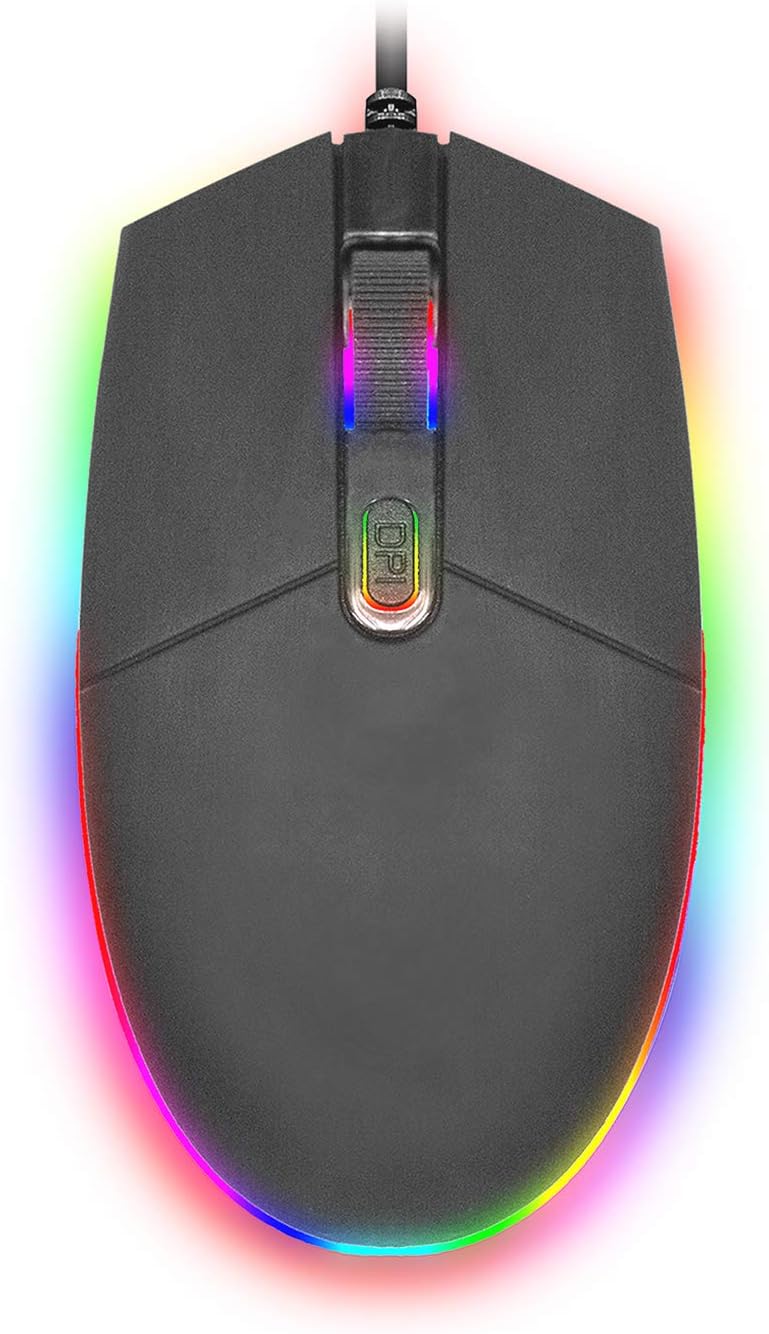
ചിത്രം: മുകളിൽ നിന്ന് താഴേക്ക് view of the SENTRY HPXKX50 RGB Gaming Mouse, showcasing its vibrant, multi-color RGB lighting along the base and around the scroll wheel.

ചിത്രം: ഒരു സൈഡ് പ്രോfile view of the SENTRY HPXKX50 RGB Gaming Mouse, highlighting the illuminated RGB strip along its bottom edge in a dark environment.
ഡിപിഐ സംവേദനക്ഷമത
The HPXKX50 mouse is equipped with a high-precision optical sensor, offering up to 7200 DPI. This allows for highly sensitive and accurate cursor movements, ideal for fast-paced gaming or precise graphic design work. Press the DPI button to switch between sensitivity levels. The mouse is designed for smooth tracking and ultra-high sensitivity.

Image: The SENTRY HPXKX50 RGB Gaming Mouse with an overlay indicating its 7200 DPI high-precision optical sensor, emphasizing its accuracy for gaming.
മെയിൻ്റനൻസ്
To ensure the longevity and optimal performance of your SENTRY HPXKX50 RGB Gaming Mouse, follow these maintenance guidelines:
- വൃത്തിയാക്കൽ: മൗസിന്റെ പ്രതലം തുടയ്ക്കാൻ മൃദുവായതും ഉണങ്ങിയതും ലിന്റ് രഹിതവുമായ ഒരു തുണി ഉപയോഗിക്കുക. കഠിനമായ അഴുക്കിന്, ചെറുതായി dampതുണിയിൽ വെള്ളം ഒഴിക്കുക. കഠിനമായ രാസവസ്തുക്കൾ, ലായകങ്ങൾ അല്ലെങ്കിൽ അബ്രസീവ് ക്ലീനറുകൾ ഉപയോഗിക്കുന്നത് ഒഴിവാക്കുക.
- സെൻസർ പരിചരണം: Keep the optical sensor on the bottom of the mouse clean and free from dust or debris. Use a cotton swab or compressed air to gently clean the sensor area.
- കേബിൾ മാനേജുമെന്റ്: Avoid sharp bends or kinks in the USB cable. Store the mouse in a way that prevents the cable from being tangled or stressed. The braided cable is designed for durability.
- സംഭരണം: ദീർഘനേരം ഉപയോഗിക്കാത്തപ്പോൾ, നേരിട്ടുള്ള സൂര്യപ്രകാശവും കടുത്ത താപനിലയും ഏൽക്കാത്ത തണുത്തതും വരണ്ടതുമായ സ്ഥലത്ത് മൗസ് സൂക്ഷിക്കുക.
ട്രബിൾഷൂട്ടിംഗ്
If you encounter issues with your SENTRY HPXKX50 RGB Gaming Mouse, refer to the table below for common problems and solutions:
| പ്രശ്നം | സാധ്യമായ കാരണം | പരിഹാരം |
|---|---|---|
| മൗസ് പ്രതികരിക്കുന്നില്ല | അയഞ്ഞ യുഎസ്ബി കണക്ഷൻ, തകരാറുള്ള യുഎസ്ബി പോർട്ട്, ഡ്രൈവർ പ്രശ്നം. | Ensure USB cable is firmly plugged in. Try a different USB port. Restart your computer. |
| കഴ്സറിന്റെ ചലനം ക്രമരഹിതമോ ചാഞ്ചാട്ടമോ ആണ് | വൃത്തികെട്ട ഒപ്റ്റിക്കൽ സെൻസർ, അനുയോജ്യമല്ലാത്ത മൗസ് പാഡ് പ്രതലം. | Clean the optical sensor. Use a clean, uniform mouse pad surface. |
| RGB lighting is off or flickering | Insufficient power from USB port, internal fault. | Try a different USB port, preferably a direct port on the motherboard (for desktops). If the issue persists, contact support. |
| ഡിപിഐ ബട്ടൺ സെൻസിറ്റിവിറ്റി മാറ്റുന്നില്ല. | സോഫ്റ്റ്വെയർ സംഘർഷം, ബട്ടൺ തകരാറ്. | Ensure no conflicting mouse software is running. Restart your computer. |
സ്പെസിഫിക്കേഷനുകൾ
| ഫീച്ചർ | വിശദാംശങ്ങൾ |
|---|---|
| ബ്രാൻഡ് | സെൻട്രി |
| മോഡൽ നമ്പർ | 50M1-05000 |
| കണക്റ്റിവിറ്റി ടെക്നോളജി | യുഎസ്ബി വയർഡ് |
| മൂവ്മെന്റ് ഡിറ്റക്ഷൻ ടെക്നോളജി | ഒപ്റ്റിക്കൽ |
| DPI (ഡോട്ട്സ് പെർ ഇഞ്ച്) | 7200 DPI വരെ |
| ലൈറ്റിംഗ് | RGB |
| നിറം | കറുപ്പ് |
| ഹാർഡ്വെയർ പ്ലാറ്റ്ഫോം | PC |
| ഓപ്പറേറ്റിംഗ് സിസ്റ്റം അനുയോജ്യത | വിൻഡോസ്, മാകോസ് (പ്ലഗ് & പ്ലേ) |
| ഇനത്തിൻ്റെ ഭാരം | 6.4 ഔൺസ് (ഏകദേശം 181 ഗ്രാം) |
| ഉൽപ്പന്ന അളവുകൾ (LxWxH) | 4.75 x 2 x 7.25 ഇഞ്ച് (ഏകദേശം 12.07 x 5.08 x 18.42 സെ.മീ) |
| പ്രത്യേക ഫീച്ചർ | എർഗണോമിക് ഡിസൈൻ |
| നിർമ്മാതാവ് | കേബിൾ മൊത്തവ്യാപാരം |
വാറൻ്റിയും പിന്തുണയും
For warranty information and customer support, please refer to the documentation provided with your purchase or visit the official SENTRY or CableWholesale webസൈറ്റ്. വാറന്റി ക്ലെയിമുകൾക്കായി നിങ്ങളുടെ വാങ്ങലിന്റെ തെളിവ് സൂക്ഷിക്കുക.
For additional assistance, you may contact the manufacturer directly through their official support channels.


