1. ആമുഖം
This manual provides detailed instructions for the assembly, operation, and maintenance of your MUSETEX ATX Mid-Tower Case 907. Please read this manual thoroughly before beginning installation to ensure proper setup and safe usage. Keep this manual for future reference.
2 സുരക്ഷാ വിവരങ്ങൾ
- Always disconnect power before installing or servicing components.
- പൊട്ടിപ്പോകാതിരിക്കാൻ ടെമ്പർഡ് ഗ്ലാസ് പാനലുകൾ ശ്രദ്ധയോടെ കൈകാര്യം ചെയ്യുക.
- Ensure all cables are properly routed and secured to prevent interference with moving parts or airflow.
- Keep the case away from liquids and excessive heat sources.
3. പാക്കേജ് ഉള്ളടക്കം
നിങ്ങളുടെ പാക്കേജിൽ എല്ലാ ഇനങ്ങളും ഉണ്ടെന്ന് ഉറപ്പാക്കുക:
- MUSETEX ATX Mid-Tower Case 907
- 6 x ARGB Fans (pre-installed)
- Remote Control for ARGB Fans
- Accessory Kit (screws, cable ties, standoffs)
- ഉപയോക്തൃ മാനുവൽ (ഈ പ്രമാണം)
4. ഉൽപ്പന്നം കഴിഞ്ഞുview ഫീച്ചറുകളും
The MUSETEX ATX Mid-Tower Case 907 is designed for gaming enthusiasts, featuring excellent airflow, vibrant ARGB lighting, and durable tempered glass panels.
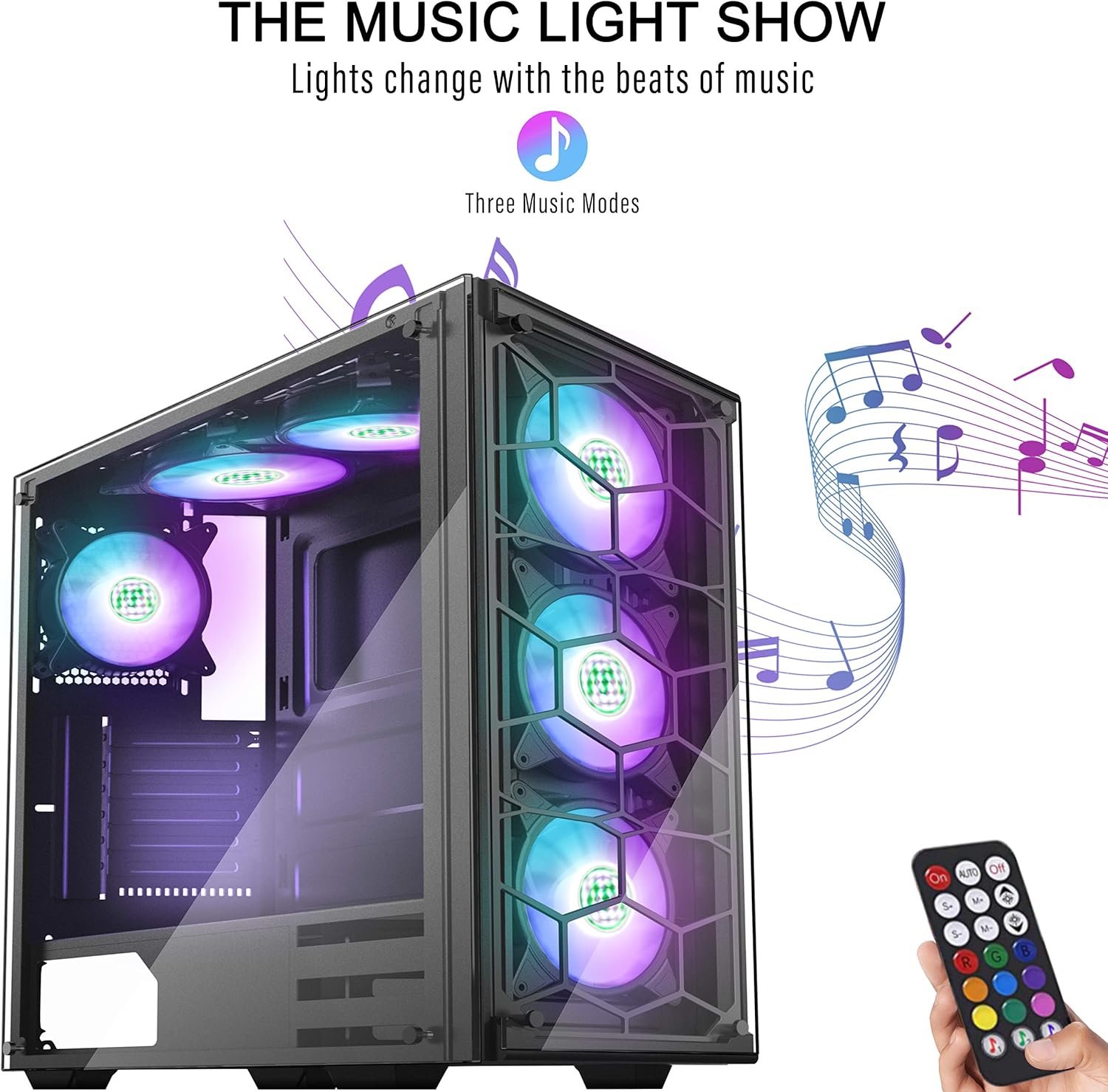
ചിത്രം 1: മുൻവശവും വശവും view of the MUSETEX ATX Mid-Tower Case 907 showcasing its ARGB fans.
പ്രധാന സവിശേഷതകൾ:
- ATX Mid-Tower Design: Spacious interior for various component sizes.
- 6 Pre-installed ARGB Fans: Provides efficient cooling and customizable lighting.
- Honeycomb Airflow: Optimized design for maximum air intake and exhaust.
- സംഗീത റിമോട്ട് കൺട്രോൾ: Synchronize lighting effects with music.
- 2 Tempered Glass Panels: Durable and clear panels for showcasing ആന്തരിക ഘടകങ്ങൾ.
- യുഎസ്ബി 3.0 കണക്റ്റിവിറ്റി: Convenient front panel I/O ports.
5. സജ്ജീകരണവും ഇൻസ്റ്റാളേഷനും
5.1 കേസ് അളവുകൾ
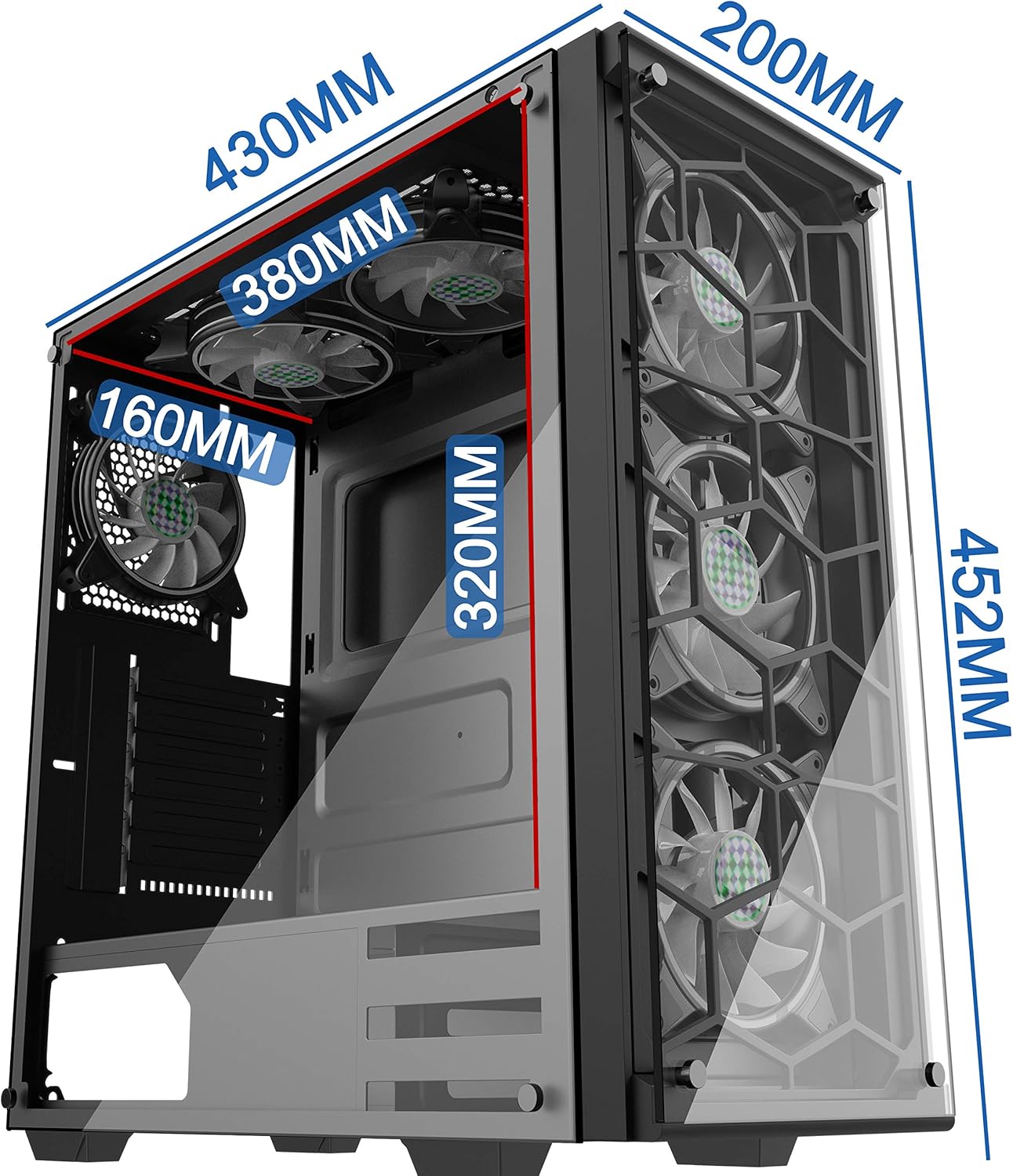
Figure 2: Detailed dimensions of the PC case, including height (452mm), depth (430mm), and width (200mm).
5.2 ഘടക അനുയോജ്യത

Figure 3: Internal layout showing compatible motherboard sizes (Mini-ITX, M-ATX, ATX, E-ATX), PSU length (200mm), SSD (3 slots), and HDD (2 slots) locations.
5.3 ഇൻസ്റ്റലേഷൻ ഘട്ടങ്ങൾ
- സൈഡ് പാനലുകൾ നീക്കം ചെയ്യുക: Carefully unscrew and remove the tempered glass side panels.
- മദർബോർഡ് ഇൻസ്റ്റാളേഷൻ: Install your motherboard (compatible with Mini-ITX, M-ATX, ATX, E-ATX) onto the standoffs.
- GPU ഇൻസ്റ്റാളേഷൻ: Install your graphics processing unit. The case supports vertical GPU installation.
- സ്റ്റോറേജ് ഇൻസ്റ്റാളേഷൻ: Install SSDs (up to 3) and HDDs (up to 2) in their designated slots.
- PSU ഇൻസ്റ്റാളേഷൻ: Install your power supply unit (up to 200mm length) in the rear mount.
- Radiator/Fan Installation: The case supports 120mm, 240mm, and 360mm radiators on the top and front.
Video 1: This video demonstrates the installation of a 120mm/240mm radiator on the top of the case and highlights the magnetic air filters and RGB lighting control.
6. പ്രവർത്തന നിർദ്ദേശങ്ങൾ
6.1 പവർ ഓൺ/ഓഫ്
Press the power button located on the top panel to turn the system on or off.
6.2 ARGB ഫാൻ നിയന്ത്രണം
The pre-installed ARGB fans can be controlled using the included remote control or the dedicated RGB button on the top panel.
- റിമോട്ട് കൺട്രോൾ: Use the remote to select various colors, lighting modes, and activate the music sync feature.
- RGB ബട്ടൺ: Press the RGB button on the top panel to cycle through different lighting colors and modes.
7. പരിപാലനം
7.1 വൃത്തിയാക്കൽ
- Magnetic Air Filters: The case is equipped with magnetic air filters on the top and bottom. Regularly remove and clean these filters to prevent dust buildup and maintain optimal airflow.
- പുറം: Wipe the exterior surfaces and tempered glass panels with a soft, damp തുണി. ഉരച്ചിലുകൾ ഉള്ള ക്ലീനറുകൾ ഒഴിവാക്കുക.
8. പ്രശ്നപരിഹാരം
- Fans Not Lighting Up: Ensure all fan cables are securely connected to the fan controller and the controller is powered. Check the remote control battery.
- ശക്തിയില്ല: Verify that the power supply is correctly installed and connected to the motherboard and components. Check the power button connection to the motherboard.
- മോശം വായുസഞ്ചാരം: Clean magnetic air filters and ensure no cables are obstructing fan blades or vents.
9 സ്പെസിഫിക്കേഷനുകൾ
| ഫീച്ചർ | സ്പെസിഫിക്കേഷൻ |
|---|---|
| കേസ് തരം | മിഡ് ടവർ |
| മദർബോർഡ് അനുയോജ്യത | വിപുലീകരിച്ച ATX |
| USB 2.0 പോർട്ടുകളുടെ എണ്ണം | 2 |
| USB 3.0 പോർട്ടുകളുടെ എണ്ണം | 1 |
| ഇനത്തിൻ്റെ ഭാരം | 17.6 പൗണ്ട് (8 കിലോഗ്രാം) |
| പാക്കേജ് അളവുകൾ | 20 x 19.45 x 10.5 ഇഞ്ച് |
| നിറം | 907 (6PCS RGB fans with remote) |
| മെറ്റീരിയൽ | ടെമ്പർഡ് ഗ്ലാസ് |
| പവർ സപ്ലൈ മൗണ്ടിംഗ് തരം | റിയർ മൗണ്ട് |
| തണുപ്പിക്കൽ രീതി | വായു, ജലം |
| ഫാൻ വലിപ്പം | 120 മില്ലിമീറ്റർ |
10. വാറൻ്റിയും പിന്തുണയും
MUSETEX products come with a standard manufacturer's warranty. For detailed warranty information, technical support, or service inquiries, please refer to the official MUSETEX webസൈറ്റിൽ ബന്ധപ്പെടുകയോ അവരുടെ ഉപഭോക്തൃ സേവനവുമായി നേരിട്ട് ബന്ധപ്പെടുകയോ ചെയ്യുക. വാറന്റി ക്ലെയിമുകൾക്കായി നിങ്ങളുടെ വാങ്ങിയതിന്റെ തെളിവ് സൂക്ഷിക്കുക.


